Ascend C provides a group of high-level Matmul APIs to help you quickly implement Matmul matrix multiplication.
The formula for Matmul is C = A x B. The following figure shows the calculation process.
A and B are the source operands. A is a left matrix with shape [M, K], and B is a right matrix with shape [K, N].
C is the destination operand, which is a matrix that stores the matrix multiplication result. Its shape is [M, N].
Figure 1 Matmul matrix multiplication
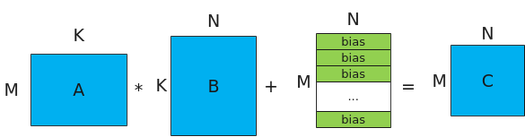

The M-axis direction mentioned below is the vertical direction of matrix A, the K-axis direction is the horizontal direction of matrix A or the vertical direction of matrix B, and the N-axis direction is the horizontal direction of matrix B.
Specific steps of implementing Matmul matrix multiplication are as follows:
Create a Matmul object. An example is as follows:
- In CUBE_ONLY (only matrix computation) scenario, the ASCENDC_CUBE_ONLY code macro needs to be set.
- By default, the MIX mode is used (including matrix computation and vector computation). In this scenario, ASCENDC_CUBE_ONLY cannot be set.
// In **CUBE_ONLY**, set this code macro before **#include "lib/matmul_intf.h"**.
// #define ASCENDC_CUBE_ONLY
#include "lib/matmul_intf.h"

typedef matmul::MatmulType<AscendC::TPosition::GM, CubeFormat::ND, half> aType;
typedef matmul::MatmulType<AscendC::TPosition::GM, CubeFormat::ND, half> bType;
typedef matmul::MatmulType<AscendC::TPosition::GM, CubeFormat::ND, float> cType;
typedef matmul::MatmulType<AscendC::TPosition::GM, CubeFormat::ND, float> biasType;
matmul::Matmul<aType, bType, cType, biasType> mm;
During object creation, input the type information of parameters A, B, C, and Bias. The type information is defined by MatmulType, including the logical location of memory, data format, and data type.
template <AscendC::TPosition POSITION, CubeFormat FORMAT, typename TYPE, bool ISTRANS = false, LayoutMode LAYOUT = LayoutMode::NONE, bool IBSHARE = false> struct MatmulType {
    constexpr static AscendC::TPosition pos = POSITION;
    constexpr static CubeFormat format = FORMAT;
    using T = TYPE;
    constexpr static bool isTrans = ISTRANS;
    constexpr static LayoutMode layout = LAYOUT;
    constexpr static bool ibShare = IBSHARE;
};
Table 1 MatmulType parameters
Parameter Description POSITION Logical memory location.
For Kirin 9020 and Kirin 9030 series processors:
- For matrix A, this parameter can be set to TPosition::GM or TPosition::TSCM.
- For matrix B, this parameter can be set to TPosition::GM or TPosition::TSCM.
- For matrix C, this parameter can be set to TPosition::GM.
CubeFormat For Kirin 9020 and Kirin 9030 series processors:
- When matrix A is in GM mode, CubeFormat::ND is supported.
- When matrix A is in TSCM mode, CubeFormat::NZ/CubeFormat::VECTOR is supported.
- When matrix B is in GM mode, CubeFormat::ND/CubeFormat::NZ is supported.
- When matrix B is in TSCM mode, CubeFormat::NZ is supported.
- When matrix C is in GM mode, CubeFormat::ND is supported.
TYPE For Kirin 9020 and Kirin 9030 series processors:
- For matrix A, this parameter can be set to half.
- For matrix B, this parameter can be set to half.
- For matrix C, this parameter can be set to half.
ISTRANS Whether to enable the matrix transpose function. Currently, transpose is not supported. This parameter can only be set to false.
false indicates that the matrix transpose function is disabled. If the function is disabled, SetTensorA and SetTensorB cannot be used to set whether to transpose matrix A and matrix B, respectively. In this case, Matmul considers that the shape of matrix A is [M, K] and that of matrix B is [K, N].
The default value is false.
LAYOUT Data layout format.
NONE (default): BatchMatmul is not used. Other options indicate that BatchMatmul is used.
Performs initialization.
REGIST_MATMUL_OBJ(&pipe, GetSysWorkSpacePtr(), mm, &tiling);
Set the left matrix A, right matrix B, and bias.
mm.SetTensorA(gm_a); // Set the left cube A.
mm.SetTensorB(gm_b); // Set the right cube B.
mm.SetBias(gm_bias); // Set the bias.

mm.SetLocalWorkspace(ubBuf);
Execute the matrix multiplication.
- Call Iterate to complete a single iterative computation, and use a while loop to compute the full data on a single core. The Iterate method allows for flexible control over the number of iterations required to compute the desired amount of data.
while (mm.Iterate()) { mm.GetTensorC(gm_c); } - Call IterateAll to compute all data on a single core. The IterateAll method does not require cyclic iterations and is relatively simple to use.
mm.IterateAll(gm_c);
- Call Iterate to complete a single iterative computation, and use a while loop to compute the full data on a single core. The Iterate method allows for flexible control over the number of iterations required to compute the desired amount of data.
End the matrix multiplication.
mm.End();