This document describes how to develop an ArkTS widget based on the declarative paradigm.
Highlights
-
Unified development paradigm
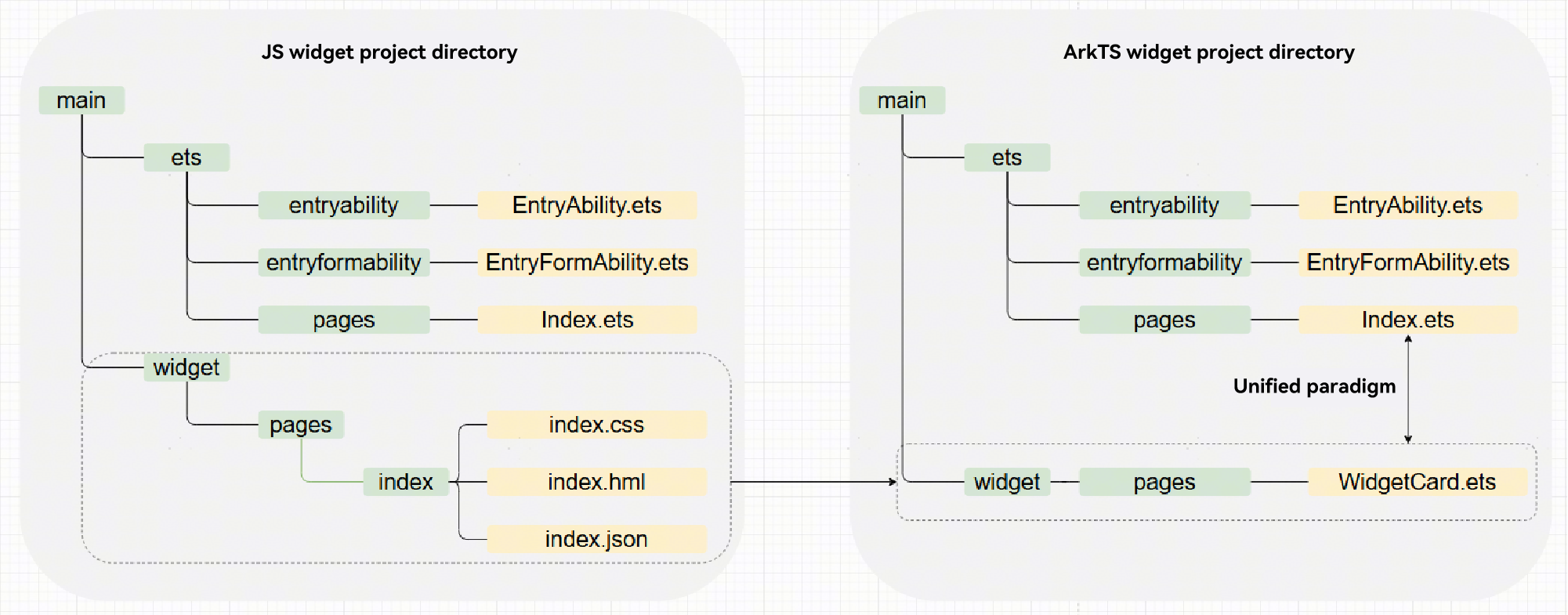
- ArkTS widgets share the same declarative UI development framework as application pages. This means that the page layouts can be directly reused in widgets, improving development experience and efficiency. For details, see Figure 1.
Figure 1 Comparison of widget project structures
-
Enhanced widget capabilities
- Animation: ArkTS widgets support the property animation and explicit animation capabilities, which can be leveraged to deliver a more engaging experience.
- Custom drawing: ArkTS widgets allow you to draw graphics with the Canvas component to present information more vividly.
- Logic code execution: When this capability is enabled, certain service logic can be implemented within widgets, effectively expanding application scenarios.
How to Implement
-
Widget host: an application that displays the widget content and controls the widget location. Only the system application can function as a widget host.
-
Widget provider: an application that provides the widget content and controls the widget content, component layout, and component tap events.
-
Widget Manager: a resident agent that manages widgets in the system. It provides formProvider as well as the APIs for widget management, usage, and periodic updates.
-
Widget rendering service: a service that manages widget rendering instances. Widget rendering instances are bound to the FormComponent on the widget host on a one-to-one basis. The widget rendering service runs the widget page code widget.abc for rendering based on the widget information configured in form_config.json, and sends the rendered data to the corresponding FormComponent on the widget host.
Figure 2 Implementation principles of ArkTS widgets
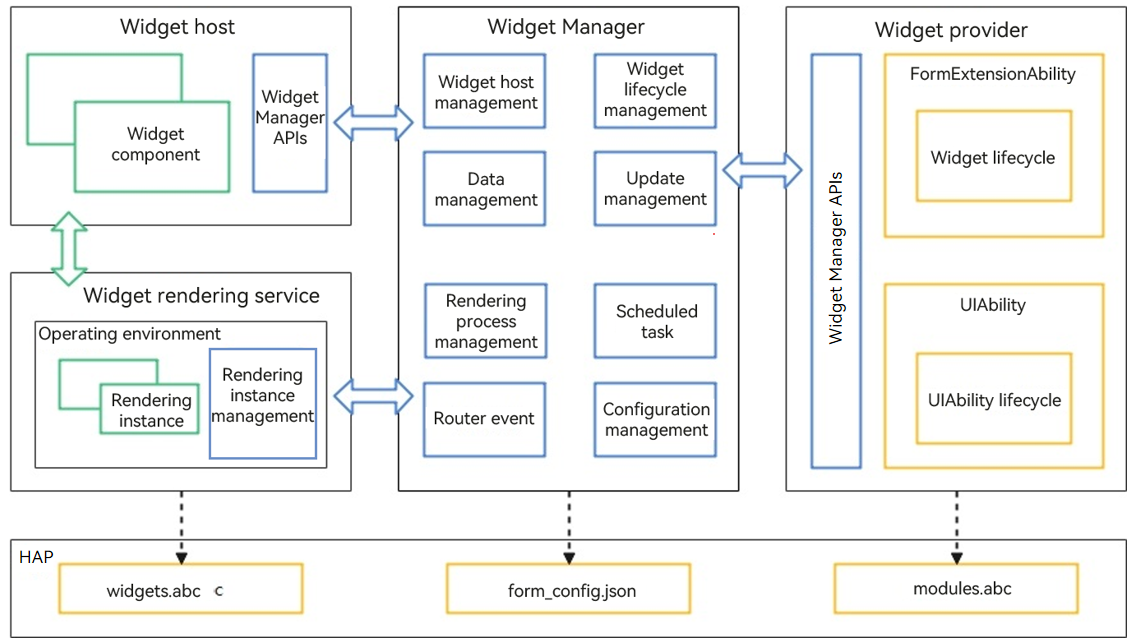
Figure 3 Working principles of the ArkTS widget rendering service
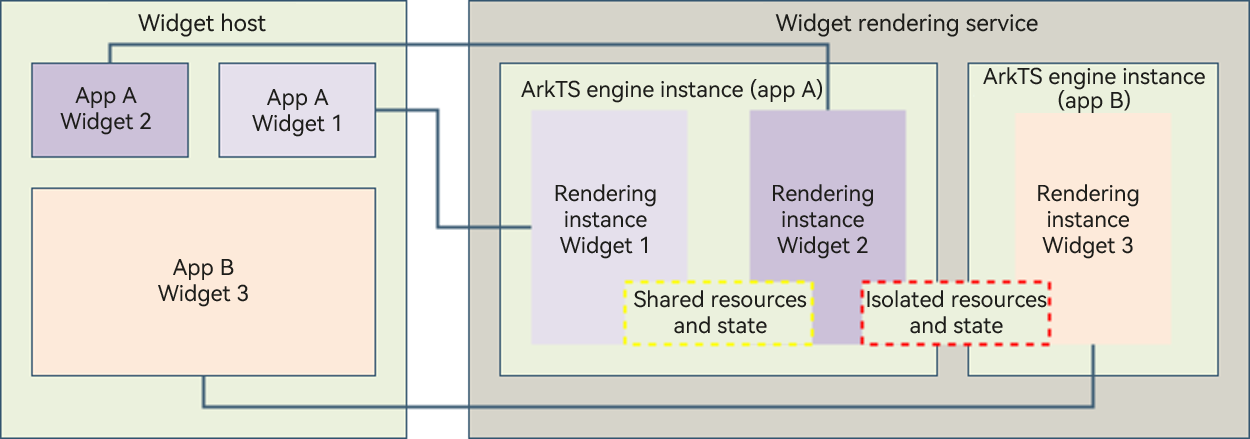
Unlike JS widgets, ArkTS widgets support logic code execution. The widget page code (in widget.abc) is executed by the widget rendering service, which is managed by the Widget Manager. Each widget component of a widget host corresponds to a rendering instance in the widget rendering service. Rendering instances of a widget provider run in the same ArkTS virtual machine operating environment, and rendering instances of different widget providers run in different ArkTS virtual machine operating environments. In this way, the resources and state data are isolated between widgets of different widget providers. During development, pay attention to the use of the globalThis object. Use one globalThis object for widgets from the same widget provider, and different globalThis objects for widgets from different widget providers.
ArkTS Widget Types
ArkTS widgets are classified into dynamic widgets, static widgets, and interactive widgets.
The overall runtime framework and rendering process of a static widget are the same as those of a dynamic widget. The main difference is that after the widget rendering service finishes rendering the widget content, the widget host uses the data of the last rendered frame as a static image for display. In addition, the widget instance in the widget rendering service releases all runtime resources of the widget to save memory. Therefore, frequent refresh causes the runtime resources of a static widget to be repeatedly created and destroyed, increasing the power consumption of the widget.
| Widget Type | Supported Capability | Scenario | Pros and Cons |
|---|---|---|---|
| Static widget | Supports only UI components and layout capabilities. | Suitable for presenting static information (with a stable UI), allowing navigation to a specific UIAbility via the FormLink component. | Offers basic functionality with efficient memory management. |
| Dynamic widget | Supports UI components, layout capabilities, common events, and custom animation capabilities. | Suitable for scenarios requiring complex logic and interactions, such as updating images or content on a widget. | Provides enhanced capabilities at the cost of high memory overhead. |
| Interactive widget | Supports overflow animation capabilities alongside dynamic widget capabilities. | Suitable for scenarios requiring complex logic and interactions, and where overflow animation is needed for better visual experience, such as widget games on the home screen. | Provides enhanced capabilities at the cost of high memory overhead. |
[h2]Dynamic Widget
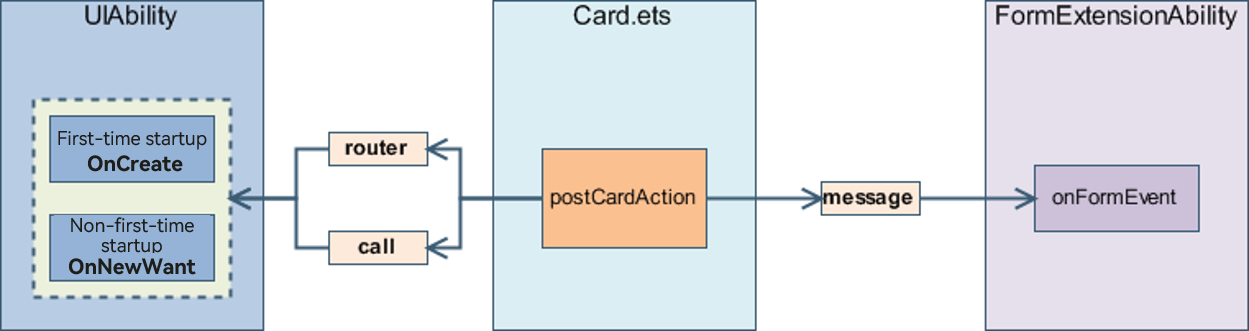
For dynamic ArkTS widgets, the postCardAction API is provided for the interaction between Card.ets and FormExtensionAbility. Currently, this API supports three types of events: router, message, and call. It can be called only in the tap event of a widget component.
Figure 4 Implementation principles of ArkTS event interaction
Dynamic widget events are used in the following scenarios:
- router event: used to redirect to the UIAbility of the application, enabling the feature of navigating from a widget to an internal application page after a widget is touched.
- call event: used to launch the UIAbility of the application to the background. Then the UIAbility can be used to request the corresponding background continuous task to complete features such as music playback.
- message event: used to launch the FormExtensionAbility and notify it through the onFormEvent callback, thereby implementing message delivery when a component in the widget is tapped and updating the widget content.
[h2]Static Widget
The FormLink component is provided for interactions between static widgets and widget providers. It supports three types of events: router, message, and call. See FormLink.
[h2]Interactive Widget
Interactive widgets are supported since API version 20. They provide overflow animations and implement human-machine interactions to improve information notifications, shallow interactions, and playability. For details, see Overview of Interactive Widgets.
Constraints
ArkTS widgets support running logic code within the UI. Compared to JS widgets, they offer more robust capabilities but also introduce an increased risk of malicious activities conducted through the widgets. The code (in widget.abc) that carries the ArkTS widget UI runs in the system public FRS process and is finally displayed in the widget host (generally the home screen application). To ensure the stability of the system rendering process, isolation security between widgets, and resource usage such as memory and power consumption, the following constraints are imposed on the capabilities available to the ArkTS widget UI:
-
Currently, widgets can be developed only based on ArkUI. Cross-platform development is not supported.
-
When importing modules, you can import only the modules marked with "supported in ArkTS widgets." If an API that is not supported is used, the widget loading is abnormal.
-
The native programming language cannot be used for development, and the native .so file cannot be loaded.
-
For widget UI page development, ArkTS widgets support only some components, events, animations, data management, state management, and API capabilities of the declarative paradigm. For APIs that can be used in ArkTS widgets, a description (for example) will be added as follows: "Widget capability: This API can be used in ArkTS widgets since API version 12."
-
The event processing of widget content is independent of that of the widget host. To prevent gesture conflicts, components that support left and right swipes are not supported in widgets.
In addition, ArkTS widgets do not support the following features:
-
Instant preview
-
Breakpoint debugging
-
Hot reload
-
For details about widget constraints in DevEco Studio, see Constraints.