Use Cases
Since version 4.1.0(11), the combined payment scenario is supported for platform merchants.
A user purchases a travel package on an app or atomic service of a merchant. The package includes different products such as air tickets, insurance, and hotels, which correspond to different merchants. However, the user makes only one payment. A platform merchant can integrate the combined payment function to combine orders from different merchants into one order for payment.
Supported merchant model: platform merchant
Combined payment screen of Huawei Pay:

Service Process
By integrating combined payment of Payment Kit, you can combine multiple sub-orders into one main order for payment. The integration process is as follows.
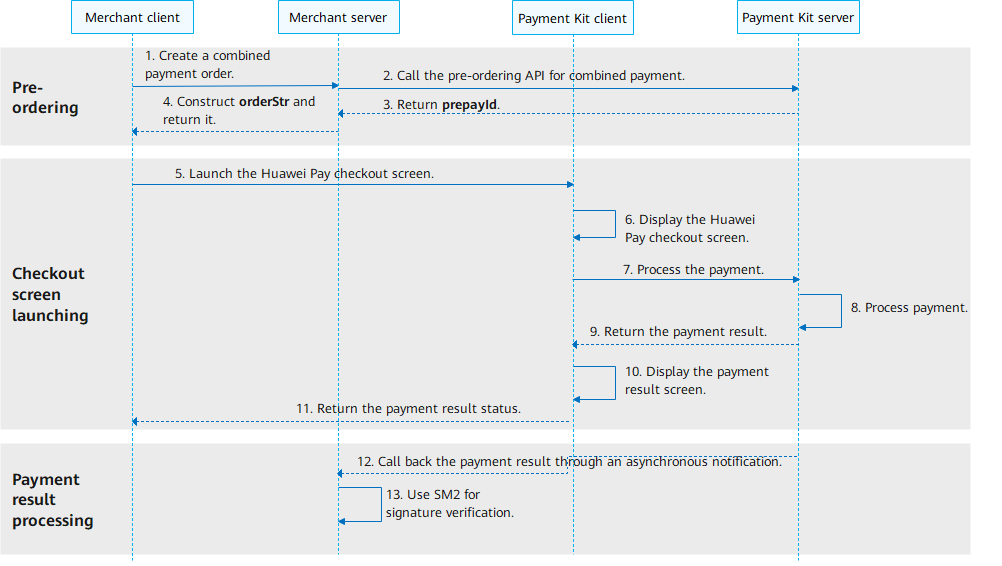
-
The merchant client requests the merchant server to create a combined order for payment.
-
The merchant server calls the pre-ordering API for combined payment of platform merchants of the Payment Kit server.
-
The Payment Kit server returns the prepayment ID (prepayId) to the merchant server.
-
The merchant server constructs the order information parameter orderStr and returns it to the client.
-
The merchant client uses orderStr as an input parameter to call the requestPayment API to launch the checkout screen of Payment Kit.
-
The Payment Kit client displays the checkout screen, where details about multiple orders can be queried.
-
The user completes the payment operation on the checkout screen of the Payment Kit client.
-
The Payment Kit server processes the payment and asynchronously processes the payment order.
-
The Payment Kit server synchronously returns the payment result to the Payment Kit client.
-
The Payment Kit client displays the payment result screen.
-
After the user closes the payment result screen, the Payment Kit client returns the payment status to the merchant client.
-
After the Payment Kit server asynchronously processes the payment, it calls the callback API passed through callbackUrl during merchant pre-ordering to return the payment result to the merchant server.
-
After receiving the payment result callback response, the merchant server performs SM2-based signature verification on the payment result.
API Description
APIs use either a promise or AsyncCallback to return the result. The APIs that use a promise provide the same functions as their counterparts that use an AsyncCallback. For details about the API, please refer to API Reference.
| API Name | Description |
|---|---|
| requestPayment(context:common.UIAbilityContext, orderStr: string): Promise<void>; | Launches the checkout screen of Payment Kit. |
| requestPayment(context:common.UIAbilityContext, orderStr: string, callback: AsyncCallback<void>): void; | Launches the checkout screen of Payment Kit. |
[h2]Pre-ordering (Server Development)
-
Call the pre-ordering API for combined payment of platform merchants based on the merchant model to obtain the prepayment ID (prepayId).
To ensure the security and reliability of payment orders, the input parameters in the request body and the PayMercAuth object in the request header need to be sorted and concatenated for signing. For details, please refer to Signing Rules.
-
Construct the combined order information parameter orderStr and return it to the client. For details about the sample code of a service API request, please refer to Service API Request.
[h2]Launching the Huawei Pay Checkout Screen (On-Device Development)
Use orderStr returned by the server to call the requestPayment API to launch the checkout screen of Payment Kit. The logic of launching the checkout screen for combined payment is the same as that in the basic payment scenario. For details, please refer to Launching the Huawei Pay Checkout Screen (On-Device Development).
[h2]Payment Result Callback Notification (Server Development)
After the payment is successful, the Huawei Pay server calls the callback API provided by you to send the payment information to your server. For details about the callback information, please refer to the combined payment result callback notification for platform merchants.
To ensure the validity of the information, the merchant server needs to perform SM2-based signature verification on the returned payment information. Pay attention to the following during signature verification:
-
Use the complete content of the notification for signature verification.
-
Before signature verification, sort and combine the returned data. The sign field indicates the signature value. The content to be verified must exclude the sign field.
-
Use the Huawei Pay certificate as the public key for signature verification.
Extension
After implementing the preceding capabilities, you can also call the following APIs to perform other order-related operations.
[h2]Platform Merchant
Query a combined payment order, apply for a refund, query a refund order, query a reconciliation statement, and query a settlement bill.