Hvigor supports flexible customization of build modes. When you create a project, DevEco Studio automatically creates the debug, release, and test build modes. Although the project-level build-profile.json5 configuration file does not specify the test mode, this mode is automatically used when the test framework is used to start a test.
[h2]GUI-based Setting
To set Build Mode on the GUI, click the  icon in the upper right corner.
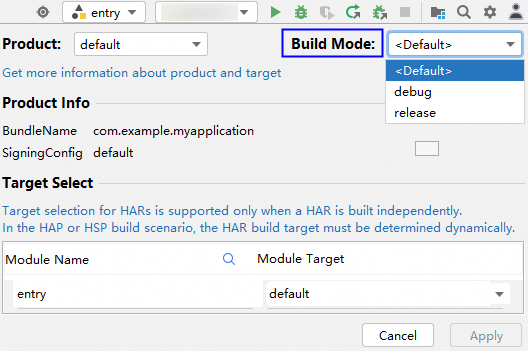
There are three built-in options: <Default>, debug, and release.
If you have defined additional build modes in the build-profile.json5 file, the corresponding options are displayed in the Build Mode drop-down list.
- <Default>: default option. With this option, the release mode is used to build App Packs and the debug mode is used to build HAPs, HSPs, or HARs.
- debug: The debug mode is used to build App Packs, HAPs, HSPs, or HARs, with the debuggable option in buildOption defaulting to true. In this case, the resulting build includes extensive debugging information such as variable names, function names, and line numbers, enabling direct debugging. However, this debugging information increases the app size and may lead to reduced runtime performance.
- release: The release mode is used to build App Packs, HAPs, HSPs, or HARs, with the debuggable option in buildOption defaulting to false. In this case, the resulting build excludes extensive debugging information and contains only the necessary code and data for the app. This reduction in size, coupled with optimization in compiled bytecode, leads to improved runtime speed.

- The build mode set from the DevEco Studio GUI or the CLI only indicates the name of the selected build mode. Whether the final build product is a debug app depends on the debuggable field in the buildOption configuration. For details, see Module-level buildOption.
- Lite wearables use standard JavaScript runtime. Therefore, the build product in release mode contains JavaScript source code. Take appropriate measures to protect your code assets.
[h2]CLI-based Setting
- Use -p buildMode to specify a build mode. For example, specify the release mode for building the HAP package of the entry module:
hvigorw --mode module -p product=default -p module=entry@default -p buildMode=release assembleHap
- Use -p debuggable=true to specify the debug mode or -p debuggable=false to specify the release mode. For example, specify the release mode for building the HAP package of the entry module:
hvigorw --mode module -p product=default -p module=entry@default -p debuggable=false assembleHap
The default build mode is release for building APP Packs and debug for building HAPs, HSPs, or HARs.
Customizing a Build Mode
Hvigor supports custom build modes. Use the buildOption field to declare build options, and the buildModeBinder field to bind target, buildOption, and buildMode.
[h2]Defining Build Options
Project-level build-profile.json5 file:
Parameter | Type | Mandatory | Description | |
|---|---|---|---|---|
buildModeSet | Object array | No | Build mode set. Multiple build modes can be configured. | |
name | String | Yes | Name of the build mode. There are three built-in build modes, which do not require explicit configuration.
| |
buildOption | Object | No | Configuration used by the build mode. For details, see Project-level buildOption. | |
products | Object array | No | Product category. Multiple products can be configured. For details, see Configuring Multiple Targets and Products. | |
buildOption | Object | No | Build configuration of the product. For details, see Project-level buildOption. NOTE: The buildOption settings specified for a product take precedence over those defined in buildMode. This means that, if the same buildOption is specified in both places, the configuration set for the product has a higher priority. | |
Module-level build-profile.json5 file
Parameter | Type | Mandatory | Description | ||
|---|---|---|---|---|---|
buildOption | Object | No | Configuration used by the build mode. For details, see Module-level buildOption. The name, debuggable, and copyFrom fields cannot be configured. | ||
buildOptionSet | Object array | No | Build option set, which defines available build options. | ||
name | String | Yes | Name of buildOption. The buildOptionSet configuration has a higher priority than the top-level standalone buildOption configuration in the file. NOTE:
| ||
copyFrom | String | No | Name of a predefined build option in the same module to copy from. This enables you to replicate an existing build option in the same module and then override its settings as needed. NOTE:
| ||
buildModeBinder | Object array | No | Mapping between the target and buildOption for a build mode. | ||
buildModeName | String | Yes | Build mode for the mapping to be created. NOTE:
| ||
mappings | Object array | No | Array that manages the binding of build options to targets. | ||
targetName | String | Yes | Target to be bound. NOTE: The value must be selected within the module. | ||
buildOptionName | String | Yes | Name of the build option to be bound. NOTE: The value must be selected within the module. | ||
targets | config | buildOption | Object | No | Configuration used by the build mode, which takes precedence over buildOptionSet. For details, see Module-level buildOption. Note that the name, debuggable, and copyFrom fields cannot be configured. |
[h2]Rules for Combining Build Options
- By default, a project supports three build modes: debug, release, and test.
- By default, a module supports three build options: default, debug, and release.
- If buildModeBinder does not define the mapping between the target and buildOption:
- release build mode: The target maps to the release option, but the default option is allocated to ohosTest.
- debug: The target maps to the debug option, but the default option is allocated to ohosTest.
- test: The target maps to the debug option, but the default option is allocated to ohosTest.
- Custom build mode: All targets map to the default option.
- The buildOption settings specified for a product in the project-level build-profile.json5 file take precedence over those defined in buildMode. This means that, if the same buildOption is specified in both places, the configuration set for the product has a higher priority.
- The module-level buildOption value, as a common configuration, is inherited by each buildOption in buildOptionSet. If copyFrom is specified, inheritance occurs prior to copying. Consequently, the settings in buildOptionSet have a higher priority than the standalone buildOption configuration.
- You can use the module-level buildModeBinder to identify the unique buildOption corresponding to a target. buildOption configured in targets has a higher priority and is combined with the corresponding buildOption following the rules of inheritance and overwrite.
- Command line options have the highest priority. Based on the integrated configuration items, you can use command line options to overwrite a specific value.
