
- You cannot install and start ohpm-repo as the root user on Linux or macOS. Install and run it as a non-root user.
- The multi-instance deployment mode is supported only when the db storage is MySQL and the store storage is SFTP or custom. In this section of multi-instance deployment, the db storage is MySQL and the store storage is SFTP.
Environment Setup
- Prepare the MySQL database service.
- Prepare at least one SFTP storage service. ohpm-repo can connect to a maximum of three SFTP services.
- Ensure that Node.js is installed and that environment variables are properly configured. For details about how to install Node.js, visit the Node.js website.

- Ensure that the SFTP service port can be accessed by external devices.
- Specify the same storage root directory for the read and write users of the SFTP service.
- The following lists compatible versions of ohpm-repo and Node.js:
- For ohpm-repo 5.4.4 and later versions, Node.js 24.x is recommended.
- For ohpm-repo 5.4.4 and earlier versions, if the data storage type is MySQL and the file storage type is SFTP, the supported Node.js version range is [18.x, 22.x].
Installing the ohpm-repo Tool
- Decompress the ohpm-repo tool package.

- Set the path of the bin directory in the directory where the ohpm-repo tool package is decompressed to the system environment variable path, and run the following command to query the version number:
ohpm-repo -v
If the version number (for example, 2.0.0) is displayed, the installation package is decompressed properly. If an error is reported, rectify the fault by referring to FAQs.

For Linux and macOS, you are advised to use Bash.
- Go to the conf directory in the ohpm-repo decompression directory and modify the config.yaml configuration file.
- Check the listen configuration. The default value is localhost:8088, indicating that only the local IP address can be listened on. If you want other hosts to access the system using the IP address or domain name, you are advised to change the value of listen to the IP address of the host where ohpm-repo is deployed.
listen: <IP address of the host where ohpm-repo is deployed>:8088
- Check the deploy_root configuration. If it is not configured, the default address is used. Do not set this path to the root directory where ohpm-repo is decompressed.
- MySQL is used for the data storage module db.
db: type: mysql config: host: "localhost" port: 3306 username: "tctAdmin" password: "password" database: "repo" - SFTP is used for the file storage module store. A maximum of three SFTP configurations can be set.
store:
  type: sftp
  config:
    location:
      -
        name: test_one_sftp
        host: "localhost"
        port: 22
        read_username: "read"
        read_password: "password"
        write_username: "write"
        write_password: "password"
        path: /source22
      -
        name: test_two_sftp
        host: "localhost"
        port: 24
        read_username: "read"
        read_password: "password"
        write_username: "write"
        write_password: "password"
        path: /source24
    #server: http://localhost:8088
1. The storage path of the ohpm-repo file is <Storage root directory configured for the SFTP server> +<Path configured in the store>. The value of path must be a relative path and must start with a slash (/). For example, if the storage root directory of the SFTP server is /user/sftp/data and the path configured in store is /source, the final storage path of the ohpm-repo file is /user/sftp/data/source.
2. When ohpm-repo is deployed in multi-instance mode, a reverse proxy server must be configured to forward client requests to multiple ohpm-repo instance servers. Therefore, store.config.server must be manually set to the domain name or IP address of the reverse proxy server and use_reverse_proxy must be set to true.
- Check the listen configuration. The default value is localhost:8088, indicating that only the local IP address can be listened on. If you want other hosts to access the system using the IP address or domain name, you are advised to change the value of listen to the IP address of the host where ohpm-repo is deployed.
- Go to the bin directory where the ohpm-repo tool package is decompressed and run the install command:
ohpm-repo install

If the --config parameter is not configured, the config.yaml configuration file in the conf directory under the ohpm-repo decompression directory is used by default.
If the installation is successful, the following information is displayed in the log:
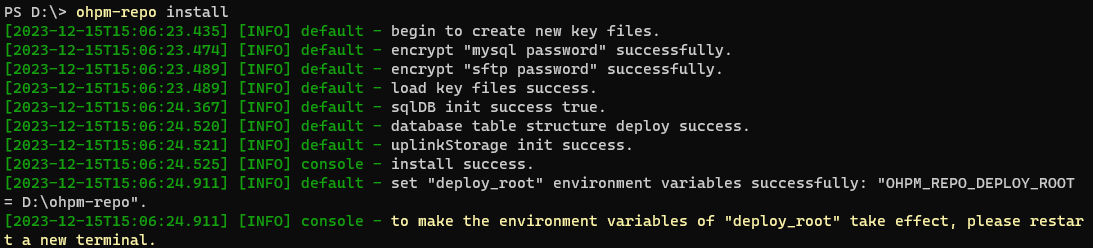
- After the installation is successful, you must reload environment variables based on the displayed information. The reload method varies with the operating system — Windows or Linux/macOS.

- Windows: Close the current window and open a new window.
- Linux or macOS: Run the reload command in the CLI. If the shell is Bash, run the source ~/.bashrc or . ~/.bashrc command. If the shell is Zsh, run the source ~/.zshrc or . ~/.zshrc command.
Deploying the First Node
Go to the bin directory where the ohpm-repo tool package is decompressed and run the following command to start ohpm-repo:
ohpm-repo start
If the startup is successful, the following information is displayed in the log:

Packaging and Deployment
Packaging and deployment commands are provided to help you deploy multiple instances more easily.
[h2]Packaging
Run the ohpm-repo pack <deploy_root> command on the host where the multi-instance configuration is implemented and the ohpm-repo service instance is started for the first time.
ohpm-repo pack D:\ohpm-repo

This command is used to package and back up the <deploy_root>/conf and <deploy_root>/meta directories of ohpm-repo and generate compressed packages in the CLI working directory.
If the packaging is successful, the following information is displayed in the log:

[h2]Deployment
Copy the package of the pack command to another computer. After decompression of the ohpm-repo tool package, run the ohpm-repo deploy <file_path> command to deploy a new instance.
ohpm-repo deploy D:\ohpm-repo\bin\pack_1695805599689.zip --deploy_root D:\new-ohpm-repo\ohpm-repo-deploy

- <file_path>: specifies the path of the backup package.
- --deploy_root: specifies the deployment root directory, which is used to store files generated when ohpm-repo is started. The default value is <home directory of the existing user>/ohpm-repo.
If the deployment is successful, the following information is displayed in the log:

After the deployment is successful, run the ohpm-repo start command to start ohpm-repo.

(Optional) Configuring Automatic Restart
Configure the automatic restart function for the ohpm-repo instance.

Before the configuration, add the bin directory of the ohpm-repo tool to the system environment variable path.
[h2]Linux
- Create the startup script run-repo.sh in the bin directory of the ohpm-repo tool.
touch run-repo.sh
- Add the following content to the file, save the file, and close it:

If the MySQL or SFTP service and ohpm-repo are deployed on the same server, place the commands for starting MySQL and SFTP before the ohpm-repo start command.
#!/bin/bash
ohpm-repo start
- Set the script as an executable file.
chmod +x run-repo.sh
- Use the Linux scheduled task tool crontab to restart the automatic execution script. Edit the crontab configuration of the current user.
crontab -e
- Write the following content to the crontab configuration of the current user, save the file, and close it:
@reboot /bin/sh run-repo.sh >/dev/null 2>&1
run-repo.sh indicates the path of the script to be executed. >/dev/null 2>&1 indicates that the output is redirected to an empty device, that is, no information is output.
After the configuration, each time the system is started, the commands in the run-repo.sh script are automatically executed.
[h2]Windows
- Create the run-repo.bat file and add the following content to the file:

If the MySQL or SFTP service and ohpm-repo are deployed on the same server, place the commands for starting MySQL and SFTP before the ohpm-repo start command.
@echo off
call ohpm-repo start
exit
- Press Win+R, type shell:startup, and press Enter. The startup file dialog box is displayed. Cut the run-repo.bat file and paste it to the startup folder.
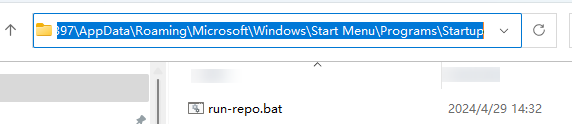
After the configuration, each time the system is started, the commands in the run-repo.bat script are automatically executed.