Before using Car Kit capabilities, you need to configure the build mode, permissions, and capabilities.
Configuring the Build Mode
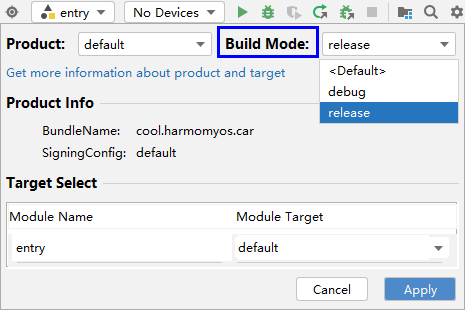
When packaging an app, click  in the upper right corner of DevEco Studio, change the build mode to release, and click Apply in the lower right corner.
Configuring Permissions
Car Kit provides two types of APIs: navigation APIs and mobility connectivity APIs. You need to configure the corresponding permissions for using these APIs.
-
To use navigation APIs, you need to configure the ohos.permission.ACCESS_SERVICE_NAVIGATION_INFO permission.
-
To use mobility connectivity APIs, you need to configure the ohos.permission.ACCESS_CAR_DISTRIBUTED_ENGINE permission.
Configure required permissions in the app configuration file module.json5 in entry/src/main. The sample code is as follows:
{
  "module": {
    "requestPermissions": [
      {
        "name": "ohos.permission.ACCESS_CAR_DISTRIBUTED_ENGINE"
      },
      {
        "name": "ohos.permission.ACCESS_SERVICE_NAVIGATION_INFO"
      }
    ]
  }
}
Configuring Capabilities
Configure the navigation hop or HiCar capability in the abilities array of the app configuration file module.json5 in entry/src/main. The procedure is as follows:
-
Configure the actions of the navigation information service in skills.

If your app has other skills, do not directly modify the existing configuration. Instead, supplement the configuration in the skills array.
"skills": [ { "entities": [ "entity.system.default" ], "actions": [ "action.navigation.infoservice" ] }, // Configure other skills. { // ... } ] -
Configure the navigation hop or HiCar capability in metadata. The sample code is as follows:
{
  "module": {
    "abilities": [
     {
        "name": "xxxx",
        "srcEntry": "xxxx",
        "description": "xxxx",
        "skills": [
          {
            "entities": [
              "entity.system.home"
            ],
            "actions": [
              "action.system.home"
            ]
          },
          {
            "entities": [
              "entity.system.default"
            ],
            "actions": [
              "action.navigation.infoservice"
            ]
          }
        ],
        "metadata": [
          {
            "name" : "carHopCapability",
            "value" : "carHopNavi,getOnCarNavi,insideCarNavi,getOffCarNavi"
          },
          {
            "name" : "hiCarCapability",
            "value" :"basicNavi,shortcutOper,multiScreenUI,mapUIOper,updateNaviStatus,searchPOI"
          }
        ]
      }
    ]
  }
}
The options of name in metadata are carHopCapability and hiCarCapability.
-
If name is set to carHopCapability, the navigation hop capability is supported. Set value according to the service scenarios.
value Scenario carHopNavi Tap for navigation hop, which cannot coexist with "tap for address hop." carHopAddress Tap for address hop, which cannot coexist with "tap for navigation hop." getOnCarNavi Auto navigation hop upon vehicle entry. insideCarNavi In-vehicle auto navigation hop. getOffCarNavi Hop to walking navigation upon vehicle exit. -
If name is set to hiCarCapability, the HiCar capability is supported. Set value according to the service scenarios.
value Scenario basicNavi Basic navigation functions. The corresponding commands are as follows:
1. START_NAVIGATION
2. STOP_NAVIGATION
shortcutOper Shortcut operation functions. The corresponding commands are as follows:
1. GO_HOME
2. GO_TO_COMPANY
multiScreenUI Multi-screen display functions. The corresponding commands are as follows:
1. START_MAP_LAYER
2. STOP_MAP_LAYER
mapUIOper Map UI control functions. The corresponding commands are as follows:
1. ZOOM_IN_MAP
2. ZOOM_OUT_MAP
3. CHANGE_THEME
updateNaviStatus Map status and metadata update. The corresponding commands are as follows:
1. START_UPDATE_NAVIGATION_STATUS
2. STOP_UPDATE_NAVIGATION_STATUS
searchPOI Address search. The corresponding command is as follows:
SEARCH_POI
For more information about the commands, please refer to CommandType.