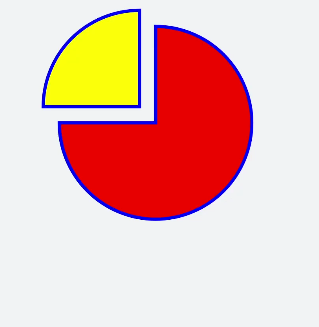
The <svg> component uses instructions M (start point), H (horizontal line), and a (drawing an arc to a specified position) to control a path and sets the fill colors to create a pie chart.
<!-- xxx.hml -->
<div class="container">
  <svg fill="#00FF00" x="100" y="400">
    <path d="M300,200 h-150 a150 150 0 1 0 150 -150 z" fill="red" stroke="blue" stroke-width="5" >
    </path>
    <path d="M275,175 v-150 a150 150 0 0 0 -150 150 z" fill="yellow" stroke="blue" stroke-width="5">
    </path>
  </svg>
</div>
/* xxx.css */
.container {
flex-direction: row;
justify-content: flex-start;
align-items: flex-start;
height: 1200px;
width: 600px;
background-color: #F1F3F5;
} 

-
M/m = moveto The parameters x and y indicate the x-axis and y-axis coordinates of the point to move to. After moving the pen with the M command, the pen is only moved without drawing a line between the two points. Therefore, the M command often appears at the beginning of a path to indicate where to start drawing.
-
L/l = lineto The parameters x and y indicate the x-axis and y-axis coordinates of a point. The L command draws a line segment between the current position and the new position (the point where the pen was located before the L command).
-
H/h = horizontal lineto Draws a horizontal line.
-
V/v = vertical lineto Draws a vertical line.
-
C/c = curveto Cubic Bézier curve Sets three sets of coordinate parameters: x1 y1, x2 y2, x y.
-
S/s = smooth curveto Cubic Bézier curve command Sets two sets of coordinate parameters: x2 y2, x y.
-
Q/q = quadratic Bezier curve Quadratic Bézier curve Sets two sets of coordinate parameters: x1 y1, x y.
-
T/t = smooth quadratic Bezier curveto Quadratic Bézier curve command Sets the parameters: x y.
-
A/a = elliptical Arc Arc command Sets the parameters: rx ry x-axis-rotation (rotation angle) large-arc-flag (angle size) sweep-flag (arc direction) x y. large-arc-flag determines whether the arc is greater than or less than 180 degrees: 0 indicates a small-angle arc, and 1 indicates a large-angle arc. sweep-flag indicates the direction of the arc: 0 draws the arc counterclockwise from the start point to the end point, and 1 draws it clockwise from the start point to the end point.
-
Z/z = closepath Draws a straight line from the current point to the start point of the path.