You can use the Web component to register application-side code with the frontend page. After registration, the frontend page can call methods on the application side by using the registered object name.
Establishing an Interaction Channel Between the Application Side and the HTML5 Page
Two methods are available for registering the application code:
Call javaScriptProxy() during Web component initialization. Call registerJavaScriptProxy() after Web component initialization. The two methods must be used together with the deleteJavaScriptRegister API to prevent memory leaks.
The following example registers the test() function with the frontend page. This way, the test() function can be triggered and run on the frontend page.
Sample code for the application using javaScriptProxy() for registration:
import { webview } from '@kit.ArkWeb';
import { BusinessError } from '@kit.BasicServicesKit';

class TestClass {
  constructor() {
  }

  test(): string {
    return 'ArkTS Hello World!';
  }
}

@Entry
@Component
struct WebComponent {
  webviewController: webview.WebviewController = new webview.WebviewController();
  // Declare the object to be registered.
  @State testObj: TestClass = new TestClass();

  build() {
    Column() {
      Button('deleteJavaScriptRegister')
        .onClick(() => {
          try {
            this.webviewController.deleteJavaScriptRegister('testObjName');
            this.webviewController.refresh();
          } catch (error) {
            console.error(
              `ErrorCode: ${(error as BusinessError).code},  Message: ${(error as BusinessError).message}`);
          }
        })
      // Load the local index.html page.
      Web({ src: $rawfile('index1.html'), controller: this.webviewController})
        // Inject the object to the web client.
        .javaScriptProxy({
          object: this.testObj,
          name: 'testObjName',
          methodList: ['test'],
          controller: this.webviewController,
          // Optional parameter.
          asyncMethodList: [],
          permission: '{"javascriptProxyPermission":{"urlPermissionList":' +
            '[{"scheme":"resource","host":"rawfile","port":"","path":""},' +
            '{"scheme":"e","host":"f","port":"g","path":"h"}],"methodList":' +
            '[{"methodName":"test","urlPermissionList":' +
            '[{"scheme":"https","host":"xxx.com","port":"","path":""},' +
            '{"scheme":"resource","host":"rawfile","port":"","path":""}]},' +
            '{"methodName":"test11","urlPermissionList":' +
            '[{"scheme":"q","host":"r","port":"","path":"t"},' +
            '{"scheme":"u","host":"v","port":"","path":""}]}]}}'
        })
    }
  }
}
Sample code for the application using registerJavaScriptProxy() for registration:

- The registration performed by registerJavaScriptProxy() takes effect after the next loading or reloading.
-
Example 1:
// xxx.ets import { webview } from '@kit.ArkWeb'; import { BusinessError } from '@kit.BasicServicesKit'; class TestClass { constructor() { } test(): string { return 'ArkUI Web Component'; } toString(): void { console.info('Web Component toString'); } } @Entry @Component struct Index { webviewController: webview.WebviewController = new webview.WebviewController(); @State testObj: TestClass = new TestClass(); build() { Column() { // Unregister the JSB object to prevent memory leaks. Button('deleteJavaScriptRegister') .onClick(() => { try { this.webviewController.deleteJavaScriptRegister('testObjName'); this.webviewController.refresh(); } catch (error) { console.error(`ErrorCode: ${(error as BusinessError).code}, Message: ${(error as BusinessError).message}`); } }) Web({ src: $rawfile('index1.html'), controller: this.webviewController }) // Register before the page is loaded. It takes effect after the page is loaded. .onControllerAttached(()=>{ try { this.webviewController.registerJavaScriptProxy(this.testObj, 'testObjName', ['test', 'toString'], // Optional parameter: asyncMethodList [], // Optional parameter: permission '{"javascriptProxyPermission":{"urlPermissionList":[{"scheme":"resource","host":"rawfile","port":"","path":""},' + '{"scheme":"e","host":"f","port":"g","path":"h"}],"methodList":[{"methodName":"test","urlPermissionList":' + '[{"scheme":"https","host":"xxx.com","port":"","path":""},{"scheme":"resource","host":"rawfile","port":"","path":""}]},' + '{"methodName":"test11","urlPermissionList":[{"scheme":"q","host":"r","port":"","path":"t"},' + '{"scheme":"u","host":"v","port":"","path":""}]}]}}' ); } catch (error) { console.error(`ErrorCode: ${(error as BusinessError).code}, Message: ${(error as BusinessError).message}`); } }) } } } -
Example 2:
// xxx.ets import { webview } from '@kit.ArkWeb'; import { BusinessError } from '@kit.BasicServicesKit'; class TestClass { constructor() { } test(): string { return 'ArkUI Web Component'; } toString(): void { console.info('Web Component toString'); } } @Entry @Component struct Index { webviewController: webview.WebviewController = new webview.WebviewController(); @State testObj: TestClass = new TestClass(); @State isRegistered: boolean = false; build() { Column() { // Unregister the JSB object to prevent memory leaks. Button('deleteJavaScriptRegister') .onClick(() => { try { this.webviewController.deleteJavaScriptRegister('testObjName'); this.webviewController.refresh(); } catch (error) { console.error(`ErrorCode: ${(error as BusinessError).code}, Message: ${(error as BusinessError).message}`); } }) Web({ src: $rawfile('index1.html'), controller: this.webviewController }) .onPageEnd(()=>{ try { if(!this.isRegistered){ this.webviewController.registerJavaScriptProxy(this.testObj, 'testObjName', ['test', 'toString'], // Optional parameter: asyncMethodList [], // Optional parameter: permission '{"javascriptProxyPermission":{"urlPermissionList":[{"scheme":"resource","host":"rawfile","port":"","path":""},' + '{"scheme":"e","host":"f","port":"g","path":"h"}],"methodList":[{"methodName":"test","urlPermissionList":' + '[{"scheme":"https","host":"xxx.com","port":"","path":""},{"scheme":"resource","host":"rawfile","port":"","path":""}]},' + '{"methodName":"test11","urlPermissionList":[{"scheme":"q","host":"r","port":"","path":"t"},' + '{"scheme":"u","host":"v","port":"","path":""}]}]}}' ); this.isRegistered = true; // After the method is registered in onPageEnd, the method takes effect only after reloading. this.webviewController.refresh(); } } catch (error) { console.error(`ErrorCode: ${(error as BusinessError).code}, Message: ${(error as BusinessError).message}`); } }) } } } -
The optional parameter permission is a JSON string. The following is an example:
{ "javascriptProxyPermission": { "urlPermissionList": [ // Object-level permission. If it is granted, all methods are available. { "scheme": "resource", // Exact match. This field is mandatory and cannot be empty. "host": "rawfile", // Exact match. This field is mandatory and cannot be empty. "port": "", // Exact match. If the value is empty, the check is not performed. This field is mandatory. "path": "" // Prefix match. If the value is empty, the check is not performed. This field is mandatory. }, { "scheme": "https", // Exact match. This field is mandatory and cannot be empty. "host": "xxx.com", // Exact match. This field is mandatory and cannot be empty. "port": "8080", // Exact match. If the value is empty, the check is not performed. This field is mandatory. "path": "a/b/c" // Prefix match. If the value is empty, the check is not performed. This parameter is mandatory. } ], "methodList": [ { "methodName": "test", "urlPermissionList": [ // Method-level permission. { "scheme": "https", // Exact match. This field is mandatory and cannot be empty. "host": "xxx.com", // Exact match. This field is mandatory and cannot be empty. "port": "", // Exact match. If the value is empty, the check is not performed. This field is mandatory. "path": "" // Prefix match. If the value is empty, the check is not performed. This field is mandatory. }, { "scheme": "resource",// Exact match. This field is mandatory and cannot be empty. "host": "rawfile", // Exact match. This field is mandatory and cannot be empty. "port": "", // Exact match. If the value is empty, the check is not performed. This field is mandatory. "path": "" // Prefix match. If the value is empty, the check is not performed. This field is mandatory. } ] }, { "methodName": "test11", "urlPermissionList": [ // Method-level permission. { "scheme": "q", // Exact match. This field is mandatory and cannot be empty. "host": "r", // Exact match. This field is mandatory and cannot be empty. "port": "", // Exact match. If the value is empty, the check is not performed. This field is mandatory. "path": "t" // Prefix match. If the value is empty, the check is not performed. This field is mandatory. }, { "scheme": "u", // Exact match. This field is mandatory and cannot be empty. "host": "v", // Exact match. This field is mandatory and cannot be empty. "port": "", // Exact match. If the value is empty, the check is not performed. This field is mandatory. "path": "" // Prefix match. If the value is empty, the check is not performed. This field is mandatory. } ] } ] } } -
Sample code for invoking application functions on the index1.html frontend page:
<!-- index1.html -->
<!DOCTYPE html>
<html>
<body>
<button type="button" onclick="callArkTS()">Click Me!</button>
<p id="demo"></p>
<script>
    function callArkTS() {
        let str = testObjName.test();
        document.getElementById("demo").innerHTML = str;
        console.info('ArkTS Hello World! :' + str);
    }
</script>
</body>
</html>
[h2]Passing Arrays Between the Application and the Frontend Page
Arrays can be used as parameters or return values of object registration methods and passed between applications and frontend pages.
import { webview } from '@kit.ArkWeb';
import { BusinessError } from '@kit.BasicServicesKit';

class TestClass {
  constructor() {
  }

  test(): Array<number> {
    return [1, 2, 3, 4];
  }

  toString(param: Array<number>): void {
    console.info('Web Component toString' + param);
  }
}

@Entry
@Component
struct Index {
  webviewController: webview.WebviewController = new webview.WebviewController();
  @State testObj: TestClass = new TestClass();

  build() {
    Column() {
      Button('refresh')
        .onClick(() => {
          try {
            this.webviewController.refresh();
          } catch (error) {
            console.error(
              `ErrorCode: ${(error as BusinessError).code},  Message: ${(error as BusinessError).message}`);
          }
        })
      Button('Register JavaScript To Window')
        .onClick(() => {
          try {
            this.webviewController.registerJavaScriptProxy(this.testObj, 'testObjName', ['test', 'toString']);
          } catch (error) {
            console.error(
              `ErrorCode: ${(error as BusinessError).code},  Message: ${(error as BusinessError).message}`);
          }
        })
      Button('deleteJavaScriptRegister')
        .onClick(() => {
          try {
            this.webviewController.deleteJavaScriptRegister('testObjName');
          } catch (error) {
            console.error(
              `ErrorCode: ${(error as BusinessError).code},  Message: ${(error as BusinessError).message}`);
          }
        })
      Web({ src: $rawfile('index7.html'), controller: this.webviewController })
    }
  }
}
<!-- index7.html -->
<!DOCTYPE html>
<html>
<body>
<button type="button" onclick="callArkTS()">Click Me!</button>
<p id="demo"></p>
<script>
function callArkTS() {
testObjName.toString(testObjName.test());
}
</script>
</body>
</html> [h2]Using Complex Types Excluding Functions
Sample code for passing complex types (excluding functions) as parameters or return values in object registration methods between the application and the frontend page:
import { webview } from '@kit.ArkWeb';
import { BusinessError } from '@kit.BasicServicesKit';

class Student {
  public name: string = '';
  public age: string = '';
}

class TestClass {
  constructor() {
  }

  // Pass the basic types name:'jeck', age:'12'.
  test(): Student {
    let st: Student = { name: 'jeck', age: '12' };
    return st;
  }

  toString(param: ESObject): void {
    console.info('Web Component toString' + param['name']);
  }
}

@Entry
@Component
struct Index {
  webviewController: webview.WebviewController = new webview.WebviewController();
  @State testObj: TestClass = new TestClass();

  build() {
    Column() {
      Button('refresh')
        .onClick(() => {
          try {
            this.webviewController.refresh();
          } catch (error) {
            console.error(
              `ErrorCode: ${(error as BusinessError).code},  Message: ${(error as BusinessError).message}`);
          }
        })
      Button('Register JavaScript To Window')
        .onClick(() => {
          try {
            this.webviewController.registerJavaScriptProxy(this.testObj, 'testObjName', ['test', 'toString']);
          } catch (error) {
            console.error(
              `ErrorCode: ${(error as BusinessError).code},  Message: ${(error as BusinessError).message}`);
          }
        })
      Button('deleteJavaScriptRegister')
        .onClick(() => {
          try {
            this.webviewController.deleteJavaScriptRegister('testObjName');
          } catch (error) {
            console.error(
              `ErrorCode: ${(error as BusinessError).code},  Message: ${(error as BusinessError).message}`);
          }
        })
      Web({ src: $rawfile('index9.html'), controller: this.webviewController })
    }
  }
}
<!-- index9.html -->
<!DOCTYPE html>
<html>
<body>
<button type="button" onclick="callArkTS()">Click Me!</button>
<p id="demo"></p>
<script>
function callArkTS() {
testObjName.toString(testObjName.test());
}
</script>
</body>
</html> [h2]Invoking a Callback of the Frontend Page from the Application
Callbacks can be used as parameters or return values of object registration methods and passed between applications and frontend pages.
import { webview } from '@kit.ArkWeb';
import { BusinessError } from '@kit.BasicServicesKit';

class TestClass {
  constructor() {
  }

  test(param: Function): void {
    param('call callback');
  }

  toString(param: string): void {
    console.info('Web Component toString' + param);
  }
}

@Entry
@Component
struct Index {
  webviewController: webview.WebviewController = new webview.WebviewController();
  @State testObj: TestClass = new TestClass();

  build() {
    Column() {
      Button('refresh')
        .onClick(() => {
          try {
            this.webviewController.refresh();
          } catch (error) {
            console.error(
              `ErrorCode: ${(error as BusinessError).code},  Message: ${(error as BusinessError).message}`);
          }
        })
      Button('Register JavaScript To Window')
        .onClick(() => {
          try {
            this.webviewController.registerJavaScriptProxy(this.testObj, 'testObjName', ['test', 'toString']);
          } catch (error) {
            console.error(
              `ErrorCode: ${(error as BusinessError).code},  Message: ${(error as BusinessError).message}`);
          }
        })
      Button('deleteJavaScriptRegister')
        .onClick(() => {
          try {
            this.webviewController.deleteJavaScriptRegister('testObjName');
          } catch (error) {
            console.error(
              `ErrorCode: ${(error as BusinessError).code},  Message: ${(error as BusinessError).message}`);
          }
        })
      Web({ src: $rawfile('index8.html'), controller: this.webviewController })
    }
  }
}
<!-- index8.html -->
<!DOCTYPE html>
<html>
<body>
<button type="button" onclick="callArkTS()">Click Me!</button>
<p id="demo"></p>
<script>
function callArkTS() {
testObjName.test(function(param){testObjName.toString(param)});
}
</script>
</body>
</html> [h2]Calling the Function in an Object of the Frontend Page from the Application Side
The function in an object of the frontend page can be used as the parameter or return value of the registration object method and passed between the application side and the frontend page.
import { webview } from '@kit.ArkWeb';
import { BusinessError } from '@kit.BasicServicesKit';

class TestClass {
  constructor() {
  }

  test(param: ESObject): void {
    param.hello('call obj func');
  }

  toString(param: string): void {
    console.info('Web Component toString' + param);
  }
}

@Entry
@Component
struct Index {
  webviewController: webview.WebviewController = new webview.WebviewController();
  @State testObj: TestClass = new TestClass();

  build() {
    Column() {
      Button('refresh')
        .onClick(() => {
          try {
            this.webviewController.refresh();
          } catch (error) {
            console.error(
              `ErrorCode: ${(error as BusinessError).code},  Message: ${(error as BusinessError).message}`);
          }
        })
      Button('Register JavaScript To Window')
        .onClick(() => {
          try {
            this.webviewController.registerJavaScriptProxy(this.testObj, 'testObjName', ['test', 'toString']);
          } catch (error) {
            console.error(
              `ErrorCode: ${(error as BusinessError).code},  Message: ${(error as BusinessError).message}`);
          }
        })
      Button('deleteJavaScriptRegister')
        .onClick(() => {
          try {
            this.webviewController.deleteJavaScriptRegister('testObjName');
          } catch (error) {
            console.error(
              `ErrorCode: ${(error as BusinessError).code},  Message: ${(error as BusinessError).message}`);
          }
        })
      Web({ src: $rawfile('index6.html'), controller: this.webviewController })
    }
  }
}
<!-- index6.html -->
<!DOCTYPE html>
<html>
<body>
<button type="button" onclick="callArkTS()">Click Me!</button>
<p id="demo"></p>
<script>
// Method 1
class Student {
constructor(nameList) {
this.methodNameListForJsProxy = nameList;
}
hello(param) {
testObjName.toString(param)
}
}
var st = new Student(["hello"])
// Method 2
// Create a constructor, with the first letter of the constructor capitalized.
function Obj1(){
this.methodNameListForJsProxy=["hello"];
this.hello=function(param){
testObjName.toString(param)
};
}
// Use the constructor to create an object using the new keyword.
var st1 = new Obj1();
function callArkTS() {
testObjName.test(st);
testObjName.test(st1);
}
</script>
</body>
</html> [h2]Calling the Function in an Object of the Application Side from the Frontend Page
The function in an object of the application side can be used as the parameter or return value of the registration object method and passed between the application side and the frontend page.
import { webview } from '@kit.ArkWeb';
import { BusinessError } from '@kit.BasicServicesKit';

class ObjOther {
  public methodNameListForJsProxy: string[];

  constructor(list: string[]) {
    this.methodNameListForJsProxy = list;
  }

  testOther(json: string): void {
    console.info(json);
  }
}

class TestClass {
public objReturn: ObjOther

  constructor() {
    this.objReturn = new ObjOther(['testOther']);
  }

  test(): ESObject {
    return this.objReturn
  }

  toString(param: string): void {
    console.info('Web Component toString' + param);
  }
}

@Entry
@Component
struct Index {
  webviewController: webview.WebviewController = new webview.WebviewController();
  @State testObj: TestClass = new TestClass();

  build() {
    Column() {
      Button('refresh')
        .onClick(() => {
          try {
            this.webviewController.refresh();
          } catch (error) {
            console.error(
              `ErrorCode: ${(error as BusinessError).code},  Message: ${(error as BusinessError).message}`);
          }
        })
      Button('Register JavaScript To Window')
        .onClick(() => {
          try {
            this.webviewController.registerJavaScriptProxy(this.testObj, 'testObjName', ['test', 'toString']);
          } catch (error) {
            console.error(
              `ErrorCode: ${(error as BusinessError).code},  Message: ${(error as BusinessError).message}`);
          }
        })
      Button('deleteJavaScriptRegister')
        .onClick(() => {
          try {
            this.webviewController.deleteJavaScriptRegister('testObjName');
          } catch (error) {
            console.error(
              `ErrorCode: ${(error as BusinessError).code},  Message: ${(error as BusinessError).message}`);
          }
        })
      Web({ src: $rawfile('index5.html'), controller: this.webviewController })
    }
  }
}
<!-- index5.html -->
<!DOCTYPE html>
<html>
<body>
<button type="button" onclick="callArkTS()">Click Me!</button>
<p id="demo"></p>
<script>
function callArkTS() {
testObjName.test().testOther("call other object func");
}
</script>
</body>
</html> [h2]Using Promises
Create a promise on the application side. Use the promise as the parameter or return value of the object method and pass it to the frontend page.
import { webview } from '@kit.ArkWeb';
import { BusinessError } from '@kit.BasicServicesKit';

class TestClass {
  constructor() {
  }

  test(): Promise<string> {
    let p: Promise<string> = new Promise((resolve, reject) => {
      setTimeout(() => {
        console.info('Execute Finished');
        reject('fail');
      }, 10000);
    });
    return p;
  }

  toString(param: string): void {
    console.info(' ' + param);
  }
}

@Entry
@Component
struct Index {
  webviewController: webview.WebviewController = new webview.WebviewController();
  @State testObj: TestClass = new TestClass();

  build() {
    Column() {
      Button('refresh')
        .onClick(() => {
          try {
            this.webviewController.refresh();
          } catch (error) {
            console.error(
              `ErrorCode: ${(error as BusinessError).code},  Message: ${(error as BusinessError).message}`);
          }
        })
      Button('Register JavaScript To Window')
        .onClick(() => {
          try {
            this.webviewController.registerJavaScriptProxy(this.testObj, 'testObjName', ['test', 'toString']);
          } catch (error) {
            console.error(
              `ErrorCode: ${(error as BusinessError).code},  Message: ${(error as BusinessError).message}`);
          }
        })
      Button('deleteJavaScriptRegister')
        .onClick(() => {
          try {
            this.webviewController.deleteJavaScriptRegister('testObjName');
          } catch (error) {
            console.error(
              `ErrorCode: ${(error as BusinessError).code},  Message: ${(error as BusinessError).message}`);
          }
        })
      Web({ src: $rawfile('index2.html'), controller: this.webviewController })
    }
  }
}
<!-- index2.html -->
<!DOCTYPE html>
<html>
<body>
<button type="button" onclick="callArkTS()">Click Me!</button>
<p id="demo"></p>
<script>
function callArkTS() {
testObjName.test().then((param)=>{testObjName.toString(param)}).catch((param)=>{testObjName.toString(param)})
}
</script>
</body>
</html> Create a promise on the frontend page. Use the promise as the parameter or return value of the object method and pass it to the application side.
import { webview } from '@kit.ArkWeb';
import { BusinessError } from '@kit.BasicServicesKit';

class TestClass {
  constructor() {
  }

  test(param:Function): void {
    setTimeout( () => { param('suc') }, 10000)
  }

  toString(param:string): void {
    console.info(' ' + param);
  }
}

@Entry
@Component
struct Index {
  webviewController: webview.WebviewController = new webview.WebviewController();
  @State testObj: TestClass = new TestClass();

  build() {
    Column() {
      Button('refresh')
        .onClick(() => {
          try {
            this.webviewController.refresh();
          } catch (error) {
            console.error(
              `ErrorCode: ${(error as BusinessError).code},  Message: ${(error as BusinessError).message}`);
          }
        })
      Button('Register JavaScript To Window')
        .onClick(() => {
          try {
            this.webviewController.registerJavaScriptProxy(this.testObj, 'testObjName', ['test', 'toString']);
          } catch (error) {
            console.error(
              `ErrorCode: ${(error as BusinessError).code},  Message: ${(error as BusinessError).message}`);
          }
        })
      Button('deleteJavaScriptRegister')
        .onClick(() => {
          try {
            this.webviewController.deleteJavaScriptRegister('testObjName');
          } catch (error) {
            console.error(
              `ErrorCode: ${(error as BusinessError).code},  Message: ${(error as BusinessError).message}`);
          }
        })
      Web({ src: $rawfile('index3.html'), controller: this.webviewController })
    }
  }
}
<!-- index3.html -->
<!DOCTYPE html>
<html>
<body>
<button type="button" onclick="callArkTS()">Click Me!</button>
<p id="demo"></p>
<script>
function callArkTS() {
let funpromise
var p = new Promise(function(resolve, reject){funpromise=(param)=>{resolve(param)}})
testObjName.test(funpromise)
p.then((param)=>{testObjName.toString(param)})
}
</script>
</body>
</html> Checking Whether the Channel Is Successfully Established
-
Enable web debugging.
For details about how to enable web debugging, see Debugging Frontend Pages by Using DevTools.
-
Use an example to check whether the channel is successfully established.
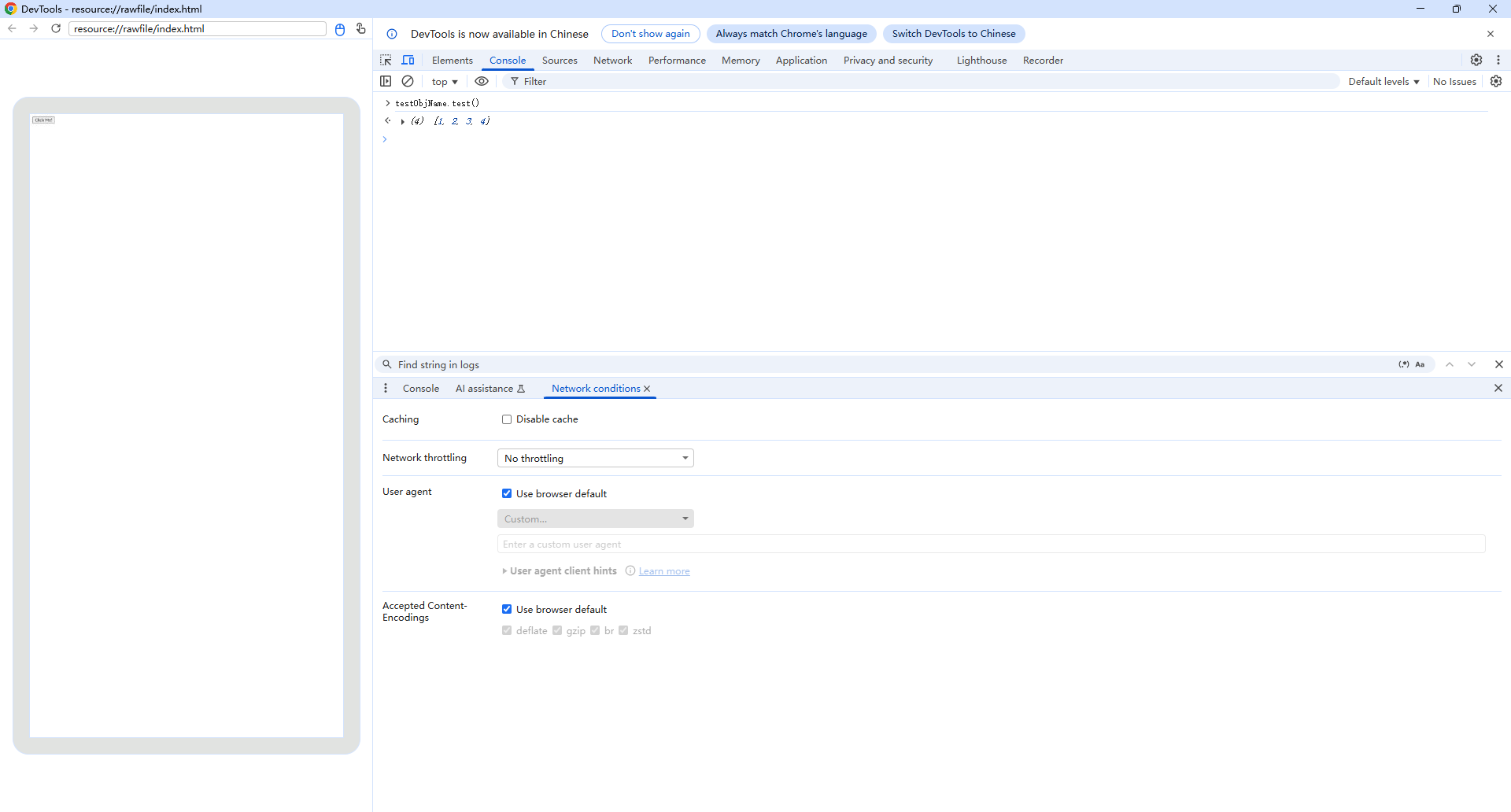
The following example passes arrays between the application side and the frontend page described in Usage of Complex Types. The debugging result is shown in the following figure.