How Do I Obtain the Fingerprint in the Signature Information?
- Call an API.
You can call bundleManager.getBundleInfoForSelf to obtain the application's own BundleInfo. BundleInfo contains signatureInfo, which includes fingerprint information generated using the SHA-256 hash algorithm.
import { bundleManager } from '@kit.AbilityKit';
import { BusinessError } from '@kit.BasicServicesKit';

let bundleFlags = bundleManager.BundleFlag.GET_BUNDLE_INFO_WITH_APPLICATION |
  bundleManager.BundleFlag.GET_BUNDLE_INFO_WITH_SIGNATURE_INFO;
try {
  bundleManager.getBundleInfoForSelf(bundleFlags).then((bundleInfo:bundleManager.BundleInfo) => {
    console.info('testTag', 'getBundleInfoForSelf successfully. fingerprint: ', bundleInfo.signatureInfo.fingerprint);
  }).catch((err: BusinessError) => {
    console.error('testTag', 'getBundleInfoForSelf failed. Cause: ', err.message);
  });
} catch (err) {
  let message = (err as BusinessError).message;
  console.error('testTag', 'getBundleInfoForSelf failed: %{public}s', message);
} - Use Bundle Manager to obtain the fingerprint information. The fingerprint information is generated using the SHA-256 hash algorithm.
hdc shell
# Replace **com.example.myapplication** with the actual bundle name.
bm dump -n com.example.myapplication | grep fingerprint

-
Obtain fingerprint information from the .cer certificate file. The fingerprint information is generated using the SHA-1 hash algorithm.
-
Obtain fingerprint information using the keytool tool. For details, see Generating a Signing Certificate Fingerprint. The fingerprint information is generated using the SHA-256 hash algorithm.
What Is appIdentifier?
appIdentifier, generated during application signing, is a field in the profile and is the unique identifier of an application. There are two ways to generate an application identifier:
- Randomly generate the appIdentifier field through automatic signing on DevEco Studio. Signing on different devices or re-signing will result in different values of appIdentifier.
- The appIdentifier field in the debug profile or release profile is fixed if you manually sign and request a profile in AppGallery Connect. This field comes from the App ID generated when the application is created in AppGallery Connect and is distributed by the cloud. In this case, the appIdentifier field does not change along the application lifecycle, including version updates, certificate changes, public and private key changes, and application transfers.
Therefore, manual signing is recommended in scenarios where appIdentifier must remain unchanged, such as cross-device debugging, cross-application interaction debugging, or multi-user development with a shared key. For details, see Configuring a Debug Signature.
How Do I Obtain appIdentifier from Application Information?
- You can call bundleManager.getBundleInfoForSelf to obtain the bundle information, which contains the signature information, and signature information in turn contains the appIdentifier.
import { bundleManager } from '@kit.AbilityKit';
import { BusinessError } from '@kit.BasicServicesKit';

let bundleFlags = bundleManager.BundleFlag.GET_BUNDLE_INFO_WITH_APPLICATION |
  bundleManager.BundleFlag.GET_BUNDLE_INFO_WITH_SIGNATURE_INFO;
try {
  bundleManager.getBundleInfoForSelf(bundleFlags).then((bundleInfo:bundleManager.BundleInfo) => {
    console.info('testTag', 'getBundleInfoForSelf successfully. appIdentifier:', bundleInfo.signatureInfo.appIdentifier);
  }).catch((err: BusinessError) => {
    console.error('testTag', 'getBundleInfoForSelf failed. Cause:', err.message);
  });
} catch (err) {
  let message = (err as BusinessError).message;
  console.error('testTag', 'getBundleInfoForSelf failed:', message);
} - Use the bm tool.
hdc shell
# Replace **com.example.myapplication** with the actual bundle name.
bm dump -n com.example.myapplication | grep appIdentifier

What Is appId?
appId, the unique identifier of an application, consists of a bundle name, underscore (_), and Base64-encoded public key of the certificate. Since it changes with the public key of the signing certificate, you are advised to use appIdentifier as the unique identifier of an application.
How do I obtain appId from application information?
- You can call bundleManager.getBundleInfoForSelf to obtain the bundle information, which contains the signature information, and signature information in turn contains the appId.
import { bundleManager } from '@kit.AbilityKit';
import { BusinessError } from '@kit.BasicServicesKit';

let bundleFlags = bundleManager.BundleFlag.GET_BUNDLE_INFO_WITH_APPLICATION |
  bundleManager.BundleFlag.GET_BUNDLE_INFO_WITH_SIGNATURE_INFO;
try {
  bundleManager.getBundleInfoForSelf(bundleFlags).then((bundleInfo:bundleManager.BundleInfo) => {
    console.info('testTag', 'getBundleInfoForSelf successfully. appId:', bundleInfo.signatureInfo.appId);
  }).catch((err: BusinessError) => {
    console.error('testTag', 'getBundleInfoForSelf failed. Cause:', err.message);
  });
} catch (err) {
  let message = (err as BusinessError).message;
  console.error('testTag', 'getBundleInfoForSelf failed:', message);
} - Use the bm tool.
hdc shell
# Replace **ohos.app.hap.myapplication** with the actual bundle name.
bm dump -n ohos.app.hap.myapplication |grep '"appId":'

Application UID
A UID is a unique identifier used by the system for application sandbox isolation. It is assigned to each application process to ensure runtime isolation between applications, such as file system isolation and memory space isolation.
The UID is generated as follows: uid = userId * 200000 + (bundleId % 200000). Here, % is the modulo operation, which calculates the remainder of bundleId divided by 200000. userId indicates the user ID where the app is to be installed, and can be obtained through the getOsAccountLocalId API. bundleId indicates the unique ID of the app, an integer ranging from 10000 to 65535 that is used only within the system. It can be obtained by reverse calculation from uid and userId.
How to Obtain the Application UID?
- Use the bm tool.
hdc shell
# Replace **ohos.app.hap.myapplication** with the actual bundle name.
bm dump -n ohos.app.hap.myapplication |grep uid
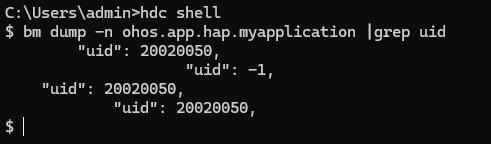
- You can call bundleManager.getBundleInfoForSelf to obtain its own BundleInfo application package information. For sample code, see How do I obtain appId from application information?. The value is obtained through bundleInfo.appInfo.uid.
What is the difference if the called module is an HSP or HAR?
When the HSP module and HAR module are called, the main difference lies in that the input parameters for calling napi_load_module_with_info to load the module are different when the Module2 (HSP/HAR) module Native calls the Module2 (HSP/HAR) module ArkTS. Other processes are the same.
-
If the called module (Module 2) is a HAR:
As shown in the figure, after compilation and building, the HAR module is packaged into each module. Therefore, the entry module is still the HAP module. The module name of the second parameter in napi_load_module_with_info must be the name of the dependent HAR defined in the oh-package.json5 file of the HAP module, not the actual name of the HAR module.

-
If the called module (Module 2) is an HSP:
When the called module Module2 is an HSP, the HSP is an independent module and its entry module is the HSP itself. Therefore, the module name of the second parameter in napi_load_module_with_info is the name of the HSP itself.
What can I do if the ArkTS file of the HAR or HSP module cannot be found?
Symptom
When the ArkTS file of a HAR/HSP module is called, the following error message is displayed:
Error message:Cannot find module 'staticModule/src/main/ets/utils/Util' imported from 'com.xxxx.crossmodulereference/entry'.
Possible Causes
The useNormalizedOHMUrl settings parameter in the project-level build-profile.json5 file is set to false.
Solution
Add the following configuration to build-profile.json5 of the calling module:
// ...
  "buildOption": {
    // ...
    "arkOptions" : {
      "runtimeOnly" : {
        "packages": [
          "static_module"
        ]
      }
    }
  },
  // ...