Overview
As video technologies develop, a high dynamic range (HDR) video gradually becomes a mainstream. Among them, HDR Vivid, as an advanced HDR standard, can provide richer colors and a wider brightness range. However, many devices and platforms still support only standard dynamic range (SDR) videos. Therefore, HDR Vivid videos need to be transcoded into SDR videos to ensure that the content can be played properly on more devices. Transcoding HDR Vivid videos into SDR videos is a complex process that involves multiple technical points. Proper transcoding can ensure that video content can be better displayed on different devices. This not only optimizes video playback experience, but also meets the requirements of more audiences. Therefore, HDR Vivid videos need to be transcoded into SDR videos in many scenarios.
Currently, the system supports only the transcoding from HDR Vivid videos to SDR videos. For other types of videos, such as HDR HLG and HDR 10 videos, they can be transcoded to SDR videos only after being converted to HDR Vivid videos through the system color space conversion capability.
Before you start, you are advised to understand the surface mode and video color space conversion of video decoding.
This document provides the following development scenarios to help you transcode HDR videos to SDR videos:
[h2]How to Implement
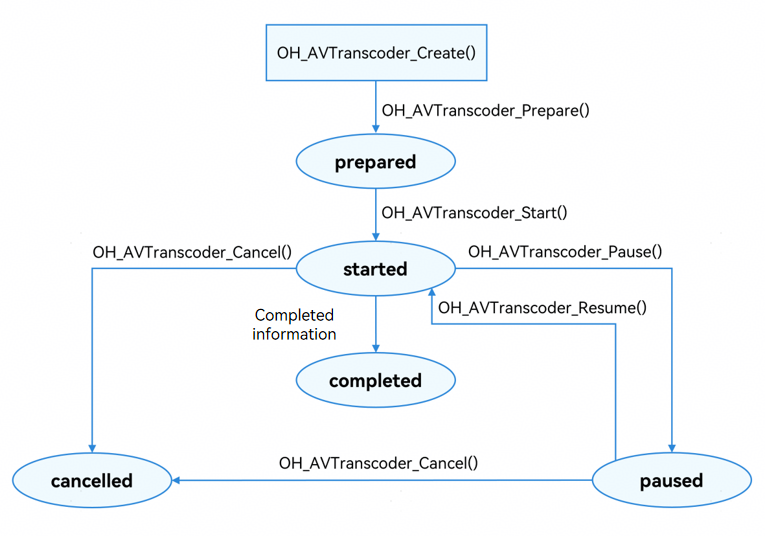
You can use AVTranscoder to implement video transcoding. Since API version 20, this feature supports C/C++ development and is available as a core system capability on mobile phones, tablets, PCs/2-in-1 devices, and others. You can check whether the current device supports the AVTranscoder by calling canIUse(). If the return value of canIUse("SystemCapability.Multimedia.Media.AVTranscoder") is true, the transcoding capability can be used. The transcoding procedure is as follows: In the initialization and preparation phases, call OH_AVTranscoder_Create() to create an 'OH_AVTranscoder' object. In the startup and running phases, call OH_AVTranscoder_Start() to start the transcoding task. In this case, you can call OH_AVTranscoder_Pause() to pause the task. When a transcoding task is paused, you can call OH_AVTranscoder_Resume() to resume the task. When a transcoding task is in progress, you can call OH_AVTranscoder_Cancel() to stop the task.
[h2]How to Develop
For details, see Using AVTranscoder to Transcode Videos (C/C++).
Key point: call OH_AVTranscoderConfig_SetDstVideoType() to set the encoding format of the output video to video/avc.
OH_AVTranscoderConfig_SetDstVideoType(config, "video/avc");
Create the default AVTranscoder configuration and set the encoding format of the output video to video/avc.
void AVTranscoder::CreateDefaultTransCoderConfig(int32_t dstFd) {
    config = OH_AVTranscoderConfig_Create();
    OH_AVTranscoderConfig_SetDstFD(config, dstFd);
    OH_AVTranscoderConfig_SetDstFileType(config, AV_OUTPUT_FORMAT_MPEG_4);
    OH_AVTranscoderConfig_SetDstVideoType(config, "video/avc");
    OH_AVTranscoderConfig_SetDstAudioType(config, "audio/mp4a-latm");
    OH_AVTranscoderConfig_SetDstAudioBitrate(config, 200000);
    OH_AVTranscoderConfig_SetDstVideoBitrate(config, 3000000);
}
Use AVTranscoder to transcode the file and return the transcoding result.
int32_t AVTranscoder::StartAVTranscoder(const SampleInfo &sampleInfo) {
    result = 0;
    sampleInfo_ = sampleInfo;
    transcoder = OH_AVTranscoder_Create();
    CreateDefaultTransCoderConfig(sampleInfo.outputFd);
    OH_AVTranscoder_SetStateCallback(transcoder, AvTranscoderStateChangeCb, nullptr);
    OH_AVTranscoder_SetErrorCallback(transcoder, OnErrorCb, nullptr);
    OH_AVErrCode result =
        OH_AVTranscoderConfig_SetSrcFD(config, sampleInfo.inputFd, 0, sampleInfo.inputFileSize);
    if (result != AV_ERR_OK) {
        AVCODEC_SAMPLE_LOGI("Transcoder setSrcFD failed, ret %{public}d", result);
    }
    result = OH_AVTranscoder_Prepare(transcoder, config);
    if (result != AV_ERR_OK) {
        AVCODEC_SAMPLE_LOGI("Transcoder prepare failed, ret %{public}d", result);
    }
    result = OH_AVTranscoder_Start(transcoder);
    return result;
}
Define an AVTranscoder state change function, and release the AVTranscoder instance when the state is AVTRANSCODER_COMPLETED.
void AVTranscoder::AvTranscoderStateChangeCb(OH_AVTranscoder *transcoder, OH_AVTranscoder_State state, void *userData) {
    if (transcoder == nullptr) {
        return;
    }
    switch (state) {
    case AVTRANSCODER_COMPLETED: {
        AVTranscoder::GetInstance().result = 1;
        AVTranscoder::GetInstance().ReleaseAVTranscoder();
        break;
    }
    default:
        break;
    }
}
Set the AvTranscoder status change listener using OH_AVTranscoder_SetStateCallback().
OH_AVTranscoder_SetStateCallback(transcoder, AvTranscoderStateChangeCb, nullptr);
Release the AVTranscoder instance after the transcoding is successful.
int32_t AVTranscoder::ReleaseAVTranscoder() {
    int ret = 0;
    AVCODEC_SAMPLE_LOGI("OH_AVTranscoder_Release ret:%{public}d", ret);
    if (transcoder != nullptr) {
        ret = OH_AVTranscoder_Release(transcoder);
        AVCODEC_SAMPLE_LOGI("OH_AVTranscoder_Release ret:%{public}d", ret);
        transcoder = nullptr;
    }
    if (config != nullptr) {
        ret = OH_AVTranscoderConfig_Release(config);
        AVCODEC_SAMPLE_LOGI("OH_AVTranscoderConfig_Release ret:%{public}d", ret);
        config = nullptr;
    }
    return ret;
}
[h2]How to Implement
When sharing or editing an HDR Vivid video, you can call the AVCodec capability to convert the video to the SDR format.
[h2]How to Develop
Use the color space conversion (CSC) capability of AVCodec. The development procedure is as follows (for details, see Converting HDR Vivid to SDR Videos):
Create a decoder instance, query the decoder capabilities supported by the system, and create a hardware decoder based on the name parameter from the query results.
class VideoDecoder {
// ...
private:
    // ...
    OH_AVCodec *decoder_ = nullptr;
};
int32_t VideoDecoder::Create(SampleInfo &sampleInfo) { // ... OH_AVCapability *capability = OH_AVCodec_GetCapabilityByCategory(OH_AVCODEC_MIMETYPE_VIDEO_HEVC, false, HARDWARE); CHECK_AND_RETURN_RET_LOG(capability != nullptr, AVCODEC_SAMPLE_ERROR, "OH_AVCodec_GetCapabilityByCategory failed"); const char *name = OH_AVCapability_GetName(capability); decoder_ = OH_VideoDecoder_CreateByName(name); // ... CHECK_AND_RETURN_RET_LOG(decoder_ != nullptr, AVCODEC_SAMPLE_ERROR, "Create VideoDecoder failed"); return AVCODEC_SAMPLE_OK; }Call OH_VideoDecoder_RegisterCallback() to set a callback function.
int32_t VideoDecoder::SetCallback(CodecUserData *codecUserData) {
    int32_t ret =
        OH_VideoDecoder_RegisterCallback(decoder_,
                                         {SampleCallback::OnCodecError, SampleCallback::OnCodecFormatChange,
                                          SampleCallback::OnNeedInputBuffer, SampleCallback::OnNewOutputBuffer},
                                         codecUserData);
    CHECK_AND_RETURN_RET_LOG(ret == AV_ERR_OK, AVCODEC_SAMPLE_ERROR, "Create SetCallback failed");
    return AVCODEC_SAMPLE_OK;
}
Call OH_VideoDecoder_Configure() to configure the decoder. The mandatory configuration items are as follows: video frame width, video frame height, video pixel format, and specifying the output as SDR.
int32_t VideoDecoder::Configure(const SampleInfo &sampleInfo) {
    OH_AVFormat *format = OH_AVFormat_Create();
    CHECK_AND_RETURN_RET_LOG(format != nullptr, AVCODEC_SAMPLE_ERROR, "Create AVFormat failed");
    OH_AVFormat_SetIntValue(format, OH_MD_KEY_WIDTH, sampleInfo.videoWidth);
    OH_AVFormat_SetIntValue(format, OH_MD_KEY_HEIGHT, sampleInfo.videoHeight);
    OH_AVFormat_SetDoubleValue(format, OH_MD_KEY_FRAME_RATE, sampleInfo.frameRate);
    OH_AVFormat_SetIntValue(format, OH_MD_KEY_PIXEL_FORMAT, sampleInfo.pixelFormat);
    OH_AVFormat_SetIntValue(format, OH_MD_KEY_ROTATION, sampleInfo.rotation);
    // ...
        OH_AVFormat_SetIntValue(format, OH_MD_KEY_VIDEO_DECODER_OUTPUT_COLOR_SPACE, OH_COLORSPACE_BT709_LIMIT);
        OH_AVFormat_SetIntValue(format, OH_MD_KEY_VIDEO_ENABLE_LOW_LATENCY, 1);
        // ...
    int ret = OH_VideoDecoder_Configure(decoder_, format);
    OH_AVFormat_Destroy(format);
    format = nullptr;
    CHECK_AND_RETURN_RET_LOG(ret == AV_ERR_OK, AVCODEC_SAMPLE_ERROR, "VideoDecoder Configure failed");
    return AVCODEC_SAMPLE_OK;
}
Currently, only the surface mode supports this capability. For details about subsequent steps, see the surface mode of video decoding.
[h2]How to Implement
You can call the C API provided by the VideoProcessing module to implement CSC from HDR Vivid videos to SDR videos. The following formats can be converted.
| Input ColorSpace | Input MetadataType | Input pixelFormat | Output ColorSpace | Output MetadataType | Output pixelFormat |
|---|---|---|---|---|---|
| OH_COLORSPACE_BT2020_PQ_LIMIT | OH_VIDEO_HDR_VIVID | NATIVEBUFFER_PIXEL_FMT_YCBCR_P010, NATIVEBUFFER_PIXEL_FMT_YCRCB_P010, NATIVEBUFFER_PIXEL_FMT_RGBA_1010102 | OH_COLORSPACE_BT709_LIMIT | OH_VIDEO_NONE | NATIVEBUFFER_PIXEL_FMT_YCBCR_420_SP, NATIVEBUFFER_PIXEL_FMT_YCRCB_420_SP, NATIVEBUFFER_PIXEL_FMT_RGBA_8888 |
| OH_COLORSPACE_BT2020_HLG_LIMIT | OH_VIDEO_HDR_VIVID | NATIVEBUFFER_PIXEL_FMT_YCBCR_P010, NATIVEBUFFER_PIXEL_FMT_YCRCB_P010, NATIVEBUFFER_PIXEL_FMT_RGBA_1010102 | OH_COLORSPACE_BT709_LIMIT | OH_VIDEO_NONE | NATIVEBUFFER_PIXEL_FMT_YCBCR_420_SP, NATIVEBUFFER_PIXEL_FMT_YCRCB_420_SP, NATIVEBUFFER_PIXEL_FMT_RGBA_8888 |
[h2]How to Develop
HarmonyOS provides the VideoProcessing module of the native side to transcode HDR Vivid videos into SDR videos. The development procedure is as follows (for details, see Video Color Space Conversion):
Call OH_VideoProcessing_Create() to create a video processing instance.
void VideoProcessing::SetProcessingSurface(SampleInfo &sampleInfo) {
    VideoProcessing_ErrorCode ret = OH_VideoProcessing_Create(&processor, VIDEO_PROCESSING_TYPE_COLOR_SPACE_CONVERSION);
    ret = OH_VideoProcessing_GetSurface(processor, &sampleInfo.inWindow);
    CHECK_AND_RETURN_LOG(ret == VIDEO_PROCESSING_SUCCESS, "OH_VideoProcessing_GetSurface failed");
}
Call OH_VideoProcessing_GetSurface() to create an input surface before video processing is started.
int32_t VideoEncoder::GetSurface(SampleInfo &sampleInfo) {
    int32_t ret;
    if (sampleInfo.processType > 1) {
        ret = OH_VideoEncoder_GetSurface(encoder_, &sampleInfo.outWindow);
    } else {
        ret = OH_VideoEncoder_GetSurface(encoder_, &sampleInfo.window);
    }
    CHECK_AND_RETURN_RET_LOG(ret == AV_ERR_OK, AVCODEC_SAMPLE_ERROR, "Get surface failed, ret: %{public}d", ret);
    return AVCODEC_SAMPLE_OK;
}
Call OH_VideoProcessing_SetSurface() to set the surface.
int32_t err = 0;
err = OH_NativeWindow_SetMetadataValue(sampleInfo.outWindow, OH_HDR_METADATA_TYPE, sizeof(uint8_t),
                                       (uint8_t *)&sampleInfo.outputFormat.metadataType);
CHECK_AND_RETURN_LOG(err == 0, "SetMetadataValue BT2020_PQ_LIMIT failed");
err = OH_NativeWindow_NativeWindowHandleOpt(sampleInfo.outWindow, SET_FORMAT, sampleInfo.outputFormat.pixelFormat);
CHECK_AND_RETURN_LOG(err == 0, "NativeWindowHandleOpt BT2020_PQ_LIMIT failed");
err = OH_NativeWindow_SetColorSpace(sampleInfo.outWindow,
                                    OH_NativeBuffer_ColorSpace(sampleInfo.outputFormat.colorSpace));
CHECK_AND_RETURN_LOG(err == 0, "SetColorSpace failed");

ret = OH_VideoProcessing_SetSurface(processor, sampleInfo.outWindow);
CHECK_AND_RETURN_LOG(ret == VIDEO_PROCESSING_SUCCESS, "SetSurface failed");
Call functions such as OH_VideoProcessing_RegisterCallback() to create and bind callback functions.
ret = OH_VideoProcessingCallback_Create(&callback);
CHECK_AND_RETURN_LOG(ret == VIDEO_PROCESSING_SUCCESS, "OH_VideoProcessingCallback_Create failed");
ret = OH_VideoProcessingCallback_BindOnError(callback, OnError);
CHECK_AND_RETURN_LOG(ret == VIDEO_PROCESSING_SUCCESS, "OH_VideoProcessingCallback_BindOnError failed");
ret = OH_VideoProcessingCallback_BindOnState(callback, OnState);
CHECK_AND_RETURN_LOG(ret == VIDEO_PROCESSING_SUCCESS, "OH_VideoProcessingCallback_BindOnState failed");
ret = OH_VideoProcessingCallback_BindOnNewOutputBuffer(callback, OnNewOutputBuffer);
CHECK_AND_RETURN_LOG(ret == VIDEO_PROCESSING_SUCCESS, "OH_VideoProcessingCallback_BindOnNewOutputBuffer failed");
ret = OH_VideoProcessing_RegisterCallback(processor, callback, nullptr);
CHECK_AND_RETURN_LOG(ret == VIDEO_PROCESSING_SUCCESS, "OH_VideoProcessing_RegisterCallback failed");
Call OH_VideoProcessing_Start() to start CSC.
void VideoProcessing::StartProcessing() {
    VideoProcessing_ErrorCode ret = OH_VideoProcessing_Start(processor);
    CHECK_AND_RETURN_LOG(ret == VIDEO_PROCESSING_SUCCESS, "OH_VideoProcessing_Start failed");
}
Call OH_VideoProcessing_Stop() to stop CSC.
void VideoProcessing::StopProcessing() {
    VideoProcessing_ErrorCode ret = OH_VideoProcessing_Stop(processor);
    CHECK_AND_RETURN_LOG(ret == VIDEO_PROCESSING_SUCCESS, "OH_VideoProcessing_Stop failed");
    DestroyProcessing();
}
Call OH_VideoProcessing_Destroy() and OH_VideoProcessing_DeinitializeEnvironment() to release the processing instances and resources.
void VideoProcessing::DestroyProcessing() {
    CHECK_AND_RETURN_LOG(processor != nullptr, "processor is nullptr");
    OH_LOG_Print(LOG_APP, LOG_INFO, LOG_PRINT_DOMAIN, LOG_TAG, "start DestroyProcessing");
    VideoProcessing_ErrorCode ret = OH_VideoProcessing_Destroy(processor);
    CHECK_AND_RETURN_LOG(ret == VIDEO_PROCESSING_SUCCESS, "OH_VideoProcessing_Destroy failed");
    processor = nullptr;
    CHECK_AND_RETURN_LOG(callback != nullptr, "callback is nullptr");
    ret = OH_VideoProcessingCallback_Destroy(callback);
    CHECK_AND_RETURN_LOG(ret == VIDEO_PROCESSING_SUCCESS, "OH_VideoProcessingCallback_Destroy failed");
    callback = nullptr;
    OH_LOG_Print(LOG_APP, LOG_INFO, LOG_PRINT_DOMAIN, LOG_TAG, "Destroy And Callback_Destroy succeed");
    OH_VideoProcessing_DeinitializeEnvironment();
}
[h2]How to Implement
You can call the C APIs provided by the VideoProcessing module to implement HDR CSC. The following table lists the supported transcoding range.
| Input ColorSpace | Input MetadataType | Input pixelFormat | Output ColorSpace | Output MetadataType | Output pixelFormat |
|---|---|---|---|---|---|
| OH_COLORSPACE_BT2020_PQ_LIMIT | OH_VIDEO_HDR_VIVID | NATIVEBUFFER_PIXEL_FMT_YCBCR_P010, NATIVEBUFFER_PIXEL_FMT_YCRCB_P010, NATIVEBUFFER_PIXEL_FMT_RGBA_1010102 | OH_COLORSPACE_BT2020_HLG_LIMIT | OH_VIDEO_HDR_VIVID | NATIVEBUFFER_PIXEL_FMT_YCBCR_P010, NATIVEBUFFER_PIXEL_FMT_YCRCB_P010, NATIVEBUFFER_PIXEL_FMT_RGBA_1010102 |
| OH_COLORSPACE_BT2020_PQ_LIMIT | OH_VIDEO_HDR_HLG | NATIVEBUFFER_PIXEL_FMT_YCBCR_P010, NATIVEBUFFER_PIXEL_FMT_YCRCB_P010, NATIVEBUFFER_PIXEL_FMT_RGBA_1010102 | OH_COLORSPACE_BT2020_HLG_LIMIT | OH_VIDEO_HDR_HDR10 | NATIVEBUFFER_PIXEL_FMT_YCBCR_P010, NATIVEBUFFER_PIXEL_FMT_YCRCB_P010, NATIVEBUFFER_PIXEL_FMT_RGBA_1010102 |
| OH_COLORSPACE_BT2020_PQ_LIMIT | OH_VIDEO_HDR_HLG | NATIVEBUFFER_PIXEL_FMT_YCBCR_P010, NATIVEBUFFER_PIXEL_FMT_YCRCB_P010, NATIVEBUFFER_PIXEL_FMT_RGBA_1010102 | OH_COLORSPACE_BT2020_HLG_LIMIT | OH_VIDEO_HDR_VIVID | NATIVEBUFFER_PIXEL_FMT_YCBCR_P010, NATIVEBUFFER_PIXEL_FMT_YCRCB_P010, NATIVEBUFFER_PIXEL_FMT_RGBA_1010102 |
| OH_COLORSPACE_BT2020_PQ_HLG_LIMIT | OH_VIDEO_HDR_VIVID | NATIVEBUFFER_PIXEL_FMT_YCBCR_P010, NATIVEBUFFER_PIXEL_FMT_YCRCB_P010, NATIVEBUFFER_PIXEL_FMT_RGBA_1010102 | OH_COLORSPACE_BT2020_PQ_HLG_LIMIT | OH_VIDEO_HDR_VIVID | NATIVEBUFFER_PIXEL_FMT_YCBCR_P010, NATIVEBUFFER_PIXEL_FMT_YCRCB_P010, NATIVEBUFFER_PIXEL_FMT_RGBA_1010102 |
[h2]How to Develop
For details, see Video Color Space Conversion.
Initialize the environment and query whether video color space conversion is supported.
bool VideoProcessing::IsColorSpaceConversionSupported(SampleInfo &sampleInfo) {
    OH_VideoProcessing_InitializeEnvironment();
    return OH_VideoProcessing_IsColorSpaceConversionSupported(&sampleInfo.inputFormat, &sampleInfo.outputFormat);
}
Set the input and output values.
sampleInfo.inputFormat.metadataType = OH_VIDEO_HDR_VIVID;
sampleInfo.inputFormat.colorSpace = OH_COLORSPACE_BT2020_HLG_LIMIT;
sampleInfo.inputFormat.pixelFormat = NATIVEBUFFER_PIXEL_FMT_YCRCB_P010;
sampleInfo.outputFormat.metadataType = OH_VIDEO_NONE;
sampleInfo.outputFormat.colorSpace = OH_COLORSPACE_BT709_LIMIT;
sampleInfo.outputFormat.pixelFormat = NATIVEBUFFER_PIXEL_FMT_YCBCR_420_SP;
Create a CSC module and obtain the surface.
void VideoProcessing::SetProcessingSurface(SampleInfo &sampleInfo) {
    VideoProcessing_ErrorCode ret = OH_VideoProcessing_Create(&processor, VIDEO_PROCESSING_TYPE_COLOR_SPACE_CONVERSION);
    ret = OH_VideoProcessing_GetSurface(processor, &sampleInfo.inWindow);
    CHECK_AND_RETURN_LOG(ret == VIDEO_PROCESSING_SUCCESS, "OH_VideoProcessing_GetSurface failed");
}
Configure the asynchronous callback function.
void OnError(OH_VideoProcessing *videoProcessor, VideoProcessing_ErrorCode error, void *userData) {
    (void)videoProcessor;
    (void)error;
    (void)userData;
    OH_LOG_Print(LOG_APP, LOG_ERROR, LOG_PRINT_DOMAIN, LOG_TAG, "OnError: %{public}d", error);
}

void OnState(OH_VideoProcessing *videoProcessor, VideoProcessing_State state, void *userData) {
    (void)videoProcessor;
    (void)state;
    (void)userData;
}

void OnNewOutputBuffer(OH_VideoProcessing *videoProcessor, uint32_t index, void *userData) {

    OH_VideoProcessing_RenderOutputBuffer(videoProcessor, index);
    (void)userData;
}
ret = OH_VideoProcessingCallback_Create(&callback); CHECK_AND_RETURN_LOG(ret == VIDEO_PROCESSING_SUCCESS, "OH_VideoProcessingCallback_Create failed"); ret = OH_VideoProcessingCallback_BindOnError(callback, OnError); CHECK_AND_RETURN_LOG(ret == VIDEO_PROCESSING_SUCCESS, "OH_VideoProcessingCallback_BindOnError failed"); ret = OH_VideoProcessingCallback_BindOnState(callback, OnState); CHECK_AND_RETURN_LOG(ret == VIDEO_PROCESSING_SUCCESS, "OH_VideoProcessingCallback_BindOnState failed"); ret = OH_VideoProcessingCallback_BindOnNewOutputBuffer(callback, OnNewOutputBuffer); CHECK_AND_RETURN_LOG(ret == VIDEO_PROCESSING_SUCCESS, "OH_VideoProcessingCallback_BindOnNewOutputBuffer failed"); ret = OH_VideoProcessing_RegisterCallback(processor, callback, nullptr); CHECK_AND_RETURN_LOG(ret == VIDEO_PROCESSING_SUCCESS, "OH_VideoProcessing_RegisterCallback failed");
Sets the surface.
int32_t err = 0;
err = OH_NativeWindow_SetMetadataValue(sampleInfo.outWindow, OH_HDR_METADATA_TYPE, sizeof(uint8_t),
                                       (uint8_t *)&sampleInfo.outputFormat.metadataType);
CHECK_AND_RETURN_LOG(err == 0, "SetMetadataValue BT2020_PQ_LIMIT failed");
err = OH_NativeWindow_NativeWindowHandleOpt(sampleInfo.outWindow, SET_FORMAT, sampleInfo.outputFormat.pixelFormat);
CHECK_AND_RETURN_LOG(err == 0, "NativeWindowHandleOpt BT2020_PQ_LIMIT failed");
err = OH_NativeWindow_SetColorSpace(sampleInfo.outWindow,
                                    OH_NativeBuffer_ColorSpace(sampleInfo.outputFormat.colorSpace));
CHECK_AND_RETURN_LOG(err == 0, "SetColorSpace failed");

ret = OH_VideoProcessing_SetSurface(processor, sampleInfo.outWindow);
CHECK_AND_RETURN_LOG(ret == VIDEO_PROCESSING_SUCCESS, "SetSurface failed");
Call OH_VideoProcessing_Start() to start CSC.
void VideoProcessing::StartProcessing() {
    VideoProcessing_ErrorCode ret = OH_VideoProcessing_Start(processor);
    CHECK_AND_RETURN_LOG(ret == VIDEO_PROCESSING_SUCCESS, "OH_VideoProcessing_Start failed");
}
Call OH_VideoProcessing_Stop() to stop CSC.
void VideoProcessing::StopProcessing() {
    VideoProcessing_ErrorCode ret = OH_VideoProcessing_Stop(processor);
    CHECK_AND_RETURN_LOG(ret == VIDEO_PROCESSING_SUCCESS, "OH_VideoProcessing_Stop failed");
    DestroyProcessing();
}
Call OH_VideoProcessing_Destroy() to destroy the video processing instance.
void VideoProcessing::DestroyProcessing() {
    CHECK_AND_RETURN_LOG(processor != nullptr, "processor is nullptr");
    OH_LOG_Print(LOG_APP, LOG_INFO, LOG_PRINT_DOMAIN, LOG_TAG, "start DestroyProcessing");
    VideoProcessing_ErrorCode ret = OH_VideoProcessing_Destroy(processor);
    CHECK_AND_RETURN_LOG(ret == VIDEO_PROCESSING_SUCCESS, "OH_VideoProcessing_Destroy failed");
    processor = nullptr;
    CHECK_AND_RETURN_LOG(callback != nullptr, "callback is nullptr");
    ret = OH_VideoProcessingCallback_Destroy(callback);
    CHECK_AND_RETURN_LOG(ret == VIDEO_PROCESSING_SUCCESS, "OH_VideoProcessingCallback_Destroy failed");
    callback = nullptr;
    OH_LOG_Print(LOG_APP, LOG_INFO, LOG_PRINT_DOMAIN, LOG_TAG, "Destroy And Callback_Destroy succeed");
    OH_VideoProcessing_DeinitializeEnvironment();
}