A passkey is an authentication credential based on the FIDO2 standard protocol (see website link disclaimer) for simple and secure sign-in. With a passkey, users can sign in to apps or websites using their fingerprint, their face, or their phone's unlock PIN. Compared with traditional passwords, passkeys offer greater convenience and enhanced security. For more information about FIDO, see FIDO Specifications (see website link disclaimer).
Since HarmonyOS 6.0.0 (20), the passkey feature is added to Online Authentication Kit to support the following capabilities:
Passkey registration: A passkey for an app or website can be created on a local device, using a user's authentication factors (such as their face, fingerprint, or PIN) as the platform authenticator.
Local passwordless authentication: A passkey can be used for passwordless authentication during app or website sign-in on the local device, using a user's authentication factors (such as their face, fingerprint, or PIN) as the platform authenticator.
Cross-device authentication through QR code scanning: A mobile device with a registered passkey can function as a roaming authenticator for passwordless sign-in to apps or websites on another device through cross-device QR code scanning.
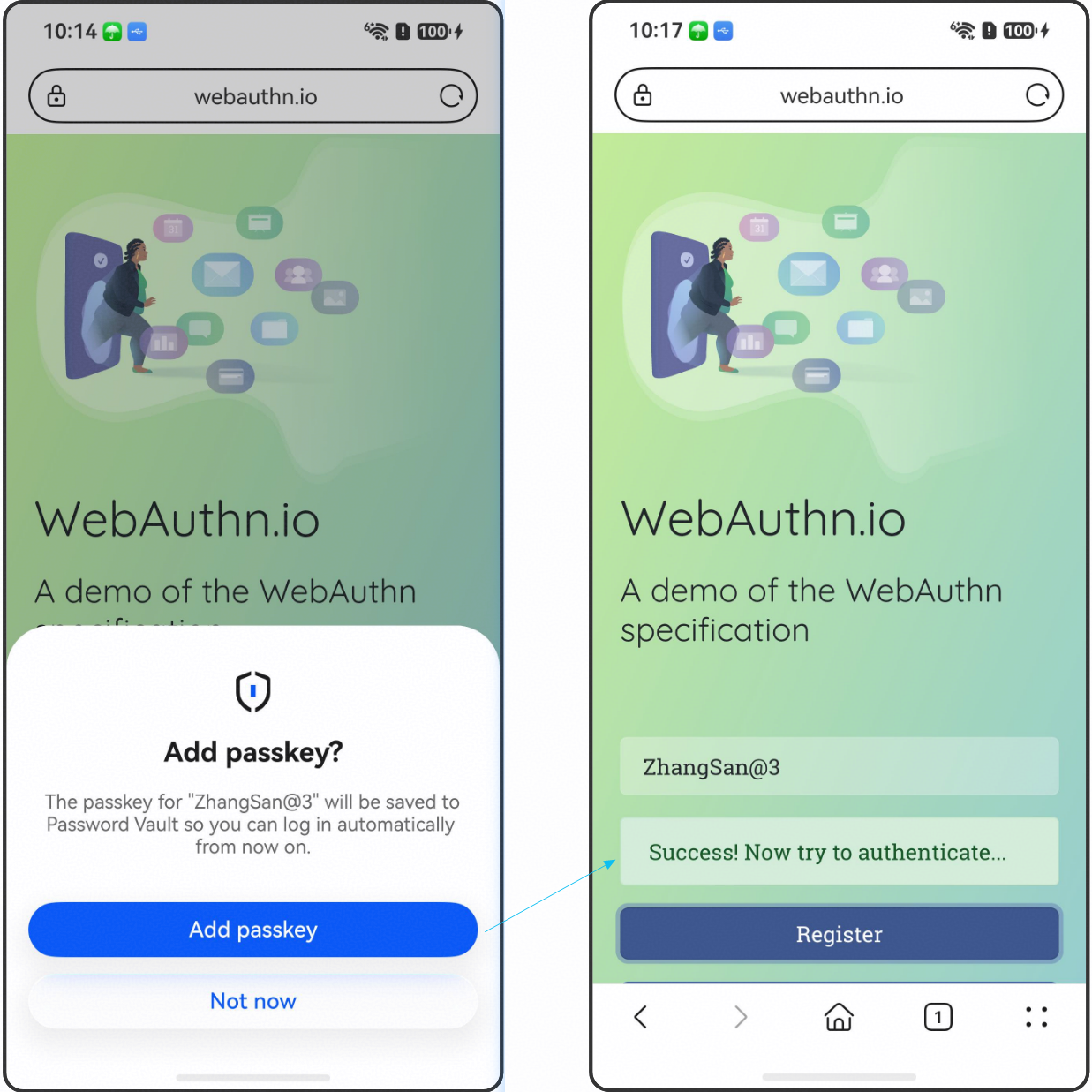
[h2]Registering a Passkey
To enable easy, fast, and secure sign-in to local apps or websites, you can create a passkey for users through the passkey registration capability of the passkey service.
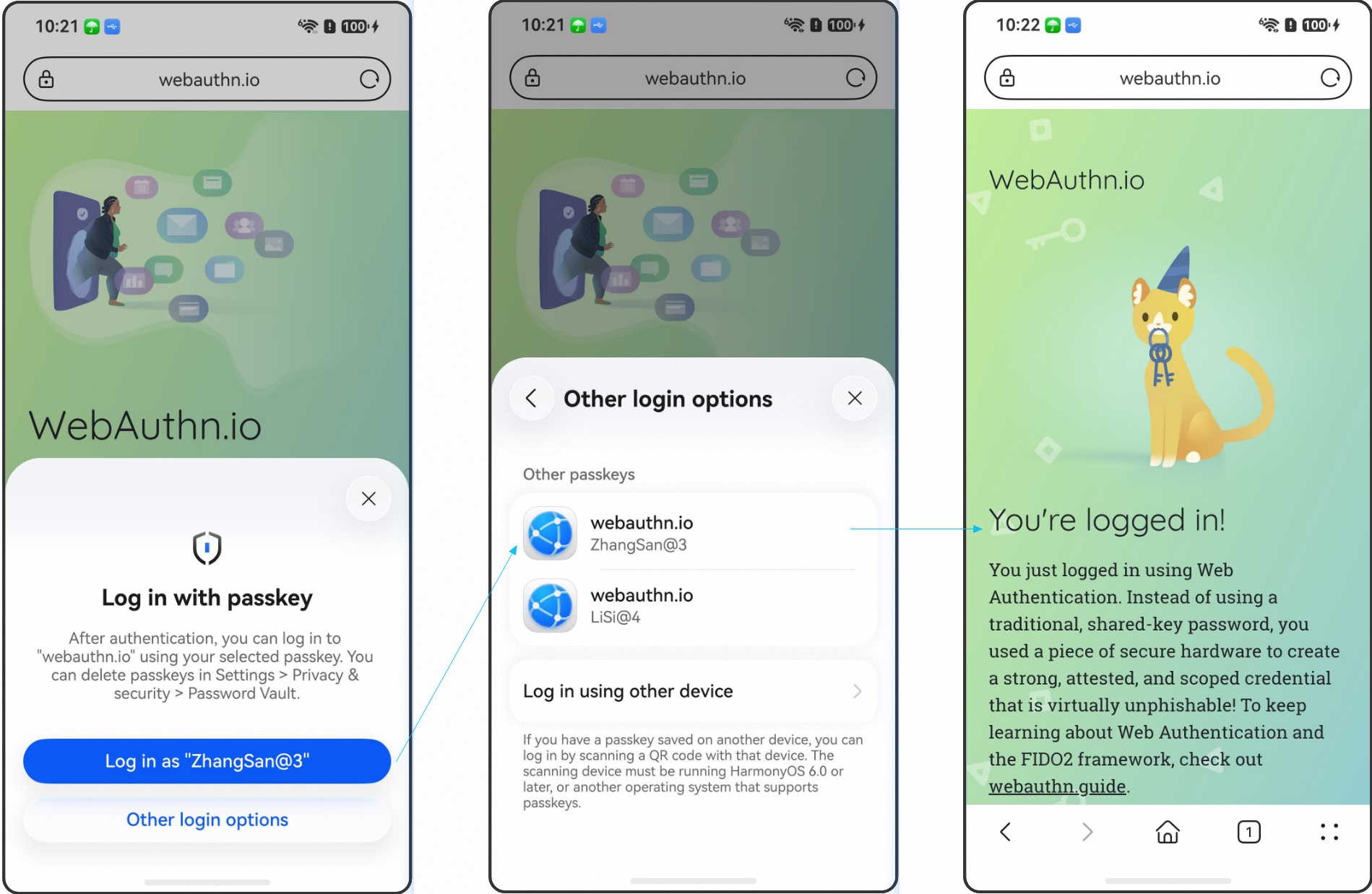
[h2]Using a Passkey to Sign In to an App or Website on the Local Device
To authenticate a user who wants to sign in to an app or website, you can use the local passwordless authentication capability of the passkey service.
[h2]Scanning a QR Code to Sign In to an App or Website on Another Device
To authenticate a user who wants to sign in to an app or website on another device, you can use the cross-device authentication capability of the passkey service through QR code scanning.


To support the preceding scenarios, you need to deploy a FIDO server that complies with FIDO2 standards.
Constraints
This function can be used only when the following conditions are met:
Your services must adopt the protocols that comply with FIDO2 standards, and you need to deploy a FIDO2-compliant FIDO server.
Mobile devices must support biometric features (fingerprints or 3D faces). Check whether a mobile device supports the ATL4 authentication trust level.
import { BusinessError } from '@kit.BasicServicesKit';
import { userAuth } from '@kit.UserAuthenticationKit';

try {
  // Example: Check whether the device supports the ATL4 authentication trust level for facial recognition.
  userAuth.getAvailableStatus(userAuth.UserAuthType.FACE, userAuth.AuthTrustLevel.ATL4);
  console.info('current auth trust level is supported');
} catch (error) {
  const err: BusinessError = error as BusinessError;
  console.error(`current auth trust level is not supported. Code is ${err?.code}, message is ${err?.message}`);
}
The passkey service requires an Internet connection and Bluetooth to provide a complete online identity authentication service. Before calling this service's APIs, your app must explicitly inform users that the passkey service will use an Internet connection and Bluetooth, and obtain user consent.
According FIDO Specifications (see website link disclaimer), the passkey service needs to upload user nickname and identifier information in apps to a network relay server, for use in cross-device authentication through QR code scanning, to implement authentication data communication between two devices. Before calling an API of this service, an app must explicitly notify users of the collected personal data and obtain users' consent. For details, see Personal Data Processing Description.
Service Process
Registration Process
An app or a browser integrates the passkey module of Online Authentication Kit and sends a registration request to the FIDO server.
The FIDO server returns the registration information (such as a challenge) to the app. The app assembles the registration message and uses the passkey service for registration.
After successful user verification by the authenticator, the passkey service generates a credential key pair. It then uses the preset private key to sign the generated public key and registration information (such as the challenge).
The passkey service returns the signature to the app. The app sends the signature to the FIDO server for registration.
The FIDO server verifies the signature, stores the public key, and returns the processing result to the app.
Authentication Process
An app or a browser integrates the passkey module of Online Authentication Kit and sends an authentication request to the FIDO server.
The FIDO server returns the authentication information (such as a challenge) to the app. The app assembles the authentication message and uses the passkey service for authentication.
After successful user verification by the authenticator, the passkey service uses the stored private key to sign the authentication information (such as a challenge).
The passkey service returns the signature to the app. The app sends the signature to the FIDO server for authentication.
The FIDO server verifies the signature and returns the processing result to the app.