When you use the same computation logic repeatedly bound to the UI, to prevent redundant computation, they can use the @Computed computed property. When the state variables that the computed property depends on change, the computation is performed only once. This resolves the redundant computation and performance issues caused by the UI reusing the property multiple times. See the following example.
@Computed
get sum() {
  return this.count1 + this.count2 + this.count3;
}
Text(`${this.count1 + this.count2 + this.count3}`) // Calculate the sum of three counters.
Text(`${this.count1 + this.count2 + this.count3}`) // Repeat the same calculation.
Text(`${this.sum}`) // Read the cached value from the @Computed sum, avoiding redundant calculations.
Text(`${this.sum}`) // Read the cached value from the @Computed sum, avoiding redundant calculations. Before reading this topic, it is advised to familiarize yourself with @ComponentV2, @ObservedV2 and @Trace, and @Local.

The @Computed decorator is supported since API version 12.
This decorator can be used in atomic services since API version 12.
This decorator can be used in ArkTS widgets since API version 23.
Overview
@Computed is a method decorator that decorates getter methods. It detects changes in the computed properties and ensures the calculation is performed only once when the properties change. Avoid modifying variables inside @Computed, as incorrect usage may lead to untracked data or application freezes. For details, see Constraints.
For simple calculations, using @Computed is not recommended due to its inherent overhead. For complex computations, @Computed provides significant performance benefits.
Decorator Description
@Computed syntax:
@Computed
get varName(): T {
    return value;
} | @Computed Decorator | Description |
|---|---|
| Supported Type | Getter accessor. |
| Initialization from the parent component | Forbidden. |
| Child component initialization | @Param. |
| Execution time | In @ComponentV2, @Computed is initialized when the custom component is created, triggering computation. In @ObservedV2 decorated classes, @Computed is initialized asynchronously after the class instance is created, triggering computation. Recomputation occurs when state variables used in the @Computed calculation are modified. |
| Value assignment allowed | No. @Computed decorated properties are read-only. For details, see Constraints. |
Constraints
-
@Computed is a method decorator and can only decorate getter methods.
@Computed get fullName() { // Correct usage. return this.firstName + ' ' + this.lastName; } @Computed val: number = 0; // Incorrect usage. An error is reported during compilation. @Computed func() { // Incorrect usage. An error is reported during compilation. } -
Methods decorated with @Computed only recompute during initialization or when the state variables used in their calculations change. Avoid performing logic operations other than data retrieval in @Computed decorated getter methods, as shown in the example below.
@Entry
@ComponentV2
struct Page {
  @Local firstName: string = 'Hua';
  @Local lastName: string = 'Li';
  @Local showFullNameRequestCount: number = 0;
  private fullNameRequestCount: number = 0;

  @Computed
  get fullName() {
    console.info('fullName');
    // Avoid assignment logic in @Computed calculations, as @Computed is essentially a getter accessor for optimizing repeated computations.
    // In this example, fullNameRequestCount only represents the number of @Computed recalculations, not the number of times fullName is accessed.
    this.fullNameRequestCount++;
    return this.firstName + ' ' + this.lastName;
  }

  build() {
    Column() {
      Text(`${this.fullName}`) // Obtain fullName once.
        .fontSize(20)
        .margin(10)
      Text(`${this.fullName}`) // Obtain fullName again. fullName is obtained twice. However, no recomputation occurs, as the cached value is read.
        .fontSize(20)
        .margin(10)

      // Clicking the button obtains the value of fullNameRequestCount.
      Text(`count ${this.showFullNameRequestCount}`)
        .fontSize(20)
        .margin(10)
      Button('get fullName')
        .width(300)
        .margin(10)
        .onClick(() => {
          this.showFullNameRequestCount = this.fullNameRequestCount;
        })
    }
    .width('100%')
  }
}
-
In @Computed decorated getter methods, do not modify properties involved in the calculation to prevent infinite recomputation leading to application freezes.
In the following example, calculating fullName1 triggers the change of this.lastName; the change of this.lastName triggers the calculation of fullName2. During the calculation of fullName2, this.firstName is changed, which triggers the recalculation of fullName1 again, resulting in circular calculation and eventually causing application freezing.
@Entry @ComponentV2 struct Page { @Local firstName: string = 'Hua'; @Local lastName: string = 'Li'; @Computed get fullName1() { console.info('fullName1'); this.lastName += 'a'; // Incorrect usage. The properties involved in computation cannot be changed. return this.firstName + ' ' + this.lastName; } @Computed get fullName2() { console.info('fullName2'); this.firstName += 'a'; // Incorrect usage. The properties involved in computation cannot be changed. return this.firstName + ' ' + this.lastName; } build() { Column() { Text(`${this.fullName1}`) .fontSize(20) .margin(10) Text(`${this.fullName2}`) .fontSize(20) .margin(10) } .width('100%') } } -
@Computed cannot be used together with !! for two-way binding. Properties decorated with @Computed are getter accessors. They are not synchronized by child components and cannot be assigned. Custom setter implementations for computed properties will not take effect and will result in a compilation error.
@ComponentV2 struct Child { @Param double: number = 100; @Event $double: (val: number) => void; build() { Button('ChildChange') .width(300) .margin(10) .onClick(() => { this.$double(200); }) } } @Entry @ComponentV2 struct Index { @Local count: number = 100; @Computed get double() { return this.count * 2; } // Custom setters for @Computed decorated properties have no effect and will cause a compile-time error. set double(newValue : number) { this.count = newValue / 2; } build() { Scroll() { Column({ space: 3 }) { Text(`${this.count}`) // Incorrect usage. @Computed decorated properties are read-only and cannot be used together with two-way binding. A compile-time error will occur. Child({ double: this.double!! }) } } } } -
@Computed is a feature of state management V2 and can only be used in @ComponentV2 and @ObservedV2.
-
When using multiple @Computed decorated properties together, avoid circular dependencies to prevent infinite loops during computation.
@Local a : number = 1;
@Computed
get b() {
  return this.a + ' ' + this.c;  // Incorrect usage. There is a circular dependency: b -> c -> b.
}
@Computed
get c() {
  return this.a + ' ' + this.b; // Incorrect usage. There is a circular dependency: c -> b -> c.
}
[h2]The @Computed Decorated Getter is Evaluated Only Once Upon Property Change
-
Using a computed property in a custom component
-
Clicking the first button changes the value of lastName, triggering a recomputation of the @Computed decorated property fullName.
-
this.fullName is bound to two Text components. The fullName log shows that the computation occurs only once.
-
For the first two Text components, the this.lastName +' '+ this.firstName logic is evaluated twice.
-
If multiple UI elements require the same computed logic this.lastName +' '+ this.firstName, you can use a computed property to reduce redundant calculations.
-
Clicking the second button increments the value of age, but the UI remains unchanged. This is because age is not a state variable, and only changes to observed variables can trigger the recomputation of the @Computed decorated property fullName.
import { hilog } from '@kit.PerformanceAnalysisKit';

const TAG = '[Sample_Textcomponent]';
const DOMAIN = 0xF811;
const BUNDLE = 'Textcomponent_';

@Entry
@ComponentV2
struct CustomComponentUse {
  @Local firstName: string = 'Li';
  @Local lastName: string = 'Hua';
  age: number = 20; // Computed cannot be triggered.

  @Computed
  get fullName() {
    hilog.info(DOMAIN, TAG, BUNDLE + '---------Computed----------');
    return this.firstName + ' ' + this.lastName + this.age;
  }

  build() {
    Column() {
      Text(this.lastName + ' ' + this.firstName)
        .fontSize(20)
        .margin(10)
      Text(this.lastName + ' ' + this.firstName)
        .fontSize(20)
        .margin(10)
      Divider()
      Text(this.fullName)
        .fontSize(20)
        .margin(10)
      Text(this.fullName)
        .fontSize(20)
        .margin(10)
      Button('changed lastName')
        .width(300)
        .margin(10)
        .onClick(() => {
          this.lastName += 'a';
        })

      Button('changed age')
        .width(300)
        .margin(10)
        .onClick(() => {
          this.age++;  // Computed cannot be triggered.
        })
    }
  }
}
Computed properties inherently introduce performance overhead. In practical development, note the following:
-
For simple logic, avoid computed properties and compute directly.
-
If the logic is used only once in the view, skip the computed property and evaluate inline.
-
-
Using a computed property in an @ObservedV2 decorated class
Clicking the button changes the value of lastName, triggering the @Computed decorated property fullName to recompute once.
import { hilog } from '@kit.PerformanceAnalysisKit';

const TAG = '[Sample_Textcomponent]';
const DOMAIN = 0xF811;
const BUNDLE = 'Textcomponent_';

@ObservedV2
class Name {
  @Trace public firstName: string = 'Hua';
  @Trace public lastName: string = 'Li';

  @Computed
  get fullName() {
    hilog.info(DOMAIN, TAG, BUNDLE + '---------Computed----------');
    return this.firstName + ' ' + this.lastName;
  }
}

const name: Name = new Name();

@Entry
@ComponentV2
struct ObservedV2ClassUser {
  name1: Name = name;

  build() {
    Column() {
      Text(this.name1.fullName)
        .fontSize(20)
        .margin(10)
      Text(this.name1.fullName)
        .fontSize(20)
        .margin(10)
      // Tap the Button to change lastName, triggering fullName recomputation. The value is computed only once.
      Button('changed lastName')
        .width(300)
        .margin(10)
        .onClick(() => {
          this.name1.lastName += 'a';
        })
    }
    .width('100%')
  }
}
[h2]@Monitor Can Listen for the Changes of the @Computed Decorated Properties
The following example shows how to convert celsius to fahrenheit and kelvin Example:
-
Clicking - decrements celsius, updates fahrenheit, then updates kelvin, which triggers onKelvinMonitor.
-
Clicking + increments celsius++, updates fahrenheit, then updates kelvin, which triggers onKelvinMonitor.
import { hilog } from '@kit.PerformanceAnalysisKit';

const TAG = '[Sample_Textcomponent]';
const DOMAIN = 0xF811;
const BUNDLE = 'Textcomponent_';

@Entry
@ComponentV2
struct ComputedPropertyResolution {
  @Local celsius: number = 20;

  @Computed
  get fahrenheit(): number {
    return this.celsius * 9 / 5 + 32; // C -> F
  }

  @Computed
  get kelvin(): number {
    return (this.fahrenheit - 32) * 5 / 9 + 273.15; // F -> K
  }

  @Monitor('kelvin')
  onKelvinMonitor(mon: IMonitor) {
    hilog.info(DOMAIN, TAG, BUNDLE + 'kelvin changed from' + mon.value()?.before + ' to ' + mon.value()?.now);
  }

  build() {
    Column({ space: 20 }) {
      Row({ space: 20 }) {
        Button('-')
          .onClick(() => {
            this.celsius--;
          })

        Text(`Celsius ${this.celsius.toFixed(1)}`).fontSize(40)

        Button('+')
          .onClick(() => {
            this.celsius++;
          })
      }

      Text(`Fahrenheit ${this.fahrenheit.toFixed(2)}`)
        .fontSize(40)
        .margin(10)
      Text(`Kelvin ${this.kelvin.toFixed(2)}`)
        .fontSize(40)
        .margin(10)
    }
    .width('100%')
  }
}
[h2]@Computed Decorated Properties Can Initialize @Param
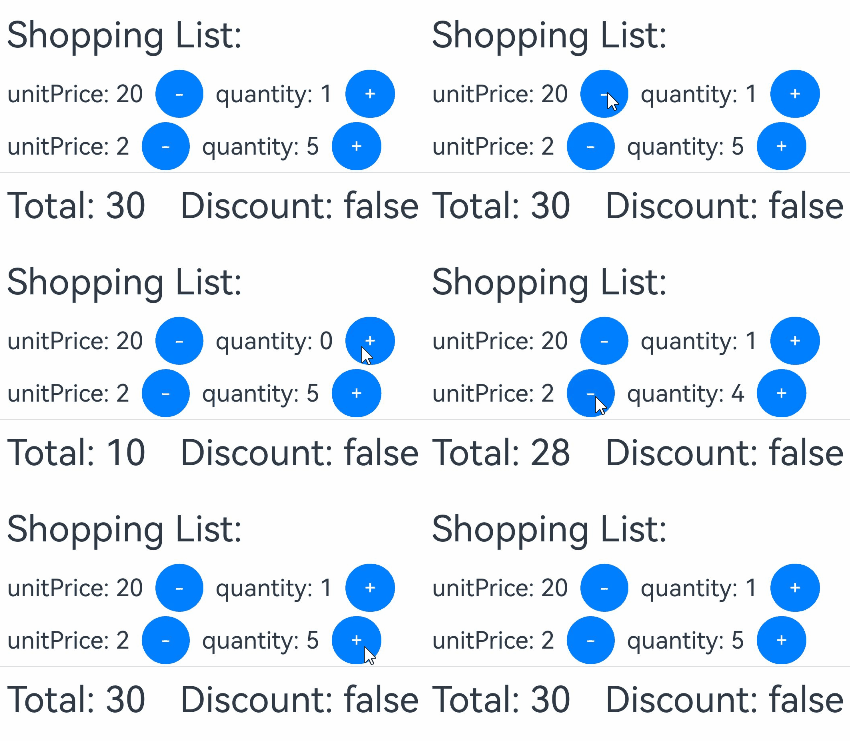
The following example shows how to use an @Computed decorated property to initialize @Param.
-
Clicking Button('-') and Button('+') changes the value of quantity, which is decorated with @Trace and can be observed when it is changed.
-
The change of quantity triggers the recomputation of total and qualifiesForDiscount.
-
The change of total and qualifiesForDiscount triggers the update of the Text component corresponding to the Child component.
@ObservedV2
class Article {
  @Trace public quantity: number = 0;
  public unitPrice: number = 0;

  constructor(quantity: number, unitPrice: number) {
    this.quantity = quantity;
    this.unitPrice = unitPrice;
  }
}

@Entry
@ComponentV2
struct ComputingInitParam {
  @Local shoppingBasket: Article[] = [new Article(1, 20), new Article(5, 2)];

  @Computed
  get total(): number {
    return this.shoppingBasket.reduce((acc: number, item: Article) => acc + (item.quantity * item.unitPrice), 0);
  }

  @Computed
  get qualifiesForDiscount(): boolean {
    return this.total >= 100;
  }

  build() {
    Column() {
      Text(`Shopping List: `)
        .fontSize(30)
        .margin(10)
      ForEach(this.shoppingBasket, (item: Article) => {
        Row() {
          Text(`unitPrice: ${item.unitPrice}`)
            .fontSize(20)
            .margin(10)
          // Tap the Button to decrease quantity, triggering recomputation of total and qualifiesForDiscount.
          Button('-')
            .onClick(() => {
              if (item.quantity > 0) {
                item.quantity--;
              }
            })
          Text(`quantity: ${item.quantity}`)
            .fontSize(20)
            .margin(10)
          // Tap the Button to increase quantity, triggering recomputation of total and qualifiesForDiscount.
          Button('+')
            .onClick(() => {
              item.quantity++;
            })
        }
        .width('100%')

        Divider()
      })
      Child({ total: this.total, qualifiesForDiscount: this.qualifiesForDiscount })
    }
    .alignItems(HorizontalAlign.Start)
  }
}

@ComponentV2
struct Child {
  @Param total: number = 0;
  @Param qualifiesForDiscount: boolean = false;

  build() {
    Row() {
      Text(`Total: ${this.total} `)
        .fontSize(30)
        .margin(10)
      Text(`Discount: ${this.qualifiesForDiscount} `)
        .fontSize(30)
        .margin(10)
    }
  }
}