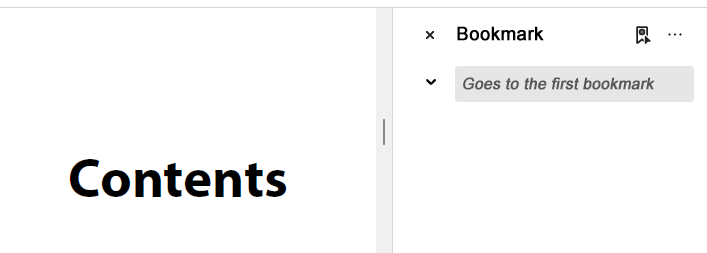
PDF Kit allows you to add and delete bookmarks for PDF documents.
When adding a bookmark, you can set the title, color, whether the bookmark is in bold or italic, and redirection information.
API Description
| API Name | Description |
|---|---|
| createBookmark(): Bookmark | Creates a bookmark for a PDF document. |
| getRootBookmark(): Bookmark | Obtains the first root bookmark of a PDF document. |
| insertBookmark(bookmark: Bookmark, parent: Bookmark, position: number): boolean | Inserts a bookmark to a PDF document. |
| setBookmarkInfo(info: BookmarkInfo): void | Sets bookmark information. |
| removeBookmark(bookmark: Bookmark): boolean | Removes a bookmark from a PDF document. |
| setDestInfo(info: DestInfo): void | Sets the bookmark redirection information. |
| getBookmarkInfo(): BookmarkInfo | Obtains bookmark information. |
Sample Code
Adding a bookmark:
-
Call the loadDocument method to load a PDF document.
-
Call the createBookmark method to create a bookmark.
-
Call the setDestInfo method to set the bookmark redirection information.
-
Call the getBookmarkInfo method to obtain bookmark information.
-
Call the setBookmarkInfo method to set the bookmark content and style.
-
Set the sandbox path for saving the document and save the settings.
Deleting a bookmark:
-
Call the loadDocument method to load a PDF document.
-
Call the getRootBookmark method to obtain the first root bookmark of the document.
-
Call the removeBookmark method to delete a bookmark.
-
Set the sandbox path for saving the document and save the settings.
import { pdfService } from '@kit.PDFKit';
import { hilog } from '@kit.PerformanceAnalysisKit';
// ...

@Entry
@Component
struct BookmarkPage {
  private pdfDocument: pdfService.PdfDocument = new pdfService.PdfDocument();
  private context = this.getUIContext().getHostContext() as Context;

  build() {
    Column() {
    // ...
        Button('addBookmark').onClick(async () => {
          // Ensure that the input.pdf document exists in the src/main/resources/resfile project directory.
          let filePath = this.context.resourceDir + '/input.pdf';
          this.pdfDocument.loadDocument(filePath);
          // Create a bookmark.
          let mark1: pdfService.Bookmark = this.pdfDocument.createBookmark();
          let mark2: pdfService.Bookmark = this.pdfDocument.createBookmark();
          // Set the redirection information of the bookmark.
          let destInfo: pdfService.DestInfo = mark1.getDestInfo();
          destInfo.fitMode = pdfService.FitMode.FIT_MODE_XYZ;
          destInfo.pageIndex = 1;
          destInfo.left = 20;
          destInfo.top = 30;
          destInfo.zoom = 1.5;
          mark1.setDestInfo(destInfo);
          // Set the content and style of the bookmark.
          let bookInfo: pdfService.BookmarkInfo = mark1.getBookmarkInfo();
          bookInfo.title = 'Bookmark for going to the first page';
          bookInfo.titleColor = 12;
          bookInfo.isBold = true;
          bookInfo.isItalic = true;
          mark1.setBookmarkInfo(bookInfo);
          // Insert the created bookmark to the PDF page.
          this.pdfDocument.insertBookmark(mark1, null, 1);
          this.pdfDocument.insertBookmark(mark2, mark1, 1);
          // Set the sandbox path for saving the document and save the settings.
          let outPdfPath = this.context.filesDir + '/testAddBookmark.pdf';
          let result = this.pdfDocument.saveDocument(outPdfPath);
          hilog.info(0x0000, 'BookmarkPage', 'saveAddBookmark %{public}s!', result ? 'success' : 'fail');
        })
        // Delete a bookmark.
        Button('removeBookmark').onClick(async () => {
          // Ensure that the testAddBookmark.pdf document exists in the sandbox directory.
          this.pdfDocument.loadDocument(this.context.filesDir + '/testAddBookmark.pdf');
          let bookmarks: pdfService.Bookmark = this.pdfDocument.getRootBookmark();
          if (bookmarks.isRootBookmark()) {
            let hasRemoveBookmark: boolean = this.pdfDocument.removeBookmark(bookmarks);
            hilog.info(0x0000, 'BookmarkPage', 'removeBookmark %{public}s!', hasRemoveBookmark ? 'success' : 'fail');
            let outPdfPath = this.context.filesDir + '/testRemoveBookmark.pdf';
            let result = this.pdfDocument.saveDocument(outPdfPath);
            hilog.info(0x0000, 'BookmarkPage', 'saveRemoveBookmark %{public}s!', result ? 'success' : 'fail');
          }
        })
        // ...
    }
  }
}