Service Process
The following figure shows the main ABR service process based on camera motion perception.
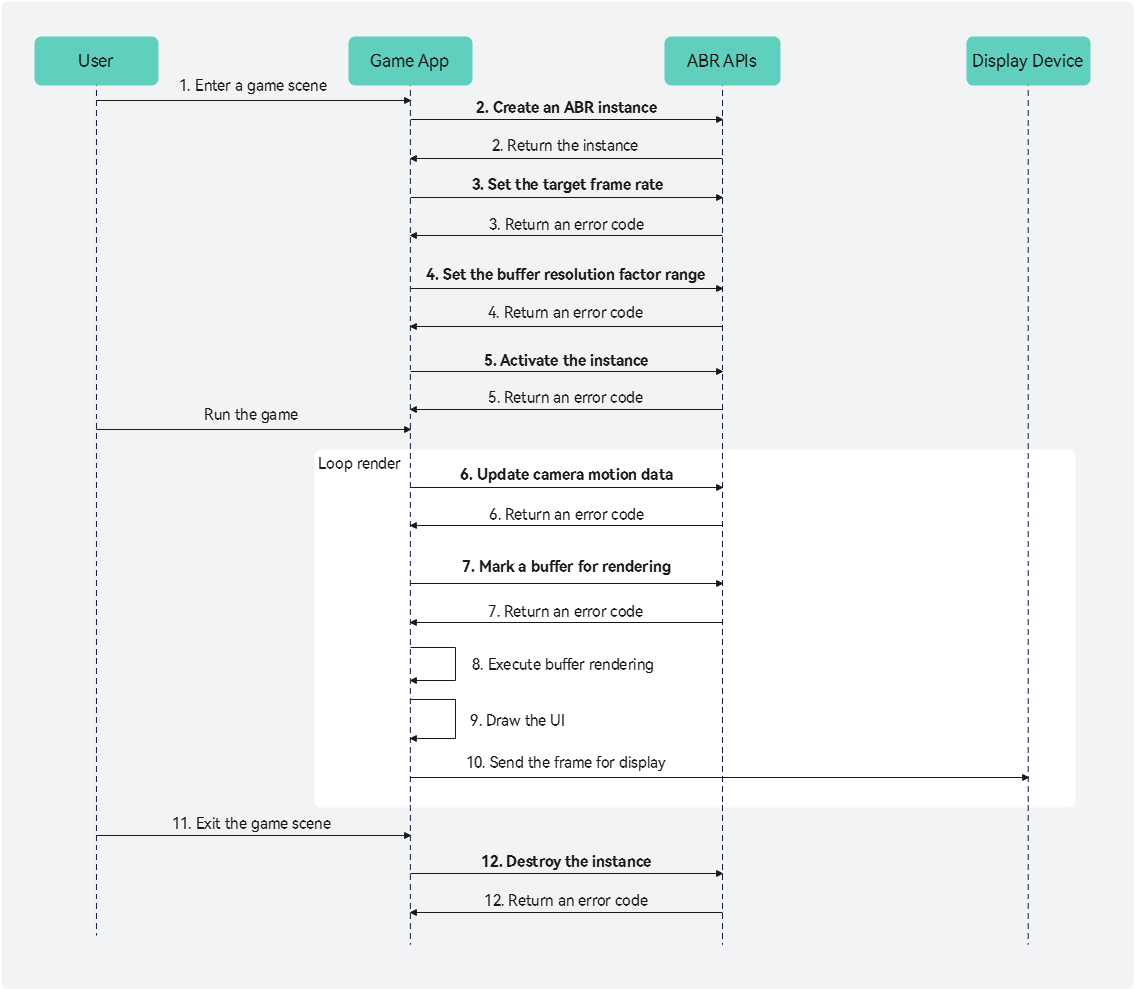
-
A user enters a game scene suitable for the ABR capability.
-
The game app calls the HMS_ABR_CreateContext API, specifying the graphics API type, to create an ABR context instance.
-
The game app calls the HMS_ABR_SetTargetFps API to initialize the ABR context instance and set the target frame rate. The ABR capability will perceive the GPU load status in real time based on the target frame rate.
-
The game app calls the HMS_ABR_SetScaleRange API to initialize the ABR context instance and set the buffer resolution factor range.
-
The game app calls the HMS_ABR_Activate API to activate the ABR context instance.
-
The game app calls the HMS_ABR_UpdateCameraData API, passing camera motion data, including the camera rotation and position information.
-
The game app calls the HMS_ABR_MarkFrameBuffer_GLES API to mark a buffer before rendering it.
-
The game app executes buffer rendering.
-
The game app draws the UI.
-
The game app sends the frame for display.
-
The user exits the game scene suitable for the ABR capability.
-
The game app calls the HMS_ABR_DestroyContext API to destroy the ABR context instance and release memory resources.
Development Procedure
The following describes an example of the implementation and API call of each step in the ABR service process based on camera motion perception. For details about the code, see Graphics Development Sample (ABR).
[h2]Configuring Project Information
Add the following configuration under module in the src/main/module.json5 file:
   "metadata": [
     {
       "name": "GraphicsAccelerateKit_ABR",
       "value": "true"
     },
   ],
[h2]Including Header Files
Include the Graphics Accelerate Kit ABR header file abr_gles.h.
// Include the ABR header file abr_gles.h.
#include <graphics_game_sdk/abr_gles.h>
[h2]Compiling CMakeLists.txt
find_library(
    # Sets the name of the path variable.
    abr-lib
    # Specifies the name of the NDK library that you want CMake to locate.
    libabr.so
)
find_library(
    # Sets the name of the path variable.
    GLES-lib
    # Specifies the name of the NDK library that you want CMake to locate.
    GLESv3
)
find_library(
    # Sets the name of the path variable.
    hilog-lib
    # Specifies the name of the NDK library that you want CMake to locate.
    hilog_ndk.z
)

target_link_libraries(entry PUBLIC
    ${abr-lib} ${GLES-lib} ${hilog-lib}
)
[h2]Performing ABR Initialization
When a surface is created for your app, the event callback function Core::OnSurfaceCreated() is triggered. Perform the following operations in this function: Create an ABR context instance, set ABR properties, and activate the instance. The ABR context instance is used for managing the entire ABR lifecycle.
-
Call the HMS_ABR_CreateContext API to create an ABR context instance and specify the graphics API type. If nullptr is returned, it indicates that the ABR context instance fails to be created or the current device does not support the ABR function.
// Create an ABR context instance and specify the graphics API type. ABR_Context *context_ = HMS_ABR_CreateContext(RENDER_API_GLES); if (context_ == nullptr) { return false; } -
Call the HMS_ABR_SetTargetFps API to initialize the ABR context instance and set the target frame rate of the ABR capability based on the target frame rate of the game.
// Initialize the ABR context instance and set the target frame rate of the ABR capability. For example, if the target frame rate of a game is 120 FPS, set the target frame rate of the ABR capability to 120 FPS. ABR_ErrorCode errorCode = HMS_ABR_SetTargetFps(context_, 120); if (errorCode != ABR_SUCCESS) { GOLOGE("HMS_ABR_SetTargetFps execution failed, error code: %d.", errorCode); return false; } -
Call the HMS_ABR_SetScaleRange API to initialize the ABR context instance and set the buffer resolution factor range.
// Initialize the ABR context instance and set a proper buffer resolution factor range based on the game resolution and image quality. // For example, set a factor of 0.5 to 1.0 times for adaptive buffer resolution adjustment. errorCode = HMS_ABR_SetScaleRange(context_, 0.5f, 1.0f); if (errorCode != ABR_SUCCESS) { GOLOGE("HMS_ABR_SetScaleRange execution failed, error code: %d.", errorCode); return false; } -
Call the HMS_ABR_Activate API to activate the ABR context instance.
// Activate the ABR context instance.
errorCode = HMS_ABR_Activate(context_);
if (errorCode != ABR_SUCCESS) {
    GOLOGE("HMS_ABR_Activate execution failed, error code: %d.", errorCode);
    return false;
}
[h2]Updating Camera Motion Data
In the frame loop, the ABR capability determines the buffer resolution factor based on the camera motion data obtained in real time.
Call the HMS_ABR_UpdateCameraData API, passing camera motion data, including the camera rotation and position information.
// Camera motion data struct. Set the real-time camera motion data of each frame.
ABR_CameraData cameraData;
// Position of each frame.
cameraData.position = static_cast<ABR_Vector3>(camera_.GetPosition());
// Camera rotation angle of each frame. The value range is [0, 360].
cameraData.rotation = static_cast<ABR_Vector3>(camera_.GetRotation());
// Update the camera motion data of each frame.
errorCode = HMS_ABR_UpdateCameraData(context_, &cameraData);
if (errorCode != ABR_SUCCESS) {
    GOLOGE("HMS_ABR_UpdateCameraData execution failed, error code: %d.", errorCode);
    return;
}
[h2]Adaptive Rendering
In the frame loop, the ABR capability performs adaptive rendering on a marked buffer.
-
Select a buffer with high shader cost and bind the buffer before rendering it.
FBO fbo{}; // ... // Create a buffer object. glGenFramebuffers(1, &fbo.fbo_); CheckOpenGLError(); // Bind the buffer. glBindFramebuffer(GL_FRAMEBUFFER, fbo.fbo_); CheckOpenGLError(); -
Call the HMS_ABR_MarkFrameBuffer_GLES API to mark the buffer.
// Call the API before buffer rendering. If the operation fails, buffer rendering will not be affected. errorCode = HMS_ABR_MarkFrameBuffer_GLES(context_); if (errorCode != ABR_SUCCESS) { GOLOGE("HMS_ABR_MarkFrameBuffer_GLES execution failed, error code: %d.", errorCode); return; } -
Execute the original rendering process of the buffer.
[h2]Destroying an ABR Context Instance
When a surface is destroyed, the event callback function Core::OnSurfaceDestroyed() is triggered. Destroy an ABR context instance in this function.
Call the HMS_ABR_DestroyContext API to destroy an ABR context instance and release memory resources.
// Destroy an ABR context instance and release memory resources.
ABR_ErrorCode errorCode = HMS_ABR_DestroyContext(&context_);
predictionPaused_ = (errorCode == ABR_SUCCESS);
if (errorCode != ABR_SUCCESS) {
    GOLOGE("HMS_ABR_DestroyContext execution failed, error code: %d.", errorCode);
    return false;
}