This guide applies to the communication between ArkWeb applications and frontend pages. You can use the ArkWeb native APIs to conduct the service communication mechanism (native JSBridge for short) based on the application architecture.
For details about how to optimize the performance of JSBridge, see JSBridge Optimization Solution.
Applicable Application Architecture
If an application is developed using a mix of ArkTS and C++, or if the application has an architecture close to that of an applet and a built-in C++ environment, you are advised to use ArkWeb_ControllerAPI and ArkWeb_ComponentAPI provided by ArkWeb on the native side to implement the JSBridge capabilities.

The preceding figure shows a general architecture of applets with universal applicability. In this architecture, the logical layer depends on a JavaScript runtime built in an application, and the runtime runs in an existing C++ environment. The logic layer can communicate with the view layer (in which ArkWeb serves as the renderer) in the C++ environment through the native API, instead of using the ArkTS JSBridge API in the ArkTS environment.
The figure on the left shows that the application needs to invoke the ArkTS environment and then the C++ environment to build an applet using the ArkTS JSBridge API. Using the native JSBridge API is more efficient because the switching between the ArkTS and C++ environments is not required, as shown in the figure on the right.
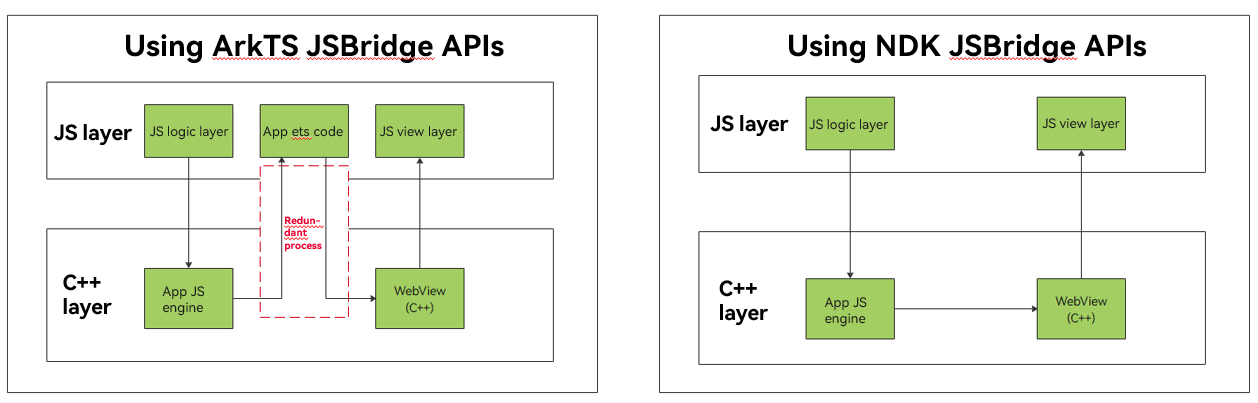
The native JSBridge APIs are provided to avoid unnecessary switching to the ArkTS environment and allow callbacks to run in non-UI threads to avoid UI blocking.
Using Native APIs to Implement JSBridge Communication (Recommended)
In the previous version, the return value of native synchronization APIs is fixed to void. However, to meet service requirements, alternative APIs are introduced since API version 18 to support return values of the Boolean and string types.
In addition, the permission field is added for the synchronous API registerJavaScriptProxyEx and asynchronous API registerAsyncJavaScriptProxyEx to control the invoking permission.
[h2]Substitute APIs
| Unrecommended API | Substitute API | Description |
|---|---|---|
| ArkWeb_OnJavaScriptProxyCallback | ArkWeb_OnJavaScriptProxyCallbackWithResult | Defines a callback used when the proxy method is executed. |
| ArkWeb_ProxyMethod | ArkWeb_ProxyMethodWithResult | Defines a proxy method. |
| ArkWeb_ProxyObject | ArkWeb_ProxyObjectWithResult | Defines a proxy object. |
| registerJavaScriptProxy | registerJavaScriptProxyEx | Registers a JavaScript object with the window. Synchronous APIs of this object can then be invoked in the window. |
| registerAsyncJavaScriptProxy | registerAsyncJavaScriptProxyEx | Registers a JavaScript object with the window. Asynchronous APIs of this object can then be invoked in the window. |
[h2]Binding the Native API to ArkWeb
-
The ArkWeb component is declared on the ArkTS side. You need to define a webTag and transfer it to the native application side using Node-API. The webTag is used as a unique identifier of the corresponding component when an ArkWeb native API is used.
-
ArkTS side:
// Define a webTag and transfer it as an input parameter when WebviewController is created to establish the mapping between controller and webTag. webTag: string = 'ArkWeb1'; controller: webview.WebviewController = new webview.WebviewController(this.webTag); // ... // In aboutToAppear, pass webTag to the C++ side through the Node-API interface as the unique identifier of the ArkWeb component on the C++ side. aboutToAppear() { console.info('aboutToAppear'); // Initialize the web Native Development Kit. testNapi.nativeWebInit(this.webTag); } -
C++ side:
// Parse and store the webTag.
static napi_value NativeWebInit(napi_env env, napi_callback_info info)
{
    OH_LOG_Print(LOG_APP, LOG_INFO, LOG_PRINT_DOMAIN, "ArkWeb", "Native Development Kit NativeWebInit start");
    size_t argc = 1;
    napi_value args[1] = {nullptr};
    napi_get_cb_info(env, info, &argc, args, nullptr, nullptr);
    // Obtain the first parameter webTag.
    size_t webTagSize = 0;
    napi_get_value_string_utf8(env, args[0], nullptr, 0, &webTagSize);
    char *webTagValue = new (std::nothrow) char[webTagSize + 1];
    size_t webTagLength = 0;
    napi_get_value_string_utf8(env, args[0], webTagValue, webTagSize + 1, &webTagLength);
    OH_LOG_Print(
        LOG_APP, LOG_INFO, LOG_PRINT_DOMAIN, "ArkWeb",
        "Native Development Kit NativeWebInit webTag:%{public}s", webTagValue);

    // Save the webTag in the instance object.
    jsbridge_object_ptr = std::make_shared<JSBridgeObject>(webTagValue);
    // ...
}
[h2]Obtaining API Struct Using the Native API
On the ArkWeb Native side, you must first obtain the API struct before you can call the Native APIs in it. The ArkWeb Native-side APIs are obtained through the OH_ArkWeb_GetNativeAPI function. Depending on the input parameter type, you can obtain the ArkWeb_ControllerAPI and ArkWeb_ComponentAPI structs respectively. Among them, ArkWeb_ControllerAPI corresponds to the ArkTS-side WebviewController API, and ArkWeb_ComponentAPI corresponds to the ArkTS-side ArkWeb component API.
static ArkWeb_ControllerAPI *controller = nullptr;
static ArkWeb_ComponentAPI *component = nullptr;
// ...
controller = reinterpret_cast<ArkWeb_ControllerAPI *>(OH_ArkWeb_GetNativeAPI(ARKWEB_NATIVE_CONTROLLER));
component = reinterpret_cast<ArkWeb_ComponentAPI *>(OH_ArkWeb_GetNativeAPI(ARKWEB_NATIVE_COMPONENT));
[h2]Registering Component Lifecycle Callback on the Native Side
Register the component lifecycle callback using ArkWeb_ComponentAPI. Before calling the API, you are advised to use ARKWEB_MEMBER_MISSING to check whether the function struct has the corresponding pointer to avoid crash caused by mismatch between the SDK and the device ROM.
if (!ARKWEB_MEMBER_MISSING(component, onControllerAttached)) {
    component->onControllerAttached(
        webTagValue, ValidCallback, static_cast<void *>(jsbridge_object_ptr->GetWeakPtr()));
} else {
    OH_LOG_Print(LOG_APP, LOG_ERROR, LOG_PRINT_DOMAIN, "ArkWeb", "component onControllerAttached func not exist");
}

if (!ARKWEB_MEMBER_MISSING(component, onPageBegin)) {
    component->onPageBegin(webTagValue, LoadStartCallback, static_cast<void *>(jsbridge_object_ptr->GetWeakPtr()));
} else {
    OH_LOG_Print(LOG_APP, LOG_ERROR, LOG_PRINT_DOMAIN, "ArkWeb", "component onPageBegin func not exist");
}

if (!ARKWEB_MEMBER_MISSING(component, onPageEnd)) {
    component->onPageEnd(webTagValue, LoadEndCallback, static_cast<void *>(jsbridge_object_ptr->GetWeakPtr()));
} else {
    OH_LOG_Print(LOG_APP, LOG_ERROR, LOG_PRINT_DOMAIN, "ArkWeb", "component onPageEnd func not exist");
}

if (!ARKWEB_MEMBER_MISSING(component, onDestroy)) {
    component->onDestroy(webTagValue, DestroyCallback, static_cast<void *>(jsbridge_object_ptr->GetWeakPtr()));
} else {
    OH_LOG_Print(LOG_APP, LOG_ERROR, LOG_PRINT_DOMAIN, "ArkWeb", "component onDestroy func not exist");
}
[h2]Invoking Application Functions on the Frontend Page
Register the application functions with the frontend page through registerJavaScriptProxyEx. The registration takes effect after the next loading or reloading.
// Register an object.
OH_LOG_Print(
    LOG_APP, LOG_INFO, LOG_PRINT_DOMAIN, "ArkWeb", "Native Development Kit registerJavaScriptProxyEx begin");
ArkWeb_ProxyMethodWithResult method1 = {
    "method1", ProxyMethod1, static_cast<void *>(jsbridge_object_ptr->GetWeakPtr())};
ArkWeb_ProxyMethodWithResult method2 = {
    "method2", ProxyMethod2, static_cast<void *>(jsbridge_object_ptr->GetWeakPtr())};
ArkWeb_ProxyMethodWithResult methodList[2] = {method1, method2};
// Call the Native Development Kit API to register an object.
// With this registration, the H5 page can call ProxyMethod1 and ProxyMethod2 in this file through proxy.method1 and proxy.method2.
ArkWeb_ProxyObjectWithResult proxyObject = {"ndkProxy", methodList, 2};
// An empty permission parameter indicates that no permission control is performed.
controller->registerJavaScriptProxyEx(webTag, &proxyObject, ""); - The permission parameter is a JSON string as follows:
{
  "javascriptProxyPermission": {
    "urlPermissionList": [       // Object-level permission. If it is granted, all methods are available.
      {
        "scheme": "resource",    // Exact match. The value cannot be empty.
        "host": "rawfile",       // Exact match. The value cannot be empty.
        "port": "",              // Exact match. If the value is empty, it is not checked.
        "path": ""               // Prefix match. If the value is empty, it is not checked.
      },
      {
        "scheme": "https",       // Exact match. The value cannot be empty.
        "host": "xxx.com",       // Exact match. The value cannot be empty.
        "port": "8080",          // Exact match. If the value is empty, it is not checked.
        "path": "a/b/c"          // Prefix match. If the value is empty, it is not checked.
      }
    ],
    "methodList": [
      {
        "methodName": "test",
        "urlPermissionList": [   // Method-level permission.
          {
            "scheme": "https",   // Exact match. The value cannot be empty.
            "host": "xxx.com",   // Exact match. The value cannot be empty.
            "port": "",          // Exact match. If the value is empty, it is not checked.
            "path": ""           // Prefix match. If the value is empty, it is not checked.
          },
          {
            "scheme": "resource",// Exact match. The value cannot be empty.
            "host": "rawfile",   // Exact match. The value cannot be empty.
            "port": "",          // Exact match. If the value is empty, it is not checked.
            "path": ""           // Prefix match. If the value is empty, it is not checked.
          }
        ]
      },
      {
        "methodName": "test11",
        "urlPermissionList": [   // Method-level permission.
          {
            "scheme": "q",       // Exact match. The value cannot be empty.
            "host": "r",         // Exact match. The value cannot be empty.
            "port": "",          // Exact match. If the value is empty, it is not checked.
            "path": "t"          // Prefix match. If the value is empty, it is not checked.
          },
          {
            "scheme": "u",       // Exact match. The value cannot be empty.
            "host": "v",         // Exact match. The value cannot be empty.
            "port": "",          // Exact match. If the value is empty, it is not checked.
            "path": ""           // Prefix match. If the value is empty, it is not checked.
          }
        ]
      }
    ]
  }
}
[h2]Invoking Frontend Page Functions on the Application
Use runJavaScript to call the frontend page function.
// Construct a struct executed in runJS.
char* jsCode = "runJSRetStr()";
ArkWeb_JavaScriptObject object = {(uint8_t *)jsCode, bufferSize, &JSBridgeObject::StaticRunJavaScriptCallback,
                                     static_cast<void *>(jsbridge_object_ptr->GetWeakPtr())};
// Call runJSRetStr() of the frontend page.
controller->runJavaScript(webTagValue, &object);
[h2]Sample Code
-
Frontend page code:
<!-- entry/src/main/resources/rawfile/runJS.html --> <!-- runJS.html --> <!DOCTYPE html> <html lang="en-gb"> <head> <meta name="viewport" content="width=device-width, initial-scale=1.0"> <title>run javascript demo</title> </head> <body> <h1>run JavaScript Ext demo</h1> <p id="webDemo"></p> <br> <button type="button" style="height:30px;width:200px" onclick="testNdkProxyObjMethod1()">test ndk method1 ! </button> <br> <br> <button type="button" style="height:30px;width:200px" onclick="testNdkProxyObjMethod2()">test ndk method2 ! </button> <br> </body> <script type="text/javascript"> function testNdkProxyObjMethod1() { if (window.ndkProxy == undefined) { document.getElementById("webDemo").innerHTML = "ndkProxy undefined" return "objName undefined" } if (window.ndkProxy.method1 == undefined) { document.getElementById("webDemo").innerHTML = "ndkProxy method1 undefined" return "objName test undefined" } let retStr = window.ndkProxy.method1("hello", "world", [1.2, -3.4, 123.456], ["Saab", "Volvo", "BMW", undefined], 1.23456, 123789, true, false, 0, undefined); console.info("ndkProxy and method1 is ok, " + retStr + ", type:" + typeof(retStr)); } function testNdkProxyObjMethod2() { if (window.ndkProxy == undefined) { document.getElementById("webDemo").innerHTML = "ndkProxy undefined" return "objName undefined" } if (window.ndkProxy.method2 == undefined) { document.getElementById("webDemo").innerHTML = "ndkProxy method2 undefined" return "objName test undefined" } var student = { name:"zhang", sex:"man", age:25 }; var cars = [student, 456, false, 4.567]; let params = "[\"{\\\"scope\\\"]"; let retStr = window.ndkProxy.method2("hello", "world", false, cars, params); console.info("ndkProxy and method2 is ok, " + retStr + ", type:" + typeof(retStr)); } function runJSRetStr(data) { const d = new Date(); let time = d.getTime(); return JSON.stringify(time) } </script> </html> -
Code in ArkTS:
// entry/src/main/ets/pages/Index.ets import testNapi from 'libentry.so'; import { webview } from '@kit.ArkWeb'; class testObj { constructor() { } test(): string { console.info('ArkUI Web Component'); return 'ArkUI Web Component'; } toString(): void { console.info('Web Component toString'); } } @Entry @Component struct Index { // Custom webTag, passed as an input parameter when WebviewController is created to establish the mapping between the controller and webTag. webTag: string = 'ArkWeb1'; controller: webview.WebviewController = new webview.WebviewController(this.webTag); @State testObjectTest: testObj = new testObj(); // In the aboutToAppear method, pass webTag to the C++ side through the Node-API interface. The C++ side uses webTag as the unique identifier of the ArkWeb component. aboutToAppear() { console.info('aboutToAppear'); // Initialize the web Native Development Kit. testNapi.nativeWebInit(this.webTag); } build() { Column() { Row() { Button('runJS hello') .fontSize(12) .onClick(() => { testNapi.runJavaScript(this.webTag, 'runJSRetStr(\"" + "hello" + "\")'); }) }.height('20%') Row() { Web({ src: $rawfile('runJS.html'), controller: this.controller }) .javaScriptAccess(true) .fileAccess(true) .onControllerAttached(() => { console.info('Native Development Kit onControllerAttached webId: ' + this.controller.getWebId()); }) }.height('80%') } } } -
ArkTS APIs exposed on the Node-API side:
// entry/src/main/cpp/types/libentry/index.d.ts
export const nativeWebInit: (webName: string) => void;
export const runJavaScript: (webName: string, jsCode: string) => void;
-
Compilation configuration on the Node-API side in entry/src/main/cpp/CMakeLists.txt.
# the minimum version of CMake. cmake_minimum_required(VERSION 3.5.0) project(NDKJSBridge) set(NATIVERENDER_ROOT_PATH ${CMAKE_CURRENT_SOURCE_DIR}) if(DEFINED PACKAGE_FIND_FILE) include(${PACKAGE_FIND_FILE}) endif() include_directories(${NATIVERENDER_ROOT_PATH} ${NATIVERENDER_ROOT_PATH}/include) add_library(entry SHARED hello.cpp jsbridge_object.cpp) find_library( # Sets the name of the path variable. hilog-lib # Specifies the name of the NDK library that # you want CMake to locate. hilog_ndk.z ) target_link_libraries(entry PUBLIC libace_napi.z.so ${hilog-lib} libohweb.so) -
Node-API layer code:
// entry/src/main/cpp/hello.cpp #include "napi/native_api.h" #include <bits/alltypes.h> #include <string> #include "hilog/log.h" #include "web/arkweb_interface.h" #include "jsbridge_object.h" constexpr unsigned int LOG_PRINT_DOMAIN = 0xFF00; std::shared_ptr<JSBridgeObject> jsbridge_object_ptr = nullptr; static ArkWeb_ControllerAPI *controller = nullptr; static ArkWeb_ComponentAPI *component = nullptr; ArkWeb_JavaScriptValueAPI *javaScriptValueApi = nullptr; // Send the JS script to the HTML5 side for execution. This method is a callback of the execution result. static void RunJavaScriptCallback(const char *webTag, const char *result, void *userData) { OH_LOG_Print( LOG_APP, LOG_INFO, LOG_PRINT_DOMAIN, "ArkWeb", "Native Development Kit RunJavaScriptCallback webTag:%{public}s", webTag); if (!userData) { OH_LOG_Print( LOG_APP, LOG_ERROR, LOG_PRINT_DOMAIN, "ArkWeb", "Native Development Kit RunJavaScriptCallback userData is nullptr"); return; } std::weak_ptr<JSBridgeObject> jsb_weak_ptr = *static_cast<std::weak_ptr<JSBridgeObject> *>(userData); if (auto jsb_ptr = jsb_weak_ptr.lock()) { jsb_ptr->RunJavaScriptCallback(result); } else { OH_LOG_Print(LOG_APP, LOG_ERROR, LOG_PRINT_DOMAIN, "ArkWeb", "Native Development Kit RunJavaScriptCallback jsb_weak_ptr lock failed"); } } // This example registers one object and two methods. static ArkWeb_JavaScriptValuePtr ProxyMethod1( const char *webTag, const ArkWeb_JavaScriptBridgeData *dataArray, size_t arraySize, void *userData) { OH_LOG_Print( LOG_APP, LOG_INFO, LOG_PRINT_DOMAIN, "ArkWeb", "Native Development Kit ProxyMethod1 webTag:%{public}s", webTag); if (!userData) { OH_LOG_Print( LOG_APP, LOG_ERROR, LOG_PRINT_DOMAIN, "ArkWeb", "Native Development Kit ProxyMethod1 userData is nullptr"); return nullptr; } std::weak_ptr<JSBridgeObject> jsb_weak_ptr = *static_cast<std::weak_ptr<JSBridgeObject> *>(userData); if (auto jsb_ptr = jsb_weak_ptr.lock()) { jsb_ptr->ProxyMethod1(dataArray, arraySize); } else { OH_LOG_Print( LOG_APP, LOG_ERROR, LOG_PRINT_DOMAIN, "ArkWeb", "Native Development Kit ProxyMethod1 jsb_weak_ptr lock failed"); } bool boolValue = true; return javaScriptValueApi->createJavaScriptValue( ArkWeb_JavaScriptValueType::ARKWEB_JAVASCRIPT_BOOL, (void*)(&boolValue), 1); } static ArkWeb_JavaScriptValuePtr ProxyMethod2( const char *webTag, const ArkWeb_JavaScriptBridgeData *dataArray, size_t arraySize, void *userData) { OH_LOG_Print( LOG_APP, LOG_INFO, LOG_PRINT_DOMAIN, "ArkWeb", "Native Development Kit ProxyMethod2 webTag:%{public}s", webTag); if (!userData) { OH_LOG_Print( LOG_APP, LOG_ERROR, LOG_PRINT_DOMAIN, "ArkWeb", "Native Development Kit ProxyMethod2 userData is nullptr"); return nullptr; } std::weak_ptr<JSBridgeObject> jsb_weak_ptr = *static_cast<std::weak_ptr<JSBridgeObject> *>(userData); std::string jsCode = "runJSRetStr()"; ArkWeb_JavaScriptObject object = { (uint8_t *)jsCode.c_str(), jsCode.size(), &JSBridgeObject::StaticRunJavaScriptCallback, static_cast<void *>(jsbridge_object_ptr->GetWeakPtr()) }; controller->runJavaScript(webTag, &object); if (auto jsb_ptr = jsb_weak_ptr.lock()) { jsb_ptr->ProxyMethod2(dataArray, arraySize); } else { OH_LOG_Print( LOG_APP, LOG_ERROR, LOG_PRINT_DOMAIN, "ArkWeb", "Native Development Kit ProxyMethod2 JsWeakPtr lock failed"); } std::string str = "this is a string"; return javaScriptValueApi->createJavaScriptValue( ArkWeb_JavaScriptValueType::ARKWEB_JAVASCRIPT_STRING, (void*)str.c_str(), str.length() + 1); } void ValidCallback(const char *webTag, void *userData) { OH_LOG_Print( LOG_APP, LOG_INFO, LOG_PRINT_DOMAIN, "ArkWeb", "Native Development Kit ValidCallback webTag: %{public}s", webTag); if (!userData) { OH_LOG_Print( LOG_APP, LOG_ERROR, LOG_PRINT_DOMAIN, "ArkWeb", "Native Development Kit ValidCallback userData is nullptr"); return; } std::weak_ptr<JSBridgeObject> jsb_weak_ptr = *static_cast<std::weak_ptr<JSBridgeObject> *>(userData); if (auto jsb_ptr = jsb_weak_ptr.lock()) { jsb_ptr->SaySomething("ValidCallback"); } else { OH_LOG_Print( LOG_APP, LOG_ERROR, LOG_PRINT_DOMAIN, "ArkWeb", "Native Development Kit ValidCallback jsb_weak_ptr lock failed"); } // Register an object. OH_LOG_Print( LOG_APP, LOG_INFO, LOG_PRINT_DOMAIN, "ArkWeb", "Native Development Kit registerJavaScriptProxyEx begin"); ArkWeb_ProxyMethodWithResult method1 = { "method1", ProxyMethod1, static_cast<void *>(jsbridge_object_ptr->GetWeakPtr())}; ArkWeb_ProxyMethodWithResult method2 = { "method2", ProxyMethod2, static_cast<void *>(jsbridge_object_ptr->GetWeakPtr())}; ArkWeb_ProxyMethodWithResult methodList[2] = {method1, method2}; // Call the Native Development Kit API to register the object. // In this case, you can use proxy.method1 and proxy.method2 to call ProxyMethod1 and ProxyMethod2 in this file on HTML5 pages. ArkWeb_ProxyObjectWithResult proxyObject = {"ndkProxy", methodList, 2}; // The permission parameter is empty, indicating that no permission control is performed. controller->registerJavaScriptProxyEx(webTag, &proxyObject, ""); OH_LOG_Print(LOG_APP, LOG_INFO, LOG_PRINT_DOMAIN, "ArkWeb", "Native Development Kit registerJavaScriptProxyEx end"); } void LoadStartCallback(const char *webTag, void *userData) { OH_LOG_Print( LOG_APP, LOG_INFO, LOG_PRINT_DOMAIN, "ArkWeb", "Native Development Kit LoadStartCallback webTag: %{public}s", webTag); if (!userData) { OH_LOG_Print( LOG_APP, LOG_ERROR, LOG_PRINT_DOMAIN, "ArkWeb", "Native Development Kit LoadStartCallback userData is null"); return; } std::weak_ptr<JSBridgeObject> jsb_weak_ptr = *static_cast<std::weak_ptr<JSBridgeObject> *>(userData); if (auto jsb_ptr = jsb_weak_ptr.lock()) { jsb_ptr->SaySomething("LoadStartCallback"); } else { OH_LOG_Print( LOG_APP, LOG_ERROR, LOG_PRINT_DOMAIN, "ArkWeb", "Native Development Kit LoadStartCallback jsb_weak_ptr lock failed"); } } void LoadEndCallback(const char *webTag, void *userData) { OH_LOG_Print( LOG_APP, LOG_INFO, LOG_PRINT_DOMAIN, "ArkWeb", "Native Development Kit LoadEndCallback webTag: %{public}s", webTag); if (!userData) { OH_LOG_Print( LOG_APP, LOG_ERROR, LOG_PRINT_DOMAIN, "ArkWeb", "Native Development Kit LoadEndCallback userData is nullptr"); return; } std::weak_ptr<JSBridgeObject> jsb_weak_ptr = *static_cast<std::weak_ptr<JSBridgeObject> *>(userData); if (auto jsb_ptr = jsb_weak_ptr.lock()) { jsb_ptr->SaySomething("LoadEndCallback"); } else { OH_LOG_Print( LOG_APP, LOG_ERROR, LOG_PRINT_DOMAIN, "ArkWeb", "Native Development Kit LoadEndCallback jsb_weak_ptr lock failed"); } } void DestroyCallback(const char *webTag, void *userData) { OH_LOG_Print( LOG_APP, LOG_INFO, LOG_PRINT_DOMAIN, "ArkWeb", "Native Development Kit DestroyCallback webTag: %{public}s", webTag); if (!userData) { OH_LOG_Print( LOG_APP, LOG_ERROR, LOG_PRINT_DOMAIN, "ArkWeb", "Native Development Kit DestroyCallback userData is nullptr"); return; } std::weak_ptr<JSBridgeObject> jsb_weak_ptr = *static_cast<std::weak_ptr<JSBridgeObject> *>(userData); if (auto jsb_ptr = jsb_weak_ptr.lock()) { jsb_ptr->SaySomething("DestroyCallback"); } else { OH_LOG_Print( LOG_APP, LOG_ERROR, LOG_PRINT_DOMAIN, "ArkWeb", "Native Development Kit DestroyCallback jsb_weak_ptr lock failed"); } } void SetComponentCallback(ArkWeb_ComponentAPI * component, const char* webTagValue) { if (!ARKWEB_MEMBER_MISSING(component, onControllerAttached)) { component->onControllerAttached( webTagValue, ValidCallback, static_cast<void *>(jsbridge_object_ptr->GetWeakPtr())); } else { OH_LOG_Print(LOG_APP, LOG_ERROR, LOG_PRINT_DOMAIN, "ArkWeb", "component onControllerAttached func not exist"); } if (!ARKWEB_MEMBER_MISSING(component, onPageBegin)) { component->onPageBegin(webTagValue, LoadStartCallback, static_cast<void *>(jsbridge_object_ptr->GetWeakPtr())); } else { OH_LOG_Print(LOG_APP, LOG_ERROR, LOG_PRINT_DOMAIN, "ArkWeb", "component onPageBegin func not exist"); } if (!ARKWEB_MEMBER_MISSING(component, onPageEnd)) { component->onPageEnd(webTagValue, LoadEndCallback, static_cast<void *>(jsbridge_object_ptr->GetWeakPtr())); } else { OH_LOG_Print(LOG_APP, LOG_ERROR, LOG_PRINT_DOMAIN, "ArkWeb", "component onPageEnd func not exist"); } if (!ARKWEB_MEMBER_MISSING(component, onDestroy)) { component->onDestroy(webTagValue, DestroyCallback, static_cast<void *>(jsbridge_object_ptr->GetWeakPtr())); } else { OH_LOG_Print(LOG_APP, LOG_ERROR, LOG_PRINT_DOMAIN, "ArkWeb", "component onDestroy func not exist"); } } // Parse and store the webTag. static napi_value NativeWebInit(napi_env env, napi_callback_info info) { OH_LOG_Print(LOG_APP, LOG_INFO, LOG_PRINT_DOMAIN, "ArkWeb", "Native Development Kit NativeWebInit start"); size_t argc = 1; napi_value args[1] = {nullptr}; napi_get_cb_info(env, info, &argc, args, nullptr, nullptr); // Obtain the first parameter webTag. size_t webTagSize = 0; napi_get_value_string_utf8(env, args[0], nullptr, 0, &webTagSize); char *webTagValue = new (std::nothrow) char[webTagSize + 1]; size_t webTagLength = 0; napi_get_value_string_utf8(env, args[0], webTagValue, webTagSize + 1, &webTagLength); OH_LOG_Print( LOG_APP, LOG_INFO, LOG_PRINT_DOMAIN, "ArkWeb", "Native Development Kit NativeWebInit webTag:%{public}s", webTagValue); // Save webTag in the instance object. jsbridge_object_ptr = std::make_shared<JSBridgeObject>(webTagValue); if (jsbridge_object_ptr) { jsbridge_object_ptr->Init(); } controller = reinterpret_cast<ArkWeb_ControllerAPI *>(OH_ArkWeb_GetNativeAPI(ARKWEB_NATIVE_CONTROLLER)); if (controller) OH_LOG_Print(LOG_APP, LOG_INFO, LOG_PRINT_DOMAIN, "ArkWeb", "get ArkWeb_ControllerAPI success"); component = reinterpret_cast<ArkWeb_ComponentAPI *>(OH_ArkWeb_GetNativeAPI(ARKWEB_NATIVE_COMPONENT)); if (component) OH_LOG_Print(LOG_APP, LOG_INFO, LOG_PRINT_DOMAIN, "ArkWeb", "get ArkWeb_ComponentAPI success"); javaScriptValueApi = reinterpret_cast<ArkWeb_JavaScriptValueAPI *>(OH_ArkWeb_GetNativeAPI(ARKWEB_NATIVE_JAVASCRIPT_VALUE)); if (javaScriptValueApi) OH_LOG_Print(LOG_APP, LOG_INFO, LOG_PRINT_DOMAIN, "ArkWeb", "get ArkWeb_JavaScriptValueAPI success"); else OH_LOG_Print(LOG_APP, LOG_ERROR, LOG_PRINT_DOMAIN, "ArkWeb", "get ArkWeb_JavaScriptValueAPI failed"); SetComponentCallback(component, webTagValue); OH_LOG_Print(LOG_APP, LOG_INFO, LOG_PRINT_DOMAIN, "ArkWeb", "Native Development Kit NativeWebInit end"); delete[] webTagValue; return nullptr; } // Send the JS script to the HTML5 side for execution. static napi_value RunJavaScript(napi_env env, napi_callback_info info) { size_t argc = 2; napi_value args[2] = {nullptr}; napi_get_cb_info(env, info, &argc, args, nullptr, nullptr); // Obtain the first parameter webTag. size_t webTagSize = 0; napi_get_value_string_utf8(env, args[0], nullptr, 0, &webTagSize); char *webTagValue = new (std::nothrow) char[webTagSize + 1]; size_t webTagLength = 0; napi_get_value_string_utf8(env, args[0], webTagValue, webTagSize + 1, &webTagLength); OH_LOG_Print( LOG_APP, LOG_INFO, LOG_PRINT_DOMAIN, "ArkWeb", "Native Development Kit OH_NativeArkWeb_RunJavaScript webTag:%{public}s", webTagValue); // Obtain the second parameter jsCode. size_t bufferSize = 0; napi_get_value_string_utf8(env, args[1], nullptr, 0, &bufferSize); char *jsCode = new (std::nothrow) char[bufferSize + 1]; size_t byteLength = 0; napi_get_value_string_utf8(env, args[1], jsCode, bufferSize + 1, &byteLength); OH_LOG_Print( LOG_APP, LOG_INFO, LOG_PRINT_DOMAIN, "ArkWeb", "Native Development Kit OH_NativeArkWeb_RunJavaScript jsCode len:%{public}zu", strlen(jsCode)); // Construct a struct executed in runJS. ArkWeb_JavaScriptObject object = {(uint8_t *)jsCode, bufferSize, &JSBridgeObject::StaticRunJavaScriptCallback, static_cast<void *>(jsbridge_object_ptr->GetWeakPtr())}; controller->runJavaScript(webTagValue, &object); delete[] webTagValue; delete[] jsCode; return nullptr; } EXTERN_C_START static napi_value Init(napi_env env, napi_value exports) { napi_property_descriptor desc[] = { {"nativeWebInit", nullptr, NativeWebInit, nullptr, nullptr, nullptr, napi_default, nullptr}, {"runJavaScript", nullptr, RunJavaScript, nullptr, nullptr, nullptr, napi_default, nullptr}, }; napi_define_properties(env, exports, sizeof(desc) / sizeof(desc[0]), desc); return exports; } EXTERN_C_END static napi_module demoModule = { .nm_version = 1, .nm_flags = 0, .nm_filename = nullptr, .nm_register_func = Init, .nm_modname = "entry", .nm_priv = ((void *)0), .reserved = {0}, }; extern "C" __attribute__((constructor)) void RegisterEntryModule(void) { napi_module_register(&demoModule); } -
Native service code:
// entry/src/main/cpp/jsbridge_object.h
#include "web/arkweb_type.h"
#include <string>

class JSBridgeObject : public std::enable_shared_from_this<JSBridgeObject> {
public:
    explicit JSBridgeObject(const char* webTag);
    ~JSBridgeObject() = default;
    void Init();
    std::weak_ptr<JSBridgeObject>* GetWeakPtr();
    static void StaticRunJavaScriptCallback(const char *webTag, const ArkWeb_JavaScriptBridgeData *data,
        void *userData);
    void RunJavaScriptCallback(const char *result);
    void ProxyMethod1(const ArkWeb_JavaScriptBridgeData *dataArray, int32_t arraySize);
    void ProxyMethod2(const ArkWeb_JavaScriptBridgeData *dataArray, int32_t arraySize);
    void SaySomething(const char* say);

private:
    std::string webTag_;
    std::weak_ptr<JSBridgeObject> weak_ptr_;
};
// entry/src/main/cpp/jsbridge_object.cpp #include "jsbridge_object.h" #include "hilog/log.h" constexpr unsigned int LOG_PRINT_DOMAIN = 0xFF00; JSBridgeObject::JSBridgeObject(const char *webTag) : webTag_(webTag) {} void JSBridgeObject::Init() { weak_ptr_ = shared_from_this(); } std::weak_ptr<JSBridgeObject> *JSBridgeObject::GetWeakPtr() { return &weak_ptr_; } void JSBridgeObject::StaticRunJavaScriptCallback( const char *webTag, const ArkWeb_JavaScriptBridgeData *data, void *userData) { OH_LOG_Print( LOG_APP, LOG_INFO, LOG_PRINT_DOMAIN, "ArkWeb", "JSBridgeObject StaticRunJavaScriptCallback webTag:%{public}s", webTag); if (!userData) { OH_LOG_Print( LOG_APP, LOG_ERROR, LOG_PRINT_DOMAIN, "ArkWeb", "JSBridgeObject StaticRunJavaScriptCallback userData is nullptr"); return; } std::weak_ptr<JSBridgeObject> jsb_weak_ptr = *static_cast<std::weak_ptr<JSBridgeObject> *>(userData); if (auto jsb_ptr = jsb_weak_ptr.lock()) { std::string result((char *)data->buffer, data->size); jsb_ptr->RunJavaScriptCallback(result.c_str()); } else { OH_LOG_Print( LOG_APP, LOG_ERROR, LOG_PRINT_DOMAIN, "ArkWeb", "JSBridgeObject StaticRunJavaScriptCallback jsb_weak_ptr lock failed"); } } void JSBridgeObject::RunJavaScriptCallback(const char *result) { OH_LOG_Print( LOG_APP, LOG_INFO, LOG_PRINT_DOMAIN, "ArkWeb", "JSBridgeObject OH_NativeArkWeb_RunJavaScript result:%{public}s", result); } void JSBridgeObject::ProxyMethod1(const ArkWeb_JavaScriptBridgeData *dataArray, int32_t arraySize) { OH_LOG_Print(LOG_APP, LOG_INFO, LOG_PRINT_DOMAIN, "ArkWeb", "JSBridgeObject ProxyMethod1 argc:%{public}d", arraySize); for (int i = 0; i < arraySize; i++) { std::string result((char *)dataArray[i].buffer, dataArray[i].size); OH_LOG_Print( LOG_APP, LOG_INFO, LOG_PRINT_DOMAIN, "ArkWeb", "JSBridgeObject ProxyMethod1 argv[%{public}d]:%{public}s, size:%{public}d", i, result.c_str(), dataArray[i].size); } } void JSBridgeObject::ProxyMethod2(const ArkWeb_JavaScriptBridgeData *dataArray, int32_t arraySize) { OH_LOG_Print( LOG_APP, LOG_INFO, LOG_PRINT_DOMAIN, "ArkWeb", "JSBridgeObject ProxyMethod2 argc:%{public}d", arraySize); for (int i = 0; i < arraySize; i++) { std::string result((char *)dataArray[i].buffer, dataArray[i].size); OH_LOG_Print( LOG_APP, LOG_INFO, LOG_PRINT_DOMAIN, "ArkWeb", "JSBridgeObject ProxyMethod2 argv[%{public}d]:%{public}s, size:%{public}d", i, result.c_str(), dataArray[i].size); } } void JSBridgeObject::SaySomething(const char *say) { OH_LOG_Print(LOG_APP, LOG_INFO, LOG_PRINT_DOMAIN, "ArkWeb", "JSBridgeObject SaySomething argc:%{public}s", say); }
[h2]Binding the Native API to ArkWeb
-
The ArkWeb component is declared on the ArkTS side. You need to define a webTag and transfer it to the native application side using Node-API. The webTag is used as a unique identifier of the corresponding component when an ArkWeb native API is used.
-
ArkTS side:
// Define a webTag and transfer it as an input parameter when WebviewController is created to establish the mapping between controller and webTag. webTag: string = 'ArkWeb1'; controller: webview.WebviewController = new webview.WebviewController(this.webTag); // ... // Use aboutToAppear() to pass webTag to C++ through Node-API. The webTag uniquely identifies the C++ ArkWeb component. aboutToAppear() { console.info('aboutToAppear'); // Initialize the web Native Development Kit. testNapi.nativeWebInit(this.webTag); } -
C++ Side:
// Parse and store the webTag.
static napi_value NativeWebInit(napi_env env, napi_callback_info info)
{
    OH_LOG_Print(LOG_APP, LOG_INFO, LOG_PRINT_DOMAIN, "ArkWeb", "Native Development Kit NativeWebInit start");
    size_t argc = 1;
    napi_value args[1] = {nullptr};
    napi_get_cb_info(env, info, &argc, args, nullptr, nullptr);
    // Obtain the first parameter webTag.
    size_t webTagSize = 0;
    napi_get_value_string_utf8(env, args[0], nullptr, 0, &webTagSize);
    char *webTagValue = new (std::nothrow) char[webTagSize + 1];
    size_t webTagLength = 0;
    napi_get_value_string_utf8(env, args[0], webTagValue, webTagSize + 1, &webTagLength);
    OH_LOG_Print(
        LOG_APP, LOG_INFO, LOG_PRINT_DOMAIN, "ArkWeb",
        "Native Development Kit NativeWebInit webTag:%{public}s", webTagValue);

    // Save the webTag in the instance object.
    jsbridge_object_ptr = std::make_shared<JSBridgeObject>(webTagValue);
    // ...
}
[h2]Obtaining API Struct Using the Native API
On the ArkWeb Native side, you must first obtain the API struct before you can call the Native APIs in it. The ArkWeb Native-side APIs are obtained through the OH_ArkWeb_GetNativeAPI function. Depending on the input parameter type, you can obtain the ArkWeb_ControllerAPI and ArkWeb_ComponentAPI function pointer structs respectively. Among them, ArkWeb_ControllerAPI corresponds to the ArkTS-side WebviewController API, and ArkWeb_ComponentAPI corresponds to the ArkTS-side ArkWeb component API.
static ArkWeb_ControllerAPI *controller = nullptr;
static ArkWeb_ComponentAPI *component = nullptr;
// ...
controller = reinterpret_cast<ArkWeb_ControllerAPI *>(OH_ArkWeb_GetNativeAPI(ARKWEB_NATIVE_CONTROLLER));
component = reinterpret_cast<ArkWeb_ComponentAPI *>(OH_ArkWeb_GetNativeAPI(ARKWEB_NATIVE_COMPONENT));
[h2]Registering Component Lifecycle Callback on the Native Side
Register the component lifecycle callback using ArkWeb_ComponentAPI. Before calling the API, you are advised to use ARKWEB_MEMBER_MISSING to check whether the function struct has the corresponding pointer to avoid crash caused by mismatch between the SDK and the device ROM.
if (!ARKWEB_MEMBER_MISSING(component, onControllerAttached)) {
    component->onControllerAttached(
        webTagValue, ValidCallback, static_cast<void *>(jsbridge_object_ptr->GetWeakPtr()));
} else {
    OH_LOG_Print(LOG_APP, LOG_ERROR, LOG_PRINT_DOMAIN, "ArkWeb", "component onControllerAttached func not exist");
}

if (!ARKWEB_MEMBER_MISSING(component, onPageBegin)) {
    component->onPageBegin(webTagValue, LoadStartCallback, static_cast<void *>(jsbridge_object_ptr->GetWeakPtr()));
} else {
    OH_LOG_Print(LOG_APP, LOG_ERROR, LOG_PRINT_DOMAIN, "ArkWeb", "component onPageBegin func not exist");
}

if (!ARKWEB_MEMBER_MISSING(component, onPageEnd)) {
    component->onPageEnd(webTagValue, LoadEndCallback, static_cast<void *>(jsbridge_object_ptr->GetWeakPtr()));
} else {
    OH_LOG_Print(LOG_APP, LOG_ERROR, LOG_PRINT_DOMAIN, "ArkWeb", "component onPageEnd func not exist");
}

if (!ARKWEB_MEMBER_MISSING(component, onDestroy)) {
    component->onDestroy(webTagValue, DestroyCallback, static_cast<void *>(jsbridge_object_ptr->GetWeakPtr()));
} else {
    OH_LOG_Print(LOG_APP, LOG_ERROR, LOG_PRINT_DOMAIN, "ArkWeb", "component onDestroy func not exist");
}
[h2]Invoking Application Functions on the Frontend Page
Register the application functions with the frontend page through registerJavaScriptProxy. The registration takes effect after the next loading or reloading.
// Register an object.
OH_LOG_Print(
    LOG_APP, LOG_INFO, LOG_PRINT_DOMAIN, "ArkWeb", "Native Development Kit registerJavaScriptProxy begin");
ArkWeb_ProxyMethod method1 = {"method1", ProxyMethod1, static_cast<void *>(jsbridge_object_ptr->GetWeakPtr())};
ArkWeb_ProxyMethod method2 = {"method2", ProxyMethod2, static_cast<void *>(jsbridge_object_ptr->GetWeakPtr())};
ArkWeb_ProxyMethod methodList[2] = {method1, method2};
// Call the Native Development Kit API to register the object.
// In this case, you can use proxy.method1 and proxy.method2 to call ProxyMethod1 and ProxyMethod2 in this file on HTML5 pages.
ArkWeb_ProxyObject proxyObject = {"ndkProxy", methodList, 2};
controller->registerJavaScriptProxy(webTag, &proxyObject);
[h2]Invoking Frontend Page Functions on the Application
Use runJavaScript to call the frontend page function.
// Construct a struct executed in runJS.
const char* jsCode = "runJSRetStr()";
ArkWeb_JavaScriptObject object = {(uint8_t *)jsCode, bufferSize, &JSBridgeObject::StaticRunJavaScriptCallback,
                                     static_cast<void *>(jsbridge_object_ptr->GetWeakPtr())};
// Call runJSRetStr() of the frontend page.
controller->runJavaScript(webTagValue, &object);
[h2]Sample Code
-
Frontend page code:
<!-- entry/src/main/resources/rawfile/runJS.html --> <!-- runJS.html --> <!DOCTYPE html> <html lang="en-gb"> <head> <meta name="viewport" content="width=device-width, initial-scale=1.0"> <title>run javascript demo</title> </head> <body> <h1>run JavaScript Ext demo</h1> <p id="webDemo"></p> <br> <button type="button" style="height:30px;width:200px" onclick="testNdkProxyObjMethod1()">test ndk method1 ! </button> <br> <br> <button type="button" style="height:30px;width:200px" onclick="testNdkProxyObjMethod2()">test ndk method2 ! </button> <br> </body> <script type="text/javascript"> function testNdkProxyObjMethod1() { if (window.ndkProxy == undefined) { document.getElementById("webDemo").innerHTML = "ndkProxy undefined" return "objName undefined" } if (window.ndkProxy.method1 == undefined) { document.getElementById("webDemo").innerHTML = "ndkProxy method1 undefined" return "objName test undefined" } window.ndkProxy.method1("hello", "world", [1.2, -3.4, 123.456], ["Saab", "Volvo", "BMW", undefined], 1.23456, 123789, true, false, 0, undefined); } function testNdkProxyObjMethod2() { if (window.ndkProxy == undefined) { document.getElementById("webDemo").innerHTML = "ndkProxy undefined" return "objName undefined" } if (window.ndkProxy.method2 == undefined) { document.getElementById("webDemo").innerHTML = "ndkProxy method2 undefined" return "objName test undefined" } var student = { name:"zhang", sex:"man", age:25 }; var cars = [student, 456, false, 4.567]; let params = "[\"{\\\"scope\\\"]"; window.ndkProxy.method2("hello", "world", false, cars, params); } function runJSRetStr(data) { const d = new Date(); let time = d.getTime(); return JSON.stringify(time) } </script> </html> -
Code in ArkTS:
// entry/src/main/ets/pages/Index.ets import testNapi from 'libentry.so'; import { webview } from '@kit.ArkWeb'; class testObj { constructor() { } test(): string { console.info('ArkUI Web Component'); return 'ArkUI Web Component'; } toString(): void { console.info('Web Component toString'); } } @Entry @Component struct Index { // Define a custom webTag and pass it as an input parameter when the WebviewController is created to establish the mapping between the controller and the webTag. webTag: string = 'ArkWeb1'; controller: webview.WebviewController = new webview.WebviewController(this.webTag); @State testObjectTest: testObj = new testObj(); // In aboutToAppear, pass the webTag to the C++ side through the Node-API interface as the unique identifier of the ArkWeb component on the C++ side. aboutToAppear() { console.info('aboutToAppear'); // Initialize the web Native Development Kit. testNapi.nativeWebInit(this.webTag); } build() { Column() { Row() { Button('runJS hello') .fontSize(12) .onClick(() => { testNapi.runJavaScript(this.webTag, 'runJSRetStr(\"" + "hello" + "\")'); }) }.height('20%') Row() { Web({ src: $rawfile('runJS.html'), controller: this.controller }) .javaScriptAccess(true) .fileAccess(true) .onControllerAttached(() => { console.info('Native Development Kit onControllerAttached webId: ' + this.controller.getWebId()); }) }.height('80%') } } } -
ArkTS APIs exposed on the Node-API side:
// entry/src/main/cpp/types/libentry/index.d.ts
export const nativeWebInit: (webName: string) => void;
export const runJavaScript: (webName: string, jsCode: string) => void;
-
Compilation configuration on the Node-API side in entry/src/main/cpp/CMakeLists.txt.
# the minimum version of CMake. cmake_minimum_required(VERSION 3.5.0) project(NDKJSBridge) set(NATIVERENDER_ROOT_PATH ${CMAKE_CURRENT_SOURCE_DIR}) if(DEFINED PACKAGE_FIND_FILE) include(${PACKAGE_FIND_FILE}) endif() include_directories(${NATIVERENDER_ROOT_PATH} ${NATIVERENDER_ROOT_PATH}/include) add_library(entry SHARED hello.cpp jsbridge_object.cpp) find_library( # Sets the name of the path variable. hilog-lib # Specifies the name of the NDK library that # you want CMake to locate. hilog_ndk.z ) target_link_libraries(entry PUBLIC libace_napi.z.so ${hilog-lib} libohweb.so) -
Node-API layer code:
// entry/src/main/cpp/hello.cpp #include "napi/native_api.h" #include <memory> #include <string> #include "hilog/log.h" #include "web/arkweb_interface.h" #include "jsbridge_object.h" constexpr unsigned int LOG_PRINT_DOMAIN = 0xFF00; std::shared_ptr<JSBridgeObject> jsbridge_object_ptr = nullptr; static ArkWeb_ControllerAPI *controller = nullptr; static ArkWeb_ComponentAPI *component = nullptr; // Send the JS script to the HTML5 side for execution. This method is a callback of the execution result. static void RunJavaScriptCallback(const char *webTag, const char *result, void *userData) { OH_LOG_Print( LOG_APP, LOG_INFO, LOG_PRINT_DOMAIN, "ArkWeb", "Native Development Kit RunJavaScriptCallback webTag:%{public}s", webTag); if (!userData) { OH_LOG_Print( LOG_APP, LOG_ERROR, LOG_PRINT_DOMAIN, "ArkWeb", "Native Development Kit RunJavaScriptCallback userData is nullptr"); return; } std::weak_ptr<JSBridgeObject> jsb_weak_ptr = *static_cast<std::weak_ptr<JSBridgeObject> *>(userData); if (auto jsb_ptr = jsb_weak_ptr.lock()) { jsb_ptr->RunJavaScriptCallback(result); } else { OH_LOG_Print(LOG_APP, LOG_ERROR, LOG_PRINT_DOMAIN, "ArkWeb", "Native Development Kit RunJavaScriptCallback jsb_weak_ptr lock failed"); } } // This example registers one object and two methods. static void ProxyMethod1( const char *webTag, const ArkWeb_JavaScriptBridgeData *dataArray, size_t arraySize, void *userData) { OH_LOG_Print( LOG_APP, LOG_INFO, LOG_PRINT_DOMAIN, "ArkWeb", "Native Development Kit ProxyMethod1 webTag:%{public}s", webTag); if (!userData) { OH_LOG_Print( LOG_APP, LOG_ERROR, LOG_PRINT_DOMAIN, "ArkWeb", "Native Development Kit ProxyMethod1 userData is nullptr"); return; } std::weak_ptr<JSBridgeObject> jsb_weak_ptr = *static_cast<std::weak_ptr<JSBridgeObject> *>(userData); if (auto jsb_ptr = jsb_weak_ptr.lock()) { jsb_ptr->ProxyMethod1(dataArray, arraySize); } else { OH_LOG_Print( LOG_APP, LOG_ERROR, LOG_PRINT_DOMAIN, "ArkWeb", "Native Development Kit ProxyMethod1 jsb_weak_ptr lock failed"); } } static void ProxyMethod2( const char *webTag, const ArkWeb_JavaScriptBridgeData *dataArray, size_t arraySize, void *userData) { OH_LOG_Print( LOG_APP, LOG_INFO, LOG_PRINT_DOMAIN, "ArkWeb", "Native Development Kit ProxyMethod2 webTag:%{public}s", webTag); if (!userData) { OH_LOG_Print( LOG_APP, LOG_ERROR, LOG_PRINT_DOMAIN, "ArkWeb", "Native Development Kit ProxyMethod2 userData is nullptr"); return; } std::weak_ptr<JSBridgeObject> jsb_weak_ptr = *static_cast<std::weak_ptr<JSBridgeObject> *>(userData); std::string jsCode = "runJSRetStr()"; ArkWeb_JavaScriptObject object = { (uint8_t *)jsCode.c_str(), jsCode.size(), &JSBridgeObject::StaticRunJavaScriptCallback, static_cast<void *>(jsbridge_object_ptr->GetWeakPtr()) }; controller->runJavaScript(webTag, &object); if (auto jsb_ptr = jsb_weak_ptr.lock()) { jsb_ptr->ProxyMethod2(dataArray, arraySize); } else { OH_LOG_Print( LOG_APP, LOG_ERROR, LOG_PRINT_DOMAIN, "ArkWeb", "Native Development Kit ProxyMethod2 JsWeakPtr lock failed"); } } void ValidCallback(const char *webTag, void *userData) { OH_LOG_Print( LOG_APP, LOG_INFO, LOG_PRINT_DOMAIN, "ArkWeb", "Native Development Kit ValidCallback webTag: %{public}s", webTag); if (!userData) { OH_LOG_Print( LOG_APP, LOG_ERROR, LOG_PRINT_DOMAIN, "ArkWeb", "Native Development Kit ValidCallback userData is nullptr"); return; } std::weak_ptr<JSBridgeObject> jsb_weak_ptr = *static_cast<std::weak_ptr<JSBridgeObject> *>(userData); if (auto jsb_ptr = jsb_weak_ptr.lock()) { jsb_ptr->SaySomething("ValidCallback"); } else { OH_LOG_Print( LOG_APP, LOG_ERROR, LOG_PRINT_DOMAIN, "ArkWeb", "Native Development Kit ValidCallback jsb_weak_ptr lock failed"); } // Register an object. OH_LOG_Print( LOG_APP, LOG_INFO, LOG_PRINT_DOMAIN, "ArkWeb", "Native Development Kit registerJavaScriptProxy begin"); ArkWeb_ProxyMethod method1 = {"method1", ProxyMethod1, static_cast<void *>(jsbridge_object_ptr->GetWeakPtr())}; ArkWeb_ProxyMethod method2 = {"method2", ProxyMethod2, static_cast<void *>(jsbridge_object_ptr->GetWeakPtr())}; ArkWeb_ProxyMethod methodList[2] = {method1, method2}; // Call the Native Development Kit API to register the object. // In this case, you can use proxy.method1 and proxy.method2 to call ProxyMethod1 and ProxyMethod2 in this file on HTML5 pages. ArkWeb_ProxyObject proxyObject = {"ndkProxy", methodList, 2}; controller->registerJavaScriptProxy(webTag, &proxyObject); OH_LOG_Print(LOG_APP, LOG_INFO, LOG_PRINT_DOMAIN, "ArkWeb", "Native Development Kit registerJavaScriptProxy end"); } void LoadStartCallback(const char *webTag, void *userData) { OH_LOG_Print( LOG_APP, LOG_INFO, LOG_PRINT_DOMAIN, "ArkWeb", "Native Development Kit LoadStartCallback webTag: %{public}s", webTag); if (!userData) { OH_LOG_Print( LOG_APP, LOG_ERROR, LOG_PRINT_DOMAIN, "ArkWeb", "Native Development Kit LoadStartCallback userData is null"); return; } std::weak_ptr<JSBridgeObject> jsb_weak_ptr = *static_cast<std::weak_ptr<JSBridgeObject> *>(userData); if (auto jsb_ptr = jsb_weak_ptr.lock()) { jsb_ptr->SaySomething("LoadStartCallback"); } else { OH_LOG_Print( LOG_APP, LOG_ERROR, LOG_PRINT_DOMAIN, "ArkWeb", "Native Development Kit LoadStartCallback jsb_weak_ptr lock failed"); } } void LoadEndCallback(const char *webTag, void *userData) { OH_LOG_Print( LOG_APP, LOG_INFO, LOG_PRINT_DOMAIN, "ArkWeb", "Native Development Kit LoadEndCallback webTag: %{public}s", webTag); if (!userData) { OH_LOG_Print( LOG_APP, LOG_ERROR, LOG_PRINT_DOMAIN, "ArkWeb", "Native Development Kit LoadEndCallback userData is nullptr"); return; } std::weak_ptr<JSBridgeObject> jsb_weak_ptr = *static_cast<std::weak_ptr<JSBridgeObject> *>(userData); if (auto jsb_ptr = jsb_weak_ptr.lock()) { jsb_ptr->SaySomething("LoadEndCallback"); } else { OH_LOG_Print( LOG_APP, LOG_ERROR, LOG_PRINT_DOMAIN, "ArkWeb", "Native Development Kit LoadEndCallback jsb_weak_ptr lock failed"); } } void DestroyCallback(const char *webTag, void *userData) { OH_LOG_Print( LOG_APP, LOG_INFO, LOG_PRINT_DOMAIN, "ArkWeb", "Native Development Kit DestroyCallback webTag: %{public}s", webTag); if (!userData) { OH_LOG_Print( LOG_APP, LOG_ERROR, LOG_PRINT_DOMAIN, "ArkWeb", "Native Development Kit DestroyCallback userData is nullptr"); return; } std::weak_ptr<JSBridgeObject> jsb_weak_ptr = *static_cast<std::weak_ptr<JSBridgeObject> *>(userData); if (auto jsb_ptr = jsb_weak_ptr.lock()) { jsb_ptr->SaySomething("DestroyCallback"); } else { OH_LOG_Print( LOG_APP, LOG_ERROR, LOG_PRINT_DOMAIN, "ArkWeb", "Native Development Kit DestroyCallback jsb_weak_ptr lock failed"); } } void SetComponentCallback(ArkWeb_ComponentAPI * component, const char* webTagValue) { if (!ARKWEB_MEMBER_MISSING(component, onControllerAttached)) { component->onControllerAttached( webTagValue, ValidCallback, static_cast<void *>(jsbridge_object_ptr->GetWeakPtr())); } else { OH_LOG_Print(LOG_APP, LOG_ERROR, LOG_PRINT_DOMAIN, "ArkWeb", "component onControllerAttached func not exist"); } if (!ARKWEB_MEMBER_MISSING(component, onPageBegin)) { component->onPageBegin(webTagValue, LoadStartCallback, static_cast<void *>(jsbridge_object_ptr->GetWeakPtr())); } else { OH_LOG_Print(LOG_APP, LOG_ERROR, LOG_PRINT_DOMAIN, "ArkWeb", "component onPageBegin func not exist"); } if (!ARKWEB_MEMBER_MISSING(component, onPageEnd)) { component->onPageEnd(webTagValue, LoadEndCallback, static_cast<void *>(jsbridge_object_ptr->GetWeakPtr())); } else { OH_LOG_Print(LOG_APP, LOG_ERROR, LOG_PRINT_DOMAIN, "ArkWeb", "component onPageEnd func not exist"); } if (!ARKWEB_MEMBER_MISSING(component, onDestroy)) { component->onDestroy(webTagValue, DestroyCallback, static_cast<void *>(jsbridge_object_ptr->GetWeakPtr())); } else { OH_LOG_Print(LOG_APP, LOG_ERROR, LOG_PRINT_DOMAIN, "ArkWeb", "component onDestroy func not exist"); } } // Parse and store the webTag. static napi_value NativeWebInit(napi_env env, napi_callback_info info) { OH_LOG_Print(LOG_APP, LOG_INFO, LOG_PRINT_DOMAIN, "ArkWeb", "Native Development Kit NativeWebInit start"); size_t argc = 1; napi_value args[1] = {nullptr}; napi_get_cb_info(env, info, &argc, args, nullptr, nullptr); // Obtain the first parameter webTag. size_t webTagSize = 0; napi_get_value_string_utf8(env, args[0], nullptr, 0, &webTagSize); char *webTagValue = new (std::nothrow) char[webTagSize + 1]; size_t webTagLength = 0; napi_get_value_string_utf8(env, args[0], webTagValue, webTagSize + 1, &webTagLength); OH_LOG_Print( LOG_APP, LOG_INFO, LOG_PRINT_DOMAIN, "ArkWeb", "Native Development Kit NativeWebInit webTag:%{public}s", webTagValue); // Save the webTag in the instance object. jsbridge_object_ptr = std::make_shared<JSBridgeObject>(webTagValue); if (jsbridge_object_ptr) { jsbridge_object_ptr->Init(); } controller = reinterpret_cast<ArkWeb_ControllerAPI *>(OH_ArkWeb_GetNativeAPI(ARKWEB_NATIVE_CONTROLLER)); component = reinterpret_cast<ArkWeb_ComponentAPI *>(OH_ArkWeb_GetNativeAPI(ARKWEB_NATIVE_COMPONENT)); SetComponentCallback(component, webTagValue); OH_LOG_Print(LOG_APP, LOG_INFO, LOG_PRINT_DOMAIN, "ArkWeb", "Native Development Kit NativeWebInit end"); delete[] webTagValue; return nullptr; } // Send the JS script to the HTML5 side for execution. static napi_value RunJavaScript(napi_env env, napi_callback_info info) { size_t argc = 2; napi_value args[2] = {nullptr}; napi_get_cb_info(env, info, &argc, args, nullptr, nullptr); // Obtain the first parameter webTag. size_t webTagSize = 0; napi_get_value_string_utf8(env, args[0], nullptr, 0, &webTagSize); char *webTagValue = new (std::nothrow) char[webTagSize + 1]; size_t webTagLength = 0; napi_get_value_string_utf8(env, args[0], webTagValue, webTagSize + 1, &webTagLength); OH_LOG_Print( LOG_APP, LOG_INFO, LOG_PRINT_DOMAIN, "ArkWeb", "Native Development Kit OH_NativeArkWeb_RunJavaScript webTag:%{public}s", webTagValue); // Obtain the second parameter jsCode. size_t bufferSize = 0; napi_get_value_string_utf8(env, args[1], nullptr, 0, &bufferSize); char *jsCode = new (std::nothrow) char[bufferSize + 1]; size_t byteLength = 0; napi_get_value_string_utf8(env, args[1], jsCode, bufferSize + 1, &byteLength); OH_LOG_Print( LOG_APP, LOG_INFO, LOG_PRINT_DOMAIN, "ArkWeb", "Native Development Kit OH_NativeArkWeb_RunJavaScript jsCode len:%{public}zu", strlen(jsCode)); // Construct a struct executed in runJS. ArkWeb_JavaScriptObject object = {(uint8_t *)jsCode, bufferSize, &JSBridgeObject::StaticRunJavaScriptCallback, static_cast<void *>(jsbridge_object_ptr->GetWeakPtr())}; controller->runJavaScript(webTagValue, &object); delete[] webTagValue; delete[] jsCode; return nullptr; } EXTERN_C_START static napi_value Init(napi_env env, napi_value exports) { napi_property_descriptor desc[] = { {"nativeWebInit", nullptr, NativeWebInit, nullptr, nullptr, nullptr, napi_default, nullptr}, {"runJavaScript", nullptr, RunJavaScript, nullptr, nullptr, nullptr, napi_default, nullptr}, }; napi_define_properties(env, exports, sizeof(desc) / sizeof(desc[0]), desc); return exports; } EXTERN_C_END static napi_module demoModule = { .nm_version = 1, .nm_flags = 0, .nm_filename = nullptr, .nm_register_func = Init, .nm_modname = "entry", .nm_priv = ((void *)0), .reserved = {0}, }; extern "C" __attribute__((constructor)) void RegisterEntryModule(void) { napi_module_register(&demoModule); } -
Native service code:
// entry/src/main/cpp/jsbridge_object.h
#include "web/arkweb_type.h"
#include <string>

class JSBridgeObject : public std::enable_shared_from_this<JSBridgeObject> {
public:
    explicit JSBridgeObject(const char* webTag);
    ~JSBridgeObject() = default;
    void Init();
    std::weak_ptr<JSBridgeObject>* GetWeakPtr();
    static void StaticRunJavaScriptCallback(const char *webTag, const ArkWeb_JavaScriptBridgeData *data,
        void *userData);
    void RunJavaScriptCallback(const char *result);
    void ProxyMethod1(const ArkWeb_JavaScriptBridgeData *dataArray, int32_t arraySize);
    void ProxyMethod2(const ArkWeb_JavaScriptBridgeData *dataArray, int32_t arraySize);
    void SaySomething(const char* say);

private:
    std::string webTag_;
    std::weak_ptr<JSBridgeObject> weak_ptr_;
};
// entry/src/main/cpp/jsbridge_object.cpp #include "jsbridge_object.h" #include "hilog/log.h" constexpr unsigned int LOG_PRINT_DOMAIN = 0xFF00; JSBridgeObject::JSBridgeObject(const char *webTag) : webTag_(webTag) {} void JSBridgeObject::Init() { weak_ptr_ = shared_from_this(); } std::weak_ptr<JSBridgeObject> *JSBridgeObject::GetWeakPtr() { return &weak_ptr_; } void JSBridgeObject::StaticRunJavaScriptCallback( const char *webTag, const ArkWeb_JavaScriptBridgeData *data, void *userData) { OH_LOG_Print( LOG_APP, LOG_INFO, LOG_PRINT_DOMAIN, "ArkWeb", "JSBridgeObject StaticRunJavaScriptCallback webTag:%{public}s", webTag); if (!userData) { OH_LOG_Print( LOG_APP, LOG_ERROR, LOG_PRINT_DOMAIN, "ArkWeb", "JSBridgeObject StaticRunJavaScriptCallback userData is nullptr"); return; } std::weak_ptr<JSBridgeObject> jsb_weak_ptr = *static_cast<std::weak_ptr<JSBridgeObject> *>(userData); if (auto jsb_ptr = jsb_weak_ptr.lock()) { std::string result((char *)data->buffer, data->size); jsb_ptr->RunJavaScriptCallback(result.c_str()); } else { OH_LOG_Print( LOG_APP, LOG_ERROR, LOG_PRINT_DOMAIN, "ArkWeb", "JSBridgeObject StaticRunJavaScriptCallback jsb_weak_ptr lock failed"); } } void JSBridgeObject::RunJavaScriptCallback(const char *result) { OH_LOG_Print( LOG_APP, LOG_INFO, LOG_PRINT_DOMAIN, "ArkWeb", "JSBridgeObject OH_NativeArkWeb_RunJavaScript result:%{public}s", result); } void JSBridgeObject::ProxyMethod1(const ArkWeb_JavaScriptBridgeData *dataArray, int32_t arraySize) { OH_LOG_Print(LOG_APP, LOG_INFO, LOG_PRINT_DOMAIN, "ArkWeb", "JSBridgeObject ProxyMethod1 argc:%{public}d", arraySize); for (int i = 0; i < arraySize; i++) { std::string result((char *)dataArray[i].buffer, dataArray[i].size); OH_LOG_Print( LOG_APP, LOG_INFO, LOG_PRINT_DOMAIN, "ArkWeb", "JSBridgeObject ProxyMethod1 argv[%{public}d]:%{public}s, size:%{public}d", i, result.c_str(), dataArray[i].size); } } void JSBridgeObject::ProxyMethod2(const ArkWeb_JavaScriptBridgeData *dataArray, int32_t arraySize) { OH_LOG_Print( LOG_APP, LOG_INFO, LOG_PRINT_DOMAIN, "ArkWeb", "JSBridgeObject ProxyMethod2 argc:%{public}d", arraySize); for (int i = 0; i < arraySize; i++) { std::string result((char *)dataArray[i].buffer, dataArray[i].size); OH_LOG_Print( LOG_APP, LOG_INFO, LOG_PRINT_DOMAIN, "ArkWeb", "JSBridgeObject ProxyMethod2 argv[%{public}d]:%{public}s, size:%{public}d", i, result.c_str(), dataArray[i].size); } } void JSBridgeObject::SaySomething(const char *say) { OH_LOG_Print(LOG_APP, LOG_INFO, LOG_PRINT_DOMAIN, "ArkWeb", "JSBridgeObject SaySomething argc:%{public}s", say); }