Overview
Make is a standard Unix build tool used to automate the build process. It can read the rules and dependencies in Makefile, build the source code based on the rules, and check the timestamps of the source code files to determine which files need to be recompiled. Make automatically resolves dependencies and compiles source files in a correct sequence. By running the make command in the terminal, Make builds code step by step based on the instructions in Makefile and generates the final executable program or library file.
Makefile is a text file that defines a series of rules to specify the sequence of files to be compiled, and the files to be recompiled. These rules include the file build mode, library file creation method, and the process of creating the executable file. Makefile describes the build and connection rules of the entire project, including the dependency of source files and the build sequence. By compiling Makefile, you can automatically build and manage projects, greatly improving the development efficiency.
Relationship between Make and Makefile:
Makefile is the configuration file of Make and is used to describe the build rules and dependencies of a project. Based on these rules and dependencies, the Make tool determines which files need to be rebuilt to implement automatic build. They cooperate to improve the efficiency and convenience of software development.
Adaptation Process of Using Make to Build Third-Party Libraries
This section describes how to use the Make tool to compile source code of bzip2 third-party libraries based on the HarmonyOS SDK in the Linux environment, and generate the .so and binary files of the third-party libraries for the HarmonyOS platform.
Setting Up the Environment
For details about how to download the Linux build environment and HarmonyOS SDK, see Environment Setup.
Obtain the source code of the third-party library. (In /mnt/e/make-makefile, make-makefile indicates the name of the created folder, which is used to store the source code files of the third-party library. You can determine whether to create the folder.)
owner@ubuntu:/mnt/e/make-makefile$ wget https://sourceforge.net/projects/bzip2/files/bzip2-1.0.6.tar.gz
Decompress the source package.
owner@ubuntu:/mnt/e/make-makefile$ tar -zxf bzip2-1.0.6.tar.gz                    # Decompress the source package.
owner@ubuntu:/mnt/e/make-makefile$
owner@ubuntu:/mnt/e/make-makefile$ cd bzip2-1.0.6/                                # Go to the bzip2 source code directory.
owner@ubuntu:/mnt/e/make-makefile/bzip2-1.0.6$
Compiling the Third-Party Library
Analyze the Makefile.
To adapt to HarmonyOS, you need to configure the non-HarmonyOS toolchain as an HarmonyOS toolchain.
According to the analysis of the Makefile in the source code, the following configuration items need to be reconfigured.
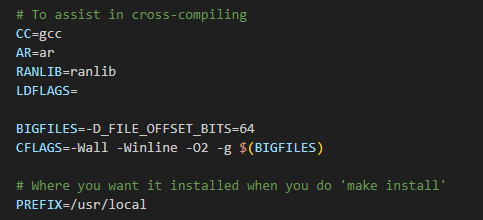
a. Compilation command configuration
# To assist in cross-compiling
CC=gcc
AR=ar
RANLIB=ranlib
Functions of environment variables:
- CC: Specifies the C language compiler.
- AR: Specifies the archive tool.
- RANLIB: Specifies the index command of the archive file.
The GCC build command in Linux is configured by default. During the build, the GCC build command needs to be configured as the HarmonyOS cross build command.
b. Installation path configuration
# Where you want it installed when you do 'make install'
PREFIX=/usr/local
PREFIX: Specifies the prefix of the installation path.
The default installation directory is /usr/local/. If you need to perform installation, set the installation directory to the user directory.
Configure the cross build command and perform cross build.
After Makefile is analyzed, you can configure the cross build command for build (xxx needs to be replaced with an actual file path).
owner@ubuntu:/mnt/e/make-makefile/bzip2-1.0.6$ make CC="xxx/ohos-sdk/linux/native/llvm/bin/clang --target=aarch64-linux-ohos" AR=xxx/ohos-sdk/linux/native/llvm/bin/llvm-ar RANLIB=xxx/ohos-sdk/linux/native/llvm/bin/llvm-ranlib -j4 libbz2.a bzip2 bzip2recover
xxx/ohos-sdk/linux/native/llvm/bin/clang --target=aarch64-linux-ohos -Wall -Winline -O2 -g -D_FILE_OFFSET_BITS=64 -c huffman.c
xxx/ohos-sdk/linux/native/llvm/bin/clang --target=aarch64-linux-ohos -Wall -Winline -O2 -g -D_FILE_OFFSET_BITS=64 -c crctable.c
...
# Some of command execution details are omitted here.
...
xxx/ohos-sdk/linux/native/llvm/bin/llvm-ar cq libbz2.a blocksort.o huffman.o crctable.o randtable.o compress.o decompress.o bzlib.o
ranlib libbz2.a
1 warning generated.
xxx/ohos-sdk/linux/native/llvm/bin/clang --target=aarch64-linux-ohos -Wall -Winline -O2 -g -D_FILE_OFFSET_BITS=64  -o bzip2 bzip2.o -L. -lbz2
owner@ubuntu:~/workspace/bzip2-1.0.6$
Parameter description:
- --j4: Specifies the number of jobs to be compiled in parallel.
- libbz2.a: Static link library file of the bzip2 compression library. It contains the functions and data structures required for bzip2 compression and decompression and is used by other programs during linking.
- bzip2: Executable file of the bzip2 compression algorithm. It is used to compress files or directories.
- bzip2recover: Recovery tool of the bzip2 compression algorithm. It can be used to recover damaged compressed files generated by the bzip2 compression algorithm.
Note: When configuring CC, you need to configure the target architecture in addition to the cross-compiled Clang. That is, you need to configure the target architecture to an aarch64 file. Only the files compiled based on this configuration can run on the 64-bit device. If you need to compile a 32-bit file, set target to arm-linux-ohos.
Run the file bzip2 command to view the compiled file.
owner@ubuntu:/mnt/e/make-makefile/bzip2-1.0.6$ file bzip2             # Run the file command to view the attributes of the generated file.
bzip2: ELF 64-bit LSB shared object, ARM aarch64, version 1 (SYSV), dynamically linked, interpreter /lib/ld-musl-aarch64.so.1, with debug_info, not stripped
owner@ubuntu:/mnt/e/make-makefile/bzip2-1.0.6$
aarch64-linux-ohos is configured during the build. Therefore, the attribute of the generated file is Arm aarch64, and the cross build is successful.
Perform installation.
According to the analysis of Makefile, you need to configure the installation path variable PREFIX during installation.
owner@ubuntu:/mnt/e/make-makefile/bzip2-1.0.6$ make install PREFIX=xxx/bzip/                   # Run the make install command for installation.
if ( test ! -d /mnt/e/make-makefile/bzip2-1.0.6/bzip/bin ) ; then mkdir -p /mnt/e/make-makefile/bzip2-1.0.6/bzip/bin ; fi
if ( test ! -d /mnt/e/make-makefile/bzip2-1.0.6/bzip/lib ) ; then mkdir -p /mnt/e/make-makefile/bzip2-1.0.6/bzip/lib ; fi
if ( test ! -d /mnt/e/make-makefile/bzip2-1.0.6/bzip/man ) ; then mkdir -p /mnt/e/make-makefile/bzip2-1.0.6/bzip/man ; fi
if ( test ! -d /mnt/e/make-makefile/bzip2-1.0.6/bzip/man/man1 ) ; then mkdir -p /mnt/e/make-makefile/bzip2-1.0.6/bzip/man/man1 ; fi
if ( test ! -d /mnt/e/make-makefile/bzip2-1.0.6/bzip/include ) ; then mkdir -p /mnt/e/make-makefile/bzip2-1.0.6/bzip/include ; fi
...
# Some of command execution details are omitted here.
...
cp -f bzgrep.1 bzmore.1 bzdiff.1 /mnt/e/make-makefile/bzip2-1.0.6/bzip/man/man1
chmod a+r /mnt/e/make-makefile/bzip2-1.0.6/bzip/man/man1/bzgrep.1
chmod a+r /mnt/e/make-makefile/bzip2-1.0.6/bzip/man/man1/bzmore.1
chmod a+r /mnt/e/make-makefile/bzip2-1.0.6/bzip/man/man1/bzdiff.1
echo ".so man1/bzgrep.1" > /mnt/e/make-makefile/bzip2-1.0.6/bzip/man/man1/bzegrep.1
echo ".so man1/bzgrep.1" > /mnt/e/make-makefile/bzip2-1.0.6/bzip/man/man1/bzfgrep.1
echo ".so man1/bzmore.1" > /mnt/e/make-makefile/bzip2-1.0.6/bzip/man/man1/bzless.1
echo ".so man1/bzdiff.1" > /mnt/e/make-makefile/bzip2-1.0.6/bzip/man/man1/bzcmp.1
owner@ubuntu:/mnt/e/make-makefile/bzip2-1.0.6$ ls xxx/bzip/                                    # View the installation file.
bin  include  lib  man
The installation is successful, and the source code of bzip2 third-party libraries is successfully compiled.
Third-Party Libraries Integrated in Applications
For details, see Integrating a Third-Party Dynamic Link Library.