Use Case
The navigation component supports the message reminder capability in the menu bar since version 5.1.0 (18).
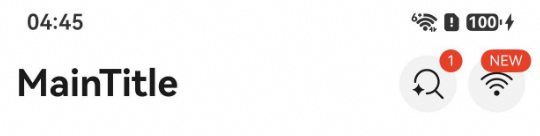
To add a message reminder to the upper right corner of a menu item, set the badge attribute in menu item settings of the title bar.
Development Procedure
-
Import required modules.
// Starting from version 6.0.2(22), you do not need to manually import HdsNavigationAttribute. For details, refer to the "Modules to Import" section of the HdsNavigation reference document. import { HdsNavigation, HdsNavigationAttribute, HdsNavigationTitleMode } from '@kit.UIDesignKit'; -
Create a level-1 navigation component, and set the badge attribute under menu in titleBar to define the message reminder style.
@Entry
@Component
struct Index {
  build() {
    HdsNavigation() { // Create the **HdsNavigation** component.
    }
    .titleBar({
      content: {
        // Set the title bar content.
        menu: {
          // Set the menu area content of the title bar.
          value: [{
            content: {
              // Set the first menu item.
              label: 'menu1',
              icon: $r('sys.symbol.AI_search'),
              isEnabled: true
            },
            badge: {
              // Set the reminder badge for the first menu item.
              count: 1
            }
          }, {
            content: {
              // Configure the second menu item as a common text icon.
              label: 'menu2',
              icon: $r('sys.symbol.wifi'),
              isEnabled: true,
              componentId: 'menu_1',
              action: () => {
              }
            },
            badge: {
              // Set the reminder badge for the second menu item.
              value: 'Message'
            }
          }]
        },
        title: { mainTitle: 'MainTitle' },
      }
    })
    .titleMode(HdsNavigationTitleMode.MINI)
    .hideBackButton(true)
  }
}