Use Cases
An ecosystem app can proactively obtain the HiCar connection status by calling the smart mobility connection status query API (for example, to determine whether the app is launched on HiCar).
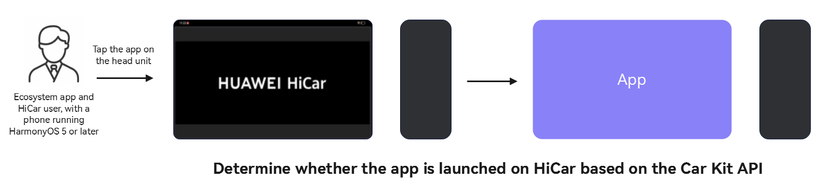
API Description
The following table describes the API for obtaining the HiCar connection status.
| API | Description |
|---|---|
| getSmartMobilityStatus | Obtains the smart mobility connection status. |
[h2]SmartMobilityInfo Event Name Description
The following table lists the values of status in SmartMobilityInfo.
| No. | Status | Description |
|---|---|---|
| 0 | IDLE | Idle. |
| 1 | RUNNING | Running. |
The following table lists the values of type in SmartMobilityInfo.
| No. | Service Type | Description |
|---|---|---|
| 0 | HICAR | HiCar. |
| 1 | SUPER_LAUNCHER | Super Home Screen. |
| 2 | CAR_HOP | Hop. |
The following table lists the parameters contained in data of SmartMobilityInfo.
| No. | Parameter | Description |
|---|---|---|
| 0 | DEVICE_TYPE | Device type. |
| 1 | DISPLAY_ID | ID of the virtual screen where the service is located. |
| 2 | IS_PHONE_DESKTOP | Indicates whether the phone home screen is displayed on HiCar (only applicable to HiCar services). |
Development Procedure
-
Import required modules.
import { smartMobilityCommon } from '@kit.CarKit'; import { UIAbility } from '@kit.AbilityKit'; import { hilog } from '@kit.PerformanceAnalysisKit'; -
Query the smart mobility connection status.
When your app is adapted for HiCar, it can query the smart mobility connection status in real time to obtain the HiCar connection status (for example, to determine whether the app is launched on HiCar).
export default class EntryAbility extends UIAbility {
  // ...
  isAppOnHiCar(): boolean {
    try {
      // ID of the screen where the app is located.
      const currentDisplayId = this.context.config.displayId;
      // Obtain the SmartMobilityAwareness instance.
      let awareness: smartMobilityCommon.SmartMobilityAwareness = smartMobilityCommon.getSmartMobilityAwareness();
      // Obtain the current smart mobility connection status.
      let info: smartMobilityCommon.SmartMobilityInfo =
        awareness.getSmartMobilityStatus(smartMobilityCommon.SmartMobilityType.HICAR);
      const deviceDisplayId = Number(info.data['DISPLAY_ID']);
      if (currentDisplayId === deviceDisplayId) {
        // Indicates that the app is on the corresponding device screen.
        hilog.info(0x0000, 'testTag', 'app in on device screen');
        return true;
      }
    } catch (e) {
      // Obtain the error code for an API call exception and handle the exception.
      hilog.error(0x0000, 'testTag', `get smart mobility status error, error code: ${e?.code}`);
    }
    return false;
  }
  // ...
}