Overview
During application running, some unexpected behaviors are inevitable. For example, unprocessed exceptions and errors are thrown, and the call or running constraints of the recovery framework are violated.
Process exit is treated as the default exception handling method. However, if user data is generated during application use, process exit may interrupt user operations and cause data loss.
If the application recovery functionality is enabled in AbilityStage and temporary data is saved, the previous application state and data will be restored upon next startup in the case of an abnormal exit, providing more consistent user experience. The application state includes two parts, namely, the page stack and the data saved in onSaveState.
In API version 9, application recovery is supported only for single-UIAbility applications developed using the stage model. Application state saving and automatic restart are performed when a JsError occurs.
In API version 10, application recovery is supported for multi-UIAbility applications developed using the stage model. Application state saving and restore are performed when an AppFreeze occurs. If an application is killed in control mode, the application state will be restored upon next startup.
Available APIs
The application recovery APIs are provided by the appRecovery module, which can be imported via import. For details, see How to Develop.
[h2]Application Recovery APIs
| API | Description |
|---|---|
| enableAppRecovery(restart?: RestartFlag, saveOccasion?: SaveOccasionFlag, saveMode?: SaveModeFlag) : void | Enables the application recovery functionality. |
| saveAppState(): boolean | Saves the state of the UIAbility that supports recovery in the current application. |
| restartApp(): void | Restarts the current process and starts the UIAbility specified by setRestartWant. If no UIAbility is specified, a foreground UIAbility that supports recovery is restarted. |
| saveAppState(context?: UIAbilityContext): boolean | Saves the UIAbility state specified by Context. |
| setRestartWant(want: Want): void | Sets the UIAbility to be restarted when restartApp is called and RestartFlag is not set to NO_RESTART. (abilityName of want can be set to the name of the UIAbility.) The UIAbility must be under the same bundle name. |
As the preceding APIs may be used during fault handling, they do not return exceptions. You need to be familiar with the usage scenarios. For details about the parameter definitions, see @ohos.app.ability.appRecovery (Application Recovery).
enableAppRecovery: This API should be called during application initialization. For example, you can call this API in onCreate of AbilityStage. After this API is called, the application will be recovered based on the first UIAbility that supports recovery.
saveAppState: After this API is called, the recovery framework invokes onSaveState for all UIAbilities that support recovery in the current process. If you choose to save data in onSaveState, the related data and UIAbility page stack are persistently stored in the local cache of the application. To save data of the specified UIAbility, you need to specify the context corresponding to that UIAbility.
setRestartWant: This API specifies the UIAbility to be restarted by appRecovery.
restartApp: After this API is called, the recovery framework kills the current process and restarts the UIAbility specified by setRestartWant, with APP_RECOVERY set as the startup cause.
In API version 9 and scenarios where a UIAbility is not specified by setRestartWant, the last foreground UIAbility that supports recovery is started. If the current foreground UIAbility does not support recovery, the application crashes.
If the restarted UIAbility has saved state data, this data is passed in as the wantParam property in the want parameter of the UIAbility's onCreate lifecycle callback. The interval between two restarts must be greater than one minute. Calling this API repeatedly within one minute only exits the app without restarting it. The behavior of automatic restart is the same as that of manual restart.
[h2]Application State Management
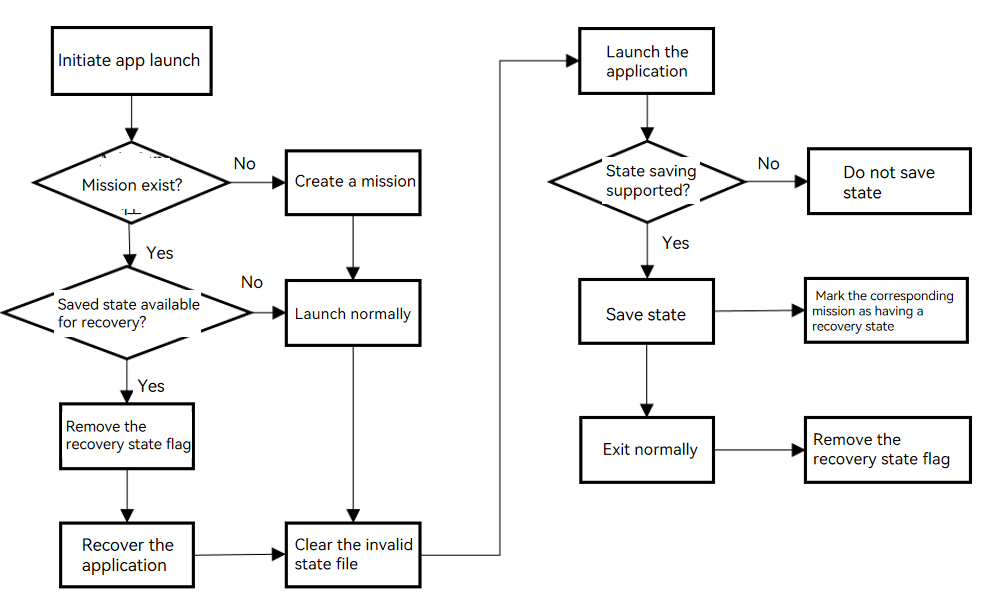
Since API version 10, application recovery is not limited to automatic restart in the case of an exception. Therefore, you need to understand when the application will load the saved state.
If the last exit of an application is not initiated by a user and a saved state is available for recovery, the startup cause is set to APP_RECOVERY when the application is started by the user next time, and the recovery state of the application is cleared.
The application recovery state flag is set when saveAppState is actively or passively called. The flag is cleared when the application exits normally or restarts after an abnormal exit. (A normal exit is usually triggered by pressing the back key or clearing recent tasks.)
[h2]Application State Saving and Restore
API version 10 or later supports saving of the application state when an application is frozen. If a JsError occurs, onSaveState is called in the main thread. If an AppFreeze occurs, however, the main thread may be frozen, and therefore onSaveState is called in a non-main thread. The following figure shows the main service flow.

When the application is frozen, the callback is not executed in the JS thread. Therefore, you are advised not to use the imported dynamic Native library or access the thread_local object created by the main thread in the code of the onSaveState callback.
[h2]Framework Fault Management
Fault management is an important way for applications to deliver a better user experience. The application framework offers three methods for application fault management: fault listening, fault recovery, and fault query.
-
Fault listening refers to the process of registering an ErrorObserver via errorManager, listening for faults, and notifying the listener of the faults.
-
Fault recovery refers to appRecovery, which restarts the app and restores it to the state before the fault occurred.
-
Fault query is the process of calling APIs of faultLogger to obtain the fault information.
The figure below does not illustrate the time when faultLogger is called. You can refer to the LastExitReason passed during application initialization to determine whether to call faultLogger to query information about the previous fault.

You are advised to handle application exceptions using errorManager. After the exceptions are fixed, you can call saveAppState and restart the application.
If you do not register ErrorObserver or enable application recovery, the process exits according to the default system logic. Users can restart the application from the home screen.
If you have enabled application recovery, the recovery framework first checks whether application state saving is supported and whether the application state saving is enabled. If so, the recovery framework calls onSaveState of the UIAbility. Finally, the application is restarted.
[h2]Supported Application Recovery Scenarios
Common fault types include JavaScript application crash, application freezing, and C++ application crash. Generally, an application is closed when a crash occurs. Application freezing occurs when the application does not respond. The fault type can be ignored for the upper layer of an application. The recovery framework implements fault management in different scenarios based on the fault type.
| Fault | Fault Listening | State Saving | Automatic Restart | Log Query |
|---|---|---|---|---|
| JS_CRASH | Supported | Supported | Supported | Supported |
| APP_FREEZE | This fault is supported since API version 18. | Supported | Supported | Supported |
| CPP_CRASH | Not supported | Not supported | Supported at API 24 and later | Supported |
Here, state saving refers to state saving upon a fault. For app freeze scenarios, you can periodically save the state or automatically save the state when the UIAbility switches to the background, so as to protect user data to the greatest extent possible.
[h2]Enabling Application Recovery
Import the required module.
import {
  appRecovery,
// ...
} from '@kit.AbilityKit';
Enable appRecovery during application module initialization, in the onCreate lifecycle callback.
appRecovery.enableAppRecovery(appRecovery.RestartFlag.ALWAYS_RESTART,
  appRecovery.SaveOccasionFlag.SAVE_WHEN_ERROR | appRecovery.SaveOccasionFlag.SAVE_WHEN_BACKGROUND,
  appRecovery.SaveModeFlag.SAVE_WITH_FILE);
[h2]Configuring the Recoverable UIAbility
Generally, the UIAbility configuration list is named module.json5.
{
  "name": "EntryAbility",
  // ...
  "recoverable": true,
  // ...
}
[h2]Saving and Restoring Data
After enabling appRecovery, you can use this functionality by either actively or passively saving the status and restoring data in a UIAbility.
The following is an example of EntryAbility:
Importing modules
import {
  appRecovery,
  AbilityConstant,
  errorManager,
  UIAbility,
  Want,
  wantConstant
} from '@kit.AbilityKit';
import { hilog } from '@kit.PerformanceAnalysisKit';
import { window } from '@kit.ArkUI';
Customize the domain value used by hilog.
const DOMAIN = 0x0000;
Actively saving state and restoring data
- Define and register the ErrorObserver callback. For details about its usage, see errorManager.
let registerId = -1;
let callback: errorManager.ErrorObserver = {
  onUnhandledException(errMsg) {
    hilog.error(DOMAIN, 'testRecoveryTag', `errMsg: ${errMsg}`);
    appRecovery.saveAppState();
    appRecovery.restartApp();
  }
} - Register the ErrorObserver and load the page in onWindowStageCreate.
registerId = errorManager.on('error', callback); - Save data.
After the callback triggers appRecovery.saveAppState(), onSaveState(state, wantParams) of EntryAbility is triggered.
onSaveState(state: AbilityConstant.StateType, wantParams: Record<string, Object>) {
  // Ability has called to save app data
  hilog.info(DOMAIN, 'testRecoveryTag', '[Demo] EntryAbility onSaveState');
  wantParams['myData'] = 'my1234567';
  return AbilityConstant.OnSaveResult.ALL_AGREE;
} - Restore data.
After the callback triggers appRecovery.restartApp(), the application is restarted. After the restart, onCreate(want, launchParam) of EntryAbility is called, and the saved data is stored in parameters of want.
if (launchParam.launchReason == AbilityConstant.LaunchReason.APP_RECOVERY) {
  this.storage = new LocalStorage();
  if (want.parameters) {
    let recoveryData = want.parameters['myData'];
    this.storage.setOrCreate('myData', recoveryData);
    this.context.restoreWindowStage(this.storage);
  }
} - Unregister the ErrorObserver callback.
errorManager.off('error', registerId, (err) => {
  hilog.error(DOMAIN, 'testRecoveryTag', '[Demo] err:', err);
});
Passively saving state and restoring data
This is triggered by the recovery framework. You do not need to register an ErrorObserver callback. You only need to implement onSaveState for application state saving and onCreate for data restore.
if (launchParam.launchReason == AbilityConstant.LaunchReason.APP_RECOVERY) {
  this.storage = new LocalStorage();
  if (want.parameters) {
    let recoveryData = want.parameters['myData'];
    this.storage.setOrCreate('myData', recoveryData);
    this.context.restoreWindowStage(this.storage);
  }
}
onSaveState(state: AbilityConstant.StateType, wantParams: Record<string, Object>) {
// Ability has called to save app data
hilog.info(DOMAIN, 'testRecoveryTag', '[Demo] EntryAbility onSaveState');
wantParams['myData'] = 'my1234567';
return AbilityConstant.OnSaveResult.ALL_AGREE;
} Restart flag for the failed UIAbility
When the faulty UIAbility is restarted, the parameters member of the want parameter in the onCreate lifecycle callback contains the ABILITY_RECOVERY_RESTART flag, with the value true.
if (want.parameters === undefined) {
  return;
}
if (want.parameters[wantConstant.Params.ABILITY_RECOVERY_RESTART] != undefined &&
  want.parameters[wantConstant.Params.ABILITY_RECOVERY_RESTART] == true) {
  hilog.info(DOMAIN, 'testRecoveryTag', 'This ability need to recovery');
}