Use Cases
Subject segmentation identifies and isolates foreground objects or regions (that is, salient subjects) that are distinct from the background in an image. It is suitable for scenarios requiring the recognition and extraction of the main information within an image and is widely used in foreground object detection and foreground subject separation tasks. Here are some examples:
-
Sticker creation: Extracts salient foreground objects from an image by removing the background.
-
Background replacement: Replaces the background of an image with a new one while preserving foreground objects.
-
Saliency detection: Quickly locates the most visually prominent regions in an image.
-
Assisted image editing: Facilitates image editing tasks, such as beautifying a foreground object separately.
Example:
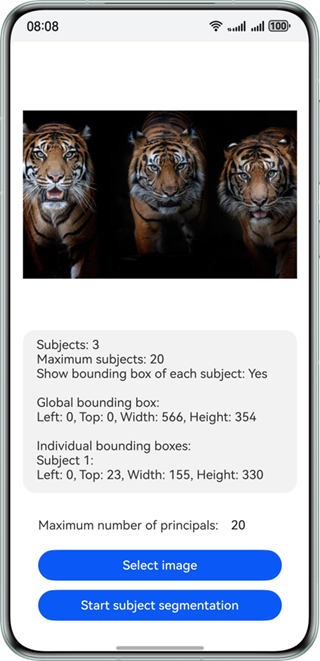
Development Procedure
-
Reference related classes and add them to a project.
import { subjectSegmentation } from '@kit.CoreVisionKit'; import { image } from '@kit.ImageKit'; import { hilog } from '@kit.PerformanceAnalysisKit'; import { BusinessError } from '@kit.BasicServicesKit'; import { fileIo } from '@kit.CoreFileKit'; import { photoAccessHelper } from '@kit.MediaLibraryKit'; -
Initialization and release: Call subjectSegmentation.init() in aboutToAppear to initialize the subject segmentation service (load the model), and call subjectSegmentation.release() in aboutToDisappear to release resources.
async aboutToAppear(): Promise<void> { const initResult = await subjectSegmentation.init(); hilog.info(0x0000, 'subjectSegmentationSample', `Subject segmentation initialization result:${initResult}`); } async aboutToDisappear(): Promise<void> { await subjectSegmentation.release(); hilog.info(0x0000, 'subjectSegmentationSample', 'Subject segmentation released successfully'); } -
Call photoAccessHelper.PhotoViewPicker to start the gallery to select an image, and use the fileIo and image modules to convert the URI to a PixelMap to prepare input data for the segmentation API.
private async selectImage() { let uri = await this.openPhoto(); if (uri === undefined) { hilog.error(0x0000, TAG, 'uri is undefined'); return; } this.loadImage(uri); } private async openPhoto(): Promise<Array<string>> { return new Promise<Array<string>>((resolve, reject) => { let photoSelectOptions = new photoAccessHelper.PhotoSelectOptions(); photoSelectOptions.MIMEType = photoAccessHelper.PhotoViewMIMETypes.IMAGE_TYPE; photoSelectOptions.maxSelectNumber = 1; let photoPicker: photoAccessHelper.PhotoViewPicker = new photoAccessHelper.PhotoViewPicker(); photoPicker.select(photoSelectOptions).then((photoSelectResult) => { hilog.info(0x0000, TAG, `PhotoViewPicker.select successfully, photoSelectResult uri: ${photoSelectResult.photoUris}`); resolve(photoSelectResult.photoUris); }).catch((err: BusinessError) => { hilog.error(0x0000, TAG, `PhotoViewPicker.select failed with errCode: ${err.code}, errMessage: ${err.message}`); reject(err); }); }); } private loadImage(names: string[]) { setTimeout(async () => { let imageSource: image.ImageSource | undefined = undefined; let fileSource = await fileIo.open(names[0], fileIo.OpenMode.READ_ONLY); imageSource = image.createImageSource(fileSource.fd); this.chooseImage = await imageSource.createPixelMap(); await fileIo.close(fileSource); }, 100); } -
Instantiate VisionInfo and pass the pixel map of the image to be detected. Configure SegmentationConfig, including the maximum number of subjects, whether to output detailed information, and whether to output the foreground image.
let visionInfo: subjectSegmentation.VisionInfo = { pixelMap: this.chooseImage }; let config: subjectSegmentation.SegmentationConfig = { maxCount: parseInt(this.maxNum), enableSubjectDetails: true, enableSubjectForegroundImage: true }; -
Call the subjectSegmentation.doSegmentation API of subjectSegmentation to implement subject segmentation and display the result on the GUI.
Button('Image Segmentation')
  .type(ButtonType.Capsule)
  .fontColor(Color.White)
  .alignSelf(ItemAlign.Center)
  .width('80%')
  .margin(10)
  .onClick(() => {
    if (!this.chooseImage) {
      hilog.error(0x0000, TAG, 'imageSegmentation not have chooseImage');
      return;
    }
    let visionInfo: subjectSegmentation.VisionInfo = {
      pixelMap: this.chooseImage
    };
    let config: subjectSegmentation.SegmentationConfig = {
      maxCount: parseInt(this.maxNum),
      enableSubjectDetails: true,
      enableSubjectForegroundImage: true
    };
    subjectSegmentation.doSegmentation(visionInfo, config)
      .then((data: subjectSegmentation.SegmentationResult) => {
        // Assemble the segmentation result information.
        let outputString = `Subject count: ${data.subjectCount}\n`;
        outputString += `Max subject count: ${config.maxCount}\n`;
        outputString += `Enable subject details: ${config.enableSubjectDetails ? 'Yes' : 'No'}\n\n`;
        let segBox: subjectSegmentation.Rectangle = data.fullSubject.subjectRectangle;
        outputString += `Full subject box:\nLeft: ${segBox.left}, Top: ${segBox.top}, Width: ${segBox.width}, Height: ${segBox.height}\n\n`;

        // Assemble the detailed segmentation information of each subject.
        if (config.enableSubjectDetails && data.subjectDetails) {
          outputString += 'Individual subject boxes:\n';
          for (let i = 0; i < data.subjectDetails.length; i++) {
            let detailSegBox: subjectSegmentation.Rectangle = data.subjectDetails[i].subjectRectangle;
            outputString += `Subject ${i + 1}:\nLeft: ${detailSegBox.left}, Top: ${detailSegBox.top}, Width: ${detailSegBox.width}, Height: ${detailSegBox.height}\n\n`;
          }
        }

        hilog.info(0x0000, TAG, 'Segmentation result: ' + outputString);
        this.dataValues = outputString;

        if (data.fullSubject && data.fullSubject.foregroundImage) {
          this.segmentedImage = data.fullSubject.foregroundImage;
        } else {
          hilog.error(0x0000, TAG, 'No foreground image in segmentation result');
        }
      })
      .catch((error: BusinessError) => {
        hilog.error(0x0000, TAG, `Image segmentation failed errCode: ${error.code}, errMessage: ${error.message}`);
        this.dataValues = `Error: ${error.message}`;
        this.segmentedImage = undefined;
      });
  })
[h2]Index.ets
import { subjectSegmentation } from '@kit.CoreVisionKit';
import { image } from '@kit.ImageKit';
import { hilog } from '@kit.PerformanceAnalysisKit';
import { BusinessError } from '@kit.BasicServicesKit';
import { fileIo } from '@kit.CoreFileKit';
import { photoAccessHelper } from '@kit.MediaLibraryKit';

const TAG: string = 'ImageSegmentationSample';

@Entry
@Component
struct Index {
  @State chooseImage: PixelMap | undefined = undefined;
  @State dataValues: string = '';
  @State segmentedImage: PixelMap | undefined = undefined;
  //Set the maximum number of subjects to be detected.
  @State maxNum: string = '20';

  async aboutToAppear(): Promise<void> {
    const initResult = await subjectSegmentation.init();
    hilog.info(0x0000, 'subjectSegmentationSample', `Subject segmentation initialization result:${initResult}`);
  }

  async aboutToDisappear(): Promise<void> {
    await subjectSegmentation.release();
    hilog.info(0x0000, 'subjectSegmentationSample', 'Subject segmentation released successfully');
  }

  build() {
    Column() {
      Image(this.chooseImage)
        .objectFit(ImageFit.Fill)
        .height('30%')
        .accessibilityDescription('Image to be segmented')

      Scroll() {
        Text(this.dataValues)
          .copyOption(CopyOptions.LocalDevice)
          .margin(10)
          .width('100%')
      }
      .height('20%')

      Image(this.segmentedImage)
        .objectFit(ImageFit.Fill)
        .height('30%')
        .accessibilityDescription('Segmented subject image')

      Row() {
        Text('Max subject count:')
          .fontSize(16)
        TextInput({ placeholder: 'Enter max subject count', text: this.maxNum })
          .type(InputType.Number)
          .placeholderColor(Color.Gray)
          .fontSize(16)
          .backgroundColor(Color.White)
          .onChange((value: string) => {
            this.maxNum = value;
          })
      }
      .width('80%')
      .margin(10)

      Button('Select Image')
        .type(ButtonType.Capsule)
        .fontColor(Color.White)
        .alignSelf(ItemAlign.Center)
        .width('80%')
        .margin(10)
        .onClick(() => {
          void this.selectImage();
        })

      Button('Image Segmentation')
        .type(ButtonType.Capsule)
        .fontColor(Color.White)
        .alignSelf(ItemAlign.Center)
        .width('80%')
        .margin(10)
        .onClick(() => {
          if (!this.chooseImage) {
            hilog.error(0x0000, TAG, 'imageSegmentation not have chooseImage');
            return;
          }
          let visionInfo: subjectSegmentation.VisionInfo = {
            pixelMap: this.chooseImage
          };
          let config: subjectSegmentation.SegmentationConfig = {
            maxCount: parseInt(this.maxNum),
            enableSubjectDetails: true,
            enableSubjectForegroundImage: true
          };
          subjectSegmentation.doSegmentation(visionInfo, config)
            .then((data: subjectSegmentation.SegmentationResult) => {
              // Assemble the segmentation result information.
              let outputString = `Subject count: ${data.subjectCount}\n`;
              outputString += `Max subject count: ${config.maxCount}\n`;
              outputString += `Enable subject details: ${config.enableSubjectDetails ? 'Yes' : 'No'}\n\n`;
              let segBox: subjectSegmentation.Rectangle = data.fullSubject.subjectRectangle;
              outputString += `Full subject box:\nLeft: ${segBox.left}, Top: ${segBox.top}, Width: ${segBox.width}, Height: ${segBox.height}\n\n`;

              // Assemble the detailed segmentation information of each subject.
              if (config.enableSubjectDetails && data.subjectDetails) {
                outputString += 'Individual subject boxes:\n';
                for (let i = 0; i < data.subjectDetails.length; i++) {
                  let detailSegBox: subjectSegmentation.Rectangle = data.subjectDetails[i].subjectRectangle;
                  outputString += `Subject ${i + 1}:\nLeft: ${detailSegBox.left}, Top: ${detailSegBox.top}, Width: ${detailSegBox.width}, Height: ${detailSegBox.height}\n\n`;
                }
              }

              hilog.info(0x0000, TAG, 'Segmentation result: ' + outputString);
              this.dataValues = outputString;

              if (data.fullSubject && data.fullSubject.foregroundImage) {
                this.segmentedImage = data.fullSubject.foregroundImage;
              } else {
                hilog.error(0x0000, TAG, 'No foreground image in segmentation result');
              }
            })
            .catch((error: BusinessError) => {
              hilog.error(0x0000, TAG, `Image segmentation failed errCode: ${error.code}, errMessage: ${error.message}`);
              this.dataValues = `Error: ${error.message}`;
              this.segmentedImage = undefined;
            });
        })
    }
    .width('100%')
    .height('80%')
    .justifyContent(FlexAlign.Center)
  }

  private async selectImage() {
    let uri = await this.openPhoto();
    if (uri === undefined) {
      hilog.error(0x0000, TAG, 'uri is undefined');
      return;
    }
    this.loadImage(uri);
  }

  private async openPhoto(): Promise<Array<string>> {
    return new Promise<Array<string>>((resolve, reject) => {
      let photoSelectOptions = new photoAccessHelper.PhotoSelectOptions();
      photoSelectOptions.MIMEType = photoAccessHelper.PhotoViewMIMETypes.IMAGE_TYPE;
      photoSelectOptions.maxSelectNumber = 1;
      let photoPicker: photoAccessHelper.PhotoViewPicker = new photoAccessHelper.PhotoViewPicker();
      photoPicker.select(photoSelectOptions).then((photoSelectResult) => {
        hilog.info(0x0000, TAG, `PhotoViewPicker.select successfully, photoSelectResult uri: ${photoSelectResult.photoUris}`);
        resolve(photoSelectResult.photoUris);
      }).catch((err: BusinessError) => {
        hilog.error(0x0000, TAG, `PhotoViewPicker.select failed with errCode: ${err.code}, errMessage: ${err.message}`);
        reject(err);
      });
    });
  }

  private loadImage(names: string[]) {
    setTimeout(async () => {
      let imageSource: image.ImageSource | undefined = undefined;
      let fileSource = await fileIo.open(names[0], fileIo.OpenMode.READ_ONLY);
      imageSource = image.createImageSource(fileSource.fd);
      this.chooseImage = await imageSource.createPixelMap();
      await fileIo.close(fileSource);
    }, 100);
  }
}