Navigation provides two routing table types: system routing table and custom routing table. You can configure routing tables to implement page redirection within a package or across packages.
The custom routing table and system routing table can be used together.
Routing Table Capability Comparison
Different routing modes meet different requirements. Usability and scalability should be balanced based on project characteristics.
| Routing Mode | Cross-Package Redirection Capability | Scalability | Usability |
|---|---|---|---|
| System routing table | No need to import page files before redirection; pages are dynamically loaded on demand | Moderate | High; the system automatically maintains the routing table; easy to use; only the corresponding page redirection configuration items are required to implement page redirection. |
| Custom routing table | Page files must be imported before redirection | High | Moderate; you must maintain the routing table manually; complex to use, but can be customized based on the application service. |
System Routing Table
The system routing table is an implementation of dynamic routing. Navigation supports the system routing table for dynamic routing since API version 12.Since API version 23, the Navigation component supports redirection to the HSP page of the on-demand module.
The system routing table supports the Emulator but not the Previewer.
Each service module (HAP, HSP, or HAR) requires an individual router_map.json file to implement a system routing table. When routing is triggered, the application only needs to pass the name of the page that needs to be routed through the routing API provided by NavPathStack. The system then automatically completes the dynamic loading of the target module, page component construction, and route redirection. This way, module decoupling is achieved at the development level. The main steps are as follows:
-
Add routing table configuration to the module.json5 file of the target module.
{ "module": { // ... "routerMap": "$profile:router_map", // ... } } -
Create the router_map.json file in resources/base/profile of the project directory. Add the following configuration information. For details about the fields, see routerMap.
{ "routerMap": [ { "name": "PageOne", "pageSourceFile": "src/main/ets/pages/PageOne.ets", "buildFunction": "PageOneBuilder", "data": { "description" : "this is PageOne" } } ] } -
On the target page, configure the @Builder decorated entry point function. The function name must be the same as the value of buildFunction in the router_map.json file. Otherwise, an error is reported at compile time.
// Entry point function for redirection to the target page @Builder export function PageOneBuilder() { PageOne(); } @Component struct PageOne { pathStack: NavPathStack = new NavPathStack(); build() { NavDestination() { } .title('PageOne') .onReady((context: NavDestinationContext) => { this.pathStack = context.pathStack; }) } } -
Use a routing API such as pushPathByName to navigate to the target page.
@Entry
@Component
struct SystemRoutingTable {
  pageStack : NavPathStack = new NavPathStack();

  build() {
    Navigation(this.pageStack){
    }.onAppear(() => {
      this.pageStack.pushPathByName('PageOne', null, false);
    })
    .hideNavBar(true)
  }
}
Custom Routing Table
A custom routing table is implemented by configuring the Builder function for the navDestination attribute of Navigation. This approach requires importing page modules, which can be done through either static or dynamic import. The differences between these two methods are as follows.
| Import Mode | Module Coupling | Implementation Complexity | Performance |
|---|---|---|---|
| Dynamic import | Low coupling between modules | High | Excellent; pages are loaded on demand, with target pages loaded just before navigation |
| Static import | High coupling between modules | Low | Average; all dependent pages are loaded during initialization |
[h2]Dynamic Import
Dynamic import enables reuse of service logic across multiple modules (HAR/HSP) to achieve service module decoupling. In addition, it supports route function extension and integration while allowing on-demand loading.
Dynamic import offers the following advantages:
- Beyond the navigation URL, you can configure extended information in route definitions, such as the default orientation (landscape or portrait) and authentication requirements, which is processed during route navigation.
- Each route page can be assigned a name, enabling navigation by name instead of file path.
- Dynamic import (on-demand loading) prevents the initial page from loading excessive code, avoiding potential performance issues.
The implementation procedure is as follows. For details, see the Automatically Generating a Dynamic Route.
- Define page navigation configuration items.
- Use resource files for definitions and use the @ohos.resourceManager module to parse the resource files at runtime.
- Configure the route loading options in the .ets file, including the route page name (that is, the alias of the page in APIs like pushPath), name of the module where the file is located (name of the HSP/HAR module), and path to the target page in the module (relative to the src directory).
- Use dynamic import to load the module containing the target page at runtime. Once the module is loaded, call a method within the module that uses import to load and display the target page, then return the Builder function defined after the page has finished loading.
- Execute the Builder function loaded in step 2 on the navDestination attribute of the Navigation component to navigate to the target page.
[h2]Static Import
Static import is straightforward to implement. However, using static imports for routing navigation creates dependency coupling between modules and increases the initial page loading time. Whenever possible, use either dynamic imports or the system routing table instead.
The implementation procedure is as follows:
- Use the @Builder decorator to create a custom constructor pageMap.
- Implement the routing table in pageMap and construct different pages based on the input page name.
- Configure pageMap in the navDestination attribute of Navigation to register the routing table.
import { hilog } from '@kit.PerformanceAnalysisKit';

const DOMAIN = 0x0000;

@Entry
@Component
struct NavigationExample {
  @Provide('navPathStack') navPathStack: NavPathStack = new NavPathStack();
  private arr: number[] = [1, 2];

  @Builder
  pageMap(name: string) {
    if (name === 'NavDestinationTitle1') {
      pageOneTmp();
    } else if (name === 'NavDestinationTitle2') {
      pageTwoTmp();
    }
  }

  build() {
    Column() {
      Navigation(this.navPathStack) {
        TextInput({ placeholder: 'search...' })
          .width('90%')
          .height(40)

        List({ space: 12 }) {
          ForEach(this.arr, (item: number) => {
            ListItem() {
              Text('Page' + item)
                .width('100%')
                .height(72)
                .borderRadius(24)
                .fontSize(16)
                .fontWeight(500)
                .textAlign(TextAlign.Center)
                .onClick(() => {
                  this.navPathStack.pushPath({ name: 'NavDestinationTitle' + item });
                })
            }
          }, (item: number) => item.toString())
        }
        .width('90%')
        .margin({ top: 12 })
      }
      // Replace $r('app.string.mainTitle') with the string resource file you use. The value in the resource file is "Main Title."
      .title($r('app.string.mainTitle'))
      .navDestination(this.pageMap)
      .mode(NavigationMode.Split)
    }
    .height('100%')
    .width('100%')
  }
}

@Component
export struct pageTwoTmp {
  @Consume('navPathStack') navPathStack: NavPathStack;
  context = this.getUIContext().getHostContext();

  build() {
    NavDestination() {
      Column() {
        Text('NavDestinationContent2')
      }.width('100%').height('100%')
    }.title('NavDestinationTitle2')
    .onBackPressed(() => {
      const popDestinationInfo = this.navPathStack.pop(); // Pop the top element out of the navigation stack.
      // Replace $r('app.string.returnValue') with the string resource file you use. The value in the resource file is "Return value."
      hilog.info(DOMAIN, 'testTag', 'pop', this.context!.resourceManager.getStringSync($r('app.string.returnValue').id),
        JSON.stringify(popDestinationInfo));
      return true;
    })
  }
}

@Component
export struct pageOneTmp {
  @Consume('navPathStack') navPathStack: NavPathStack;
  context = this.getUIContext().getHostContext();

  build() {
    NavDestination() {
      Column() {
        Text('NavDestinationContent1')
      }.width('100%').height('100%')
    }.title('NavDestinationTitle1')
    .onBackPressed(() => {
      const popDestinationInfo = this.navPathStack.pop(); // Pop the top element out of the navigation stack.
      // Replace $r('app.string.returnValue') with the string resource file you use. The value in the resource file is "Return value."
      hilog.info(DOMAIN, 'testTag', 'pop', this.context!.resourceManager.getStringSync($r('app.string.returnValue').id),
        JSON.stringify(popDestinationInfo));
      return true;
    })
  }
}
How to Develop
The following example shows how to implement cross-package redirection between six pages based on the system routing table. Each package contains two pages: HapPageA and HapPageB for HAP, HspPageA and HspPageB for HSP, and HarPageA and HarPageB for HAR.
-
Configure the routing table.
Configure the system routing table in each HAP, HAR, and HSP module by referring to System Routing Table. Create a router_map.json file in the src/main/resources/base/profile/ directory of each module.
Insert the routing table information in the router_map.json file. The following uses the HAP module as an example:
{
  "routerMap": [
    {
      "name": "HapPageA",
      "pageSourceFile": "src/main/ets/pages/HapPageA.ets",
      "buildFunction": "HapPageABuilder",
      "data": {
        "description": "this is HapPageA"
      }
    },
    {
      "name": "HapPageB",
      "pageSourceFile": "src/main/ets/pages/HapPageB.ets",
      "buildFunction": "HapPageBBuilder",
      "data": {
        "description": "this is HapPageB"
      }
    }
  ]
}
Configure the routing table in the module.json5 file of each module.
{ "module": { // ... "routerMap": "$profile:router_map", // ... } } -
Develop the redirection feature.
Take HapPageA in the HAP package as an example:
// For reference only. Create pages and modules based on your needs.
import { ControlPanel } from './Common';

@Component
export struct HapPageA {
  build() {
    NavDestination() {
      Stack({alignContent: Alignment.Center}) {
        ControlPanel()
      }.width('100%').height('100%')
    }.title('HapPageA')
    .onReady((ctx: NavDestinationContext) => {
      let config = ctx.getConfigInRouteMap();
    })
  }
}

// buildFunction of the page, which is used to construct the page.
@Builder
export function HapPageABuilder(): void {
  HapPageA();
}
Common is a control panel component extracted for easy demonstration of page redirection. The following is an example:
@Component export struct ControlPanel { private stack: NavPathStack | undefined = undefined; aboutToAppear(): void { let info = this.queryNavigationInfo(); this.stack = info?.pathStack; } build() { Column({ space: 20 }) { Button('push HapPageA').onClick(() => { this.stack?.pushPath({ name: 'HapPageA' }); }) Button('push HapPageB').onClick(() => { this.stack?.pushPath({ name: 'HapPageB' }); }) Button('push HarPageA').onClick(() => { this.stack?.pushPath({ name: 'HarPageA' }); }) Button('push HarPageB').onClick(() => { this.stack?.pushPath({ name: 'HarPageB' }); }) Button('push HspPageA').onClick(() => { this.stack?.pushPath({ name: 'HspPageA' }); }) Button('push HspPageB').onClick(() => { this.stack?.pushPath({ name: 'HspPageB' }); }) } } } -
Compile and build.
HAR and HSP are depended on by the HAP module. Therefore, you need to build the HAR and HSP first. For demonstration purposes, the build products are stored in a public directory.
Figure 1 HSP and HAR build products
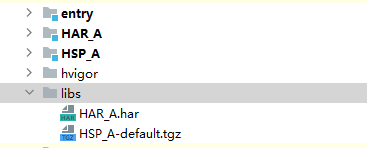
Configure the dependencies on the HAR and HSP in the oh-package.json5 file of the HAP.
{
  "name": "entry",
  "version": "1.0.0",
  "description": "Please describe the basic information.",
  "main": "",
  "author": "",
  "license": "",
  "dependencies": {
    "har_a": "file:../libs/HAR_A.har", // Use file to specify a fixed file because the local dependency package is used in the example.
    "hsp_a": "file:../libs/HSP_A-default.tgz", // Use file to specify a fixed file because the local dependency package is used in the example.
  }
}
Run the HAP module in DevEco Studio and the HAP and HSP are installed together on the device, as shown in the following figure.
Figure 2 Navigation across packages