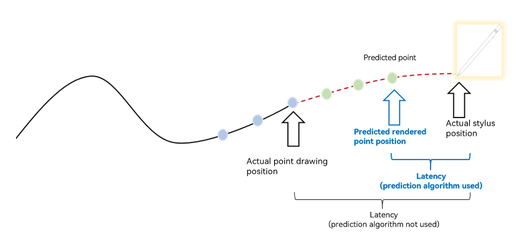
Integrating point prediction can reduce the latency during drawing and writing in your app and improve stylus writing experience.
Use Case
Obtain a touch event on the custom screen of the app, and call the point prediction API to obtain the position of the next prediction point.
API Description
| Class | API | Description |
|---|---|---|
| PointPredictor | getPredictionPoint(event: TouchEvent): TouchPoint | Obtains a prediction point. |
Development Procedure
-
Import required modules. Obtain the touch event information of the current screen and call the API to calculate the prediction point information.
import { PointPredictor } from '@kit.Penkit';

@Entry
@Component
struct PointPredictorDemo {
  @State actualXCoordinate: number = 0;
  @State actualYCoordinate: number = 0;
  @State predictorXCoordinate: Dimension = 0;
  @State predictorYCoordinate: Dimension = 0;
  pointPredictor: PointPredictor = new PointPredictor();

  aboutToAppear() {
    console.info('getPredictionPoint aboutToAppear');
  }

  aboutToDisappear() {
    console.info('getPredictionPoint aboutToDisappear');
  }

  build() {
    Stack({ alignContent: Alignment.TopEnd }) {
      this.canvas(); // Canvas
    }.height('100%').width('100%')
  }

  // Canvas
  @Builder
  canvas() {
    Column() {
      Text ('Actual point coordinates: X: '+ this.actualXCoordinate +' Y:' + this.actualYCoordinate) .textAlign(TextAlign.Start)
      Text ('Prediction point coordinates: X: '+ this.predictorXCoordinate +' Y:' + this.predictorYCoordinate)
        .textAlign(TextAlign.Start)
    }.position({ x: 0, y: 0 })
    .alignItems(HorizontalAlign.Start)

    Stack()
      .width('100%')
      .height('100%')
      .onTouch((event: TouchEvent) => {
        switch (event.type) {
          case TouchType.Down: // Create a drawing path when the screen is touched.
            break;
          case TouchType.Move: // Use the prediction algorithm to perform prediction and obtain the prediction point.
            let point = this.pointPredictor?.getPredictionPoint(event);
            this.actualXCoordinate = event.touches[0]?.x;
            this.actualYCoordinate = event.touches[0]?.y;
            this.predictorXCoordinate = point?.x;
            this.predictorYCoordinate = point?.y;
            console.info ('pointPredictor actual point coordinates x:' + event.touches[0]?.x +' y:' + event.touches[0]?.y);
            console.info ('pointPredictor prediction point coordinates x:' + point?.x +' y:' + point?.y);
            break;
          case TouchType.Up:
            break;
        }
      })
  }
}