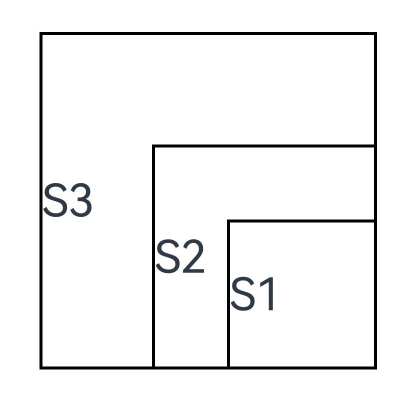
If the system-provided layout components (such as Flex, Column, Row, etc.) cannot meet complex layout requirements, or if you want to customize the calculation of the size and position of child components within a component, you are advised to use the following APIs in a custom component:
-
onMeasureSize: invoked upon layout. You can add custom logic in this callback to calculate the size of child components within the custom component and return the size information of the custom component. It is executed before onPlaceChildren.
-
onPlaceChildren: invoked upon layout. You can add custom logic in this callback to set the positions of child components within the custom component.
In the following example, the Index page contains a custom component that implements custom layout, and the child components of this custom component are passed in through a builder defined within the Index page.
In the custom component, onMeasureSize and onPlaceChildren are called to set the size and position of child components. For example, in this sample, the component size is initialized to 100 in onMeasureSize, and each subsequent child component's size is increased by half of the previous child component's size, achieving an incremental sizing effect. In onPlaceChildren, startPos is defined as 300, and the position of each child component is set to startPos minus the child component's own height, so that the bottom-right corners of all child components align at the vertex position (300, 300), achieving a Stack-like component that displays child components starting from the bottom-right corner.
Example
// xxx.ets
@Entry
@Component
struct Index {
  build() {
    Column() {
      CustomLayout({ builder: columnChildren })
    }
  }
}

// Pass multiple components in a builder as level-1 child components of the custom component (that is, container components for example, <Column>, are not included).
@Builder
function columnChildren() {
  ForEach([1, 2, 3], (index: number) => { // LazyForEach is not supported.
    Text('S' + index)
      .fontSize(30)
      .width(100)
      .height(100)
      .borderWidth(2)
      .offset({ x: 10, y: 20 })
  })
}

@Component
struct CustomLayout {
  @Builder
  doNothingBuilder() {
  };

  @BuilderParam builder: () => void = this.doNothingBuilder;
  result: SizeResult = {
    width: 0,
    height: 0
  };

  // Step 1: Calculate the size of each child component.
  onMeasureSize(selfLayoutInfo: GeometryInfo, children: Array<Measurable>, constraint: ConstraintSizeOptions) {
    let size = 100;
    children.forEach((child) => {
      let result: MeasureResult = child.measure({ minHeight: size, minWidth: size, maxWidth: size, maxHeight: size })
      size += result.width / 2;
    })
    // this.result represents the custom component's own size.
    this.result.width = 100;
    this.result.height = 400;
    return this.result;
  }
  // Step 2: Place the child components.
  onPlaceChildren(selfLayoutInfo: GeometryInfo, children: Array<Layoutable>, constraint: ConstraintSizeOptions) {
    let startPos = 300;
    children.forEach((child) => {
      let pos = startPos - child.measureResult.height;
      child.layout({ x: pos, y: pos })
    })
  }

  build() {
    this.builder()
  }
}