[h2]定位过程
根据应用运行过程中HIlog日志进行排查:
- 应用在启动时即申请了后台长时任务,根据关键词"startBackgroundRunning"可过滤出来,如下所示:
06-30 14:19:57.882   60087-61546   C01711/com.hm...NTINUOUS_TASK  [StartBackgroundRunningExecuteCB:271] RequestStartBackgroundRunning isBatch: 0, bgModeSize: 0
06-30 14:19:57.889   60087-61546   C01711/com.hm...CKGROUND_TASK  [StartBackgroundRunning:201] BackgroundTaskMgrProxy read notificationId -1, continuousTaskId 14
06-30 14:19:57.889   60087-61546   C01711/com.hm...NTINUOUS_TASK  [StartBackgroundRunningExecuteCB:276] notification -1, continuousTaskId 14
- 应用通过2次侧滑退到手机桌面,通过日志中关键字"onBackPress return true",说明重写了onBackPress的方法;关键字"app is inBackground"则表明应用是进入后台状态,并不是进程结束。
06-30 14:27:36.433   60087-61785   C03900/com.hm.example/Ace            com.hm.example    I     [(-1:100000:singleton)] [com.hm.example][entry][100000]: OnBackPressed called
06-30 14:27:36.433   60087-60087   C03922/com.hm.example/AceNavigation  com.hm.example    I     [(100000:100000:scope)] can't find destination node to process back press
06-30 14:27:36.434   60087-60087   C03925/com.hm.example/AceRouter      com.hm.example    I     [(100000:100000:scope)] router user onBackPress return true
06-30 14:27:36.434   60087-60087   C03900/com.hm.example/Ace            com.hm.example    I     [(100000:100000:scope)] router consumed backpressed event
06-30 14:27:36.751   60087-61785   C03900/com.hm.example/Ace            com.hm.example    I     [(-1:100000:singleton)] [com.hm.example][entry][100000]: OnBackPressed called
06-30 14:27:36.751   60087-60087   C03922/com.hm...AceNavigation        com.hm.example    I     [(100000:100000:scope)] can't find destination node to process back press
06-30 14:27:36.752   60087-60087   C03900/com.hm.example/Ace            com.hm.example    E     [(100000:100000:scope)] Error calling onBackPress
06-30 14:27:36.753   60087-60087   A03D00/com.hm.example/JSAPP          com.hm.example    I     Ability onBackPressed
06-30 14:27:36.753   60087-60087   C04200/com.hm...neSessionImpl        com.hm.example    I     (3012)PerformBack: Transfer back event to host session needMoveToBackground 1
06-30 14:27:36.764   60087-60087   A03D00/com.hm.example/JSAPP          com.hm.example    I     [@umeng][common][lifecycle]:AbilityLifecycleCallback onWindowStageInactive ability: ${ability} windowStage: ${windowStage}
06-30 14:27:36.770   60087-60087   A03D00/com.hm.example/JSAPP          com.hm.example    I     Ability onBackground1:::true
06-30 14:27:36.770   60087-60087   C01332/com.hm.example/UIAbility      com.hm.example    I     [js_ui_ability.cpp:1408]end, name: onBackground, time: 2
06-30 14:27:36.770   60087-60087   C04202/com.hm.example/WMSMain        com.hm.example    I     [] GoBackground(170): reason: 0
06-30 14:27:36.771   60087-60087   C03900/com.hm.example/Ace            com.hm.example    I     [(-2:100000:singleton)] [com.hm.example][entry][100000]: window background
06-30 14:27:36.776   60087-60087   C01406/com.hm.example/OHOS::RS       com.hm.example    I     RSSurfaceNode::SetAbilityState, surfaceNodeId:[258071699914753], ability state: background
06-30 14:27:36.777   60087-60087   A03D00/com.hm.example/JSAPP          com.hm.example    I     [@umeng][common][lifecycle]:AbilityLifecycleCallback onAbilityBackground ability: ${ability}
06-30 14:27:36.777   60087-60087   C02D07/com.hm.example/ObserverMgr    com.hm.example    I     start to handle background
06-30 14:27:37.559   60087-60087   C03F00/com.hm.example/ArkCompiler    com.hm.example    I     [gc] app is inBackground
[h2]修改建议
应用在自定义侧滑退出应用时应结束应用进程,而不是进入后台。ArkTS提供了UIAbilityContext.terminateSelf和UIAbilityContext.terminateSelfWithResult两个接口用于主动退出停止。参考代码:
import { common } from '@kit.AbilityKit';

@Entry
@Component
struct Index {
  private message: string = '连续侧滑2次退出应用';
  private firstBackTimestamp: number = 0;
  private context: common.UIAbilityContext = this.getUIContext().getHostContext() as common.UIAbilityContext;
  promptAction = this.getUIContext().getPromptAction();

  build() {
    Column() {
      Text(this.message)
        .fontWeight(FontWeight.Bold);
    }
    .height('100%')
    .width('100%')
    .justifyContent(FlexAlign.Center);
  }

  onBackPress(): boolean | void {
    let now = Date.now();
    if (now - this.firstBackTimestamp < 1000) {
      this.context.terminateSelf();
    } else {
      this.firstBackTimestamp = now;
      this.promptAction.showToast({
        message: '再侧滑一次退出应用',
        duration: 1000
      });
    }
    return true;
  }
} 
[h2]修改建议
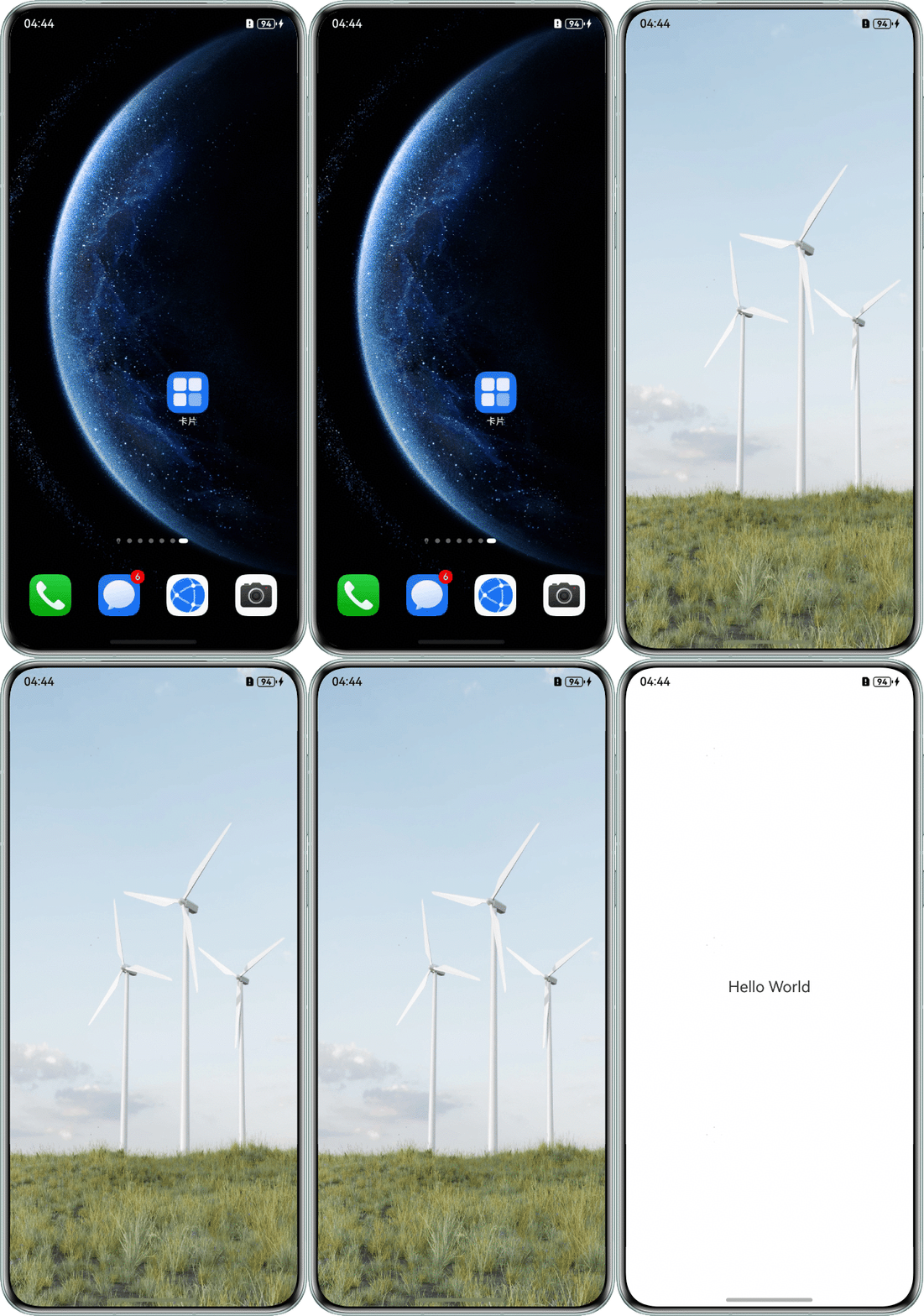
启动页设置资源加载完成前的替代显示内容。
import { window } from '@kit.ArkUI';
import { common } from '@kit.AbilityKit';

@Entry
@Component
struct StartDemo {
  @State loading: boolean = true;
  @State isShow: boolean = false;

  aboutToAppear() {
    let context: common.UIAbilityContext = this.getUIContext().getHostContext() as common.UIAbilityContext;
    window.getLastWindow(context).then((windowClass) => {
      windowClass.setWindowLayoutFullScreen(true);
    });
    // 加载好内容后到时才显示,避免闪屏
    setTimeout(() => {
      this.isShow = true;
    }, 2000);

    // 模拟页面内容加载
    setTimeout(() => {
      this.loading = false;
    }, 3000);
  }

  build() {
    Column() {
      if (!this.loading && this.isShow) {
        // 加载好的页面内容
        Stack() {
          Text('Hello World')
            .fontSize(20);
        }
        .width('100%')
        .height('100%')
        .backgroundColor(Color.White);
      } else {
        // 未加载好页面内容时使用图片替代
        Stack() {
          Image($r('app.media.beauty')) // $r('app.media.beauty')需要替换为开发者需要的图片资源文件
            .width('100%')
            .height('100%')
            .objectFit(ImageFit.Fill);
        }
        .width('100%')
        .height('100%');
      }
    }
    .backgroundColor(Color.Black)
    .width('100%')
    .height('100%');
  }
}
效果图如下: