问题现象
应用开发时很多时候由于涉及数据库表过多,需要在项目中提前预置SQLite数据库文件(rawfile或resfile目录下),再在应用中无需创建相关表直接访问数据库。针对此类预置在项目工程中的数据库文件,应该如何实现在应用中获取数据库并操作其中的表?
背景知识
- 应用沙箱是一种以安全防护为目的的隔离机制,避免数据受到恶意路径穿越访问。在这种沙箱的保护机制下,应用可见的目录范围即为“应用沙箱目录”。
- rawfile目录支持创建多层子目录,子目录名称可以自定义,文件夹内可以自由放置各类资源文件。目录中的资源文件会被直接打包进应用,不经过编译,也不会分配资源ID。通过指定文件路径和文件名访问。
- resfile目录支持创建多层子目录,子目录名称可以自定义,文件夹内可以自由放置各类资源文件。目录中的资源文件会被直接打包进应用,不经过编译,也不会分配资源ID。应用安装后,resfile资源会被解压到应用沙箱路径,通过Context属性resourceDir获取到resfile资源目录后,可通过文件路径访问,且该路径仅能以只读方式访问。
- 关系型数据库(Relational Database,RDB)是一种基于关系模型来管理数据的数据库。关系型数据库基于SQLite组件提供了一套完整的对本地数据库进行管理的机制,对外提供了一系列的增、删、改、查等接口,也可以直接运行用户输入的SQL语句来满足复杂的场景需要。
解决方案
关系型数据库(Relational Database,RDB)不支持直接打开rawfile或resfile目录下预置的SQLite数据库,需要先将对应的SQLite数据库文件拷贝到应用沙箱目录,再使用@ohos.data.relationalStore进行相关数据库操作。具体步骤如下:
- 若数据库预置在rawfile目录下,可使用resourceManager.getRawFdSync接口获取对应资源的文件描述符(fd),再使用fs.readSync接口读取文件内容,结合fs.writeSync接口将读取的内容写入到沙箱指定文件中。(可参考下述示例的saveRawFileToSandbox代码)
- 若数据库预置在resfile目录下,可使用fs.openSync接口获取对应资源的文件描述符(fd),再使用fs.readSync接口读取文件内容,结合fs.writeSync接口将读取的内容写入到沙箱指定文件中。(可参考下述示例的saveResFileToSandbox代码)
- 将在项目rawfile或resfile目录下预置的SQLite数据库文件通过上述方案拷贝到应用沙箱databaseDir目录下后,即可在应用中使用relationalStore.getRdbStore接口获取数据库实例进行数据库相关操作。(可参考下述示例的initDataBaseDir代码)

需要注意以下几点:
- 在创建或打开数据库时若不指定StoreConfig的rootDir时,则会默认在${context.databaseDir}/rdb/${customDir}目录下创建或打开。若指定rootDir,则会在${rootDir}/${customDir}目录下创建或打开数据库,通过设置此参数打开的数据库为只读模式。rootDir配置从API18版本开始提供。
- rawfile目录下文件需使用resourceManager.getRawFdSync获取文件描述符或使用resourceManager.getRawFileContentSync获取其文件数据。
- resfile目录路径可使用${this.context.resourceDir}获取,其目录下的文件可直接使用@ohos.file.fs (文件管理)的能力打开读取。
完整示例代码如下:
import { common } from '@kit.AbilityKit';
import { fileIo, ReadOptions } from '@kit.CoreFileKit';
import { relationalStore } from '@kit.ArkData';
import { BusinessError } from '@kit.BasicServicesKit';
import { resourceManager } from '@kit.LocalizationKit';

@Entry
@Component
struct Index {
  private context: common.UIAbilityContext = this.getUIContext().getHostContext() as common.UIAbilityContext;
  private promptAction = this.getUIContext().getPromptAction();
  private resManage: resourceManager.ResourceManager = this.context.resourceManager;
  private store: relationalStore.RdbStore | undefined = undefined;
  private dbName: string = 'test.db';
  private tableName: string = 'testTable';
  private storeConfig: relationalStore.StoreConfig = {
    name: this.dbName,
    securityLevel: relationalStore.SecurityLevel.S1,
  };
  /**
   * 创建或打开数据库的路径
   * 知识点1:
   * 若不指定StoreConfig的rootDir,则默认在${this.context.databaseDir}/rdb路径下创建或打开数据库;
   * 若需要自定义数据库的路径,则需指定StoreConfig的rootDir
   */
  private dbFilePath: string = `${this.context.databaseDir}/rdb`;

  build() {
    Column({ space: 20 }) {
      Button('rawfile目录下预置的数据库')
        .type(ButtonType.ROUNDED_RECTANGLE)
        .onClick(() => {
          // 需要替换为实际预置在rawfile目录下的db文件相对路径
          let rawfilePath: string = 'rdb/test.db'; // rawfile/rdb/test.db
          this.saveRawFileToSandbox(rawfilePath, this.dbFilePath, this.dbName);
          this.initDataBaseDir();
        });

      Button('操作resfile目录下预置的数据库')
        .type(ButtonType.ROUNDED_RECTANGLE)
        .onClick(() => {
          // 需要替换为实际预置在resfile目录下的db文件相对路径
          let resfilePath: string = `${this.context.resourceDir}/rdb/test.db`;
          this.saveResFileToSandbox(resfilePath, this.dbFilePath, this.dbName);
          this.initDataBaseDir();
        });

      Button('删除已创建的默认路径数据库文件')
        .type(ButtonType.ROUNDED_RECTANGLE)
        .onClick(() => {
          this.deleteRdb();
        });
    }
    .justifyContent(FlexAlign.Center)
    .width('100%')
    .height('100%');
  }

  private deleteRdb() {
    relationalStore.deleteRdbStore(this.context, this.storeConfig).then(() => {
      // 数据库删除成功后,已初始化的RdbStore实例将无法继续使用。
      // 及时将相关变量置空以释放资源。
      this.store = undefined;
      this.promptAction.showToast({ message: `删除数据库成功` });
      console.info('Delete RdbStore successfully.');
    }).catch((err: BusinessError) => {
      console.error(`Delete RdbStore failed, code is ${err.code},message is ${err.message}`);
    });
  }

  saveRawFileToSandbox(rawfilePath: string, dbFileDir: string, dbFileName: string) {
    let destFile: fileIo.File | undefined = undefined;
    try {
      /**
       * 知识点2:rawfile目录下文件需使用resourceManager的getRawFdSync或getRawFileContentSync获取其文件数据
       */
      // 1.获取rawfile目录下预置的数据库文件
      const srcFile = this.resManage.getRawFdSync(rawfilePath);
      // 2.将rawfile目录下数据库文件写入指定沙箱目录下
      // 如果目录不存在则开始创建
      if (!fileIo.accessSync(dbFileDir)) {
        console.info(`沙箱路径【${dbFileDir}】不存在,开始创建目录。`);
        fileIo.mkdirSync(dbFileDir, true);
      }
      let dbFilePath = `${dbFileDir}/${dbFileName}`;
      destFile = fileIo.openSync(dbFilePath, fileIo.OpenMode.READ_WRITE | fileIo.OpenMode.CREATE);
      this.copyFile(srcFile.fd, srcFile.offset, destFile);
      console.info(`拷贝rawfile目录下预置的数据库文件到沙箱成功!`);
    } catch (err) {
      this.promptAction.showToast({ message: `拷贝数据库文件到沙箱失败` });
      console.error(`拷贝rawfile目录下预置的数据库文件到沙箱失败, code is ${err.code},message is ${err.message}`);
    } finally {
      if (rawfilePath) {
        this.resManage.closeRawFdSync(rawfilePath);
      }
      if (destFile) {
        fileIo.closeSync(destFile);
      }
    }
  }

  copyFile(fd: number, currentOffset: number, destFile: fileIo.File) {
    // 读取缓冲区大小
    let bufferSize = 30000;
    let buffer = new ArrayBuffer(bufferSize); // 创建buffer缓冲区

    // 要copy的文件的offset和length
    let readOption: ReadOptions = {
      offset: currentOffset,
      length: bufferSize // 每次期望读取数据的长度。可选,默认缓冲区长度
    };
    // 后面len会一直减,直到没有
    while (true) {
      // 读取buffer容量的内容
      let readLength = fileIo.readSync(fd, buffer, readOption);
      // 写入buffer容量的内容
      fileIo.writeSync(destFile.fd, buffer, { length: readLength });
      // 判断后续内容,修改读文件的参数
      // buffer没读满代表文件读完了
      if (readLength < bufferSize) {
        break;
      }
      if (readOption.offset != undefined) {
        readOption.offset += readLength;
      }
    }
  }

  saveResFileToSandbox(resfilePath: string, dbFileDir: string, dbFileName: string) {
    let srcFile: fileIo.File | undefined = undefined;
    let destFile: fileIo.File | undefined = undefined;
    try {
      /**
       * 知识点3:resfile目录路径可使用${context.resourceDir}获取,可直接使用文件管理的能力打开读取
       */
      // 1.获取resfile目录下预置的数据库文件
      srcFile = fileIo.openSync(resfilePath, fileIo.OpenMode.READ_ONLY);
      // 2.将resfile目录下数据库文件写入指定沙箱目录下
      // 如果目录不存在则开始创建
      if (!fileIo.accessSync(dbFileDir)) {
        console.info(`沙箱路径【${dbFileDir}】不存在,开始创建目录。`);
        fileIo.mkdirSync(dbFileDir, true);
      }
      let dbFilePath = `${dbFileDir}/${dbFileName}`;
      destFile = fileIo.openSync(dbFilePath, fileIo.OpenMode.READ_WRITE | fileIo.OpenMode.CREATE);
      this.copyFile(srcFile.fd, 0, destFile);
      console.info(`拷贝resfile目录下预置的数据库文件到沙箱成功!`);
    } catch (err) {
      this.promptAction.showToast({ message: `拷贝数据库文件到沙箱失败` });
      console.error(`拷贝resfile目录下预置的数据库文件到沙箱失败, code is ${err.code},message is ${err.message}`);
    } finally {
      if (srcFile) {
        fileIo.closeSync(srcFile);
      }
      if (destFile) {
        fileIo.closeSync(destFile);
      }
    }
  }

  initDataBaseDir() {
    try {
      relationalStore.getRdbStore(this.context, this.storeConfig)
        .then(async (rdbStore: relationalStore.RdbStore) => {
          this.store = rdbStore;
          console.info('Get RdbStore successfully.');
          // 操作数据库增删改查
          this.operateRdb();
        })
        .catch((err: BusinessError) => {
          this.promptAction.showToast({ message: `打开数据库失败` });
          console.error(`Get RdbStore failed, code is ${err.code},message is ${err.message}`);
        });
    } catch (err) {
      this.promptAction.showToast({ message: `打开数据库失败` });
      console.error(`initDataBaseDir failed, code is ${err.code},message is ${err.message}`);
    }
  }

  operateRdb() {
    if (!this.store) {
      console.error('RdbStore is undefined.');
      return;
    }
    try {
      // 进行数据的相关操作
      // 插入数据
      const valueBucket: relationalStore.ValuesBucket = {
        'NAME': 'rdbTest',
        'AGE': 10,
      };
      let rowId: number = this.store.insertSync(this.tableName, valueBucket);
      console.info(`Insert is successful, rowId = ${rowId}`);
      // 查询数据
      let resultSet = this.store.querySqlSync(`SELECT * FROM ${this.tableName} limit 10`);
      console.info(`ResultSet column names: ${resultSet.columnNames}, row count: ${resultSet.rowCount}`);
      if (resultSet.rowCount > 0) {
        resultSet.getRows(resultSet.rowCount).then((rows: Array<relationalStore.ValuesBucket>) => {
          console.info(`querySqlSync successful rows = ${JSON.stringify(rows)}`);
          this.promptAction.showToast({ message: `查询数据库成功,查询结果:${rows.length}` });
        }).catch((err: BusinessError) => {
          console.error(`querySqlSync failed, code is ${err.code},message is ${err.message}`);
        }).finally(() => {
          resultSet.close();
        });
      } else {
        resultSet.close();
      }
    } catch (err) {
      console.error(`operateRdb failed, code is ${err.code},message is ${err.message}`);
    }
  }
}
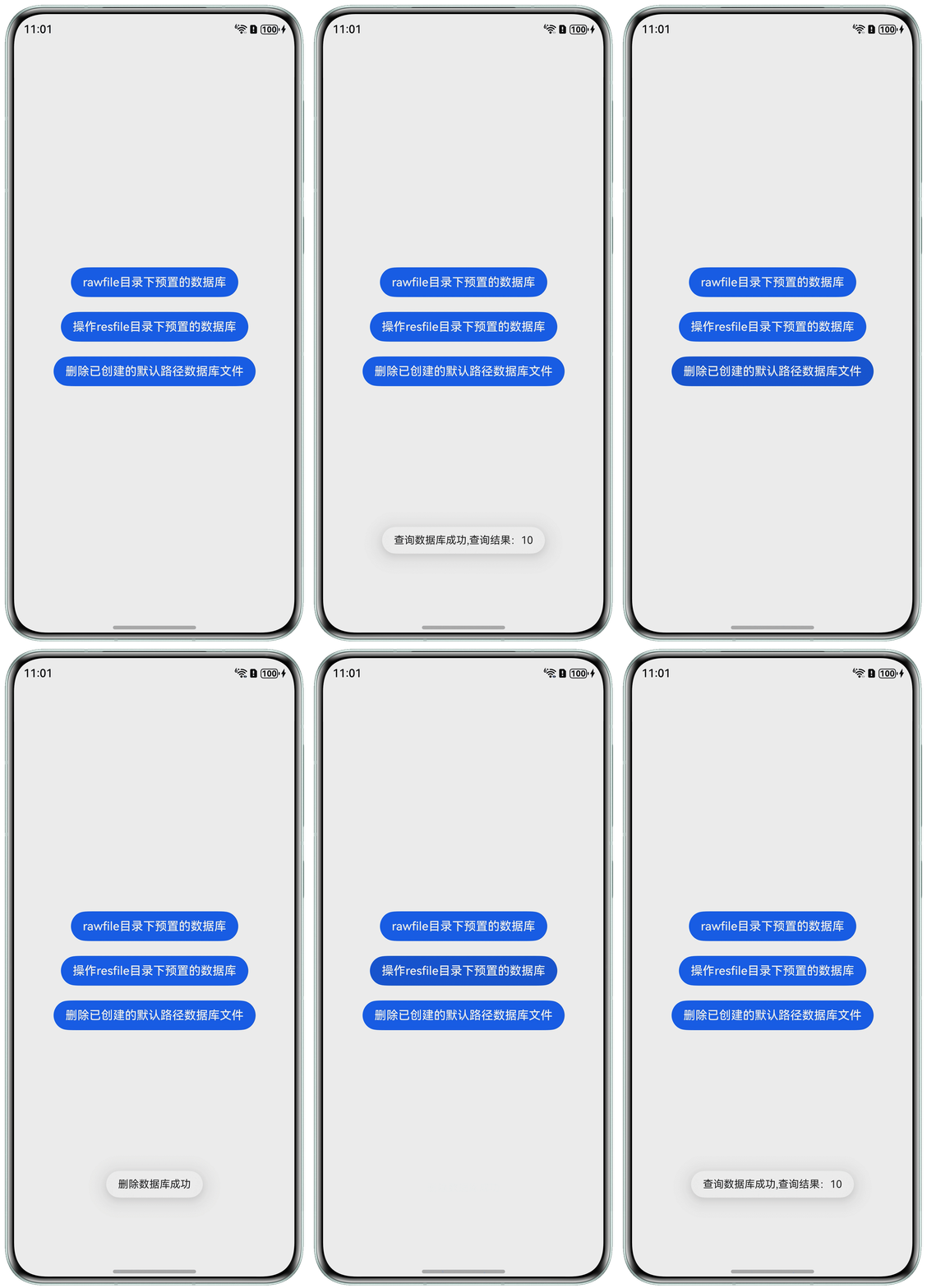
代码运行效果: