问题现象
如何实现以下几种样式的Progress进度条:
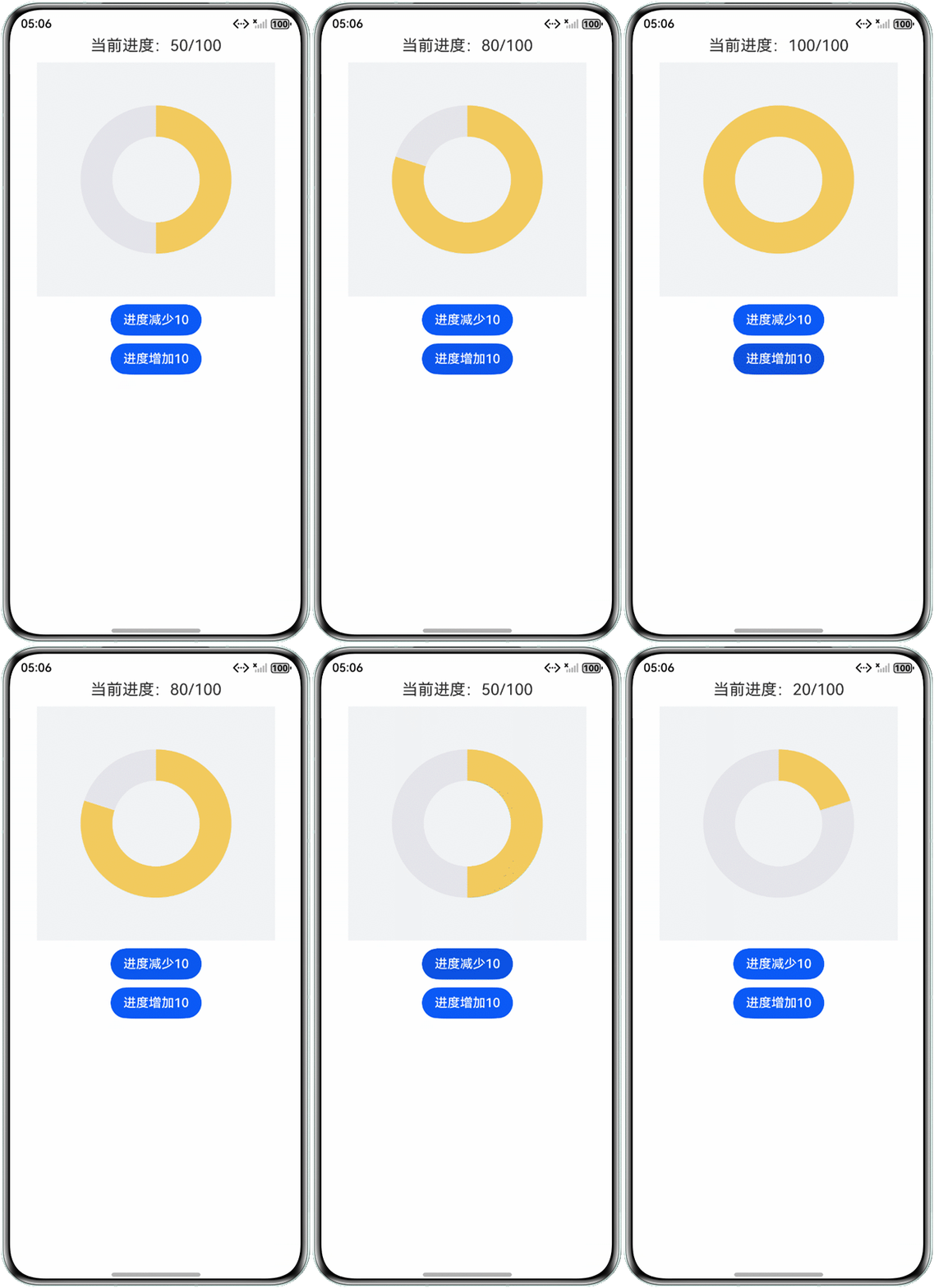
- 无凸起的环形进度条:起始点和结束点无半圆凸起,保持进度条的完整闭环的环形进度条。
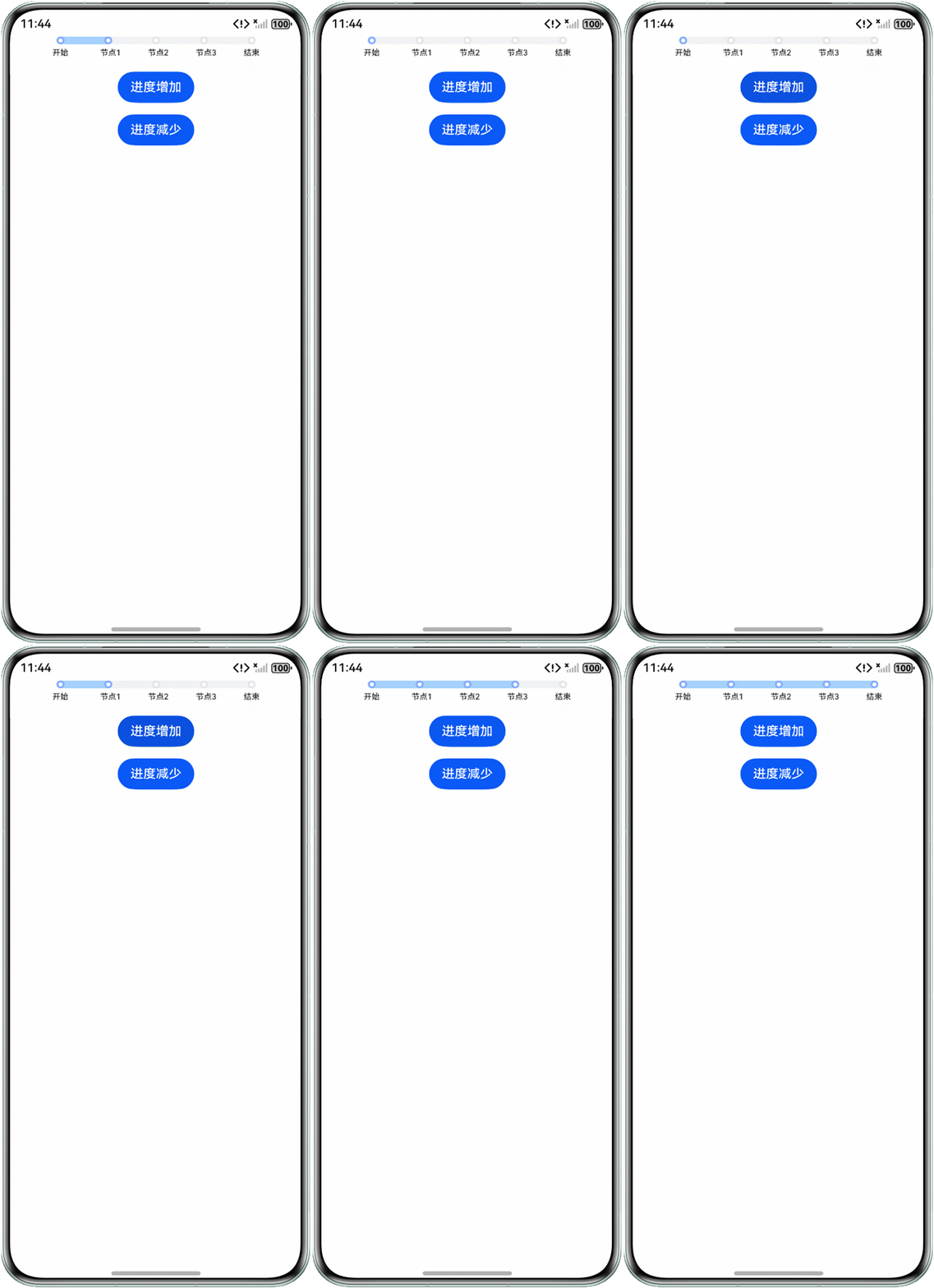
- 阶段进度条:进度划分为多个阶段,每经过一个阶段会让阶段图标亮起,常用于展示任务流程。
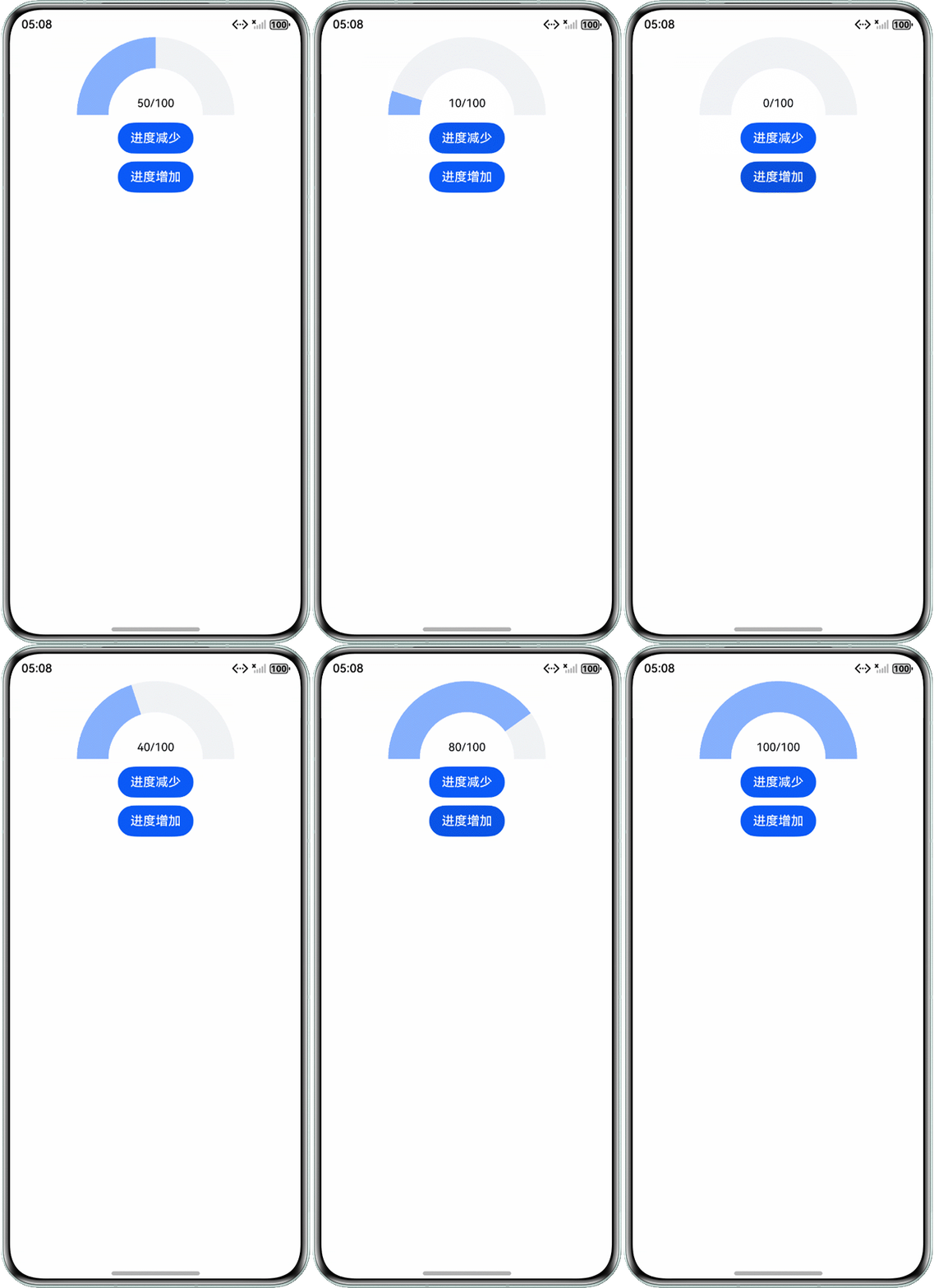
- 弧形进度条:以弧形轨迹显示进度,常用于仪表盘中的弧形进度条。
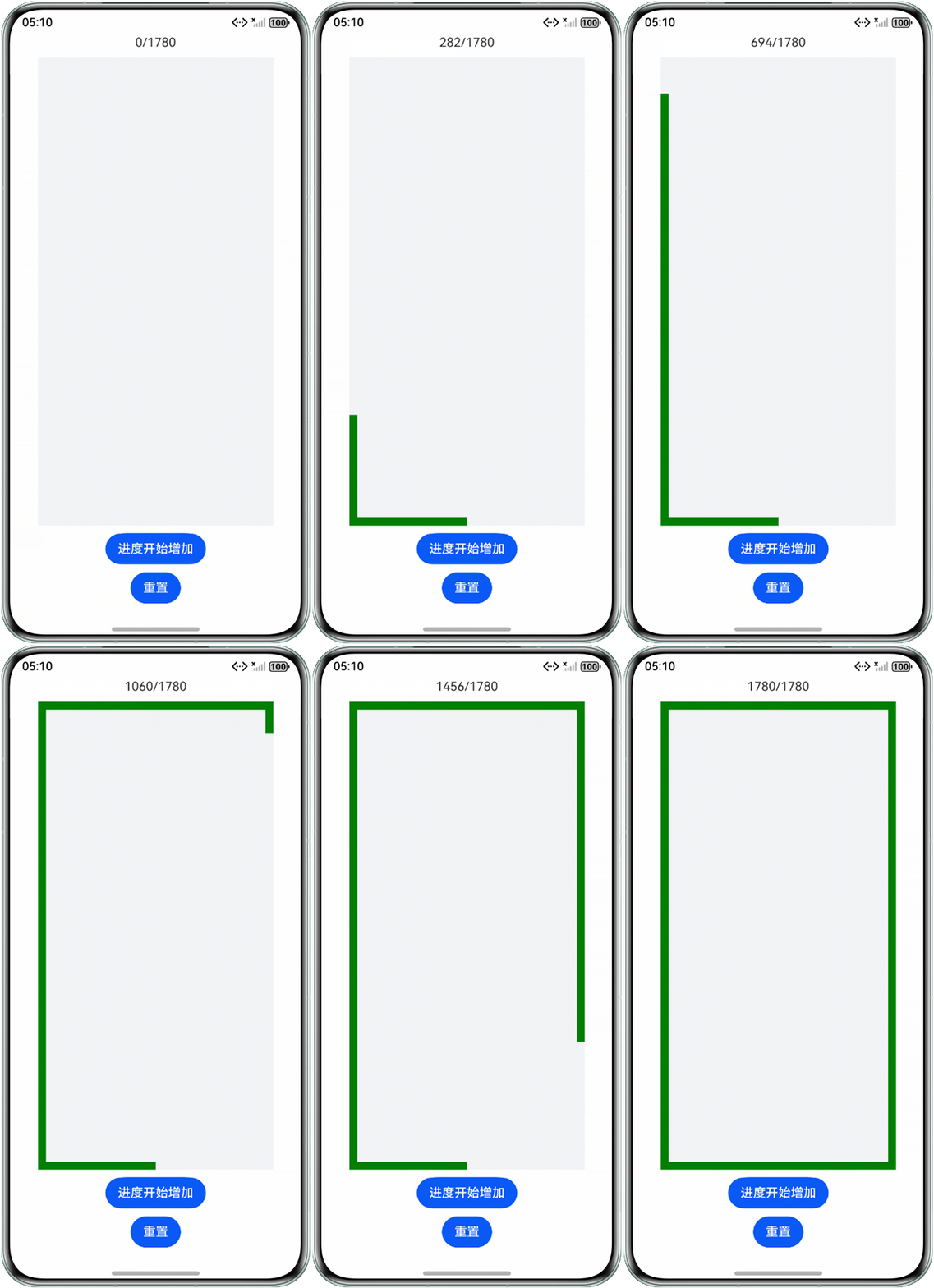
- 方形环绕的进度条:进度条围绕在内容或控件的四周,形成一个方形包围的进度展示效果,常用于加载或任务进度可视化。
背景知识
- Progress:进度条组件,用于显示内容加载或操作处理等进度。value可指定当前进度值。设置小于0的数值时置为0,设置大于total的数值时置为total。
- ProgressType可以设置进度条样式。ProgressType类型包括:ProgressType.Linear(线性样式)、ProgressType.Ring(环形无刻度样式)、ProgressType.ScaleRing(环形有刻度样式)、ProgressType.Eclipse(圆形样式)和ProgressType.Capsule(胶囊样式)。
- ContentModifier:提供自定义绘制组件内容区的能力。当开发者期望自定义组件的内容区时可以使用此功能。Progress组件可以通过contentModifier方法自定义内容区。
- DrawModifier:可设置前景、内容前景、内容和内容背景的绘制方法。当组件本身的绘制内容不满足需求时,可使用自定义组件绘制功能,在原有组件基础上部分绘制,或者全部自行绘制。
解决方案
可以采用如下不同的方案实现自定义Progress的样式:
- 场景一:无凸起的环形进度条。通过contentModifier方法自定义内容区,在内容区中添加Canvas画布组件。在画布组件中绘制圆形路径背景和圆弧路径进度(线条两端为平行线)从而实现当前场景。
@Entry
@Component
struct CustomProgressExample1 {
  @State value: number = 50;

  build() {
    Column({ space: 10 }) {
      Text(`当前进度:${this.value}/100`).fontSize(20);
      Progress({
        value: this.value
      })
        .contentModifier(new MyProgressModifier1()); // 绑定自定义进度条
      Button('进度减少10')
        .onClick(() => {
          if (this.value - 10 < 0) {
            this.value = 0;
          } else {
            this.value -= 10;
          }
        });
      Button('进度增加10')
        .onClick(() => {
          if (this.value + 10 > 100) {
            this.value = 100;
          } else {
            this.value += 10;
          }
        });
    }
    .width('100%')
    .height('100%');
  }
}

export class MyProgressModifier1 implements ContentModifier<ProgressConfiguration> {
  context: CanvasRenderingContext2D;

  constructor() {
    this.context = new CanvasRenderingContext2D(new RenderingContextSettings(true));
  }

  applyContent(): WrappedBuilder<[ProgressConfiguration]> {
    return wrapBuilder(myProgress1);
  }
}

@Builder
export function myProgress1(config: ProgressConfiguration) {
  Column() {
    Canvas((config.contentModifier as MyProgressModifier1).context)
      .onReady(() => {
        let context = (config.contentModifier as MyProgressModifier1).context;
        context.lineWidth = 40;
        context.lineCap = 'butt';
        // 先画一个完整的灰色圆环作为背景
        context.strokeStyle = '#e5e5ea';
        context.arc(150, 150, 75, Math.PI * (-0.5), Math.PI * (1.5)); // 绘制完整圆环
        context.stroke();
        context.beginPath();
        // 再画金色部分作为进度
        context.strokeStyle = '#f3cb5d';
        context.arc(150, 150, 75, Math.PI * (-0.5), Math.PI * (-0.5 + config.value / config.total * 2));
        context.stroke();
      })
      .width(300)
      .height(300)
      .backgroundColor('#f1f3f5');
  };
}
效果预览:
- 场景二:阶段进度条。同样是自定义内容区,但是是使用多个基础组件组合实现自定义进度条。在布局组件中通过相对定位的方式将多个阶段图标设置在相应的进度对应的位置,在下层添加线性渐变的组件实现进度条功能(如果需要可设置多个阶段的颜色)。
@Entry
@Component
struct CustomProgressExample2 {
  textList: string[] = ['开始', '节点1', '节点2', '节点3', '结束'];
  @State value: number = 2;

  build() {
    Column({ space: 15 }) {
      Progress({
        value: this.value,
        total: this.textList.length
      })
        .contentModifier(new MyProgressModifier2(this.textList))
        .width(240);
      Button('进度增加')
        .onClick(() => {
          if (this.value + 1 > this.textList.length) {
            this.value = this.textList.length;
          } else {
            this.value++;
          }
        });
      Button('进度减少')
        .onClick(() => {
          if (this.value - 1 < 1) {
            this.value = 1;
          } else {
            this.value--;
          }
        });
    }
    .height('100%')
    .width('100%');
  }
}

export class MyProgressModifier2 implements ContentModifier<ProgressConfiguration> {
  textList: string[] = [];

  constructor(textList: string[]) {
    this.textList = textList;
  }

  applyContent(): WrappedBuilder<[ProgressConfiguration]> {
    return wrapBuilder(myProgress2);
  }
}

@Builder
export function myProgress2(config: ProgressConfiguration) {
  Stack() {
    ForEach((config.contentModifier as MyProgressModifier2).textList, (item: string, index: number) => {
      // 阶段进度条上的点
      Row() {
        Circle({ width: 5, height: 5 }).fill('#ffffff');
      }
      .borderRadius('50%')
      .width(10)
      .height(10)
      .backgroundColor(index < config.value ? '#86b0ff' : '#e5e5ea')
      .justifyContent(FlexAlign.Center)
      .position({ x: -5 + index * 240 / (config.total - 1) })
      .zIndex(2);
      // 阶段描述
      Text(item)
        .position({ x: -10 + index * 240 / (config.total - 1), y: 15 })
        .fontSize(10)
        .fontColor('#ea000000');
    });
    // 阶段进度条
    Row()
      .width('100%')
      .height(10)
      .linearGradient({
        direction: GradientDirection.Right,
        colors: [['#a4d3ff', (config.value - 1) / (config.total - 1)],
          ['#f1f3f5', (config.value - 1) / (config.total - 1)]]
      })
      .backgroundColor('#f1f3f5')
      .zIndex(1);
  }
  .height(30)
  .alignContent(Alignment.TopStart);
}
效果预览:
- 场景三:弧形进度条。不仅可以使用contentModifier方法自定义内容区,还可以通过通用属性drawModifier绘制组件内容。在绘制内容接口中获取DrawContext对象,再通过该对象中canvas方法获取用于绘制的画布实例。通过@ohos.graphics.drawing (绘制模块)的接口绘制内容到画布,从而实现自定义进度条样式。该方案可以在组件基础上添加前景保留原本的内容。
import { drawing } from '@kit.ArkGraphics2D';

@Entry
@Component
struct CustomProgressExample3 {
  @State num: number = 50; // Progress进度值
  @State modifier: MyProgressDrawModifier = new MyProgressDrawModifier(this.getUIContext()); //

  aboutToAppear(): void {
    this.modifier.value = this.num; // 初始化绘制时的进度值
    this.modifier.total = 100;
  }

  build() {
    Column({ space: 10 }) {
      Progress({ value: this.num, total: 100 })
        .width(200)
        .height(100)
        .drawModifier(this.modifier);
      Button('进度减少')
        .onClick(() => {
          if (this.modifier.value - 10 < 0) {
            this.modifier.value = 0;
          } else {
            this.modifier.value -= 10;
          }
          this.num = this.modifier.value; // 同步绘制的进度值到Progress组件
        });
      Button('进度增加')
        .onClick(() => {
          if (this.modifier.value + 10 > 100) {
            this.modifier.value = 100;
          } else {
            this.modifier.value += 10;
          }
          this.num = this.modifier.value;
        });
    }
    .width('100%')
    .height('100%');
  }
}

export class MyProgressDrawModifier extends DrawModifier {
  value: number = 0; // 绘制时的进度值
  total: number = 0; // 绘制时的最大值
  uiContext: UIContext;

  constructor(uiContext: UIContext) {
    super();
    this.uiContext = uiContext;
  }

  // 自定义绘制内容,会替换组件原本绘制的内容
  drawContent(drawContext: DrawContext): void {
    let canvas = drawContext.canvas; // 获取绘制内容时的画布
    let pen = new drawing.Pen(); // 创建画笔对象
    pen.setStrokeWidth(this.uiContext.vp2px(40)); // 设置绘制时的线宽
    pen.setColor({
      // 设置绘制时的颜色,进度条背景
      alpha: 255,
      red: 241,
      green: 243,
      blue: 245
    });
    let path = new drawing.Path(); // 创建路径,背景路径
    path.addArc({
      // 弧形进度条背景路径
      left: this.uiContext.vp2px(20),
      top: this.uiContext.vp2px(20),
      right: this.uiContext.vp2px(180),
      bottom: this.uiContext.vp2px(180)
    }, -180, 180);
    canvas.attachPen(pen); // 绑定画笔到画布
    canvas.drawPath(path); // 绘制弧形进度条背景

    pen.setColor({
      // 修改绘制时的颜色,用于绘制进度条进度
      alpha: 255,
      red: 134,
      green: 176,
      blue: 255
    });
    let path2 = new drawing.Path(); // 进度条进度的路径
    path2.addArc({
      left: this.uiContext.vp2px(20),
      top: this.uiContext.vp2px(20),
      right: this.uiContext.vp2px(180),
      bottom: this.uiContext.vp2px(180)
    }, -180, this.value / this.total * 180);
    canvas.attachPen(pen); // pen的效果修改后重新绑定
    canvas.drawPath(path2); // 绘制进度
    canvas.detachPen(); // 画笔与画布解绑

    let font = new drawing.Font(); // 字型对象
    font.setSize(50); // 设置字体大小,单位px
    let text = `${this.value}/100`; // 进度值文本
    let width = font.measureText(text, 0);
    let textBlob = drawing.TextBlob.makeFromString(text, font);
    canvas.drawTextBlob(textBlob, this.uiContext.vp2px(100) - width / 2, this.uiContext.vp2px(90)); // 绘制进度的文本
  }
}
效果预览:
- 场景四:方形环绕的进度条。除了如上三个场景中的方案,还可以直接通过组件模仿进度条效果,从而实现自定义Proress。
- 直接使用画布组件自定义进度条,参考如何实现圆角矩形进度条。
- 通过Polyline(折线绘制组件)设置不同进度下坐标点的位置,实现环绕内容的方形进度条。如下是通过折线组件实现。
@Entry
@Component
struct CustomProgressExample4 {
  componentWidth: number = 300;
  componentHeight: number = 600;
  stroke: number = 10; // 折线进度条的宽度
  polylineWidth: number = this.componentWidth - this.stroke;
  polylineHeight: number = this.componentHeight - this.stroke;
  @State @Watch('setPoints') value: number = 0; // 进度值,变动会修改折线的坐标点
  @State points: number[][] = []; // 折线坐标点
  total: number = 2 * (this.componentWidth + this.componentHeight) - 4 * this.stroke; // 折线进度条最大值

  setPoints() {
    if (this.value < this.polylineWidth / 2) { // 进度未超过左下角
      this.points = [
        [this.polylineWidth / 2, this.polylineHeight],
        [this.polylineWidth / 2 - this.value, this.polylineHeight]
      ];
    } else if (this.value < this.componentWidth / 2 + this.componentHeight) { // 进度在组件左边
      this.points = [
        [this.polylineWidth / 2, this.polylineHeight],
        [0, this.polylineHeight],
        [0, this.polylineHeight + this.polylineWidth / 2 - this.value]
      ];
    } else if (this.value < this.polylineWidth * 3 / 2 + this.componentHeight) { //进度在组件顶部
      this.points = [
        [this.polylineWidth / 2, this.polylineHeight],
        [0, this.polylineHeight],
        [0, 0],
        [this.value - this.polylineWidth / 2 - this.polylineHeight, 0]
      ];
    } else if (this.value < this.polylineWidth * 3 / 2 + this.componentHeight * 2) { //进度在组件右侧
      this.points = [
        [this.polylineWidth / 2, this.polylineHeight],
        [0, this.polylineHeight],
        [0, 0],
        [this.polylineWidth, 0],
        [this.polylineWidth, this.value - this.polylineWidth / 2 * 3 - this.polylineHeight]];
    } else { // 进度超过右下角
      this.points = [
        [this.polylineWidth / 2, this.polylineHeight],
        [0, this.polylineHeight],
        [0, 0],
        [this.polylineWidth, 0],
        [this.polylineWidth, this.polylineHeight],
        [this.total - this.value + this.polylineWidth / 2, this.polylineHeight]];
    }
  }

  build() {
    Column({ space: 10 }) {
      Text(this.value + '/' + this.total);
      Stack() {
        Polyline() // 折线作为环绕组件的进度条
          .width(this.polylineWidth)
          .height(this.polylineHeight)
          .fillOpacity(0)
          .stroke(Color.Green)
          .strokeWidth(this.stroke)
          .points(this.points);
      }.height(this.componentHeight)
      .width(this.componentWidth)
      .backgroundColor('#f1f3f5');

      Button('进度开始增加')
        .onClick(() => {
          let id = setInterval(() => {
            if (this.value + 10 < this.total) {
              this.value += 10;
            } else {
              this.value = this.total;
              clearInterval(id);
            }
          }, 10);
        });
      Button('重置')
        .onClick(() => {
          this.value = 0;
        });
    }
    .height('100%')
    .width('100%');
  }
}
效果预览: