问题描述
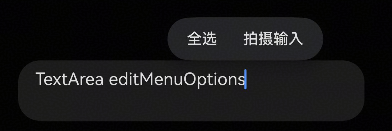
在使用TextInput、TextArea等文本输入类组件时,系统会默认生成编辑选项,如拍照输入、全选等气泡内容,如果希望隐藏该内容,如何实现?
解决措施
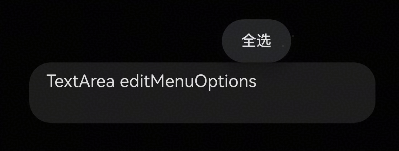
方案一:禁用editMenuOptions的菜单选项。
- 以禁止为例,定义onCreateMenu方法,使用filter函数切除Array中的粘贴选项。
- 在editMenuOptions属性中使用onCreateMenu方法初始化editMenu。
示例代码如下:
@Entry
@Component
struct TextAreaExample {
  @State text: string = 'TextArea editMenuOptions';

  onCreateMenu(menuItems: Array<TextMenuItem>) {
    menuItems = menuItems.filter((item) => item.content !== 'Photo Input'); // Can also choose to disable other menu options such as "Aelect All".
    return menuItems;
  }

  build() {
    Column() {
      TextArea({ text: this.text })
        .width('95%')
        .height(56)
        .editMenuOptions({
          onCreateMenu: this.onCreateMenu,
          onMenuItemClick: (menuItem: TextMenuItem, textRange: TextRange) => {
            return false; // Return false, execute custom logic first, then execute system logic
          }
        })
        .margin({ top: 100 })
    }
    .width('90%')
    .margin('5%')
  }
}
实现效果:
方案二:如果想隐藏该组件上所有的弹出气泡,包括复制、粘贴、全选、拍摄输入等,可以利用selectionMenuHidden属性隐藏系统文本选择菜单,示例代码如下:
@Entry
@Component
struct Index {
  @State message: string = '';

  build() {
    Column() {
      Text(`The input content:${this.message}`)
        .margin({
          top: 100,
          bottom: 30
        })
      TextInput({ placeholder: 'Please enter the content' })
        .borderRadius(0)
        .onChange((value: string) => {
          this.message = value;
        })
        .selectionMenuHidden(true)
    }
    .width('100%')
    .height('100%')
  }
} 方案三:对于需要菜单都自定义实现的,可以拦截整个默认菜单并使用自定义bindContextMenu代替。可以参考:长按弹出菜单的自定义预览样式。
参考链接