背景知识
- List列表包含一系列相同宽度的列表项。适合连续、多行呈现同类数据,例如图片和文本。对单条列表项进行横向滑动显示其支持的操作项,是一种比较常见的移动端交互方式。
- swipeAction用于设置ListItem的划出组件,其必填参数为SwipeActionOptions。
- PanGesture:滑动手势事件,当滑动的最小距离达到设定的最小值时触发滑动手势事件。
解决方案
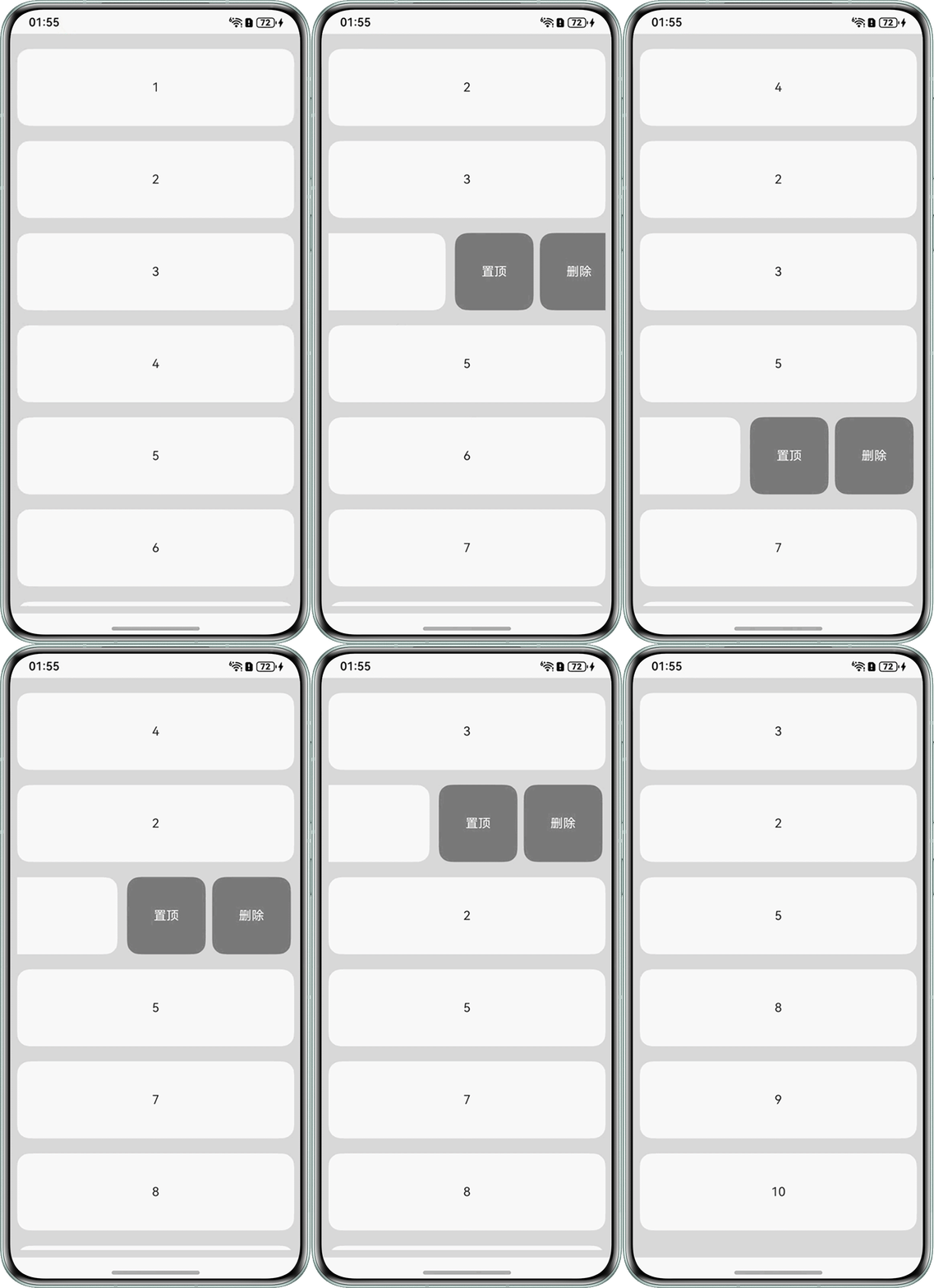
- 场景一:通过左滑显示删除按钮,具体实现如下:
- 为ListItem绑定滑动事件。
- ListItem滑动时动态展示删除按钮。
- 点击删除按钮实现删除逻辑,并且更新列表项数据。
完整代码示例如下:
@Entry
@Component
struct ListSwipeSlideDelete {
  @State itemIndexArr: number[] = [1, 2, 3, 4, 5, 6, 7, 8, 9, 10];

  @Builder
  itemEnd(index: number) {
    Row() {
      Text('置顶')
        .margin({ left: 8, top: 10 })
        .fontSize(16)
        .backgroundColor('#808080')
        .fontColor(Color.White)
        .textAlign(TextAlign.Center)
        .borderRadius(16)
        .width(100)
        .height(100.5)
        .onClick(() => {
          this.itemIndexArr.splice(0, 0, this.itemIndexArr[index]);
          this.itemIndexArr.splice(index + 1, 1);
        });
      Text('删除')
        .margin({ left: 8, top: 10 })
        .fontSize(16)
        .backgroundColor('#808080')
        .fontColor(Color.White)
        .borderRadius(16)
        .textAlign(TextAlign.Center)
        .width(100)
        .height(100.5)
        .onClick(() => {
          // 用数组的删除方法模拟删除逻辑
          this.itemIndexArr.splice(index, 1);
        });
    }.padding(4).justifyContent(FlexAlign.SpaceEvenly);
  }

  build() {
    Column() {
      List({ space: 10 }) {
        ForEach(this.itemIndexArr, (item: string, index) => {
          ListItem() {
            Text('' + item)
              .width('100%')
              .height(100)
              .fontSize(16)
              .margin({ top: 10 })
              .borderRadius(16)
              .textAlign(TextAlign.Center)
              .backgroundColor(Color.White);
          }.swipeAction({ end: this.itemEnd.bind(this, index), edgeEffect: SwipeEdgeEffect.Spring });
        });
      }.edgeEffect(EdgeEffect.None).scrollBar(BarState.Off);
    }
    .padding(10)
    .backgroundColor(0xDCDCDC)
    .width('100%')
    .height('100%');
  }
}
实现效果如下:
- 场景二:通过点击显示删除按钮,具体实现如下:
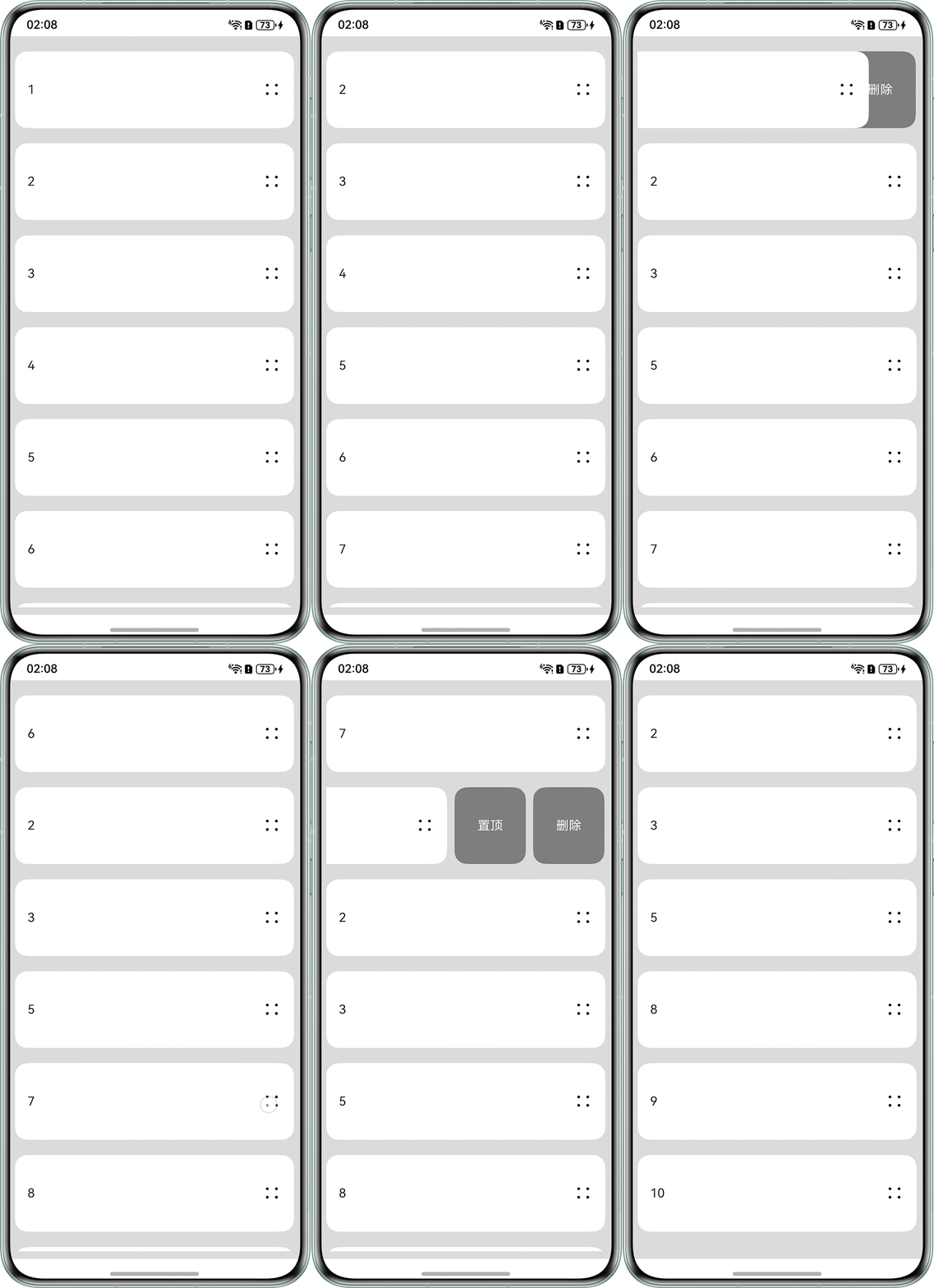
- 使用swipeStatus数组记录每个列表项的滑动偏移量,0表示未滑动,-200表示完全滑出(显示操作按钮)。
- 由于onClick事件与swipeAction无法实现联动,可通过PanGesture实现手动滑动功能,滑动结束后系统将根据滑动距离自动决定展开或收起操作。
- 通过translate属性配合animation实现平滑的滑动过渡。
完整代码示例如下:@Entry @Component struct ListSwipeClickDelete { @State itemIndexArr: number[] = [1, 2, 3, 4, 5, 6, 7, 8, 9, 10]; // 存储每个列表项的滑动状态(0:未滑动,-200:完全滑出) @State swipeStatus: number[] = []; aboutToAppear() { // 初始化滑动状态数组,与列表项数量一致 this.itemIndexArr.forEach(() => { this.swipeStatus.push(0); }); } // 切换滑动状态的方法 toggleSwipe(index: number) { // 如果当前未滑动则滑出,已滑出则收起 this.swipeStatus[index] = this.swipeStatus[index] === 0 ? -200 : 0; } @Builder itemEnd(index: number) { Row() { Text('置顶') .margin({ left: 8 }) .fontSize(16) .backgroundColor('#808080') .fontColor(Color.White) .textAlign(TextAlign.Center) .borderRadius(16) .width(90) .height(100.5) .onClick(() => { // 置顶逻辑 this.itemIndexArr.splice(0, 0, this.itemIndexArr[index]); this.itemIndexArr.splice(index + 1, 1); // 同步更新滑动状态数组 const status = this.swipeStatus[index]; this.swipeStatus.splice(0, 0, status); this.swipeStatus.splice(index + 1, 1); // 重置滑动状态 this.swipeStatus[0] = 0; }); Text('删除') .margin({ left: 8 }) .fontSize(16) .backgroundColor('#808080') .fontColor(Color.White) .borderRadius(16) .textAlign(TextAlign.Center) .width(90) .height(100.5) .onClick(() => { // 删除逻辑 this.itemIndexArr.splice(index, 1); this.swipeStatus.splice(index, 1); }); } .width(200) .height(100) .justifyContent(FlexAlign.SpaceEvenly); } build() { Column() { List({ space: 10 }) { ForEach(this.itemIndexArr, (item: number, index: number) => { ListItem() { Stack({ alignContent: Alignment.End }) { // 滑动操作按钮(始终在底层) this.itemEnd(index); // 列表项主内容(可滑动部分) Row() { Text('' + item) .fontSize(16); Image($r('sys.media.ohos_ic_public_more')) .width(24) .height(24) .onClick(() => { // 点击图片触发滑动状态切换 this.toggleSwipe(index); }); } .width('100%') .height(100) .justifyContent(FlexAlign.SpaceBetween) .padding({ left: 16, right: 16 }) .backgroundColor(Color.White) .borderRadius(16) // 通过translate实现滑动效果 .translate({ x: this.swipeStatus[index] }) // 添加滑动动画 .animation({ duration: 300, curve: Curve.EaseOut }) // 支持手动滑动手势 .gesture( PanGesture({ direction: PanDirection.Horizontal }) .onActionUpdate((event: GestureEvent) => { // 限制滑动范围在0到200之间 let newX = (this.swipeStatus[index] + event.offsetX) as number; if (newX > 0) { newX = 0; } if (newX < -200) { newX = -200; } this.swipeStatus[index] = newX; }) .onActionEnd(() => { // 滑动结束后自动调整状态(超过一半则完全展开,否则收起) if (this.swipeStatus[index] < -100) { this.swipeStatus[index] = -200; } else { this.swipeStatus[index] = 0; } }) ); } .margin({ top: 10 }); }; }); } .edgeEffect(EdgeEffect.None) .scrollBar(BarState.Off); } .padding(10) .backgroundColor(0xDCDCDC) .width('100%') .height('100%'); } }
实现效果如下: