背景知识
- 提供用于图形绘制和媒体数据写入的Surface(详细参考自定义渲染 (XComponent))负责将其嵌入到视图中,支持应用自定义Surface位置和大小。
- setSpecificSystemBarEnabled可设置主窗口状态栏、底部导航区域的显示和隐藏,使用Promise异步回调。
- 使用getWindowAvoidArea方法获取避让区域的高度,据此设置应用页面内容的上下padding实现避让状态栏和导航栏。
- onPageShow在router路由页面(仅@Entry装饰的自定义组件)每次显示时触发一次,包括路由跳转、应用进入前台等场景。
问题定位
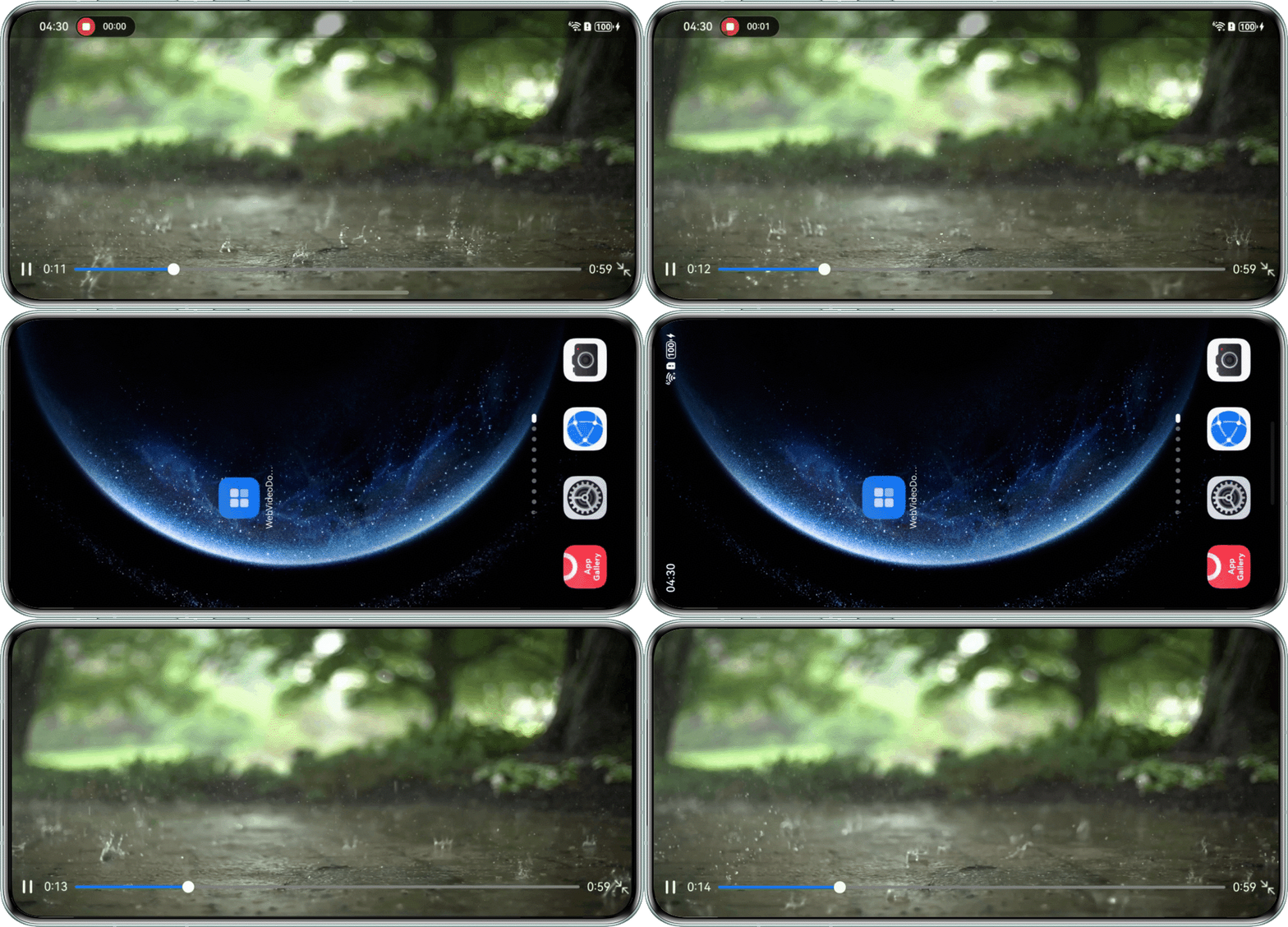
- 使用DevEco Testing查看问题页面,视频组件为XComponent组件。
- 查看全屏时的相关设置,点击全屏按钮时应用沉浸式横屏显示。并且页面使用onPageShow在应用进入前台时避让导航栏和状态栏。
@State isPaused: boolean = true; // 暂停播放

onPageShow() {
  this.isPaused = true; // 恢复播放
  // 重新进入该页面时退出沉浸式
  let context: common.UIAbilityContext = this.getUIContext().getHostContext() as common.UIAbilityContext;
  window.getLastWindow(context).then((lastWindow) => {
    lastWindow.setWindowLayoutFullScreen(false);
    lastWindow.setWindowSystemBarEnable(['status', 'navigation']);
  });
}

修改建议
页面不使用onPageShow避让导航栏和状态栏,而是设置为点击退出按钮退出全屏时再避让导航栏和状态栏。
import display from '@ohos.display';
import emitter from '@ohos.events.emitter';
import { common } from '@kit.AbilityKit';
import media from '@ohos.multimedia.media';
import { audio } from '@kit.AudioKit';
import { window } from '@kit.ArkUI';

const PROPORTION = 0.99; // 占屏幕比例
const SURFACE_W = 0.9; // 表面宽比例
const SURFACE_H = 1.78; // 表面高比例
const SET_INTERVAL = 100; // interval间隔时间
const TIME_ONE = 60000;
const TIME_TWO = 1000;

let innerEventFalse: emitter.InnerEvent = {
  eventId: 1,
  priority: emitter.EventPriority.HIGH
};
let innerEventTrue: emitter.InnerEvent = {
  eventId: 2,
  priority: emitter.EventPriority.HIGH
};
let innerEventWH: emitter.InnerEvent = {
  eventId: 3,
  priority: emitter.EventPriority.HIGH
};

@Entry
@Component
struct Index {
  tag: string = 'AVPlayManager';
  private xComponentController: XComponentController = new XComponentController();
  private avPlayer: media.AVPlayer | null = null;
  private surfaceId: string = '';
  private intervalID: number = -1;
  private seekTime: number = -1;
  private context: common.UIAbilityContext | undefined = undefined;
  private fileName: string = 'video3.mp4'; // 'video3.mp4'需要在src/main/resources/rawfile中替换为开发者需要的视频资源文件
  private isSwiping: boolean = false; // 用户滑动过程中
  @State isPaused: boolean = true; // 暂停播放
  @State xComponentFlag: boolean = false;
  @StorageLink('durationTime') durationTime: number = 0; // 视频总时长
  @StorageLink('currentTime') currentTime: number = 0; // 视频当前时间
  @StorageLink('speedName') speedName: string = '1_0X';
  @StorageLink('speedIndex') speedIndex: number = 0; // 倍速索引
  private surfaceW: number | null = null;
  private surfaceH: number | null = null;
  private percent: number = 0;
  private windowWidth: number = 300;
  private windowHeight: number = 200;
  @State xHeight: string = '';
  @State xWidth: string = '';
  @State @Watch('changeOrientation') isFull: boolean = false;

  getDurationTime(): number {
    return this.durationTime;
  }

  getCurrentTime(): number {
    return this.currentTime;
  }

  timeConvert(time: number): string {
    let min: number = Math.floor(time / TIME_ONE);
    let second: string = ((time % TIME_ONE) / TIME_TWO).toFixed(0);
    second = second.padStart(2, '0');
    return `${min}:${second}`;
  }

  async msleepAsync(ms: number): Promise<boolean> {
    return new Promise((resolve) => {
      setTimeout(() => {
        resolve(true);
      }, ms);
    });
  }

  async avSetupVideo() {
    // 通过UIAbilityContext的resourceManager成员的getRawFd接口获取媒体资源播放地址。
    // 返回类型为{fd,offset,length},fd为HAP包fd地址,offset为媒体资源偏移量,length为播放长度。
    if (this.context === undefined) {
      return;
    }
    let fileDescriptor = await this.context.resourceManager.getRawFd(this.fileName);
    let avFileDescriptor: media.AVFileDescriptor =
      { fd: fileDescriptor.fd, offset: fileDescriptor.offset, length: fileDescriptor.length };

    if (this.avPlayer) {
      console.info(`${this.tag}: init avPlayer release2createNew`);
      this.avPlayer.release();
      await this.msleepAsync(1500);
    }
    // 创建avPlayer实例对象
    this.avPlayer = await media.createAVPlayer();

    // 创建状态机变化回调函数
    await this.setAVPlayerCallback((avPlayer: media.AVPlayer) => {
      this.percent = avPlayer.width / avPlayer.height;
      this.setVideoWH();
      this.durationTime = this.getDurationTime();
      setInterval(() => { // 更新当前时间
        if (!this.isSwiping) {
          this.currentTime = this.getCurrentTime();
        }
      }, SET_INTERVAL);
    });

    // 为fdSrc赋值触发initialized状态机上报
    this.avPlayer.fdSrc = avFileDescriptor;

    this.avPlayer.on('audioInterrupt', (interruptEvent: audio.InterruptEvent) => {
      if (interruptEvent.forceType === audio.InterruptForceType.INTERRUPT_FORCE) {
        // 强制打断类型(INTERRUPT_FORCE):音频相关处理已由系统执行,应用需更新自身状态,做相应调整。
        switch (interruptEvent.hintType) {
          case audio.InterruptHint.INTERRUPT_HINT_PAUSE:
            this.isPaused = true; // 应用切换至音频暂停状态
            let context: common.UIAbilityContext = this.getUIContext().getHostContext() as common.UIAbilityContext;
            // 调用该接口手动改变设备横竖屏状态
            window.getLastWindow(context).then((lastWindow) => {
              lastWindow.setPreferredOrientation(window.Orientation.PORTRAIT);
            });
            break;
          case audio.InterruptHint.INTERRUPT_HINT_STOP:
            // 此分支表示系统已将音频流停止(永久失去焦点),为保持状态一致,应用需切换至音频暂停状态。
            this.isPaused = true; // 此句为简化处理,代表应用切换至音频暂停状态的若干操作。
            break;
          default:
            break;
        }
      }
    });
  }

  avPlay(): void {
    if (this.avPlayer) {
      try {
        this.avPlayer.play();
      } catch (e) {
        console.error(`${this.tag}: avPlay = ${JSON.stringify(e)}`);
      }
    }
  }

  avPause(): void {
    if (this.avPlayer) {
      try {
        this.avPlayer.pause();
        console.info(`${this.tag}: avPause==`);
      } catch (e) {
        console.error(`${this.tag}: avPause== ${JSON.stringify(e)}`);
      }
    }
  }

  async avSeek(seekTime: number): Promise<void> {
    if (this.avPlayer) {
      try {
        console.info(`${this.tag}: videoSeek  seekTime== ${seekTime}`);
        this.avPlayer.seek(seekTime, 2);
        this.currentTime = seekTime;
      } catch (e) {
        console.error(`${this.tag}: videoSeek== ${JSON.stringify(e)}`);
      }
    }
  }

  // 注册avplayer回调函数
  async setAVPlayerCallback(callback: (avPlayer: media.AVPlayer) => void): Promise<void> {
    // seek操作结果回调函数
    if (this.avPlayer == null) {
      console.error(`${this.tag}: avPlayer has not init!`);
      return;
    }
    this.avPlayer.on('seekDone', (seekDoneTime) => {
      console.info(`${this.tag}: setAVPlayerCallback AVPlayer seek succeeded, seek time is ${seekDoneTime}`);
    });
    this.avPlayer.on('speedDone', (speed) => {
      console.info(`${this.tag}: setAVPlayerCallback AVPlayer speedDone, speed is ${speed}`);
    });
    // error回调监听函数,当avPlayer在操作过程中出现错误时调用reset接口触发重置流程
    this.avPlayer.on('error', (err) => {
      console.error(`${this.tag}: setAVPlayerCallback Invoke avPlayer failed ${JSON.stringify(err)}`);
      if (this.avPlayer == null) {
        console.error(`${this.tag}: avPlayer has not init on error`);
        return;
      }
      this.avPlayer.reset();
    });
    // 状态机变化回调函数
    this.avPlayer.on('stateChange', async (state) => {
      if (this.avPlayer == null) {
        console.info(`${this.tag}: avPlayer has not init on state change`);
        return;
      }
      switch (state) {
        case 'idle': // 成功调用reset接口后触发该状态机上报
          console.info(`${this.tag}: setAVPlayerCallback AVPlayer state idle called.`);
          break;
        case 'initialized': // avplayer设置播放源后触发该状态上报
          console.info(`${this.tag}: setAVPlayerCallback AVPlayer state initialized called.`);
          if (this.surfaceId) {
            this.avPlayer.surfaceId = this.surfaceId; // 设置显示画面,当播放的资源为纯音频时无需设置
            console.info(`${this.tag}: setAVPlayerCallback this.avPlayer.surfaceId = ${this.avPlayer.surfaceId}`);
            this.avPlayer.prepare();
          }
          break;
        case 'prepared': // prepare调用成功后上报该状态机
          console.info(`${this.tag}: setAVPlayerCallback AVPlayer state prepared called.`);
          this.avPlayer.on('bufferingUpdate', (infoType: media.BufferingInfoType, value: number) => {
            console.info(`${this.tag}: bufferingUpdate called, infoType value: ${infoType}, value:${value}}`);
          });
          this.durationTime = this.avPlayer.duration;
          this.currentTime = this.avPlayer.currentTime;
          this.avPlayer.play(); // 调用播放接口开始播放
          this.avPlayer.setSpeed(media.PlaybackSpeed.SPEED_FORWARD_1_00_X);
          callback(this.avPlayer);
          break;
        case 'playing': // play成功调用后触发该状态机上报
          console.info(`${this.tag}: setAVPlayerCallback AVPlayer state playing called.`);
          if (this.intervalID !== -1) {
            clearInterval(this.intervalID);
          }
          this.intervalID = setInterval(() => { // 更新当前时间
            AppStorage.setOrCreate('durationTime', this.durationTime);
            AppStorage.setOrCreate('currentTime', this.currentTime);
          }, 100);
          // 根据播放状态提交相应事件
          let eventDataTrue: emitter.EventData = {
            data: {
              'flag': true
            }
          };
          let innerEventTrue: emitter.InnerEvent = {
            eventId: 2,
            priority: emitter.EventPriority.HIGH
          };
          emitter.emit(innerEventTrue, eventDataTrue);
          break;
        case 'completed': // 播放结束后触发该状态机上报
          console.info(`${this.tag}: setAVPlayerCallback AVPlayer state completed called.`);
          let eventDataFalse: emitter.EventData = {
            data: {
              'flag': false
            }
          };
          let innerEvent: emitter.InnerEvent = {
            eventId: 1,
            priority: emitter.EventPriority.HIGH
          };
          emitter.emit(innerEvent, eventDataFalse);
          if (this.intervalID !== -1) {
            clearInterval(this.intervalID);
          }
          this.avPlayer.off('bufferingUpdate');
          AppStorage.setOrCreate('currentTime', this.durationTime);
          break;
        case 'released':
          console.info(`${this.tag}: setAVPlayerCallback released called.`);
          break;
        case 'stopped':
          console.info(`${this.tag}: setAVPlayerCallback AVPlayer state stopped called.`);
          break;
        case 'error':
          console.error(`${this.tag}: setAVPlayerCallback AVPlayer state error called.`);
          break;
        case 'paused':
          console.info(`${this.tag}: setAVPlayerCallback AVPlayer state paused called.`);
          break;
        default:
          console.info(`${this.tag}: setAVPlayerCallback AVPlayer state unknown called.`);
          break;
      }
    });
    // 时间上报监听函数
    this.avPlayer.on('timeUpdate', (time: number) => {
      this.currentTime = time;
    });
  }

  aboutToAppear() {
    this.windowWidth = display.getDefaultDisplaySync().width;
    this.windowHeight = display.getDefaultDisplaySync().height;
    this.surfaceW = this.windowWidth * SURFACE_W;
    this.surfaceH = this.surfaceW / SURFACE_H;
    this.xHeight = this.surfaceH.toString() + 'px';
    this.xWidth = this.surfaceW.toString() + 'px';
    this.isPaused = true;
    this.context = this.getUIContext().getHostContext() as common.UIAbilityContext;
  }

  changeOrientation() {
    let context: common.UIAbilityContext = this.getUIContext().getHostContext() as common.UIAbilityContext;
    window.getLastWindow(context).then((lastWindow) => {
      lastWindow.setPreferredOrientation(this.isFull ? window.Orientation.AUTO_ROTATION_LANDSCAPE :
        window.Orientation.PORTRAIT);
      // 进入全屏时进入沉浸式,退出全屏时再显示状态栏和导航栏
      lastWindow.setWindowLayoutFullScreen(this.isFull);
      lastWindow.setWindowSystemBarEnable(this.isFull ? [] : ['status', 'navigation']);
    });
    this.xHeight = this.isFull ? '100%' : this.surfaceH?.toString() + 'px';
    this.xWidth = this.isFull ? '100%' : this.surfaceW?.toString() + 'px';
  }

  aboutToDisappear() {
    if (this.avPlayer == null) {
      console.info(`${this.tag}: avPlayer has not init aboutToDisappear`);
      return;
    }
    this.avPlayer.release((err) => {
      if (err == null) {
        console.info(`${this.tag}: videoRelease release success`);
      } else {
        console.error(`${this.tag}: videoRelease release failed, error message is = ${JSON.stringify(err.message)}`);
      }
    });
    emitter.off(innerEventFalse.eventId);
  }

  onPageHide() {
    this.avPause();
    this.isPaused = false;
  }

  onPageShow() {
    emitter.on(innerEventTrue, (res: emitter.EventData) => {
      if (res.data) {
        this.isPaused = res.data.flag;
        this.xComponentFlag = res.data.flag;
      }
    });
    emitter.on(innerEventFalse, (res: emitter.EventData) => {
      if (res.data) {
        this.isPaused = res.data.flag;
      }
    });
    emitter.on(innerEventWH, (res: emitter.EventData) => {
      if (res.data) {
        this.windowWidth = res.data.width;
        this.windowHeight = res.data.height;
        this.setVideoWH();
      }
    });
    this.avPlay();
    this.isPaused = true;
    // 重新进入该页面时不退出沉浸式
  }

  setVideoWH(): void {
    if (this.percent >= 1) { // 横向视频
      this.surfaceW = Math.round(this.windowWidth * PROPORTION);
      this.surfaceH = Math.round(this.surfaceW / this.percent);
    } else { // 纵向视频
      this.surfaceH = Math.round(this.windowHeight * PROPORTION);
      this.surfaceW = Math.round(this.surfaceH * this.percent);
    }
  }

  @Builder
  CoverXComponent() {
    XComponent({
      // 装载视频容器
      id: 'xComponent',
      type: XComponentType.SURFACE,
      controller: this.xComponentController
    })
      .id('VideoView')
      .visibility(this.xComponentFlag ? Visibility.Visible : Visibility.Hidden)
      .onLoad(() => {
        this.surfaceId = this.xComponentController.getXComponentSurfaceId();
        this.avSetupVideo();
      })
      .height(this.xHeight)
      .width(this.xWidth);
  }

  build() {
    Column() {
      Stack() {
        Stack() {
          this.CoverXComponent();
        }
        .alignContent(Alignment.Center)
        .id('VideoView')
        .height('100%')
        .width('100%');

        Column() {
          Blank();
          Column() {
            Row() {
              Row() {
                // 播放、暂停键
                // $r('app.media.ic_video_play')和$r('app.media.ic_video_pause')需要更换为用户需要的图片资源
                Image(this.isPaused ? $r('app.media.ic_video_play') : $r('app.media.ic_video_pause')) // 暂停/播放
                  .id(this.isPaused ? 'pause' : 'play')
                  .width(25)
                  .height(25)
                  .onClick(() => {
                    if (this.isPaused) {
                      this.avPause();
                      this.isPaused = false;
                    } else {
                      this.avPlay();
                      this.isPaused = true;
                    }
                  });
                // 左侧时间
                Text(this.timeConvert(this.currentTime))
                  .id('currentTimeText')
                  .fontColor(Color.White)
                  .textAlign(TextAlign.End)
                  .fontWeight(FontWeight.Regular)
                  .margin({ left: 10 });
              };

              // 进度条
              Row() {
                Slider({
                  value: this.currentTime,
                  min: 0,
                  max: this.durationTime,
                  style: SliderStyle.OutSet
                })
                  .id('Slider')
                  .blockColor(Color.White)
                  .trackColor(Color.Gray)
                  .selectedColor('#007DFF')
                  .showTips(false)
                  .onChange((value: number) => {
                    if (this.seekTime !== value) {
                      this.seekTime = value;
                      this.avSeek(Number.parseInt(value.toFixed(0)));
                    }
                  });
              }
              .layoutWeight(1);

              Row() {
                // 右侧时间
                Text(this.timeConvert(this.durationTime))
                  .id('durationTimeText')
                  .fontColor(Color.White)
                  .fontWeight(FontWeight.Regular);
              };

              // $r('app.media.out')和$r('app.media.full')需要替换为开发者需要的图片资源文件
              Image(this.isFull ? $r('app.media.out') : $r('app.media.full'))
                .width(20)
                .height(20)
                .objectFit(ImageFit.Contain)
                .onClick(() => {
                  this.isFull = !this.isFull; // 进入全屏或退出全屏
                })
                .margin({ left: 5 });
            }
            .justifyContent(FlexAlign.Center)
            .padding({ left: 10, right: 5 })
            .width('100%');
          }
          .width('100%')
          .justifyContent(FlexAlign.Center)
          .margin({ bottom: 10 });
        }
        .width('100%')
        .height('100%')
        .margin({ bottom: 20 });
      }
      .backgroundColor(Color.Black)
      .height('100%')
      .width('100%');
    }
    .backgroundColor(Color.Black)
    .height('100%')
    .width('100%');
  }
}
效果图如下: