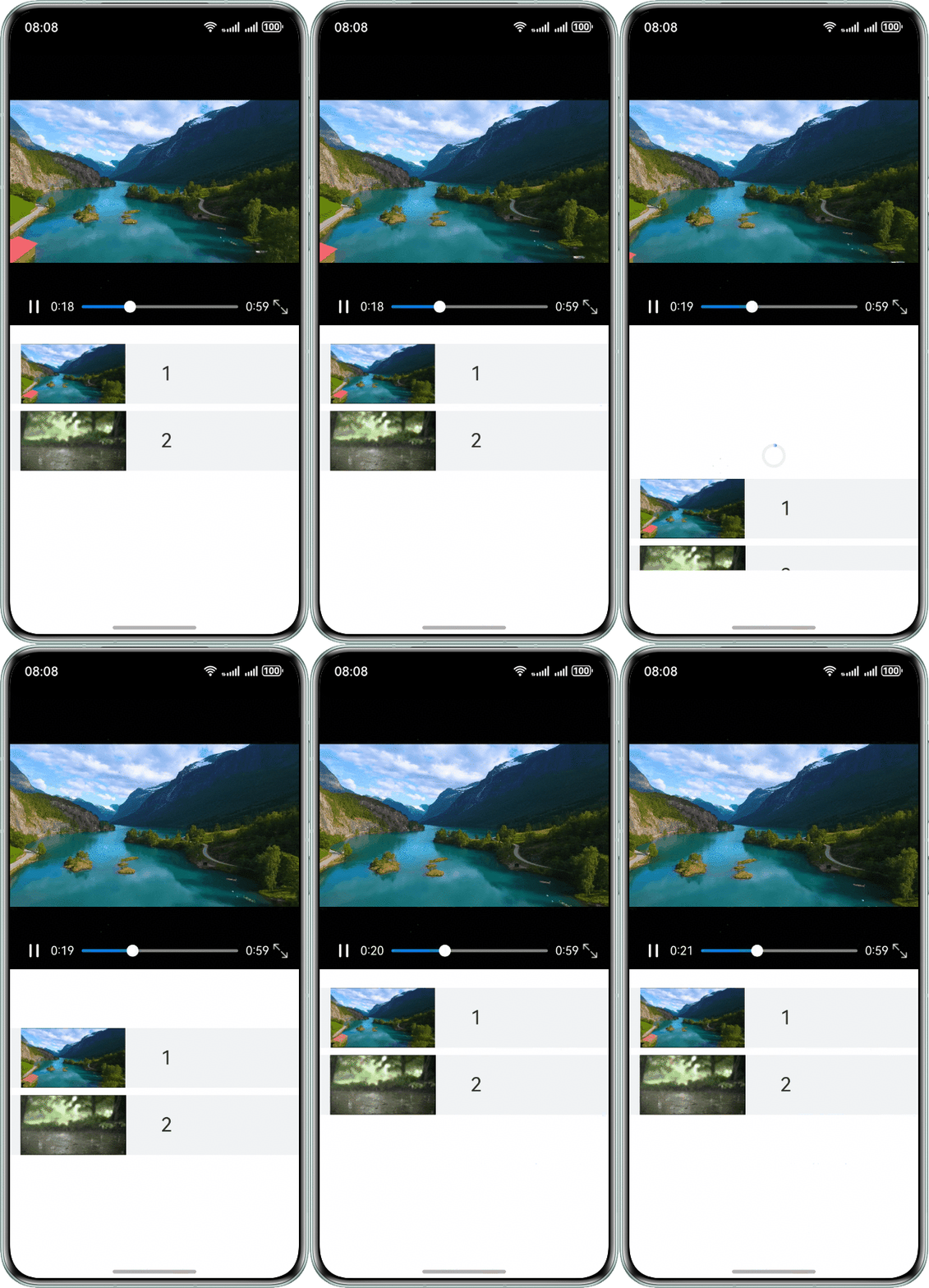
背景知识
- 下拉刷新效果可通过如下方式实现:
Refresh组件可以进行页面下拉操作并显示刷新动效,并通过onRefreshing方法在进入刷新状态时触发回调。
- Video为用于播放视频文件并控制其播放状态的组件。
问题定位
- 使用DevEco Testing查看列表组件和视频组件,列表组件为Refresh组件,视频组件为Video组件。
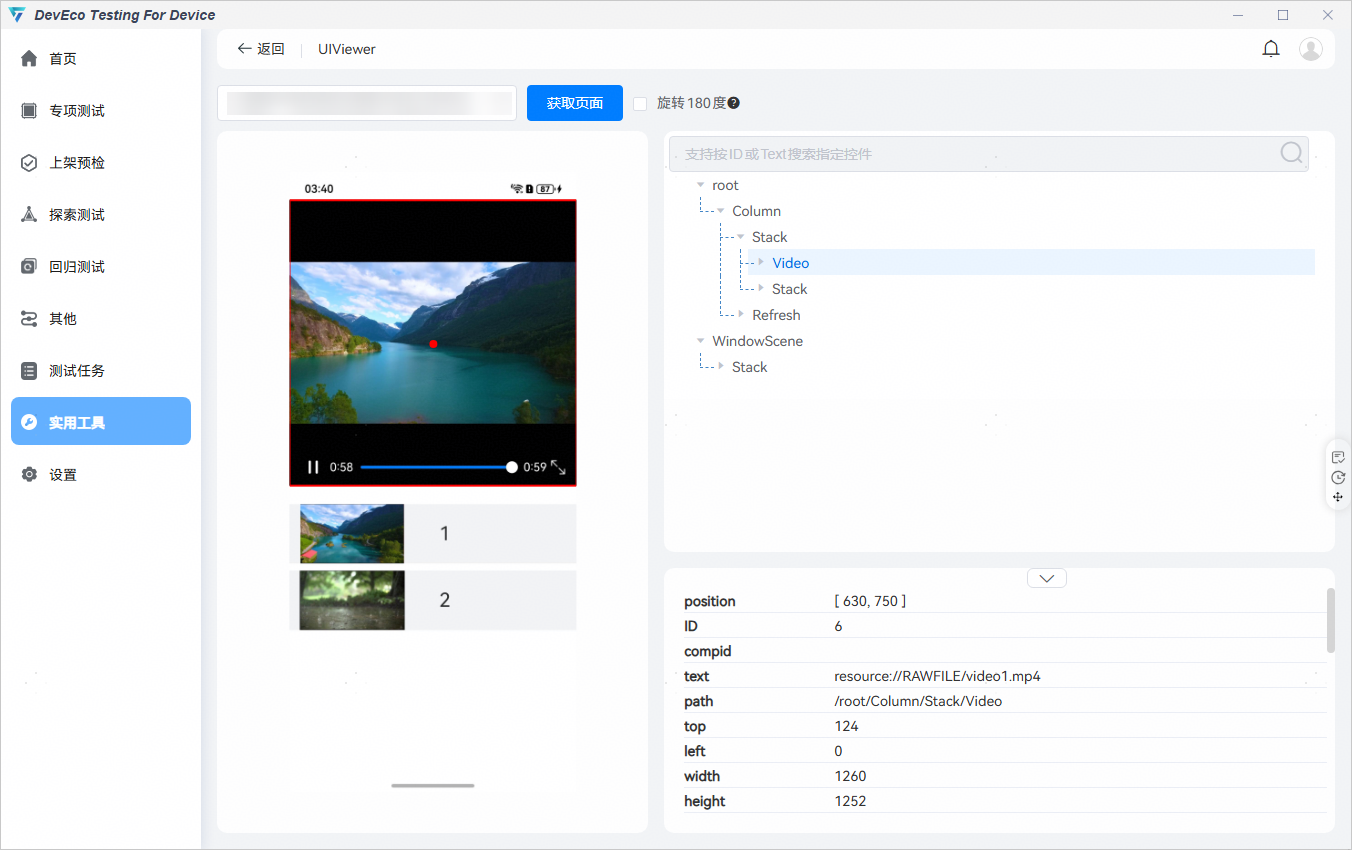
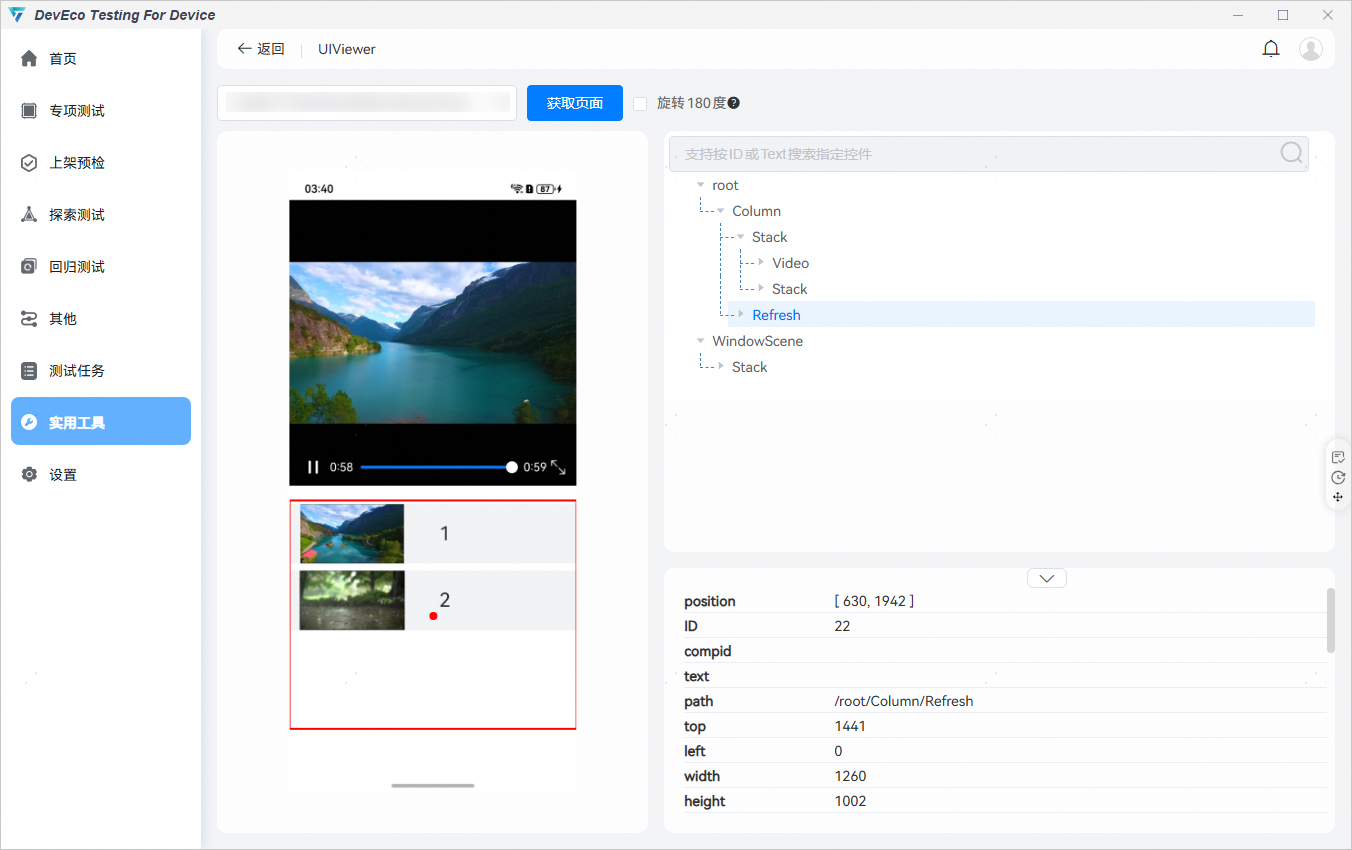
- 查看Refresh组件和Video组件的设置,视频组件播放视频列表中的第一个视频,视频列表下拉刷新时视频数据重新加载,加载完成后视频组件重新获取视频列表中的第一个视频。关键部分:
Video({
  src: $rawfile(this.currentSec),
  controller: this.controller
})

Refresh()
.onRefreshing(() => {
  // 模拟数据刷新。
  setTimeout(() => {
    this.refreshing = false;
    this.videos = [new MyVideo('video1.mp4', $r('app.media.myposter1')),
        new MyVideo('video1.mp4', $r('app.media.myposter2'))];
    this.currentSec = this.videos[0].src; // 立即重新加载视频
    this.controller.setCurrentTime(this.currentTime);
  }, 500)
})
完整示例:
class MyVideo {
  src: string = '';
  previewUri: ResourceStr = '';

  constructor(src: string, previewUri: ResourceStr) {
    this.src = src;
    this.previewUri = previewUri;
  }
}

interface TimeObject {
  time: number;
}

interface DurationObject {
  duration: number;
}

@Entry
@Component
struct ListRefreshLoad {
  // 'video1.mp4'和'video2.mp4'需要在src/main/resources/rawfile中替换为开发者需要的视频资源文件
  // $r('app.media.myposter1')和$r('app.media.myposter2')需要替换为开发者需要的图片资源文件
  @State videos: MyVideo[] = [new MyVideo('video1.mp4', $r('app.media.myposter1')),
    new MyVideo('video2.mp4', $r('app.media.myposter2'))];
  @State currentSec: string = '';
  @State currentTime: number = 0;
  @State isPlay: boolean = false;
  @State durationTime: number = 0;
  @State sliderWidth: number = 230;
  @State refreshing: boolean = false;
  @State refreshOffset: number = 0;
  @State refreshState: RefreshStatus = RefreshStatus.Inactive;
  @State isLoading: boolean = false;
  private controller: VideoController = new VideoController();

  aboutToAppear(): void {
    this.currentSec = this.videos[0].src;
    console.info('currentSec', this.currentSec.toString());
  }

  timeConvert(time: number): string {
    let min: number = Math.floor(time / 60);
    let second: string = (time % 60).toFixed(0);
    second = second.padStart(2, '0');
    return `${min}:${second}`;
  }

  @Builder
  refreshBuilder() {
    Stack({ alignContent: Alignment.Bottom }) {
      // 可以通过刷新状态控制是否存在Progress组件。
      // 当刷新状态处于下拉中或刷新中状态时Progress组件才存在。
      if (this.refreshState !== RefreshStatus.Inactive && this.refreshState !== RefreshStatus.Done) {
        Progress({ value: this.refreshOffset, total: 64, type: ProgressType.Ring })
          .width(32).height(32)
          .style({ status: this.refreshing ? ProgressStatus.LOADING : ProgressStatus.PROGRESSING })
          .margin(10);
      }
    }
    .clip(true)
    .height('100%')
    .width('100%');
  }

  build() {
    Column() {
      // Start solution1
      Stack() {
        Video({
          src: $rawfile(this.currentSec),
          controller: this.controller
        })
        // End solution1
          .width('100%')
          .height('100%')
          .objectFit(ImageFit.Contain)
          .controls(false)
          .autoPlay(true)
          .onPrepared((e?: DurationObject) => {
            this.isPlay = true;
            if (e !== undefined) {
              this.durationTime = e.duration;
            }
          })
          .onUpdate((e?: TimeObject) => {
            if (e !== undefined) {
              this.currentTime = e.time;
            }
          });
        Stack() {
          Row() {
            // $r('app.media.ic_video_play')和$r('app.media.ic_video_pause')需要替换为开发者需要的图片资源文件
            Image(this.isPlay ? $r('app.media.ic_video_play') : $r('app.media.ic_video_pause'))
              .width(25)
              .height(25)
              .onClick(() => {
                if (this.isPlay) {
                  this.controller.pause();
                  this.isPlay = false;
                } else {
                  this.controller.start();
                  this.isPlay = true;
                }
              });

            // 左侧时间
            Text(this.timeConvert(this.currentTime))
              .fontColor(Color.White)
              .textAlign(TextAlign.End)
              .fontWeight(FontWeight.Regular)
              .margin({ left: 10 });

            Slider({
              value: this.currentTime,
              min: 0,
              max: this.durationTime,
              style: SliderStyle.OutSet
            })
              .blockColor(Color.White)
              .trackColor(Color.Gray)
              .selectedColor('#007DFF')
              .showTips(false)
              .width(this.sliderWidth)
              .onChange((value: number, mode: SliderChangeMode) => {
                if (mode === SliderChangeMode.Begin) {
                  this.controller.pause();
                } else if (mode === SliderChangeMode.Moving) {
                  this.controller.setCurrentTime(value);
                } else if (mode === SliderChangeMode.End) {
                  this.controller.start();
                }
              });

            // 右侧时间
            Text(this.timeConvert(this.durationTime))
              .id('durationTimeText')
              .fontColor(Color.White)
              .fontWeight(FontWeight.Regular);

            // $r('app.media.out')和$r('app.media.full')需要替换为开发者需要的图片资源文件
            Image($r('app.media.full'))
              .width(20)
              .height(20)
              .objectFit(ImageFit.Contain)
              .margin({ left: 5 });
          }
          .width('100%')
          .justifyContent(FlexAlign.Center)
          .padding({ left: 10, right: 5 })
          .margin({ bottom: 5 });
        }
        .width('100%')
        .height('100%')
        .alignContent(Alignment.Bottom);
      }
      .width('100%')
      .height('50%');


      Refresh({ refreshing: $$this.refreshing, builder: this.refreshBuilder() }) {
        Stack({ alignContent: Alignment.Top }) {
          Scroll() {
            List() {
              ForEach(this.videos, (video: MyVideo, index: number) => {
                ListItem() {
                  Row() {
                    Image(video.previewUri)
                      .width(150)
                      .margin({ left: 10 })
                      .objectFit(ImageFit.Contain);

                    Text('' + (index + 1))
                      .fontSize(26)
                      .height('100%')
                      .width(100)
                      .textAlign(TextAlign.Center)
                      .borderRadius(10);
                  }
                  .width('100%')
                  .height(80)
                  .backgroundColor('#f1f3f5');
                }
                .margin({ top: 5, bottom: 5 });
              }, (item: string) => item);
            }
            .nestedScroll({
              scrollForward: NestedScrollMode.PARENT_FIRST,
              scrollBackward: NestedScrollMode.SELF_FIRST
            })
            .scrollBar(BarState.Off)
            .height('100%');
          }
          .scrollBar(BarState.Off);
        };
      }
      .width('100%')
      .onOffsetChange((offset: number) => {
        this.refreshOffset = offset;
      })
      .onStateChange((state: RefreshStatus) => {
        this.refreshState = state;
      })
      // Start solution2
      .onRefreshing(() => {
        // 模拟数据刷新。
        setTimeout(() => {
          this.refreshing = false;
          this.videos = [new MyVideo('video1.mp4', $r('app.media.myposter1')),
            new MyVideo('video1.mp4', $r('app.media.myposter2'))];
          this.currentSec = this.videos[0].src; // 立即重新加载视频
          this.controller.setCurrentTime(this.currentTime);
        }, 500);
      })
      // End solution2
      .height('40%')
      .margin({ top: 20 });
    }
    .height('100%');
  }
}
修改建议
视频列表下拉刷新视频数据重新加载后,判断加载后的视频资源与原先的资源是否是相同的,不相同时再重新加载视频。
关键部分:
Stack() {
  Video({
    src: $rawfile(this.currentSec),
    controller: this.controller
  })
.onRefreshing(() => {
// 模拟数据刷新。
setTimeout(() => {
this.refreshing = false;
this.videos = [new MyVideo('video1.mp4', $r('app.media.myposter1')),
new MyVideo('video1.mp4', $r('app.media.myposter2'))];
// 判断刷新后的视频资源是否是原先资源
if (this.videos[0].src !== this.currentSec) {
this.currentSec = this.videos[0].src; // 重新加载视频
console.info('currentSec', this.currentSec.toString());
this.controller.setCurrentTime(this.currentTime);
}
}, 500);
}) 完整示例:
class MyVideo {
src: string = '';
previewUri: ResourceStr = '';
constructor(src: string, previewUri: ResourceStr) {
this.src = src;
this.previewUri = previewUri;
}
}
interface TimeObject {
time: number;
}
interface DurationObject {
duration: number;
}
@Entry
@Component
struct ListRefreshLoad {
// 'video1.mp4'和'video2.mp4'需要在src/main/resources/rawfile中替换为开发者需要的视频资源文件
// $r('app.media.myposter1')和$r('app.media.myposter2')需要替换为开发者需要的图片资源文件
@State videos: MyVideo[] = [new MyVideo('video1.mp4', $r('app.media.myposter1')),
new MyVideo('video2.mp4', $r('app.media.myposter2'))];
@State currentSec: string = '';
@State currentTime: number = 0;
@State isPlay: boolean = false;
@State durationTime: number = 0;
sliderWidth: number = 230;
@State refreshing: boolean = false;
@State refreshOffset: number = 0;
@State refreshState: RefreshStatus = RefreshStatus.Inactive;
private controller: VideoController = new VideoController();
aboutToAppear(): void {
this.currentSec = this.videos[0].src;
console.info('currentSec', this.currentSec.toString());
}
timeConvert(time: number): string {
let min: number = Math.floor(time / 60);
let second: string = (time % 60).toFixed(0);
second = second.padStart(2, '0');
return `${min}:${second}`;
}
@Builder
refreshBuilder() {
Stack({ alignContent: Alignment.Bottom }) {
// 可以通过刷新状态控制是否存在Progress组件。
// 当刷新状态处于下拉中或刷新中状态时Progress组件才存在。
if (this.refreshState !== RefreshStatus.Inactive && this.refreshState !== RefreshStatus.Done) {
Progress({ value: this.refreshOffset, total: 64, type: ProgressType.Ring })
.width(32).height(32)
.style({ status: this.refreshing ? ProgressStatus.LOADING : ProgressStatus.PROGRESSING })
.margin(10);
}
}
.clip(true)
.height('100%')
.width('100%');
}
build() {
Column() {
Stack() {
Video({
src: $rawfile(this.currentSec),
controller: this.controller
})
.width('100%')
.height('100%')
.objectFit(ImageFit.Contain)
.controls(false)
.autoPlay(true)
.onPrepared((e?: DurationObject) => {
this.isPlay = true;
if (e !== undefined) {
this.durationTime = e.duration;
}
})
.onUpdate((e?: TimeObject) => {
if (e !== undefined) {
this.currentTime = e.time;
}
});
Stack() {
Row() {
// $r('app.media.ic_video_play')和$r('app.media.ic_video_pause')需要替换为开发者需要的图片资源文件
Image(this.isPlay ? $r('app.media.ic_video_play') : $r('app.media.ic_video_pause'))
.width(25)
.height(25)
.onClick(() => {
if (this.isPlay) {
this.controller.pause();
this.isPlay = false;
} else {
this.controller.start();
this.isPlay = true;
}
});
// 左侧时间
Text(this.timeConvert(this.currentTime))
.fontColor(Color.White)
.textAlign(TextAlign.End)
.fontWeight(FontWeight.Regular)
.margin({ left: 10 });
Slider({
value: this.currentTime,
min: 0,
max: this.durationTime,
style: SliderStyle.OutSet
})
.blockColor(Color.White)
.trackColor(Color.Gray)
.selectedColor('#007DFF')
.showTips(false)
.width(this.sliderWidth)
.onChange((value: number, mode: SliderChangeMode) => {
if (mode === SliderChangeMode.Begin) {
this.controller.pause();
} else if (mode === SliderChangeMode.Moving) {
this.controller.setCurrentTime(value);
} else if (mode === SliderChangeMode.End) {
this.controller.start();
}
});
// 右侧时间
Text(this.timeConvert(this.durationTime))
.id('durationTimeText')
.fontColor(Color.White)
.fontWeight(FontWeight.Regular);
// $r('app.media.out')和$r('app.media.full')需要替换为开发者需要的图片资源文件
Image($r('app.media.full'))
.width(20)
.height(20)
.objectFit(ImageFit.Contain)
.margin({ left: 5 });
}
.width('100%')
.justifyContent(FlexAlign.Center)
.padding({ left: 10, right: 5 })
.margin({ bottom: 5 });
}
.width('100%')
.height('100%')
.alignContent(Alignment.Bottom);
}
.width('100%')
.height('50%');
Refresh({ refreshing: $$this.refreshing, builder: this.refreshBuilder() }) {
Stack({ alignContent: Alignment.Top }) {
Scroll() {
List() {
ForEach(this.videos, (video: MyVideo, index: number) => {
ListItem() {
Row() {
Image(video.previewUri)
.width(150)
.margin({ left: 10 })
.objectFit(ImageFit.Contain);
Text('' + (index + 1))
.fontSize(26)
.height('100%')
.width(100)
.textAlign(TextAlign.Center)
.borderRadius(10);
}
.width('100%')
.height(80)
.backgroundColor('#f1f3f5');
}
.margin({ top: 5, bottom: 5 });
}, (item: string) => item);
}
.nestedScroll({
scrollForward: NestedScrollMode.PARENT_FIRST,
scrollBackward: NestedScrollMode.SELF_FIRST
})
.scrollBar(BarState.Off)
.height('100%');
}
.scrollBar(BarState.Off);
};
}
.width('100%')
.onOffsetChange((offset: number) => {
this.refreshOffset = offset;
})
.onStateChange((state: RefreshStatus) => {
this.refreshState = state;
})
.onRefreshing(() => {
  // 模拟数据刷新。
  setTimeout(() => {
    this.refreshing = false;
    this.videos = [new MyVideo('video1.mp4', $r('app.media.myposter1')),
      new MyVideo('video1.mp4', $r('app.media.myposter2'))];
    // 判断刷新后的视频资源是否是原先资源
    if (this.videos[0].src !== this.currentSec) {
      this.currentSec = this.videos[0].src; // 重新加载视频
      console.info('currentSec', this.currentSec.toString());
      this.controller.setCurrentTime(this.currentTime);
    }
  }, 500);
})
.height('40%')
.margin({ top: 20 });
}
.height('100%');
}
} 效果图如下: