问题现象
@ohos.graphics.drawing模块可以进行文本绘制。本文总结了如下三种绘制过程中的常见问题:
- 文本降级逻辑无法适用。
- 文本偏移。
- 使用makeFromFile无法获取rawfile中文本字体类型。
背景知识
- 文本绘制在开发过程中是一个常见的需求,@ohos.graphics.text模块提供了接口创建复杂的文本段落,包括多样的文本样式、段落样式、换行规则等,并最终将这些信息转换为能在屏幕上高效渲染的布局数据。实现文本样式的统一设置(如下划线,加粗等)可以使用CustomSpan,实现自定义文本绘制逻辑(如动画以及过渡效果等)需要创建RenderNode,并在其中定义绘图函数,使用Canvas中的attachPen和attachBrush接口将画笔画刷的实例设置到画布实例中后在Canvas上进行文本绘制,详细操作步骤可参考简单文本绘制与显示。CustomSpan和RenderNode的适用场景区别如下表所示。
方法
适用场景
CustomSpan
富文本展示(如图文混排)、文本样式自定义。
RenderNode
自定义UI控件或图形绘制、实现动画或复杂布局。
- 文本绘制常用工具有drawTextBlob与drawSingleCharacter,前者常用于绘制一段文字,后者常用于绘制单个字符,两者的使用场景对比如下表所示:
方法
优点
缺点
适用场景
drawTextBlob
高效、适合长文本。
控制粒度差。
- 绘制长文本、段落、标题。
- 需要字体、颜色、样式统一。
drawSingleCharacter
灵活、支持逐字符控制。
性能较低、不适合大量字符。
- 动态字符、逐字动画、特殊效果。
- 需要独立控制每个字符。
- 单个字符的简单文本绘制。
解决方案
- 场景一:文本降级逻辑无法适用。
文本降级是指当系统无法正常渲染某段文本时,自动采用一种替代方案来显示文本,以保证基本的可读性和可用性。若文本未使用降级逻辑降级至系统字体,可能会出现文本缺失的情况。
drawTextBlob不支持字体降级,若需使用降级逻辑,推荐使用drawSingleCharacter进行代替。drawSingleCharacter在文字绘制方面的功能更加完善,可以在检测到当前字型中的字体不支持待绘制字符时,降级至使用系统字体绘制字符。
若使用drawSingleCharacter仍出现文本缺失的情况,可以排查是否为兼容性问题,常见的文本降级原因如下所示:- 字体缺失:应用指定了字体降级后使用某种字体(如“华文行楷”),但目标设备上没有安装该字体。
- 字体样式不支持:某些字体文件可能仅包含Regular样式,不支持Bold或Italic。系统会尝试找相近的样式进行模拟,或降级为普通字体,但可能导致文字变形、模糊或渲染异常。
- 渲染引擎兼容性问题:不同平台(如HarmonyOS、其他平台)对某些字体、排版、文本格式的支持不同,可能导致渲染异常。
- 场景二:文本偏移。文本偏移一般是由文本坐标设置错误导致的。drawTextBlob的坐标(x,y)从字体的左下角坐标开始计算。当坐标以基线drawinfo.baseline作为参考标准时,因为drawinfo.baseline的默认值为0,所以直接使用drawing接口去绘制文本时,会因字体接口计算偏移量而与实际情况有偏差。
onDrawWrong(context: DrawContext, drawInfo: CustomSpanDrawInfo): void {
  const canvas = context.canvas;
  const textBrush = new drawing.Brush();
  const localFont = new drawing.Font();
  localFont.setSize(gUIContext.vp2px(this.fontSize));
  const textBlob =
  drawing.TextBlob.makeFromString(this.originText, localFont, drawing.TextEncoding.TEXT_ENCODING_UTF8);
  canvas.attachBrush(textBrush);
  hilog.info(0x00, 'MyCustomSpan', `drawInfo.baseline: ${drawInfo.baseline}`);
  // 绘制
  canvas.drawTextBlob(textBlob, drawInfo.x, drawInfo.baseline);
  canvas.detachBrush();
}
问题效果预览:

因此在计算文本坐标时要根据字体的bound做出相应调整,bound和baseline的关系如下图所示,从Top到bottom为bound垂直区域,ascent为文本的升部,decender为文本的降部。
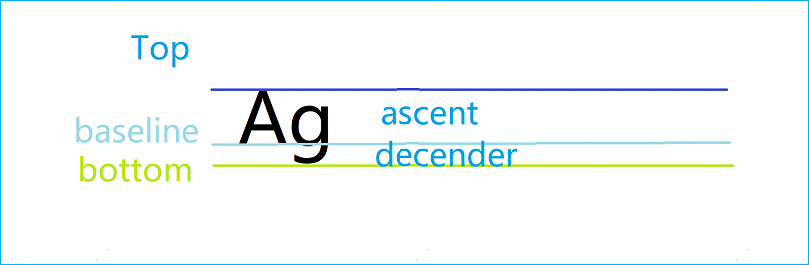
根据bound修改后的绘制效果参考代码如下:
import { drawing } from '@kit.ArkGraphics2D';
import hilog from '@ohos.hilog';

let gUIContext: UIContext;

class MyCustomSpan extends CustomSpan {
  originText: string;
  fontSize?: number;

  constructor(originText: string) {
    super();
    this.originText = originText;
  }

  onMeasure(measureInfo: CustomSpanMeasureInfo): CustomSpanMetrics {
    this.fontSize = measureInfo.fontSize;
    let measureUtils = gUIContext.getMeasureUtils();
    return {
      width: gUIContext.px2vp(measureUtils.measureText({
        textContent: this.originText,
        fontSize: measureInfo.fontSize,
      })),
      height: undefined // 高度设置为undefined自适应文本
    };
  }

  onDraw(context: DrawContext, drawInfo: CustomSpanDrawInfo): void {
    const canvas = context.canvas;
    const textBrush = new drawing.Brush(); // 设置文本绘制画刷
    const localFont = new drawing.Font();
    localFont.setSize(gUIContext.vp2px(this.fontSize));
    const textBlob =
      drawing.TextBlob.makeFromString(this.originText, localFont, drawing.TextEncoding.TEXT_ENCODING_UTF8); // 设置绘制文本
    canvas.attachBrush(textBrush);
    hilog.info(0x00, 'MyCustomSpan', `drawInfo.baseline: ${drawInfo.baseline}`);
    let bounds = textBlob.bounds(); // 获取文本实际边距
    // 修改text的坐标并绘制
    canvas.drawTextBlob(textBlob, drawInfo.x - bounds.left, drawInfo.lineTop - bounds.top);
    canvas.detachBrush();
  }

  onDrawWrong(context: DrawContext, drawInfo: CustomSpanDrawInfo): void {
    const canvas = context.canvas;
    const textBrush = new drawing.Brush();
    const localFont = new drawing.Font();
    localFont.setSize(gUIContext.vp2px(this.fontSize));
    const textBlob =
      drawing.TextBlob.makeFromString(this.originText, localFont, drawing.TextEncoding.TEXT_ENCODING_UTF8);
    canvas.attachBrush(textBrush);
    hilog.info(0x00, 'MyCustomSpan', `drawInfo.baseline: ${drawInfo.baseline}`);
    // 绘制
    canvas.drawTextBlob(textBlob, drawInfo.x, drawInfo.baseline);
    canvas.detachBrush();
  }
}

@Entry
@ComponentV2
struct DrawText {
  private textController1: TextController = new TextController();
  private textController2: TextController = new TextController();

  aboutToAppear() {
    gUIContext = this.getUIContext();
  }

  onDidBuild(): void {
    const style1 = new MutableStyledString(new MyCustomSpan('危乎高哉'));
    this.textController1.setStyledString(style1);

    const style2 = new MutableStyledString(new MyCustomSpan('危乎高哉'));
    style2.appendStyledString(new StyledString('哉')); // 绘制文字后在末尾处添加
    this.textController2.setStyledString(style2);
  }

  build() {
    Row() {
      Text('危乎高哉')
        .margin(5);
      Text(undefined, { controller: this.textController1 })
        .margin(5);
      Text(undefined, { controller: this.textController2 })
        .margin(5);
    }
    .alignItems(VerticalAlign.Center)
    .height('100%')
    .width('100%');
  }
}
效果预览:

- 场景三:使用makeFromFile无法获取rawfile中文本字体文件。
rawfile目录没有对外暴露的路径,使用makeFromFile时,使用路径需为应用沙箱路径或真实物理路径。
自API 18起,可以使用makeFromRawfile获取保存在rawfile目录中的字体文件。
更多关于文本绘制的常见问题,如自定义字体或系统字体的注册、文本高度及行间距的测量、多样式文本的绘制与显示等可参考文本开发概述。
常见FAQ
Q:如何检测字体中是否支持指定Unicode?
A:目前没有接口支持。若要判断指定Unicode是否支持,可以通过在线字体网站查询,或使用textToGlyphs替代drawing.Typeface,若返回值不为0,则代表可以绘制。