问题现象
动画渲染异常,动画效果不流畅,列表的子组件是瞬间出现,而不是渐入渐出。
应用场景:列表添加数据等一系列场景。比如添加购物车时,所添加的商品会排在首位,渲染异常导致用户体验感差。
问题代码示例参考如下:
@Entry
@Component
struct ListDemo {
  @State message: number[] = [1, 2, 3];
  @State num: number = 4;
  listController: Scroller = new Scroller();

  build() {
    Column() {
      Stack() {
        List({ scroller: this.listController }) {
          ForEach(this.message, (item: number) => {
            ListItem() {
              ListItemComponent({ titleText: item.toString(), subTitleText: `sub:${item}` });
            }
            .margin({
              bottom: 5
            });
          }, (item: number) => item.toString());
        }
        .alignListItem(ListItemAlign.Center)
        .width('100%');
      }
      .alignContent(Alignment.TopStart)
      .layoutWeight(1);

      Button('添加')
        .onClick(() => {
          this.message.splice(1, 0, this.num);
          this.num++;
        });
    }
    .justifyContent(FlexAlign.Start)
    .height('100%')
    .width('100%');
  }
}

@Component
struct ListItemComponent {
  @Prop titleText: string = '';
  @Prop subTitleText: string = '';
  @State heightValue: number = 0;
  @State opacityValue: number = 0.0;

  build() {
    Column() {
      Text(this.titleText)
        .height(30);
      Blank()
        .height(10);
      Text(this.subTitleText)
        .height(25);
    }
    .justifyContent(FlexAlign.Center)
    .width('70%')
    .height(this.heightValue)
    .opacity(this.opacityValue)
    .border({ width: 1 })
    .justifyContent(FlexAlign.Center)
    .onAppear(() => {
      this.getUIContext().keyframeAnimateTo({},
        [{
          duration: 600,
          curve: Curve.EaseOut,
          event: () => {
            this.heightValue = 80;
          }
        },
          {
            duration: 200,
            curve: Curve.Linear,
            event: () => {
              this.opacityValue = 1.0;
            }
          }
        ]);
    });
  }
}
问题效果预览:
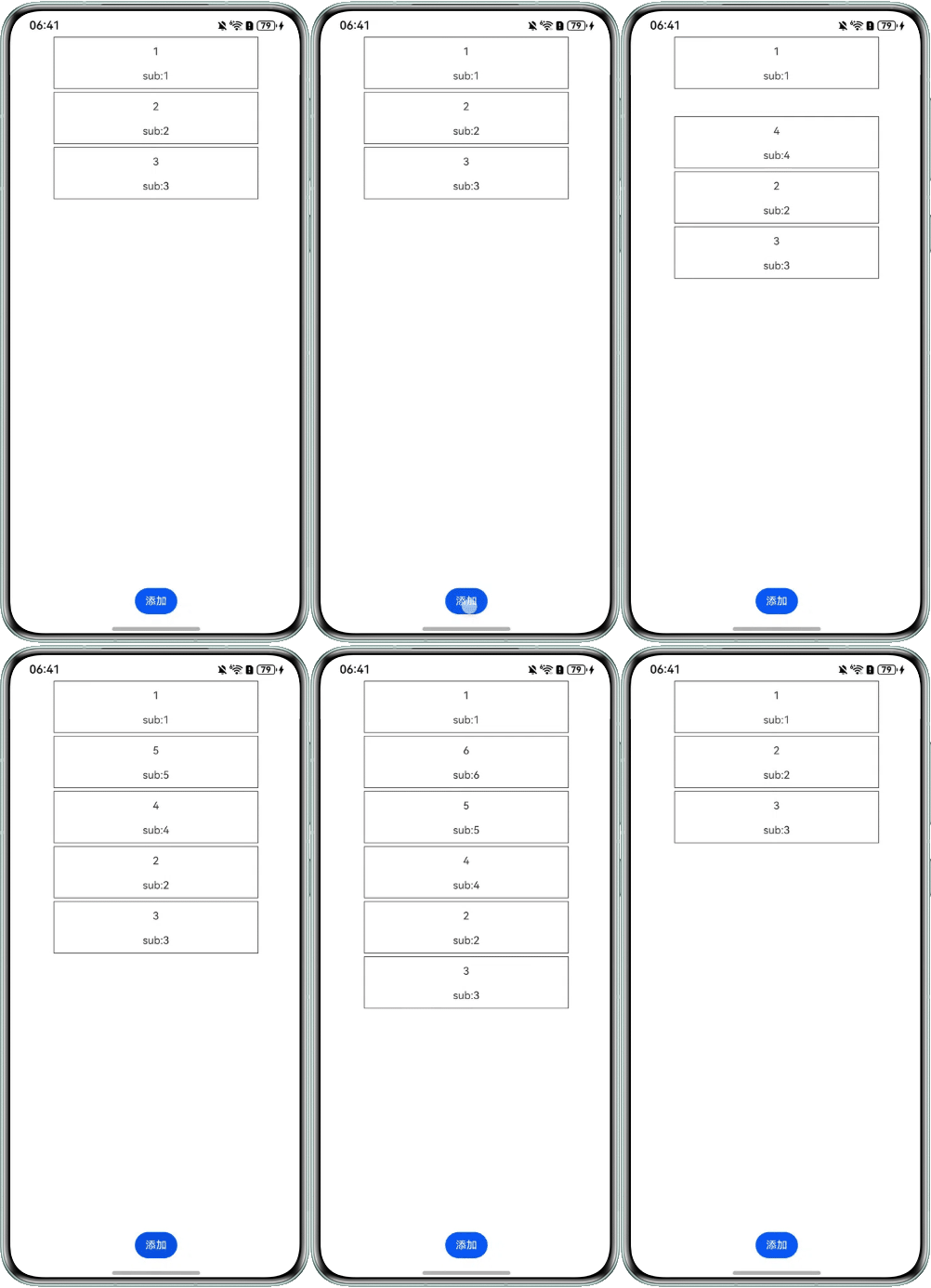

解决方案
可在onAppear回调中使用keyframeAnimateTo进行关键帧动画,改变高度和透明度,实现淡入和展开的效果。
@Entry
@Component
struct ListDemo {
  @State message: number[] = [1, 2, 3];
  @State num: number = 4;
  listController: Scroller = new Scroller();

  build() {
    Column() {
      Stack() {
        List({ scroller: this.listController }) {
          ForEach(this.message, (item: number) => {
            ListItem() {
              ListItemComponent2({ titleText: item.toString(), subTitleText: `sub:${item}` });
            }
            .margin({
              bottom: 5
            });
          }, (item: number) => item.toString());
        }
        .alignListItem(ListItemAlign.Center)
        .width('100%');
      }
      .alignContent(Alignment.TopStart)
      .layoutWeight(1);

      Button('添加')
        .onClick(() => {
          this.message.splice(1, 0, this.num);
          this.num++;
        });
    }
    .justifyContent(FlexAlign.Start)
    .height('100%')
    .width('100%');
  }
}

@Component
struct ListItemComponent2 {
  @Prop titleText: string = '';
  @Prop subTitleText: string = '';
  @State heightValue: number = 0;
  @State opacityValue: number = 0.0;

  build() {
    Column() {
      Text(this.titleText)
        .height(30);
      Blank()
        .height(10);
      Text(this.subTitleText)

        .height(25);
    }
    .width('70%')
    .height(this.heightValue)
    .opacity(this.opacityValue)
    .border({ width: 1 })
    .justifyContent(FlexAlign.Center)
    .onAppear(() => {
      // 通过keyframeAnimateTo分段调整高度和透明度实现淡入和展开的效果
      this.getUIContext().keyframeAnimateTo(
        { iterations: 1 },
        [
          {
            duration: 0,
            curve: Curve.EaseOut,
            event: () => {
              this.heightValue = 0;
            }
          },
          {
            duration: 600,
            curve: Curve.Linear,
            event: () => {
              this.heightValue = 80;
            }
          }
        ]);

      this.getUIContext().keyframeAnimateTo(
        { iterations: 1 },
        [
          {
            duration: 400,
            curve: Curve.EaseOut,
            event: () => {
              this.opacityValue = 0;
            }
          },
          {
            duration: 600,
            curve: Curve.Linear,
            event: () => {
              this.opacityValue = 1;
            }
          }
        ]);
    });
  }
}