问题现象
点击按钮蓝色部分才会响应点击事件,被灰点遮挡的部分点击无响应,如何实现点击灰点处和按钮事件都生效?
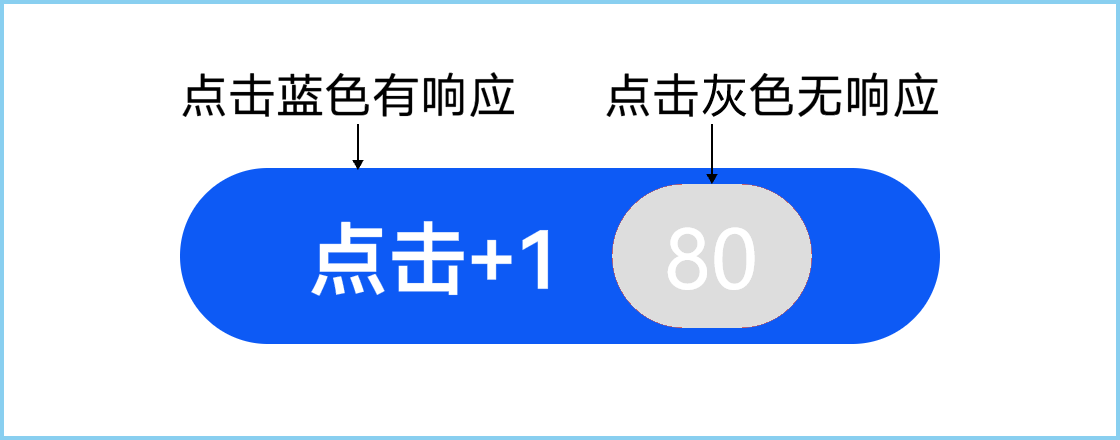
问题代码示例参考如下:
@Entry
@Component
struct BadgeClickTest {
  @State badgeCount: number = 80;

  build() {
    Stack() {
      Badge({
        count: this.badgeCount,
        maxCount: 99,
        position: { x: 90, y: 5 },
        style: {
          fontSize: '20vp',
          badgeColor: '#ddd',
          badgeSize: 30,
          borderWidth: 0
        }
      }) {
        Button('点击+1')
          .width(170)
          .padding({ left: 25 })
          .fontSize(18)
          .align(Alignment.Start)
          .onClick(() => {
            this.badgeCount += 1
          })
          .backgroundColor('#0D5AF5')
      }
    }.width('100%').height('100%')
  }
}

解决方案
将按钮点击事件迁移至Badge组件,可以实现点击灰点处和按钮事件都生效。
@Entry
@Component
struct BadgeClickTest {
  @State badgeCount: number = 80;

  build() {
    Stack() {
      Badge({
        count: this.badgeCount,
        maxCount: 99,
        position: { x: 90, y: 5 },
        style: {
          fontSize: '20vp',
          badgeColor: '#ddd',
          badgeSize: 30,
          borderWidth: 0
        }
      }) {
        Button('点击+1')
          .width(170)
          .padding({ left: 25 })
          .fontSize(18)
          .align(Alignment.Start)
      }
      .onClick(() => {
        // 将按钮点击事件迁移至Badge组件
        this.badgeCount += 1;
      })
    }
    .width('100%')
    .height('100%')
  }
}