Q:存在较大量的蓝牙设备时(车库场景),低功耗蓝牙连接效率低。当目标设备名称只能模糊匹配时,无法直接使用ScanFilter按名称精确过滤,扫描过程耗时较长。扫描到设备后,通过GattClientDevice订阅服务并匹配特征值的过程也需要额外耗时。
A:方案一:
在BLE扫描距离范围内扫描时,可以通过扫描过滤参数ScanFilter来过滤出目标设备,如设备的随机MAC地址、设备名称、serviceUUID等,可以快速找到目标设备。如果已经连接过,可以将随机MAC地址或deviceName保存起来,下次可以直接用保存的信息去过滤扫描。

当目标设备名称只能模糊匹配时,可以结合serviceUUID或制造商ID等其他过滤条件设置ScanFilter,减少扫描到的设备数量。在扫描回调中再对设备名称进行模糊匹配,找到目标设备后立即调用ble.stopBLEScan()停止扫描。
ble.on('BLEDeviceFind', (data) => {
data.forEach(device => {
// 假设目标设备名称包含"HeartRate"关键词
if (device.deviceName && device.deviceName.includes('HeartRate')) {
console.info('找到目标设备:', device.deviceId);
// 停止扫描以节省资源
ble.stopBLEScan();
// 进行连接等后续操作
}
});
});
示例:使用name过滤发起BLE扫描的代码。
// 开始扫描
async startScan(): Promise<void> {
let grantStatus: boolean = await this.checkPermissionGrant('ohos.permission.ACCESS_BLUETOOTH') ===
abilityAccessCtrl.GrantStatus.PERMISSION_GRANTED;
if (!grantStatus) {
this.promptAction.showToast({
message: '请先申请蓝牙权限',
duration: 2000
});
return;
}

if (this.isScanning) {
return;
}

try {
// 清空之前的结果
this.deviceList = [];

let scanFilter: ble.ScanFilter = {
name: 'XXXXXXXX'
};
// Setting Scan Parameters
let scanOptions: ble.ScanOptions = {
interval: 100,
dutyMode: ble.ScanDuty.SCAN_MODE_LOW_LATENCY,
matchMode: ble.MatchMode.MATCH_MODE_AGGRESSIVE
};

ble.on('BLEDeviceFind', (data) => {
console.info('testTag', `scan result = ${data[0].deviceId}`);
console.info('BLEScannerDemo: 扫描结果:', JSON.stringify(data));
this.scanCallback(data);
});

// 开始扫描
await ble.startBLEScan([scanFilter], scanOptions);
console.info('BLEScannerDemo: 开始扫描');

this.isScanning = true;
this.promptAction.showToast({
message: '开始扫描BLE设备',
duration: 2000
});

console.info('BLE扫描已启动');

// 30秒后自动停止扫描(节省电量)
setTimeout(() => {
if (this.isScanning) {
this.stopScan();
}
}, 30000);

} catch (error) {
const err: BusinessError = error as BusinessError;
console.error('开始扫描失败:', err.code, err.message);
this.promptAction.showToast({
message: `扫描失败: ${err.message}`,
duration: 3000
});
}
} 
使用蓝牙能力时,需要在module.json5中添加ohos.permission.ACCESS_BLUETOOTH权限。
完整代码如下:
import { ble } from '@kit.ConnectivityKit';
import { BusinessError } from '@kit.BasicServicesKit';
import { abilityAccessCtrl, common, Permissions } from '@kit.AbilityKit';
import { PromptAction } from '@kit.ArkUI';
import { JSON } from '@kit.ArkTS';
import { bundleManager } from '@kit.AbilityKit';

// BLE设备信息接口
interface BLEDeviceInfo {
deviceId: string;
deviceName: string;
rssi: number;
manufactureData?: ArrayBuffer;
serviceUuids?: Array<string>;
}

@Entry
@Component
struct BLEScannerDemo {
// 扫描状态
@State isScanning: boolean = false;
// 扫描结果列表
@State deviceList: Array<BLEDeviceInfo> = [];
// 权限状态
context: common.UIAbilityContext = this.getUIContext().getHostContext() as common.UIAbilityContext;
uiContext: UIContext = this.getUIContext();
promptAction: PromptAction = this.uiContext.getPromptAction();

// BLE扫描回调
scanCallback(data: Array<ble.ScanResult>) {
// 扫描到设备时触发
data.forEach(device => {
console.info(`发现设备: ${device.deviceId}, RSSI: ${device.rssi}`);

// 检查是否已存在该设备
const existingIndex = this.deviceList.findIndex(item => item.deviceId === device.deviceId);

if (existingIndex !== -1) {
// 更新已有设备信息
this.deviceList[existingIndex] = {
deviceId: device.deviceId,
deviceName: device.deviceName || '未知设备',
rssi: device.rssi,

};
} else {
// 添加新设备
const newDevice: BLEDeviceInfo = {
deviceId: device.deviceId,
deviceName: device.deviceName || '未知设备',
rssi: device.rssi,
};
this.deviceList.push(newDevice);
}

// 触发UI更新
this.deviceList = [...this.deviceList];

});

}

// 页面显示时初始化
aboutToAppear(): void {
const atManager: abilityAccessCtrl.AtManager = abilityAccessCtrl.createAtManager();
atManager.requestPermissionsFromUser(this.context, ['ohos.permission.ACCESS_BLUETOOTH'], (err: BusinessError) => {
if (err) {
console.error('权限申请失败');
} else {
console.info('权限申请成功');
}
});
}

//校验权限
async checkPermissionGrant(permission: Permissions): Promise<abilityAccessCtrl.GrantStatus> {
let atManager: abilityAccessCtrl.AtManager = abilityAccessCtrl.createAtManager();
let grantStatus: abilityAccessCtrl.GrantStatus = abilityAccessCtrl.GrantStatus.PERMISSION_DENIED;

// 获取应用程序的accessTokenID。
let tokenId: number = 0;
try {
let bundleInfo: bundleManager.BundleInfo =
await bundleManager.getBundleInfoForSelf(bundleManager.BundleFlag.GET_BUNDLE_INFO_WITH_APPLICATION);
let appInfo: bundleManager.ApplicationInfo = bundleInfo.appInfo;
tokenId = appInfo.accessTokenId;
} catch (error) {
const err: BusinessError = error as BusinessError;
console.error(`Failed to get bundle info for self, code: ${err.code}, message: ${err.message}`);
}

// 校验应用是否被授予权限。
try {
grantStatus = await atManager.checkAccessToken(tokenId, permission);
} catch (error) {
const err: BusinessError = error as BusinessError;
console.error(`Failed to check access token, code: ${err.code}, message: ${err.message}`);
}

return grantStatus;
}

// 开始扫描
async startScan(): Promise<void> {
let grantStatus: boolean = await this.checkPermissionGrant('ohos.permission.ACCESS_BLUETOOTH') ===
abilityAccessCtrl.GrantStatus.PERMISSION_GRANTED;
if (!grantStatus) {
this.promptAction.showToast({
message: '请先申请蓝牙权限',
duration: 2000
});
return;
}

if (this.isScanning) {
return;
}

try {
// 清空之前的结果
this.deviceList = [];

let scanFilter: ble.ScanFilter = {
name: 'XXXXXXXX'
};
// Setting Scan Parameters
let scanOptions: ble.ScanOptions = {
interval: 100,
dutyMode: ble.ScanDuty.SCAN_MODE_LOW_LATENCY,
matchMode: ble.MatchMode.MATCH_MODE_AGGRESSIVE
};

ble.on('BLEDeviceFind', (data) => {
console.info('testTag', `scan result = ${data[0].deviceId}`);
console.info('BLEScannerDemo: 扫描结果:', JSON.stringify(data));
this.scanCallback(data);
});

// 开始扫描
await ble.startBLEScan([scanFilter], scanOptions);
console.info('BLEScannerDemo: 开始扫描');

this.isScanning = true;
this.promptAction.showToast({
message: '开始扫描BLE设备',
duration: 2000
});

console.info('BLE扫描已启动');

// 30秒后自动停止扫描(节省电量)
setTimeout(() => {
if (this.isScanning) {
this.stopScan();
}
}, 30000);

} catch (error) {
const err: BusinessError = error as BusinessError;
console.error('开始扫描失败:', err.code, err.message);
this.promptAction.showToast({
message: `扫描失败: ${err.message}`,
duration: 3000
});
}
}

// 停止扫描
async stopScan(): Promise<void> {
if (!this.isScanning) {
return;
}

try {

await ble.stopBLEScan();
this.isScanning = false;
console.info('BLEScannerDemo: 停止扫描');
this.promptAction.showToast({
message: `扫描结束,发现 ${this.deviceList.length} 个设备`,
duration: 3000
});
console.info('BLE扫描已停止');
ble.off('BLEDeviceFind');
} catch (error) {
const err: BusinessError = error as BusinessError;
console.error('停止扫描失败:', err.code, err.message);
this.promptAction.showToast({
message: `停止扫描失败: ${err.message}`,
duration: 3000
});
}
}

// 清空结果
clearResults(): void {
this.deviceList = [];
this.promptAction.showToast({
message: '已清空扫描结果',
duration: 2000
});
}

// 格式化设备信息用于显示
formatDeviceInfo(device: BLEDeviceInfo): string {
let info = `名称: ${device.deviceName}\n`;
info += `ID: ${device.deviceId}\n`;
info += `信号强度: ${device.rssi} dBm`;

if (device.serviceUuids && device.serviceUuids.length > 0) {
info += `\n服务UUID: ${device.serviceUuids.length} 个`;
}

return info;
}

build() {
Column({ space: 20 }) {
// 标题
Text('BLE设备扫描器')
.fontSize(24)
.fontWeight(FontWeight.Bold)
.margin({ top: 20 })

// 扫描状态显示
Row({ space: 10 }) {
Text('扫描状态:')
.fontSize(16)
Text(this.isScanning ? '扫描中...' : '已停止')
.fontSize(16)
.fontColor(this.isScanning ? Color.Green : Color.Gray)
}
.margin({ top: 10 })

// 控制按钮
Row({ space: 20 }) {
Button(this.isScanning ? '停止扫描' : '开始扫描')
.backgroundColor(this.isScanning ? Color.Orange : Color.Blue)
.fontColor(Color.White)
.padding(10)
.borderRadius(8)
.onClick(() => {
if (this.isScanning) {
this.stopScan();
} else {
this.startScan();
}
})

Button('清空结果')
.backgroundColor(Color.Gray)
.fontColor(Color.White)
.padding(10)
.borderRadius(8)
.onClick(() => this.clearResults())
.enabled(this.deviceList.length > 0 && !this.isScanning)
}
.margin({ top: 20 })

// 设备数量统计
Text(`发现设备: ${this.deviceList.length} 个`)
.fontSize(16)
.fontColor(Color.Blue)
.margin({ top: 10 })

// 设备列表
if (this.deviceList.length > 0) {
List({ space: 10 }) {
ForEach(this.deviceList, (device: BLEDeviceInfo) => {
ListItem() {
Column({ space: 8 }) {
// 设备名称和信号强度
Row() {
Text(device.deviceName)
.fontSize(18)
.fontWeight(FontWeight.Bold)
.layoutWeight(1)

// 信号强度指示
Text(`${device.rssi} dBm`)
.fontSize(14)
.fontColor(this.getRSSIColor(device.rssi))
}
.width('100%')

// 设备ID
Text(`ID: ${device.deviceId}`)
.fontSize(12)
.fontColor(Color.Gray)
.width('100%')
.textOverflow({ overflow: TextOverflow.Ellipsis })

// 附加信息
if (device.manufactureData || device.serviceUuids) {
Text(this.getAdditionalInfo(device))
.fontSize(12)
.fontColor(Color.Green)
.width('100%')
}
}
.padding(12)
.backgroundColor(Color.White)
.borderRadius(8)
.shadow({
radius: 2,
color: Color.Gray,
offsetX: 1,
offsetY: 1
})
.margin({ top: 5, bottom: 5 })
}
}, (device: BLEDeviceInfo) => device.deviceId)
}
.width('100%')
.height('60%')
.margin({ top: 10 })
.divider({
strokeWidth: 1,
color: Color.Gray,
startMargin: 10,
endMargin: 10
})
} else {
// 空状态提示
Column({ space: 20 }) {

Text(this.isScanning ? '正在搜索附近的BLE设备...' : '点击"开始扫描"搜索BLE设备')
.fontSize(16)
.fontColor(Color.Gray)
.textAlign(TextAlign.Center)
}
.height('60%')
.justifyContent(FlexAlign.Center)
.margin({ top: 40 })
}
}
.width('100%')
.height('100%')
.padding(16)
.backgroundColor(Color.White)
}

// 根据RSSI值获取颜色
private getRSSIColor(rssi: number): ResourceColor {
if (rssi >= -50) {
return Color.Green;
}
if (rssi >= -70) {
return Color.Blue;
}
if (rssi >= -85) {
return Color.Orange;
}
return Color.Red;
}

// 获取附加信息
private getAdditionalInfo(device: BLEDeviceInfo): string {
const info: string[] = [];

if (device.manufactureData) {
info.push('有制造商数据');
}

if (device.serviceUuids && device.serviceUuids.length > 0) {
info.push(`${device.serviceUuids.length}个服务`);
}

return info.join(' | ');
}

// 页面销毁时停止扫描
aboutToDisappear(): void {
if (this.isScanning) {
this.stopScan();
}
}
}
方案二:
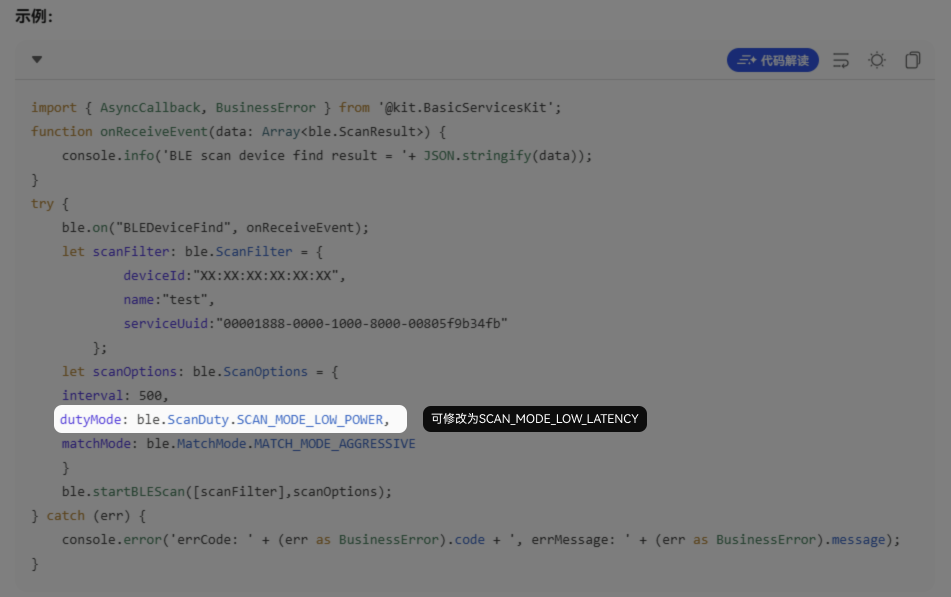
ble.startBLEScan发起BLE扫描流程时,可以选择SCAN_MODE_LOW_LATENCY扫描模式,减少蓝牙扫描的时间,提高扫描发现效率。
方案三:
服务发现与特征值匹配优化。扫描到目标设备后,通过GattClientDevice订阅服务并匹配特征值的过程可能耗时较长,可以通过以下方式优化:
- 持久化设备信息,避免重复服务发现。首次成功连接并完成服务发现后,将目标设备的服务UUID和特征值UUID等关键信息缓存到本地。下次连接同一设备时,无需再次调用getServices()遍历所有服务,直接使用已存储的UUID进行特征值操作。
- 优化连接与服务发现的时序。订阅连接状态变化事件on('BLEConnectionStateChange'),在连接成功(STATE_CONNECTED)的回调中调用getServices(),避免在连接过程中重复调用。服务发现完成后,将发现的服务与特征值信息缓存或持久化。
Q:ScanFilter指的是结果中被过滤掉(不包含)的部分,还是过滤出(仅包含)的意思?
A:是过滤出(仅包含)的意思。
Q:蓝牙扫描怎么取消过滤条件?
A:将startBLEScan过滤条件传入为null。
Q:设备名称只能模糊匹配时如何使用ScanFilter?
A:可以结合serviceUUID或制造商ID等其他过滤条件设置ScanFilter减少扫描范围,在扫描回调中再对设备名称进行模糊匹配。
Q:如何优化服务发现和特征值匹配的耗时?
A:首次连接后缓存服务UUID和特征值UUID等信息,下次连接直接使用缓存数据。同时在连接成功回调中调用getServices(),避免重复调用。
Q:如何使用蓝牙订阅事件感知蓝牙开关情况、扫描结果获取和连接状态的变化?对于订阅事件的使用是否有顺序要求?
A:通过蓝牙订阅事件感知状态变化的实现主要涉及以下三类场景,具体实现方式如下:
- 开关蓝牙场景:
调用开启蓝牙access.enableBluetooth时,系统会弹出开启蓝牙的对话框,可以通过以下方式感知用户操作对话框的行为:
- 同意开启蓝牙:开启蓝牙前通过access.on('stateChange')订阅本端蓝牙开关状态变化事件,通过回调中的BluetoothState枚举值确认蓝牙打开。
- 拒绝开启蓝牙:API20提供了access.enableBluetoothAsync,可以感知弹框拒绝的情况。
错误码ID
错误信息
原因
2900013
The user does not respond.
弹框后超过一定时间未响应
2900014
User refuse the action.
弹框后点击拒绝开启蓝牙
- 获取蓝牙扫描结果场景:
- 使用connection.startBluetoothDiscovery开启蓝牙扫描,扫描结果可通过API10开始支持的connection.on('bluetoothDeviceFind')或者API18开始支持的connection.on('discoveryResult')的回调函数获取。
- 使用ble.startBLEScan发起BLE扫描流程,扫描结果可通过ble.on('BLEDeviceFind')的回调函数获取。
- 监听蓝牙连接状态场景:
- 经典蓝牙:
- 通过API18提供的socket.sppReadAsync、socket.sppWriteAsync接口可以感知传输过程中经典蓝牙是否已经断连,断开连接时,接口会抛出错误码2901054并返回。
- 通过API20提供的COMMON_EVENT_BLUETOOTH_REMOTEDEVICE_ACL_STATE_CHANGE的公共事件感知ACL连接状态变化,当ACL链路断开时,所有依赖它的上层协议(如SPP、A2DP、HFP等)的连接状态都会同步断开,因此经典蓝牙连接也会断开。
- 通过API22提供的socket.isConnected检查当前链路是否已连接。
- 基于A2DP、HFP等经典蓝牙Profile的连接使用BaseProfile.getConnectionState判断。
- BLE:
- client端提供了on('BLEConnectionStateChange')接口,用于监听client端BLE蓝牙的连接状态。
server端提供了on('connectionStateChange')接口,用于监听server端BLE蓝牙的连接状态。
通过回调中BLEConnectionChangeState参数的ProfileConnectionState可以确认蓝牙连接状态。
名称
值
说明
STATE_DISCONNECTED
0
表示profile已断连
STATE_CONNECTING
1
表示profile正在连接
STATE_CONNECTED
2
表示profile已连接
STATE_DISCONNECTING
3
表示profile正在断连
- 通过API22提供的getConnectedState获取当前与server端设备的连接状态。
- client端提供了on('BLEConnectionStateChange')接口,用于监听client端BLE蓝牙的连接状态。
- 经典蓝牙: