问题现象
业务中,尝试将登录的Token信息利用PersistentStorage存储。具体方案为:在EntryAbility的onWindowStageCreate方法中查询PersistentStorage是否存在Token,如有则通过loadContent方法加载首页,否则加载登录页。登录成功后,将Token持久化存储,以实现后续持久化登录。问题是在EntryAbility中获取持久化数据失败,每次退出应用后,都需要重新登录。
背景知识
- PersistentStorage是应用程序中的可选单例对象。此对象的作用是持久化存储选定的AppStorage属性,以确保这些属性在应用程序重新启动时的值与应用程序关闭时的值相同。
- 用户首选项(Preferences)为应用提供Key-Value键值型的数据处理能力,支持应用持久化轻量级数据,并对其修改和查询。当用户有轻量级的键值型数据需要存储时,可以采用Preferences来进行存储。
问题定位
- 检查PersistentStorage存储的Token信息是否持久化在本地。检查“/data/app/el2/100/base/包名/haps/entry/files/persistent_storage”文件,发现Token信息已经持久化。
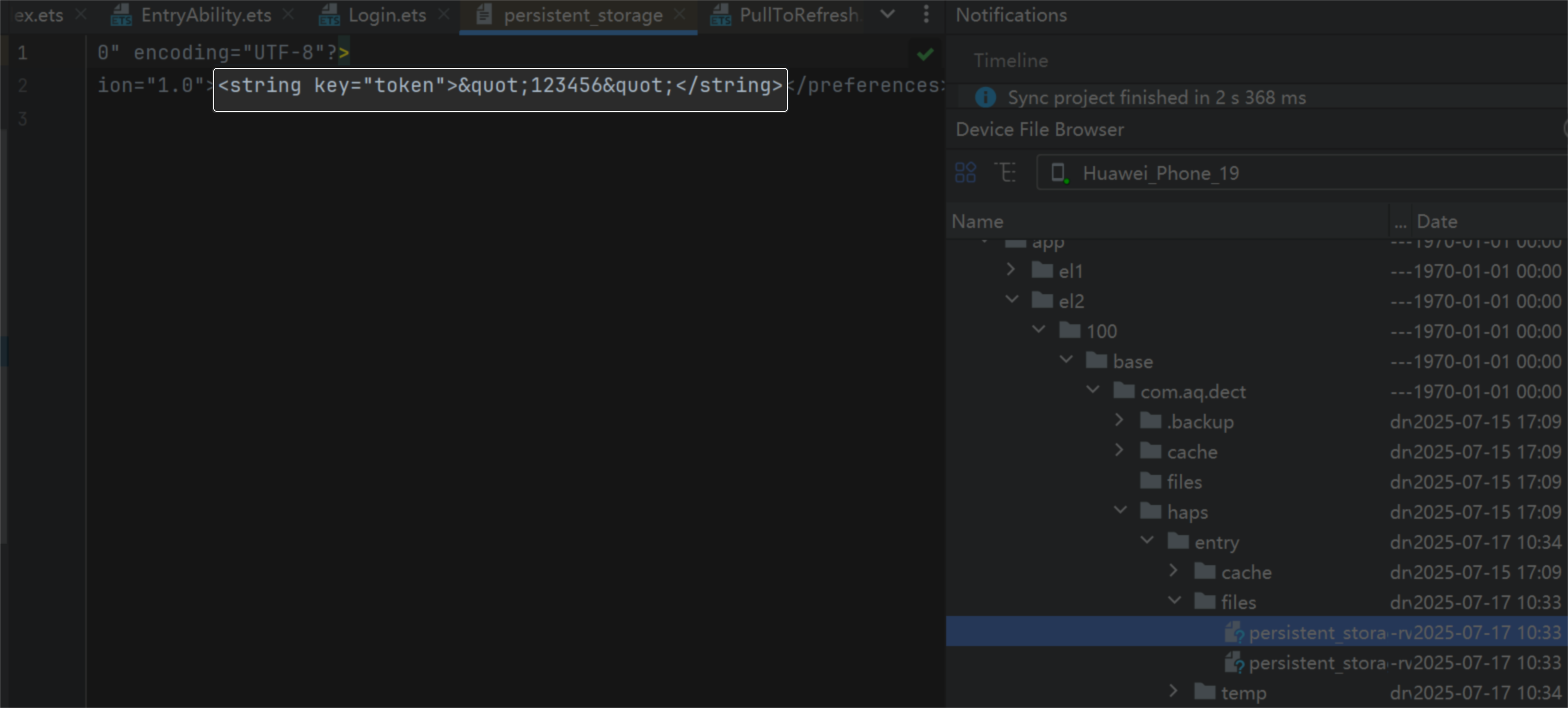
- 检查EntryAbility中获取Token信息是否有值。经过断点调试,发现该值为空。
修改建议
方案一:在EntryAbility中loadContent传入的回调中创建PersistentStorage对象,在loadContent加载的首页中判断是否持久化存储了Token信息,如果存储了则保持在当前页面,否则跳转登录页面。示例代码如下:
- 在EntryAbility的onWindowStageCreate创建PersistentStorage对象。
import { AbilityConstant, ConfigurationConstant, UIAbility, Want } from '@kit.AbilityKit';
import { hilog } from '@kit.PerformanceAnalysisKit';
import { window } from '@kit.ArkUI';

const DOMAIN = 0x0000;

export default class EntryAbility extends UIAbility {
  onCreate(want: Want, launchParam: AbilityConstant.LaunchParam): void {
    try {
      this.context.getApplicationContext().setColorMode(ConfigurationConstant.ColorMode.COLOR_MODE_NOT_SET);
    } catch (err) {
      hilog.error(DOMAIN, 'testTag', 'Failed to set colorMode. Cause: %{public}s', JSON.stringify(err));
    }
    hilog.info(DOMAIN, 'testTag', '%{public}s', 'Ability onCreate');
    hilog.info(DOMAIN, 'testTag', want.bundleName);
    hilog.info(DOMAIN, 'testTag', launchParam.launchReasonMessage);
  }

  onDestroy(): void {
    hilog.info(DOMAIN, 'testTag', '%{public}s', 'Ability onDestroy');
  }

  onWindowStageCreate(windowStage: window.WindowStage): void {
    // Main window is created, set main page for this ability
    hilog.info(DOMAIN, 'testTag', '%{public}s', 'Ability onWindowStageCreate');

    windowStage.loadContent('pages/Index', (err) => {
      // 创建PersistentStorage对象
      PersistentStorage.persistProp('token', '');
      if (err.code) {
        hilog.error(DOMAIN, 'testTag', 'Failed to load the content. Cause: %{public}s', JSON.stringify(err));
        return;
      }
      hilog.info(DOMAIN, 'testTag', 'Succeeded in loading the content.');
    });
  }

  onWindowStageDestroy(): void {
    // Main window is destroyed, release UI related resources
    hilog.info(DOMAIN, 'testTag', '%{public}s', 'Ability onWindowStageDestroy');
  }

  onForeground(): void {
    // Ability has brought to foreground
    hilog.info(DOMAIN, 'testTag', '%{public}s', 'Ability onForeground');
  }

  onBackground(): void {
    // Ability has back to background
    hilog.info(DOMAIN, 'testTag', '%{public}s', 'Ability onBackground');
  }
};
- 在首页的aboutToAppear方法中,判断当前用户是否登录,即是否可获取持久化Token信息。
@Entry
@Component
struct Index {
  @State message: string = '这是首页';

  aboutToAppear(): void {
    // 获取token信息,判断如果未登录,则跳转登录页
    const token = AppStorage.get('token') as string;
    if (token == '') {
      this.getUIContext().getRouter().pushUrl({
        url: 'pages/Login'
      }).catch(() => {
        console.error('跳转失败');
      });
    }
  }

  build() {
    RelativeContainer() {
      Text(this.message)
        .id('HelloWorld')
        .fontSize($r('app.float.page_text_font_size'))
        .fontWeight(FontWeight.Bold)
        .alignRules({
          center: { anchor: '__container__', align: VerticalAlign.Center },
          middle: { anchor: '__container__', align: HorizontalAlign.Center }
        })
        .onClick(() => {
          this.message = 'Welcome';
        });
    }
    .height('100%')
    .width('100%');
  }
}
- 在登录页通过AppStorage保存Token信息。
@Entry
@Component
struct Login {
  build() {
    Column({ space: 10 }) {
      Text('这是登录页')
        .fontSize($r('app.float.page_text_font_size'))
        .fontWeight(FontWeight.Bold);
      Button('登录去首页')
        .fontSize($r('app.float.page_text_font_size'))
        .fontWeight(FontWeight.Bold)
        .onClick(() => {
          // 在登录页通过AppStorage保存Token信息
          AppStorage.setOrCreate('token', '123456');
          this.getUIContext().getRouter().pushUrl({
            url: 'pages/Index'
          }).catch(() => {
            console.error('跳转失败');
          });
        });
    }
    .height('100%')
    .width('100%');
  }
}
方案二:通过用户首选项实现数据持久化。在EntryAbility的onWindowStageCreate方法中查询用户首选项中持久化存储的Token信息,如有则通过loadContent方法加载首页,否则加载登录页。
- 创建用户首选项工具类。实现用户首选项的增、删、改、查操作。
import { preferences } from '@kit.ArkData';

class TokenPreferences {
  context: Context | undefined = undefined;
  tokenName: string = 'TOKEN';

  // 获取实例
  getStore() {
    let options: preferences.Options = { name: this.tokenName };
    return preferences.getPreferencesSync(this.context, options);
  }

  // 增
  async insert(value: string) {
    const dataPreferences = await this.getStore();
    dataPreferences.putSync(this.tokenName, value);
    dataPreferences.flush();
  }

  // 删
  async delete() {
    const dataPreferences = await this.getStore();
    dataPreferences.deleteSync(this.tokenName);
    dataPreferences.flush();
  }

  // 查
  async query() {
    const dataPreferences = await this.getStore();
    const value = dataPreferences.getSync(this.tokenName, '') as string;
    return value;
  }
}

const tokenPreferences: TokenPreferences = new TokenPreferences();

export { tokenPreferences };
- 在EntryAbility的onWindowStageCreate方法中查询是否存在Token信息,从而加载不同的页面内容。
import { AbilityConstant, ConfigurationConstant, UIAbility, Want } from '@kit.AbilityKit';
import { hilog } from '@kit.PerformanceAnalysisKit';
import { window } from '@kit.ArkUI';
import { tokenPreferences } from '../utils/TokenPreferences';

const DOMAIN = 0x0000;

export default class EntryAbility extends UIAbility {
  onCreate(want: Want, launchParam: AbilityConstant.LaunchParam): void {
    try {
      this.context.getApplicationContext().setColorMode(ConfigurationConstant.ColorMode.COLOR_MODE_NOT_SET);
    } catch (err) {
      hilog.error(DOMAIN, 'testTag', 'Failed to set colorMode. Cause: %{public}s', JSON.stringify(err));
    }
    hilog.info(DOMAIN, 'testTag', '%{public}s', 'Ability onCreate');
    hilog.info(DOMAIN, 'testTag', want.bundleName);
    hilog.info(DOMAIN, 'testTag', launchParam.launchReasonMessage);
  }

  onDestroy(): void {
    hilog.info(DOMAIN, 'testTag', '%{public}s', 'Ability onDestroy');
  }

  async onWindowStageCreate(windowStage: window.WindowStage): Promise<void> {
    // Main window is created, set main page for this ability
    hilog.info(DOMAIN, 'testTag', '%{public}s', 'Ability onWindowStageCreate');
    tokenPreferences.context = this.context;
    const token = await tokenPreferences.query();
    if (token == '') {
      windowStage.loadContent('pages/Login').catch(() => {
        hilog.error(DOMAIN, 'testTag', '跳转Login页失败');
      });
    } else {
      windowStage.loadContent('pages/Index').catch(() => {
        hilog.error(DOMAIN, 'testTag', '跳转Index页失败');
      });
    }
  }

  onWindowStageDestroy(): void {
    // Main window is destroyed, release UI related resources
    hilog.info(DOMAIN, 'testTag', '%{public}s', 'Ability onWindowStageDestroy');
  }

  onForeground(): void {
    // Ability has brought to foreground
    hilog.info(DOMAIN, 'testTag', '%{public}s', 'Ability onForeground');
  }

  onBackground(): void {
    // Ability has back to background
    hilog.info(DOMAIN, 'testTag', '%{public}s', 'Ability onBackground');
  }
};
- 登录页,登录后保存首选项,并跳转首页。
import { tokenPreferences } from '../utils/TokenPreferences';

@Entry
@Component
struct Login {
  build() {
    Column({ space: 10 }) {
      Text('这是登录页')
        .fontSize($r('app.float.page_text_font_size'))
        .fontWeight(FontWeight.Bold);
      Button('登录去首页')
        .fontSize($r('app.float.page_text_font_size'))
        .fontWeight(FontWeight.Bold)
        .onClick(() => {
          // 持久化存储
          tokenPreferences.insert('654321');
          // 跳转首页
          this.getUIContext().getRouter().pushUrl({
            url: 'pages/Index'
          }).catch(() => {
            console.error('跳转失败');
          });
        });
    }
    .height('100%')
    .width('100%');
  }
}
- 首页,退出登录后删除首选项。
import { tokenPreferences } from '../utils/TokenPreferences';

// 首页
@Entry
@Component
struct Index {
  build() {
    Column({ space: 10 }) {
      Text('这是首页')
        .fontSize($r('app.float.page_text_font_size'))
        .fontWeight(FontWeight.Bold);
      Text('退出登录')
        .fontSize($r('app.float.page_text_font_size'))
        .fontWeight(FontWeight.Bold)
        .onClick(() => {
          // 删除首选项
          tokenPreferences.delete();
          this.getUIContext().getRouter().pushUrl({
            url: 'pages/Login'
          }).catch(() => {
            console.error('跳转失败');
          });
        });
    }.height('100%')
    .width('100%');
  }
}