背景知识
动态属性设置:动态设置组件的属性,支持开发者在属性设置时使用if/else语法,且根据需要使用多态样式设置属性。属性修改器限制范围详见属性修改器中instance参数支持范围与属性支持范围,自定义Modifier详见自定义Modifier支持范围。可定义类型如下所示:
序号 | 类型 | 备注 |
|---|---|---|
1 | applyNormalAttribute | 组件普通状态时的样式。 |
2 | applyPressedAttribute | 组件按压状态的样式。 |
3 | applyFocusedAttribute | 组件获焦状态的样式。 |
4 | applyDisabledAttribute | 组件禁用状态的样式。 |
5 | applySelectedAttribute | 组件选中状态的样式。 |
解决方案
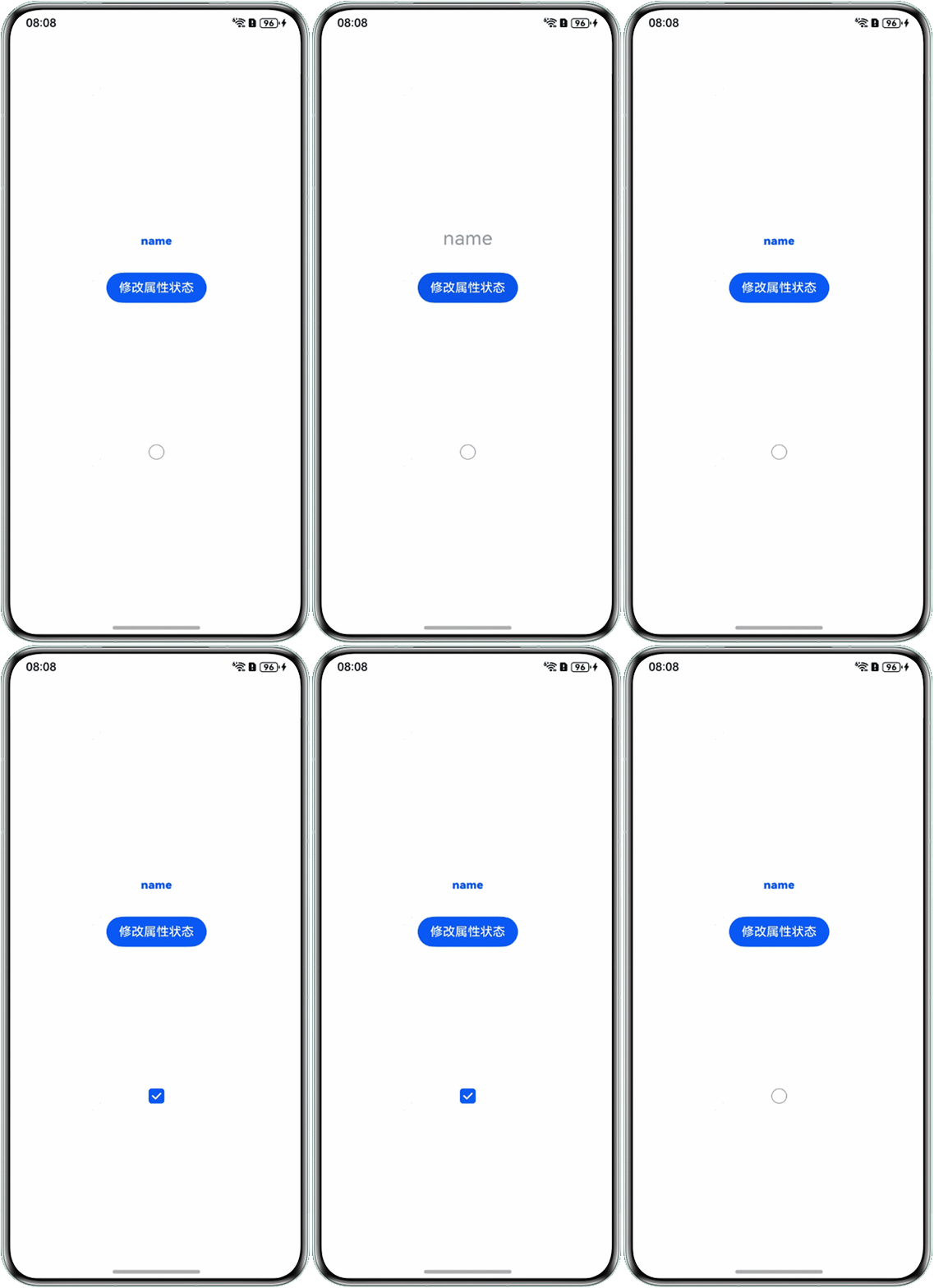
场景一:组件创建时,实现动态修改属性的功能,属性修改器(attributeModifier)以Text与Checkbox组件为例。
- 创建组件动态属性类,修改Text文本的行高、字体大小、颜色、粗细;Checkbox中修改选中颜色与选中的多选框样式。
- 创建OptionOneIndex页面调用动态属性类方法。
// 自定义class实现Text的AttributeModifier接口
class MyTextModifier implements AttributeModifier<TextAttribute> {
  textType: string = 'TYPE_ONE';
  textSize: number = 15;
  textHeight: number = 0;

  constructor(textType: string, textSize: number, textHeight: number) {
    this.textType = textType;
    this.textSize = textSize;
    this.textHeight = textHeight;
  }

  applyNormalAttribute(instance: TextAttribute): void {
    if (this.textType === 'TYPE_ONE') {
      instance.lineHeight(this.textHeight); // 设置行高
      instance.fontSize(this.textSize); // 设置字体大小
      instance.fontColor('#0a59f7'); // 设置字体颜色
      instance.fontWeight(FontWeight.Bolder); // 设置字体类型
      instance.width(200);
    } else if (this.textType === 'TYPE_TWO') {
      instance.lineHeight(100);
      instance.fontSize(20);
      instance.fontWeight(FontWeight.Bold);
      instance.fontColor('#33000000');
      instance.width(200);
    } else if (this.textType === 'TYPE_THREE') {
      instance.lineHeight(100);
      instance.fontSize(25);
      instance.fontColor('#66000000');
      instance.fontWeight(FontWeight.Normal);
      instance.width(200);
    } else if (this.textType === 'TYPE_FOUR') {
      instance.lineHeight(100);
      instance.fontSize(30);
      instance.fontColor('#99000000');
      instance.textAlign(TextAlign.Center);
    }
  }
}

// 自定义class实现Checkbox的AttributeModifier接口
export class MyCheckboxModifier implements AttributeModifier<CheckboxAttribute> {
  isSelect: boolean = false;

  // 通过构造函数,创建时传参
  constructor(Select?: boolean) {
    this.isSelect = Select ? Select : false;
  }

  applyNormalAttribute(instance: CheckboxAttribute): void {
    // instance为Checkbox的属性对象,设置正常状态下属性值
    instance.borderColor('#fff');
  }

  applySelectedAttribute(instance: CheckboxAttribute): void {
    // instance为Checkbox的属性对象,设置选中状态下属性值
    instance.borderColor('#0a59f7'); // 修改颜色
    instance.shape(CheckBoxShape.ROUNDED_SQUARE); // 修改选中的多选框样式
  }
}

@Entry
@Component
struct OptionOneIndex {
  // 使用方创建提供方的AttributeModifier实现类实例
  @State value: number = 0;
  @State arr: string[] = ['TYPE_ONE', 'TYPE_TWO', 'TYPE_THREE', 'TYPE_FOUR'];
  @State textOne: MyTextModifier = new MyTextModifier(this.arr[this.value], 15, 100);
  @State checkboxModifier: MyCheckboxModifier = new MyCheckboxModifier();
  @State isSelected: boolean = false; // 定义状态变量

  build() {
    Column() {
      Column({ space: 16 }) {
        Text('name')
          .attributeModifier(this.textOne)
          .textAlign(TextAlign.Center);
        Button('修改属性状态')
          .onClick(() => {
            this.value = (this.value + 1) % 4;
            this.textOne.textType = this.arr[this.value];
          });
      };

      Checkbox({
        name: 'checkbox1',
        group: 'settings',

      })
        .select(this.isSelected)
        .attributeModifier(this.checkboxModifier)
        .onChange((value: boolean) => {
          this.isSelected = value; // 更新状态变量
        });
    }
    .width('100%')
    .height('100%')
    .padding(16)
    .justifyContent(FlexAlign.SpaceEvenly);
  }
}
效果预览:
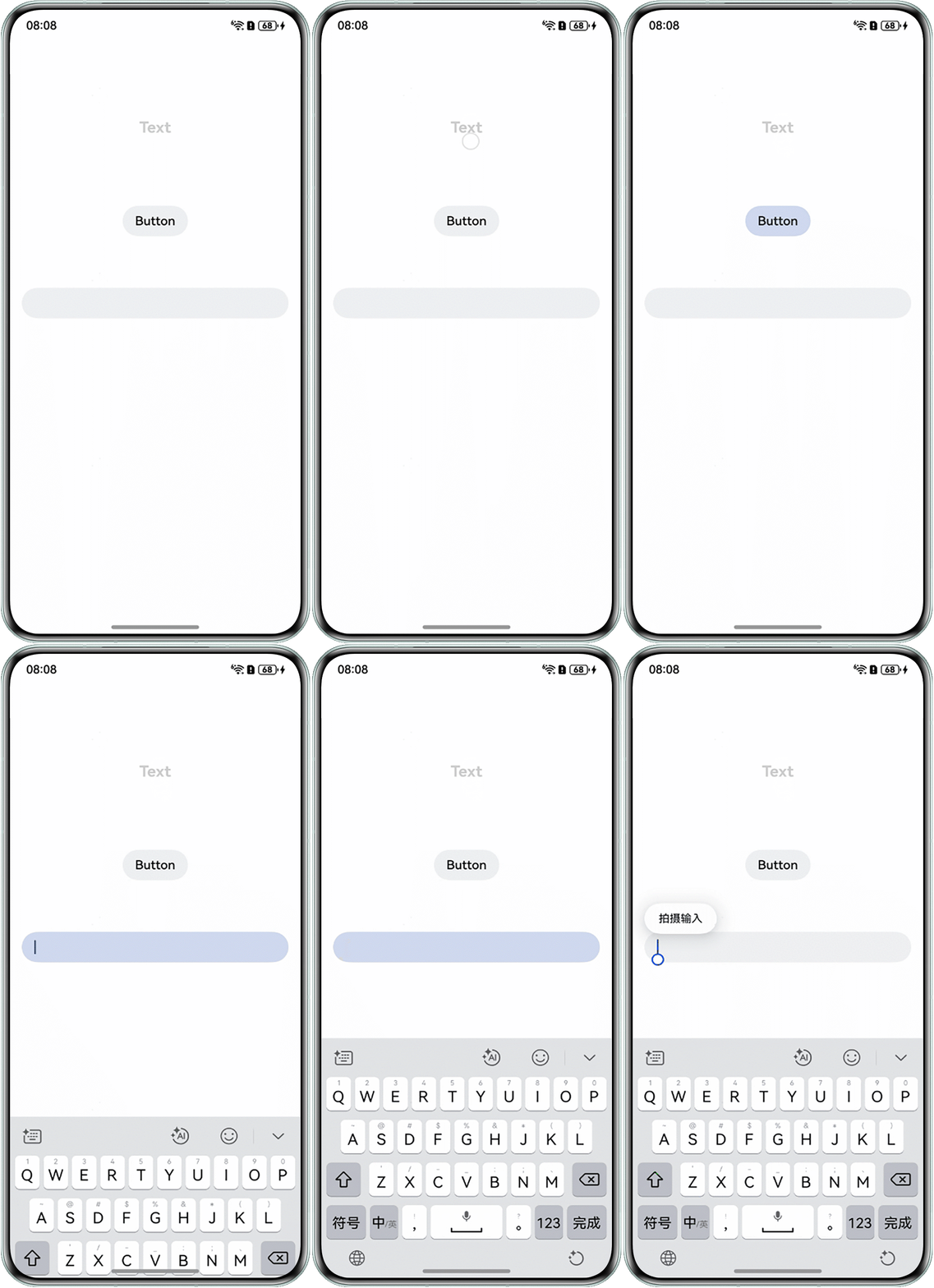
- 场景二:在不同组件下如何实现复用相同的属性。AttributeModifier的泛型类和回调方法参数对象类型可以写多个,不同组件可以复用相同的动态属性,如:applyNormalAttribute(instance: TextAttribute|TextInputAttribute|ButtonAttribute)。如果有组件与其他组件有区别需单独处理,可以在自定义实现的class构造器中增加一个参数,用以作为分支逻辑的判断条件。如下Text组件做了单独处理,点击后实现字体大小和颜色的切换;点击Button和TextInput则是可以切换相同的背景色。
class MyModifier implements AttributeModifier<TextAttribute | TextInputAttribute | ButtonAttribute> {
  isDark: boolean = false;
  type: string = 'TextInputAttribute';

  constructor(dark?: boolean, type?: string) {
    this.isDark = dark ?? false;
    this.type = type ?? '';
  }

  applyNormalAttribute(instance: TextAttribute | TextInputAttribute | ButtonAttribute): void {
    if (this.type === 'TextAttribute') {
      if (this.isDark) {
        instance.fontSize(15); // 设置字体大小
        instance.fontColor('#0a59f7'); // 设置字体颜色
        instance.fontWeight(FontWeight.Bolder); // 设置字体类型
      } else {
        instance.fontSize(20);
        instance.fontWeight(FontWeight.Bold);
        instance.fontColor('#33000000');
      }
    } else {
      if (this.isDark) {
        instance.backgroundColor('#fff0f1f3');
      } else {
        instance.backgroundColor('#ffcfdaef');
      }
    }
  }
}

@Entry
@Component
struct Index {
  @State textMod: MyModifier = new MyModifier(true, 'TextAttribute');
  @State buttonMod: MyModifier = new MyModifier();
  @State textInputMod: MyModifier = new MyModifier();

  build() {
    Column() {
      Column() {
        Text(`Text`)
          .attributeModifier(this.textMod)
          .onClick(() => {
            this.textMod.isDark = !this.textMod.isDark;
          });
      }
      .width('100%')
      .alignItems(HorizontalAlign.Center)
      .justifyContent(FlexAlign.Center)
      .height(70);

      Button(`Button`)
        .fontColor('#000')
        .attributeModifier(this.buttonMod)
        .onClick(() => {
          this.buttonMod.isDark = !this.buttonMod.isDark;
        });

      TextInput()
        .attributeModifier(this.textInputMod)
        .onClick(() => {
          this.textInputMod.isDark = !this.textInputMod.isDark;
        });
    }
    .width('100%')
    .height('60%')
    .padding(16)
    .justifyContent(FlexAlign.SpaceEvenly);
  }
}
效果预览:
常见FAQ
Q:自定义封装的组件,能在父组件引用时使用链式属性(自定义属性)吗?
A:自定义组件不支持直接添加.fontSize()、.fontColor()、.fontWeight()等属性,会报语法错误,自定义组件能支持的属性很少,如.width()、 .height()、.backgroundColor()等属性本身就客观支持自定义组件的设置,而且属性也不是直接在内部组件生效,而是在外层生效。可以通过对子组件传参的方式,实现组件属性修改。子组件动态属性设置方式,以场景一为例,修改参考如下:
- 创建CommodityText并默认其背景颜色为Color.Gray。
mBackgroundColor: ResourceColor = Color.Gray;
- CommodityText内定义backgroundColor修改组件颜色。
// 修改原TextAttribute的backgroundColor的默认属性
backgroundColor(backgroundColor: ResourceColor): CommodityTextFaqOne {
  this.mBackgroundColor = backgroundColor; // 修改子组件的背景颜色
  return this;
}
- applyNormalAttribute内调用背景颜色接口,并赋值传入的颜色。
instance.backgroundColor(this.mBackgroundColor);
- 父组件内调用子组件并赋值子组件背景颜色为Color.Blue。
// CustomSysComp为子组件
CustomSysComp({
  textOne: new CommodityTextFaqOne(this.arr[this.value], 15, 50)
    .backgroundColor(Color.Blue) // 通过链式方式修改textOne的默认背景颜色
})
  .width('100%')
  .height(400);
Q:自定义组件如何实现系统组件属性的链式调用?
A:自定义组件外部自定义Modifier继承需要实现的系统组件Modifier,传递给自定义组件内部,自定义组件内部将Modifier设置给对应系统组件容器。以下Column为例的示例代码:
import { ColumnModifier } from '@kit.ArkUI';

class MyModifier extends ColumnModifier {
  applyNormalAttribute(instance: ColumnModifier): void {
    super.applyNormalAttribute?.(instance);
  }
}

@Entry
@ComponentV2
struct FaqTwoPage {
  @Local message: string = 'Hello World';
  @Local myModifier: ColumnModifier = new MyModifier()
    .width(100)
    .height(100)
    .margin(10)
    .backgroundColor(Color.Pink)
    .justifyContent(FlexAlign.Center)
    .alignItems(HorizontalAlign.Center);

  build() {
    Column({ space: 10 }) {
      CustomTest({ modifier: this.myModifier });
    }
    .height('100%')
    .width('100%');
  }
}

@ComponentV2
struct CustomTest {
  @Param @Require modifier: ColumnModifier;

  @Builder
  customBuilder() {
  }

  @BuilderParam customBuilderParam: () => void = this.customBuilder;

  build() {
    Column() {
      Text('CustomTest');
      this.customBuilderParam();
    }
    .attributeModifier(this.modifier);
  }
}
Q:Text如何实现在设置宽度属性和不设置宽度属性之间切换?
A:可以通过attributeModifier来实现,在applyNormalAttribute方法中判断满足条件时设置宽度属性,否则不设置,具体示例代码如下:
// 宽度属性修改器
class TextWidthModifier implements AttributeModifier<TextAttribute> {
  private needWidth: boolean;

  constructor(needWidth: boolean) {
    this.needWidth = needWidth;
  }

  // 普通状态下动态设置宽度
  applyNormalAttribute(instance: TextAttribute): void {
    if (this.needWidth) {
      // 条件满足时设置宽度
      instance.width(10);
    }
    // 条件不满足时不设置宽度(即保持默认或父容器约束)
  }
}

@Entry
@Component
struct FaqThreePage {
  @State needWidth: boolean = true;

  build() {
    Column() {
      Text('Dynamic Width')
        .attributeModifier(new TextWidthModifier(this.needWidth));
    };
  }
}