问题现象
使用clearRect清除之前的绘画,但是清除效果和预期有差异。一共有两个场景:
- 场景一:
绘制时对画布进行矩阵变换,使用clearRect清除时未达预期,出现问题现象如下所示:
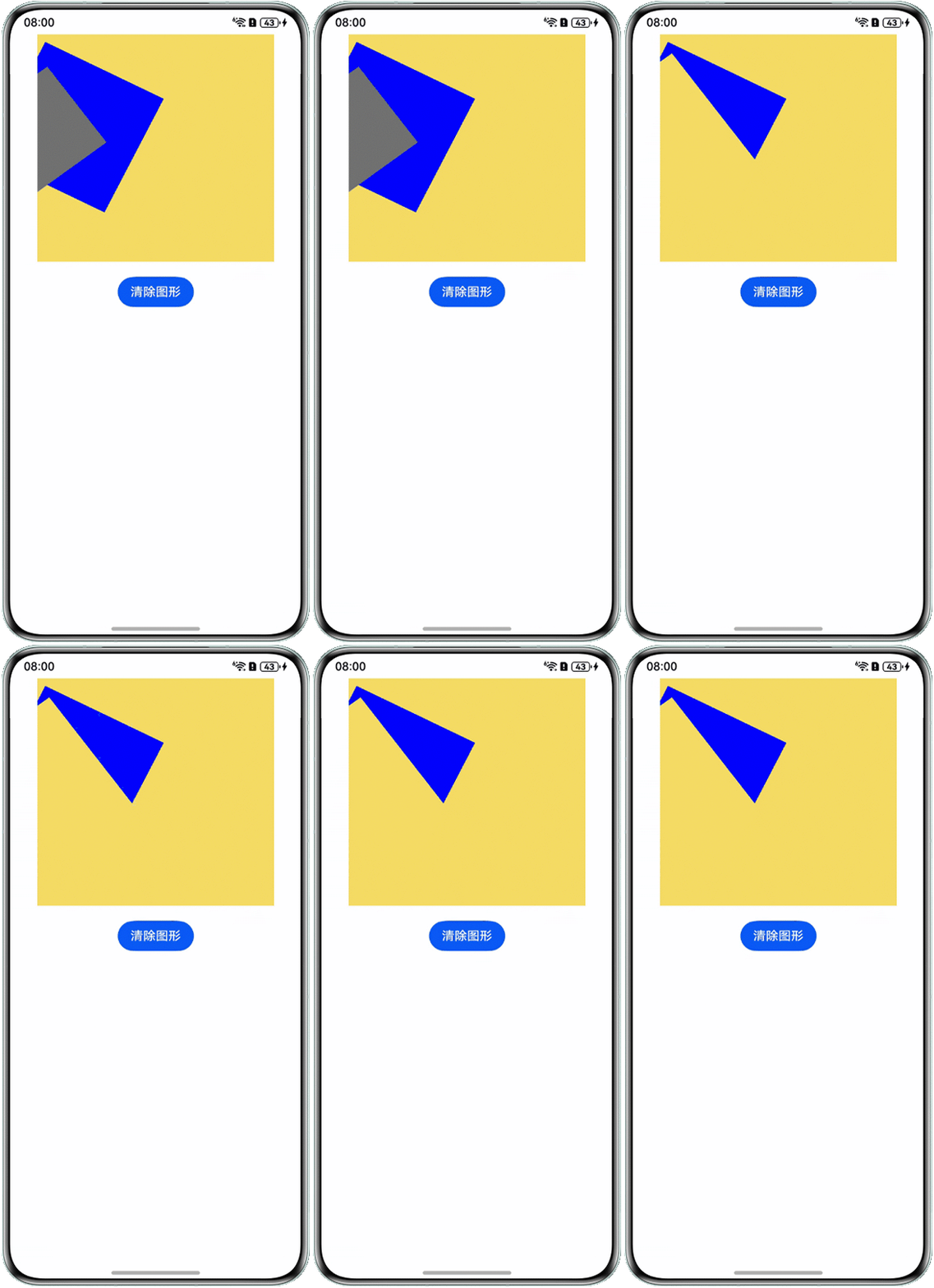
问题相关代码如下:
// 第一段画布的绘制代码 Canvas(this.coordinateSystemContext) .width(this.canvasWidth) .height(this.canvasHeight) .backgroundColor('#F5DC62') .onReady(() => { this.coordinateSystemContext.fillStyle = '#0000FF' this.coordinateSystemContext.transform(1, 0.5, -0.5, 1, 10, 10) this.coordinateSystemContext.fillRect(0, 0, 150, 150) this.coordinateSystemContext.transform(1, 0.5, -0.5, 1, 10, 10) this.coordinateSystemContext.fillStyle = '#FF707070' this.coordinateSystemContext.fillRect(10, 10, 100, 100) this.coordinateSystemContext.strokeStyle = '#F5DC62' this.coordinateSystemContext.lineWidth = 5 }) Button('清除图形') .onClick(() => { this.coordinateSystemContext.clearRect(0, 0, this.canvasHeight, this.canvasWidth); }) - 场景二:
绘制时对画布进行缩放,使用clearRect清除时未达预期,出现问题现象如下所示:

问题相关代码:
// 第二段画布的绘制代码
Canvas(this.incompleteAreaContext)
   .width(this.canvasWidth)
   .height(this.canvasHeight)
   .backgroundColor('#F5DC62')
   .onReady(() => {
      this.incompleteAreaContext.fillStyle = '#0000FF'
      this.incompleteAreaContext.fillRect(10, 10, 100, 100)
      this.incompleteAreaContext.scale(this.ratio, this.ratio)
      this.incompleteAreaContext.fillStyle = '#ff00eaff'
      this.incompleteAreaContext.fillRect(10, 10, 100, 100)
      this.incompleteAreaContext.strokeStyle = '#F5DC62'
      this.incompleteAreaContext.lineWidth = 5
   })
Button('清除图形')
  .onClick(() => {
     this.incompleteAreaContext.clearRect(0, 0, this.incompleteAreaContext.height, this.incompleteAreaContext.width);
  })
背景知识
Canvas提供画布组件,用于自定义绘制图形,开发者使用CanvasRenderingContext2D对象和OffscreenCanvasRenderingContext2D对象在Canvas组件上进行绘制,支持绘制形状、文本、图像及复杂动画。
分析结论
clearRect失效通常由以下原因导致:
- 坐标系参数未适配当前变换状态:当画布经过矩阵变换后,clearRect的坐标参数未适配当前变换状态。
- 未正确计算需要清除的区域范围:当画布进行了缩放,未正确计算需要清除的区域范围,导致残留轨迹。
解决方案
- 场景一:适配画布变换状态:若画布经过缩放或平移,需先重置变换矩阵再清除,示例如下:
@Entry @Component struct CanvasExample1 { // 用来配置CanvasRenderingContext2D对象的参数,包括是否开启抗锯齿,true表明开启抗锯齿。 private settings: RenderingContextSettings = new RenderingContextSettings(true); // 用来创建CanvasRenderingContext2D对象,通过在canvas中调用CanvasRenderingContext2D对象来绘制。 private coordinateSystemContext: CanvasRenderingContext2D = new CanvasRenderingContext2D(this.settings); private canvasWidth: number = 300; private canvasHeight: number = 300; build() { Column({space:20}) { // 在canvas中调用CanvasRenderingContext2D对象。 // 第一段画布的绘制代码 Canvas(this.coordinateSystemContext) .width(this.canvasWidth) .height(this.canvasHeight) .backgroundColor('#F5DC62') .onReady(() => { this.coordinateSystemContext.fillStyle = '#0000FF'; this.coordinateSystemContext.transform(1, 0.5, -0.5, 1, 10, 10); this.coordinateSystemContext.fillRect(0, 0, 150, 150); this.coordinateSystemContext.transform(1, 0.5, -0.5, 1, 10, 10); this.coordinateSystemContext.fillStyle = '#FF707070'; this.coordinateSystemContext.fillRect(10, 10, 100, 100); this.coordinateSystemContext.strokeStyle = '#F5DC62'; this.coordinateSystemContext.lineWidth = 5; }) Button('清除图形') .onClick(() => { // 保存当前画布状态 this.coordinateSystemContext.save(); // 重置变换矩阵(确保清除区域覆盖整个画布) this.coordinateSystemContext.resetTransform(); // 清除整个画布 this.coordinateSystemContext.clearRect(0, 0, this.coordinateSystemContext.width, this.coordinateSystemContext.height); // 恢复之前的画布状态(如缩放、平移等) this.coordinateSystemContext.restore(); }); } .width('100%') .height('100%'); } } - 场景二:正确计算清除区域:根据当前缩放比例动态调整清除范围,示例如下:
@Entry
@Component
struct CanvasExample2 {
  // 用来配置CanvasRenderingContext2D对象的参数,包括是否开启抗锯齿,true表明开启抗锯齿。
  private settings: RenderingContextSettings = new RenderingContextSettings(true);
  // 用来创建CanvasRenderingContext2D对象,通过在canvas中调用CanvasRenderingContext2D对象来绘制。
  private incompleteAreaContext: CanvasRenderingContext2D = new CanvasRenderingContext2D(this.settings);
  private canvasWidth: number = 300;
  private canvasHeight: number = 300;
  private ratio: number = 0.3; // 假设存在缩放比例变量

  build() {
    Column({ space: 20 }) {
      // 在canvas中调用CanvasRenderingContext2D对象。
      // 第二段画布的绘制代码
      // 第二段画布的绘制代码
      Canvas(this.incompleteAreaContext)
        .width(this.canvasWidth)
        .height(this.canvasHeight)
        .backgroundColor('#F5DC62')
        .onReady(() => {
          this.incompleteAreaContext.fillStyle = '#0000FF';
          this.incompleteAreaContext.fillRect(10, 10, 100, 100);
          this.incompleteAreaContext.scale(this.ratio, this.ratio);
          this.incompleteAreaContext.fillStyle = '#ff00eaff';
          this.incompleteAreaContext.fillRect(10, 10, 100, 100);
          this.incompleteAreaContext.strokeStyle = '#F5DC62';
          this.incompleteAreaContext.lineWidth = 5;
        });
      Button('清除图形')
        .onClick(() => {
          // 计算实际清除区域
          let clearWidth = this.incompleteAreaContext.width / this.ratio;
          let clearHeight = this.incompleteAreaContext.height / this.ratio;
          this.incompleteAreaContext.clearRect(0, 0, clearWidth, clearHeight);
        });
    }
    .width('100%')
    .height('100%');
  }
}