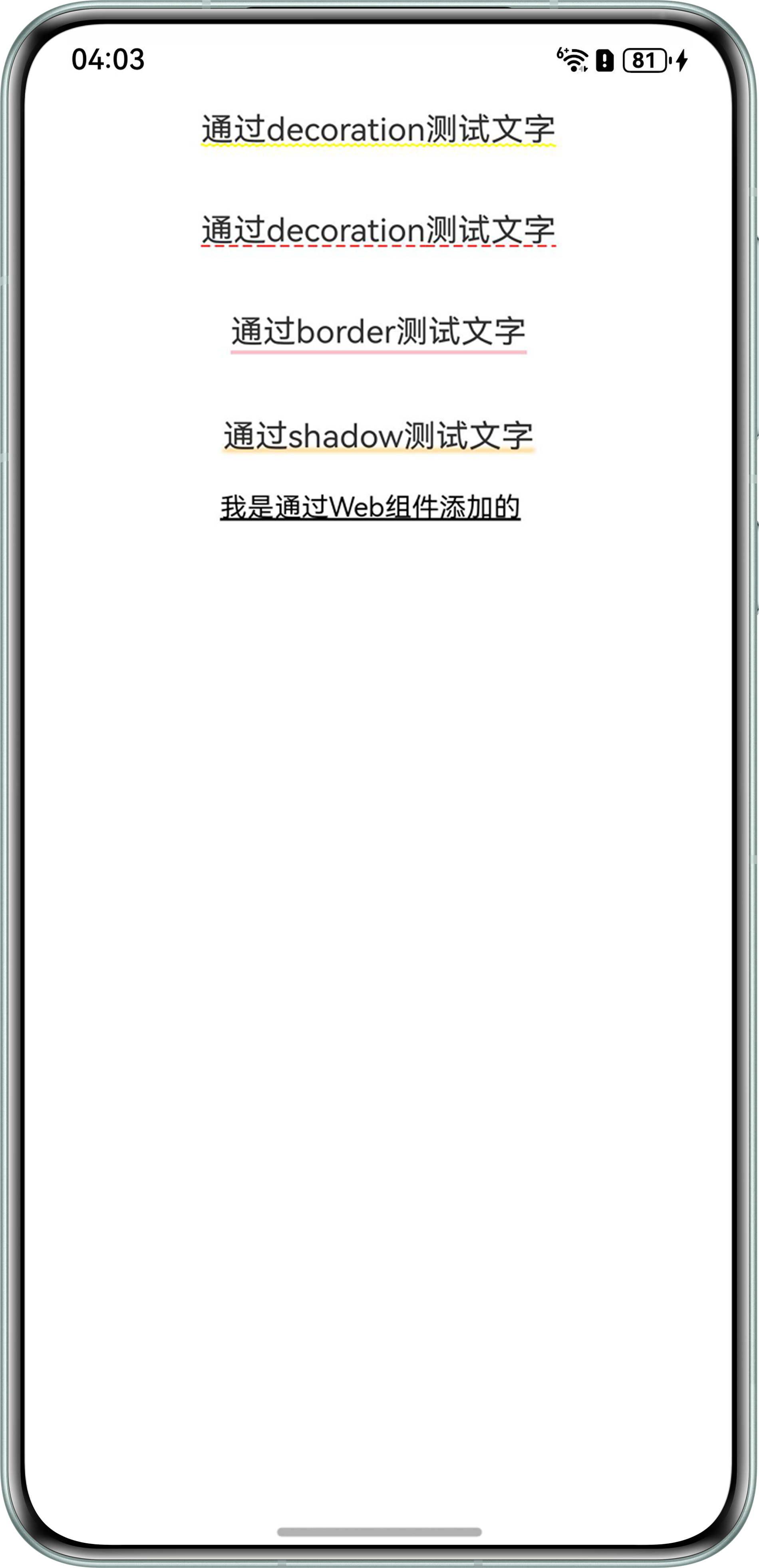
背景知识
- Text组件的decoration属性只能修改线条样式和颜色,无法修改高度和位置。
- onAreaChange是在组件显示的尺寸、位置等发生变化时触发的事件。
- shadow:为组件添加阴影效果。
- border:设置组件边框样式。通过链式调用.border()方法,分别配置边框宽度、颜色、样式。
- Web组件:Web组件提供了网页显示能力,根据页面加载数据来源可以分为三种常用场景,包括加载网络页面、加载本地页面、加载HTML格式的富文本数据。
解决方案
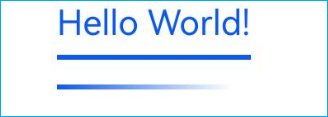
- 方案一:将Text文字和底部下划线使用Column容器封装成一个组件,在需要的地方应用。
@Entry
@Component
struct Index {
  message: string = 'Hello World!';
  @State textLength: Length = 0;
  isKey: boolean = true;

  build() {
    Column() {
      Column() {
        Text(this.message)
          .fontSize(14)
          .fontColor(this.isKey ? '#0A59F7' : '#cd202021')
          .padding({ bottom: 5 })
          .onAreaChange((oldValue: Area, newValue: Area) => {
            this.textLength = newValue.width;
          })
        // 自定义选中文本底部导航条--单直线
        if (this.isKey) {
          Column().width(this.textLength).height(2).backgroundColor('#0A59F7');
        }

        // 自定义选中文本底部导航条--线性渐变
        if (this.isKey) {
          Text().width(this.textLength).height(2)
            .linearGradient({
              direction: GradientDirection.Right,
              colors: [['#0A59F7', 0.0], [Color.White, 0.9]]
            })
            .margin({ top: 10 })
        }
      }
      .width('100%')
    }
  }
}
效果预览:
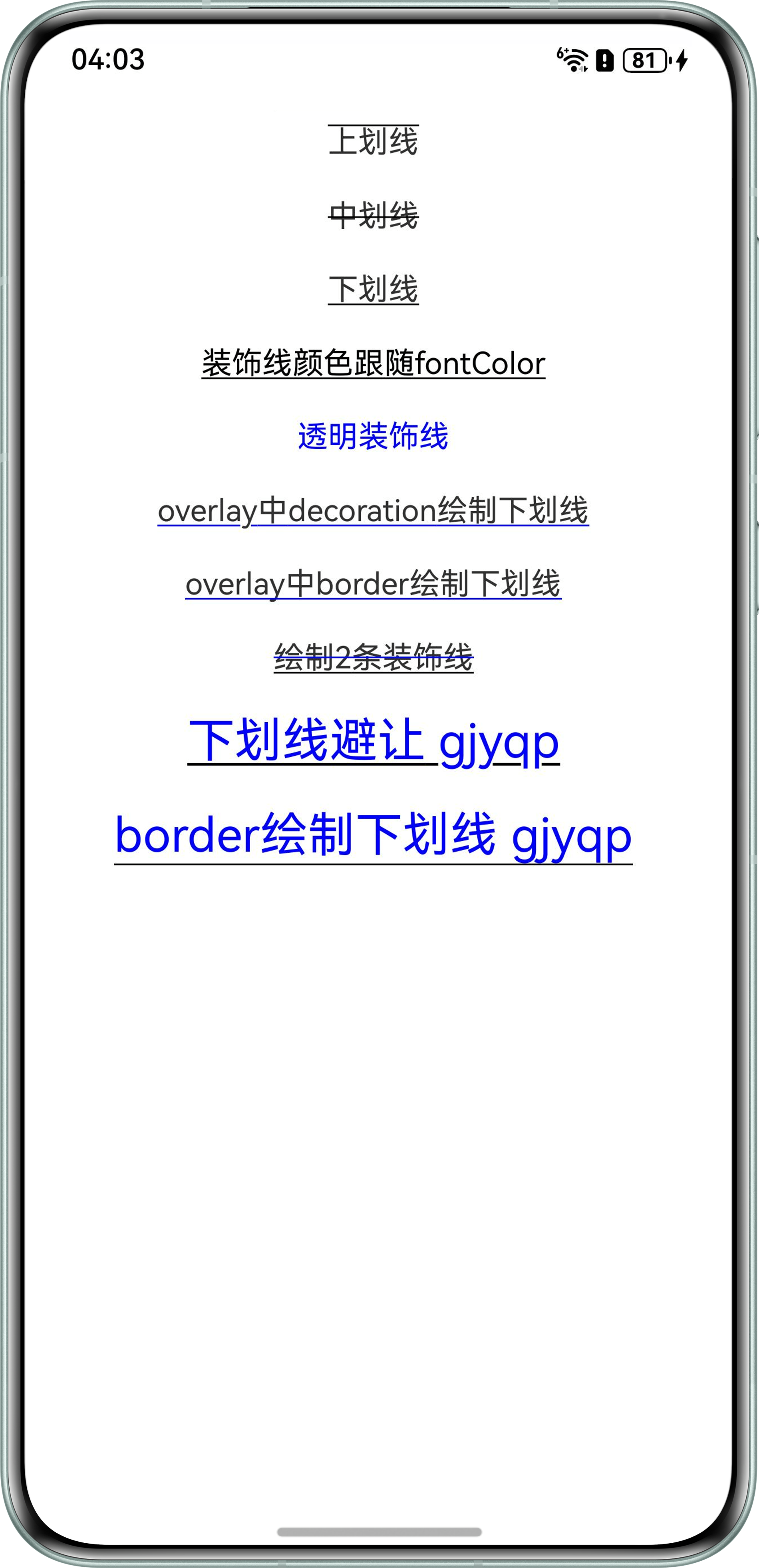
- 方案二:通过Text组件的decoration参数直接设置基础线条样式。
@Entry
@Component
struct Scene2 {
  messageBorder: string = 'overlay中border绘制下划线';
  messageDecoration: string = 'overlay中decoration绘制下划线';
  messageTwoLine: string = '绘制2条装饰线';

  build() {
    Column({ space: 20 }) {
      Text('上划线')
        .decoration({ type: TextDecorationType.Overline })

      Text('中划线')
        .decoration({ type: TextDecorationType.LineThrough })

      Text('下划线')
        .decoration({ type: TextDecorationType.Underline })

      Text('装饰线颜色跟随fontColor')
        .fontColor(Color.Black)
        .decoration({ type: TextDecorationType.Underline, color: Color.Transparent })

      Text('透明装饰线')
        .fontColor(Color.Blue)
        .decoration({ type: TextDecorationType.Underline, color: '#00FFFFFF' })

      // overlay中decoration绘制下划线,注意y的位置有下划线避让
      Text(this.messageDecoration)
        .overlay(this.OverlayNodeDecoration(), {
          align: Alignment.Start,
          offset: { x: 0, y: 0 }
        })

      // overlay中border绘制下划线,注意y的位置没有下划线避让
      Text(this.messageBorder)
        .overlay(this.OverlayNodeBorder(), {
          align: Alignment.Start,
          offset: { x: 0, y: -2 }
        })

      Text(this.messageTwoLine)
        .decoration({ type: TextDecorationType.Underline })
        .overlay(this.OverlayNodeTwoLine(), {
          align: Alignment.Start,
          offset: { x: 0, y: -10 }
        })

      // 字体放大后,下划线避让非常明显
      Text('下划线避让 gjyqp')
        .fontColor(Color.Blue)
        .fontSize(25)
        .decoration({ type: TextDecorationType.Underline })

      // border绘制的下划线,位置更靠下
      Text('border绘制下划线 gjyqp')
        .fontColor(Color.Blue)
        .fontSize(25)
        .borderWidth({ bottom: 1 })
    }
    .padding(20)
  }

  @Builder
  OverlayNodeDecoration() {
    Text(this.messageDecoration)
      // decoration绘制下划线,下划线避让,会导致y的位置出现一段空白
      .decoration({
        type: TextDecorationType.Underline,
        color: Color.Blue,
        style: TextDecorationStyle.SOLID
      })
      .fontColor(Color.Transparent)
      .hitTestBehavior(HitTestMode.Transparent) // 配置浮层不阻塞交互
  }

  @Builder
  OverlayNodeBorder() {
    Text(this.messageBorder)
      .borderWidth({ bottom: 1 })
      .borderColor(Color.Blue)
      .fontColor(Color.Transparent)
      .hitTestBehavior(HitTestMode.Transparent) // 配置浮层不阻塞交互
  }

  @Builder
  OverlayNodeTwoLine() {
    Text(this.messageTwoLine)
      .borderWidth({ bottom: 1 })
      .borderColor(Color.Blue)
      .fontColor(Color.Transparent)
      .hitTestBehavior(HitTestMode.Transparent) // 配置浮层不阻塞交互
  }
}
效果预览:
- 方案三:通过border属性给Text组件添加下边框来实现文字下划线的效果。
@Entry
@Component
struct Scene3 {
  build() {
    Column() {
      Text('测试文字')
        .fontSize(15)
        .border({
          width: {
            left: 0,
            right: 0,
            top: 0,
            bottom: 2
          },
          color: { bottom: Color.Gray },
          style: {
            bottom: BorderStyle.Solid // 线条样式(实线)
          }
        })
    }
    .width('100%')
  }
}
- 方案四:给组件添加阴影效果,通过shadow()方法设置参数,设置垂直方向偏移量(使阴影位于组件下方),最后限制容器高度,强制触发布局约束,实现文字下划线的效果。
@Entry
@Component
struct Scene4 {
  build() {
    Column() {
      Text('测试文字')
        .fontSize(15)
        .shadow({
          radius: 5,
          color: Color.Green,
          offsetX: 0,
          offsetY: 50,
          fill: true
        })
        .height(1)
    }
    .width('100%')
  }
}
- 方案五:通过Web组件加载本地HTML文件实现特定样式效果。在rawfile文件夹新建Index.html。
<!DOCTYPE html> <html> <body> <p><span class='test-underline'>我是通过Web组件添加的</span></p> </body> <style> .test-underline{ font-size:50px; text-decoration: underline; text-decoration-color:black; text-decoration-thickness: 0.1em; } </style> </html>Index.ets。import web_webview from '@ohos.web.webview'; @Entry @Component struct WebComponent { controller: web_webview.WebviewController = new web_webview.WebviewController(); build() { Column() { // 通过$rawfile加载本地资源文件。 Web({ src: $rawfile('Index.html'), controller: this.controller }) .fileAccess(true) .geolocationAccess(false); } } }
效果预览: