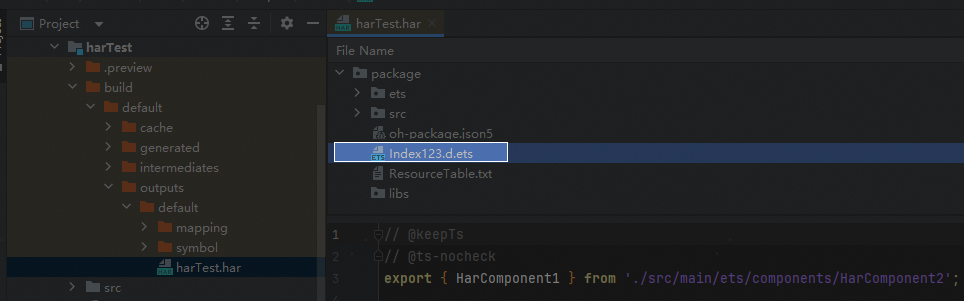
问题现象
想要在构建过程中动态将oh-package.json5中main指向的入口文件修改为另外的文件,例如由"main": "Index.ets"修改为"main": "Index123.ets",如何实现?
背景知识
- Hvigor允许开发者实现自己的插件,开发者可以定义自己的构建逻辑,Hvigor提供了一些API能够修改oh-package.json5中的内容,比如setDependenciesOpt设置工程下oh-package.json5中的dependencies依赖。setOverrides设置工程下oh-package.json5中的overrides字段,更多API可以参考插件上下文。
- Hvigor插件并不支持修改main字段,但是可以通过fs在构建过程中写入内容来实现。
解决方案
以构建har包为例,准备两个入口文件Index.ets和Index123.ets,目前oh-package.json5的入口文件为Index.ets。
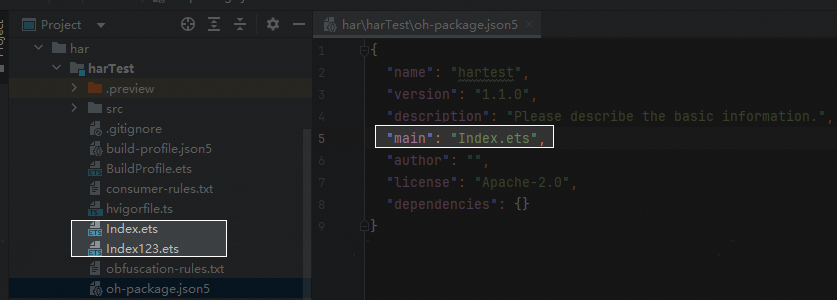
在har模块的hvigorfile.ts文件中添加如下内容:
import { harTasks } from '@ohos/hvigor-ohos-plugin';
import * as fs from 'fs';
export default {
  system: harTasks,  /* Built-in plugin of Hvigor. It cannot be modified. */
  plugins: [customPluginFunction()] /* Custom plugin to extend the functionality of Hvigor. */
}

export function customPluginFunction(): HvigorPlugin  {
  return {
    pluginId: 'CustomPluginID1',
    apply(pluginContext): Promise<void> {
      pluginContext.registerTask({
        // 编写自定义任务
        name: 'customTask1',
        run: (taskContext) => {
          // 读取文件内容
          const packageFile = taskContext.modulePath+'\\oh-package.json5';
          console.info('packageFile', packageFile)
          fs.readFile(packageFile, 'utf8', (readError, data) => {
            if (readError) {
              console.error('Error reading file:', readError);
              return;
            }
            try {
              // 解析JSON数据
              const jsonData = JSON.parse(data);
              // 修改main字段
              jsonData.main = 'Index123.ets';
              // 将修改后的 JSON 数据转换为字符串
              const updatedData = JSON.stringify(jsonData, null, 2);
              // 写入文件
              fs.writeFile(packageFile, updatedData, 'utf8', (writeError) => {
                if (writeError) {
                  console.error('Error writing file:', writeError);
                } else {
                  console.info('File updated successfully.');
                }
              });
            } catch (parseError) {
              console.error('Error parsing JSON:', parseError);
            }
          });
        },
        // 确认自定义任务插入位置
        postDependencies: ['default@ProcessOHPackageJson']
      })
    }
  }
}
构建har包,可以看到入口文件已被替换成Index123.ets。