Q:组件使用bindSheet属性绑定半模态页面,竖屏时,半模态页面从底部弹出,期望应用在横屏时,从右边弹出半模态页面,如何实现?
A:实现方式如下:
- 半模态在竖屏时可以满足要求,但在横屏时不能从右边弹出,需要和自定义弹窗互相搭配使用。
- 使用媒体查询接口监听屏幕旋转。在竖屏时弹窗弹出的是半模态弹窗,横屏后弹出的是自定义弹窗。代码运行前需要将module.json5的orientation字段配置成auto_rotation,让屏幕随传感器旋转。完整示例参考如下:
import { mediaquery } from '@kit.ArkUI';

@Component
struct MenuExample {
  @State list: string[] = ['共享屏幕', '聊天', '举手'];

  build() {
    Column() {
      Column() {
        ForEach(this.list, (item: string) => {
          Text(item).fontSize(16).margin({ bottom: 30 });
        });
      }
      .alignItems(HorizontalAlign.Center);
    }
    .width('100%')
    .height('100%')
    .justifyContent(FlexAlign.Center)
    .alignItems(HorizontalAlign.Center);
  }
}

// 自定义弹窗
@CustomDialog
struct CustomDialogExample {
  controller?: CustomDialogController;

  build() {
    MenuExample();
  }
}

@Entry
@Component
struct SheetTransitionExample {
  @State isShow: boolean = false; // 控制半模态弹窗
  @State showType: number = 0; // 0没有弹窗,1竖屏弹窗打开,2横屏弹窗打开
  @State matches: boolean = false; // false竖屏
  // 监听横屏事件,mediaquery.matchMediaSync接口已废弃,建议使用this.getUIContext().getMediaQuery().matchMediaSync()来获取
  listener = this.getUIContext().getMediaQuery().matchMediaSync('(orientation: landscape)');
  dialogController: CustomDialogController | null = new CustomDialogController({
    builder: CustomDialogExample(),
    onWillDismiss: (dismissDialogAction: DismissDialogAction) => {
      if (dismissDialogAction.reason === DismissReason.TOUCH_OUTSIDE) {
        this.showType = 0;
      }
      dismissDialogAction.dismiss(); // 注册dismiss行为
    },
    autoCancel: true,
    alignment: DialogAlignment.CenterEnd,
    cornerRadius: 20,
    width: '30%',
    height: '100%',
  });

  ChangeWindow() {
    if (this.showType !== 0) {
      if (this.matches) {
        // 横屏时,关闭竖屏弹窗,打开横屏弹窗
        this.isShow = false;
        if (this.dialogController != null) {
          this.dialogController.open();
        }
      } else {
        // 竖屏时,关闭横屏弹窗,打开竖屏弹窗
        this.isShow = true;
        if (this.dialogController != null) {
          this.dialogController.close();
        }
      }
    }
  }

  onPortrait(mediaQueryResult: mediaquery.MediaQueryResult) {
    this.matches = mediaQueryResult.matches;
    this.ChangeWindow();
  }

  aboutToAppear(): void {
    // 注册回调
    let portraitFunc = (mediaQueryResult: mediaquery.MediaQueryResult): void =>
    this.onPortrait(mediaQueryResult);
    // 绑定回调函数
    this.listener.on('change', portraitFunc);
  }

  aboutToDisappear(): void {
    this.listener.off('change'); // 取消注册回调
    this.dialogController = null; // 将dialogController置空
  }

  @Builder
  myBuilder() {
    MenuExample();
  }

  build() {
    Column() {
      Button('显示弹窗')
        .onClick(() => {
          this.showType = this.matches ? 2 : 1;
          this.ChangeWindow();
        })
        .fontSize(20);
    }
    .justifyContent(FlexAlign.Center)
    .width('100%')
    .height('100%')
    .bindSheet($$this.isShow, this.myBuilder(), {
      height: 300,
      onWillDismiss: ((dismissSheetAction: DismissSheetAction) => {
        if (dismissSheetAction.reason === DismissReason.SLIDE_DOWN) {
          this.showType = 0;
        }
        dismissSheetAction.dismiss(); // 注册dismiss行为
      }),
    });
  }
}
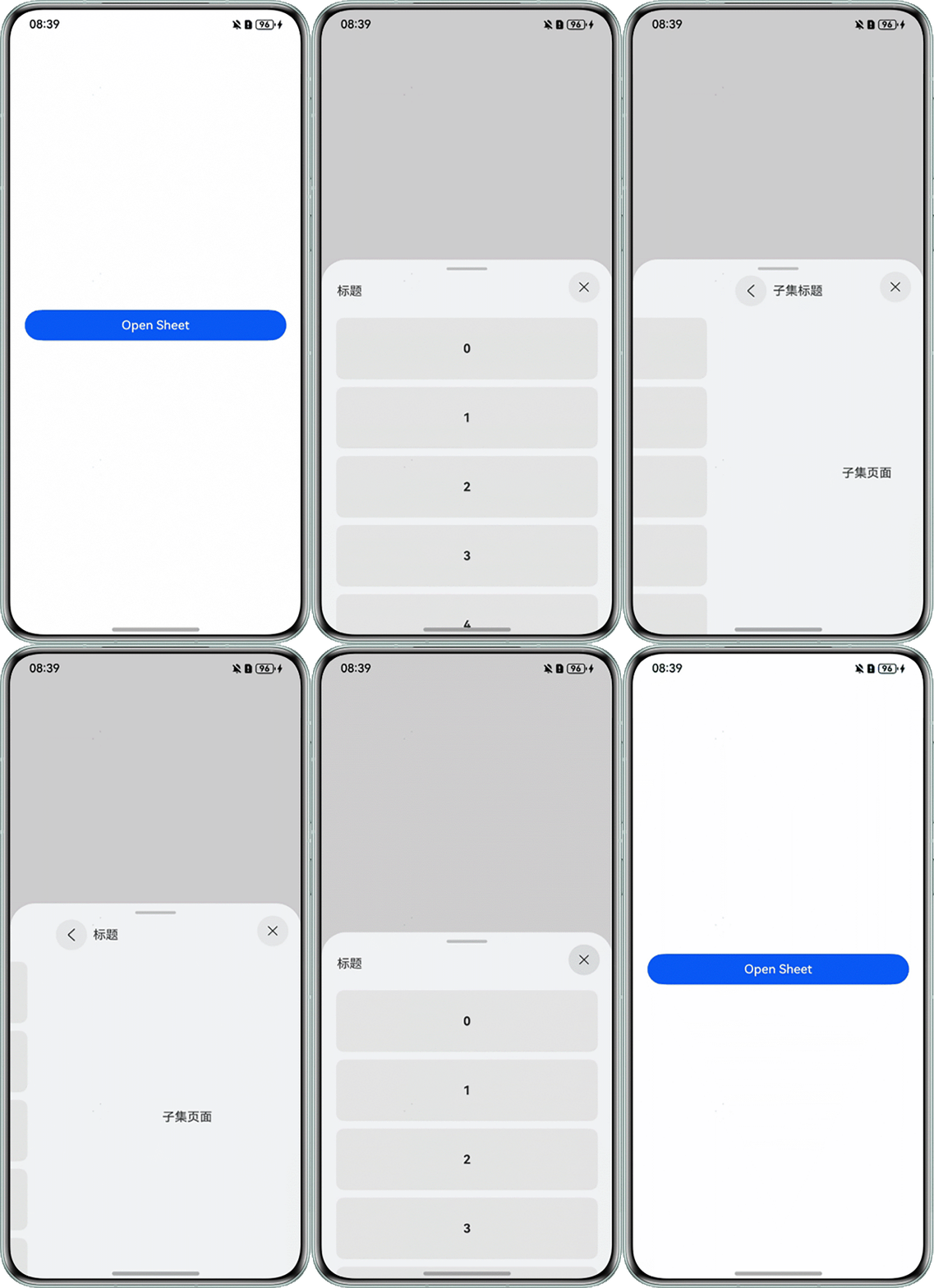
Q:在使用bindSheet时,只能显示一个弹窗内容,如何在bindSheet中实现页面切换的效果?
A:实现思路如下:
- 半模态页面实现:使用Stack容器层叠布局两个组件,通过@State变量动态控制组件显隐状态,从而实现组件切换。
- 动画效果优化:为组件绑定onClick点击事件,使用animateTo设置动画持续时间,再指定由于闭包代码导致的状态变化插入过渡动效。
.onClick(() => { this.title = '子集标题'; this.getUIContext()?.animateTo({ duration: 800, // 动画持续时间,单位为毫秒。 curve: Curve.EaseOut, // 动画曲线。 playMode: PlayMode.Normal, // 动画播放模式,默认播放完成后重头开始播放。 默认值:PlayMode.Normal onFinish: () => { console.info('play end'); } }, () => { // 指定显示动效的闭包函数,在闭包函数中导致的状态变化系统会自动插入过渡动画。 this.flag = !this.flag; }); }); - 页面切换实现:translate属性实现页面切换效果,平移距离通过onAreaChange回调动态获取弹窗宽度,避免不同设备动画的移动尺寸不同。
SheetBuilder2({ title: this.title, flag: this.flag })
        .width('100%')
        .height('100%')
        .translate(this.flag ? { x: 0 } : { x: this.translateX })
        .onAreaChange((oldValue: Area, newValue: Area) => {
          console.info('testTag', `获取到oldValue、newValue:${oldValue.width}、${newValue.width}`);
          // 适配其他尺寸设备时,使用onAreaChange获取宽度,动画的移动尺寸直接取弹窗的宽度。
          this.translateX = newValue.width as number;
        });
完整代码如下:
@Entry
@Component
struct SheetDemo {
  @State isShowSheet: boolean = false;
  private items: number[] = [0, 1, 2, 3, 4];
  @State title: string = '标题';
  @State flag: boolean = false;
  @State translateX: number = 0;

  @Builder
  SheetBuilder() {
    Stack() {

      Column() {
        Row() {
          Text(this.title);
        }
        .padding({ left: 20, right: 20 })
        .height('50')
        .width('100%');

        List({ space: '10vp' }) {
          ForEach(this.items, (item: number) => {
            ListItem() {
              Text(String(item)).fontSize(16).fontWeight(FontWeight.Bold);
            }
            .width('90%')
            .height('80vp')
            .backgroundColor('#E5E5E5')
            .borderRadius(10)
            .onClick(() => {
              this.title = '子集标题';
              this.getUIContext()?.animateTo({
                duration: 800, // 动画持续时间,单位为毫秒。
                curve: Curve.EaseOut, // 动画曲线。
                playMode: PlayMode.Normal, // 动画播放模式,默认播放完成后重头开始播放。  默认值:PlayMode.Normal
                onFinish: () => {
                  console.info('play end');
                }
              }, () => {
                // 指定显示动效的闭包函数,在闭包函数中导致的状态变化系统会自动插入过渡动画。
                this.flag = !this.flag;
              });
            });

            });
        }
        .alignListItem(ListItemAlign.Center)
        .margin({ top: '10vp' })
        .width('100%')
        .height('100%');
      }.width('100%').height('100%')
      .translate(this.flag ? { x: -this.translateX } : { x: 0 });

      SheetBuilder2({ title: this.title, flag: this.flag })
        .width('100%')
        .height('100%')
        .translate(this.flag ? { x: 0 } : { x: this.translateX })
        .onAreaChange((oldValue: Area, newValue: Area) => {
          console.info('testTag', `获取到oldValue、newValue:${oldValue.width}、${newValue.width}`);
          // 适配其他尺寸设备时,使用onAreaChange获取宽度,动画的移动尺寸直接取弹窗的宽度。
          this.translateX = newValue.width as number;
        });
      };
  }

  build() {

    Column() {
      Button('Open Sheet').width('90%')
        .onClick(() => {
          this.isShowSheet = !this.isShowSheet;
        })
        .bindSheet($$this.isShowSheet, this.SheetBuilder(), {
          detents: [SheetSize.MEDIUM, SheetSize.LARGE, 600],
          preferType: SheetType.BOTTOM,
        });
    }.width('100%').height('100%')
    .justifyContent(FlexAlign.Center);
  }
}

@Component
struct SheetBuilder2 {
  @Link title: string;
  @Link flag: boolean;

  build() {
    Column() {
      Row() {
        Column() {
          Image($r('sys.media.ohos_ic_compnent_titlebar_back'))
            .height(24)
            .width(24)
            .fillColor('#313232');

        }
        .borderRadius(40)
        .width(40)
        .height(40)
        .justifyContent(FlexAlign.Center)
        .alignItems(HorizontalAlign.Center)
        .backgroundColor('#e6e8e9')
        .margin({ right: 8 })
        .onClick(() => {
          this.title = '标题';
          this.getUIContext()?.animateTo({
            duration: 500,
            curve: Curve.EaseOut,
            playMode: PlayMode.Normal,
            onFinish: () => {
              console.info('play end');
            }
          }, () => {
            this.flag = !this.flag;
          });
        });
        Text(this.title);
      }
      .height('50')
      .width('100%');
      Column() {
        Text('子集页面');
      }
      .justifyContent(FlexAlign.Center)
      .alignItems(HorizontalAlign.Center)
      .width('100%')
      .layoutWeight(1);
    }.width('100%').height('100%').padding({ right: 18, left: 18 });
  }
}
效果图如下: