问题现象
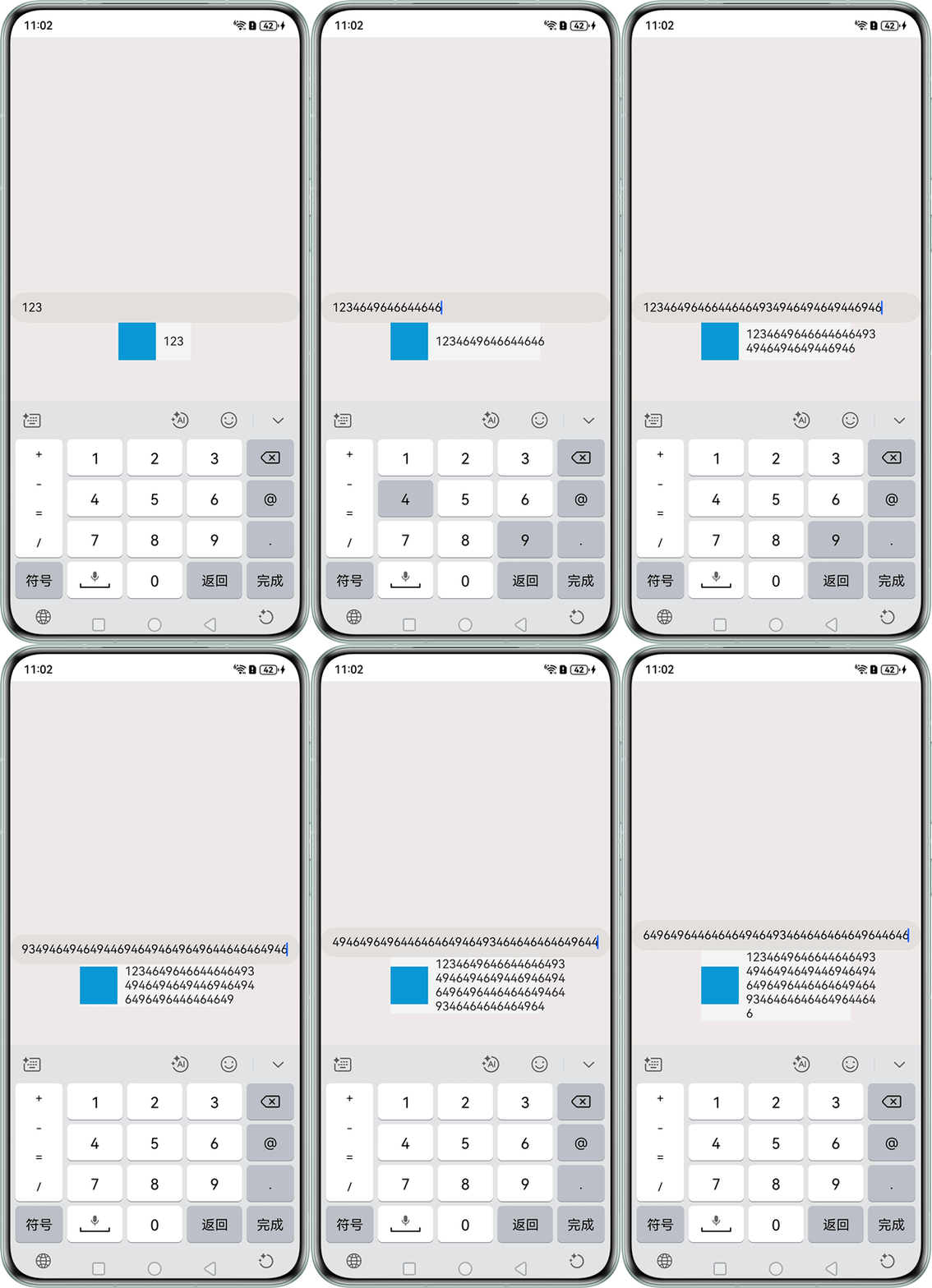
在Row布局中,左边是固定宽高组件,右边是Text组件的父组件,并且要求父组件占据Row组件剩余空间,但是当Text组件文字过多时会超出父组件设定范围,如何实现Text组件在父组件设定范围内的宽高自适应,避免超出父组件的设定范围?
问题效果预览:

背景知识
- Row组件是沿水平方向布局容器,Row组件在嵌套使用时,设置在外层的属性可能不会对内层子组件起到预期的效果,比如将constraintSize属性设置在外层Row时会导致内层Row中的子组件Text超出设定的范围。
- Text组件能够使用constraintSize属性来设置约束尺寸,保证Text组件在设定好的范围内自由变动,并且其优先级高于width和height。
解决方案
可以通过计算得出Text父组件在Row容器下的最大宽高,以此来设置属性constraintSize约束Text组件的最大尺寸,实现Text组件在设定范围内的宽高自适应。具体实现如下:
- 将constraintSize属性设置在Text组件下,约束Text组件的尺寸,并且通过计算,得出最大尺寸的具体值,Text的constraintSize属性的最大宽度是由:父组件的宽度maxWidth减去左边固定宽高组件的宽度stableWidth,再减去父组件左内边距margin.left,再减去父组件右内边距margin.right之后即可得到。在aboutToAppear生命周期方法中进行计算:
aboutToAppear(): void {
  try {
    let screenW = this.getUIContext().px2vp(display.getDefaultDisplaySync().width);
    // 获取屏幕宽度,并转换为vp
    let stableW =
    this.getUIContext()
      .px2vp(this.uiContext?.getHostContext()?.resourceManager.getNumber($r('app.float.page_text_font_size').id));
    // 获取页面字体大小,并转换为vp
    let marginR = Number(this.removeCharacter(this.marginRight as string));
    let marginL = this.marginLeft as number;
    // 左边距直接转换为数字
    let marginT = this.getUIContext()
      .px2vp(this.uiContext?.getHostContext()?.resourceManager.getNumber((this.marginTop as Resource).id));
    // 顶部边距直接转换为vp
    this.maxWidth = screenW - stableW - marginR - marginL - marginT; // 计算最大宽度
    console.info(`this.maxWidth: ${this.maxWidth}`); // 打印最大宽度
  } catch (error) {
  }
}
- 得出Text的在Row组件中的最大尺寸,并将其传入constraintSize属性,即可动态指定Text组件的尺寸,防止文字超出文本框。
Row() {
  Text(this.str).constraintSize({ maxWidth: this.maxWidth })
    .onClick(() => {
      this.str = this.str + '';
    });
}
完整示例参考如下:
import { display } from '@kit.ArkUI';

@Entry
@Component
struct Index {
  @State str: string = '123';
  uiContext = this.getUIContext();
  @State maxWidth: number = 0;
  marginRight: Length = '16vp';
  marginLeft: Length = 16;
  marginTop: Length = $r('app.float.page_text_font_size');

  removeCharacter(str: string) {
    let result = str.replace(/[a-zA-Z]/g, '');
    return result;
  }

  aboutToAppear(): void {
    try {
      let screenW = this.getUIContext().px2vp(display.getDefaultDisplaySync().width);
      // 获取屏幕宽度,并转换为vp
      let stableW =
        this.getUIContext()
          .px2vp(this.uiContext?.getHostContext()?.resourceManager.getNumber($r('app.float.page_text_font_size').id));
      // 获取页面字体大小,并转换为vp
      let marginR = Number(this.removeCharacter(this.marginRight as string));
      let marginL = this.marginLeft as number;
      // 左边距直接转换为数字
      let marginT = this.getUIContext()
        .px2vp(this.uiContext?.getHostContext()?.resourceManager.getNumber((this.marginTop as Resource).id));
      // 顶部边距直接转换为vp
      this.maxWidth = screenW - stableW - marginR - marginL - marginT; // 计算最大宽度
      console.info(`this.maxWidth: ${this.maxWidth}`); // 打印最大宽度
    } catch (error) {
    }
  }

  build() {
    Column() {
      TextInput({ text: $$this.str });
      Row() {
        Row() {
          Row().width(50).height(50).backgroundColor('#ff18a2d0');
        };

        Row() {
          Text(this.str).constraintSize({ maxWidth: this.maxWidth })
            .onClick(() => {
              this.str = this.str + '';
            });
        }
        .margin({ left: 10, right: 10 });
      }
      .backgroundColor('#fff2f5f5');
    }
    .width('100%')
    .height('100%')
    .backgroundColor('#ffeeeaea')
    .justifyContent(FlexAlign.Center);
  }
}
常见FAQ
Q:在解决方案的aboutToAppear方法中,使用getNumber方法获取其中的数据,得到的数据单位都是px吗?
A:用getNumber方法获取数据的数据单位都是px。例如Integer对应的是原数值,float中的数不带单位时对应的是原数值,带"vp","fp"单位时对应的是px值。具体参考官网资源管理。