问题现象
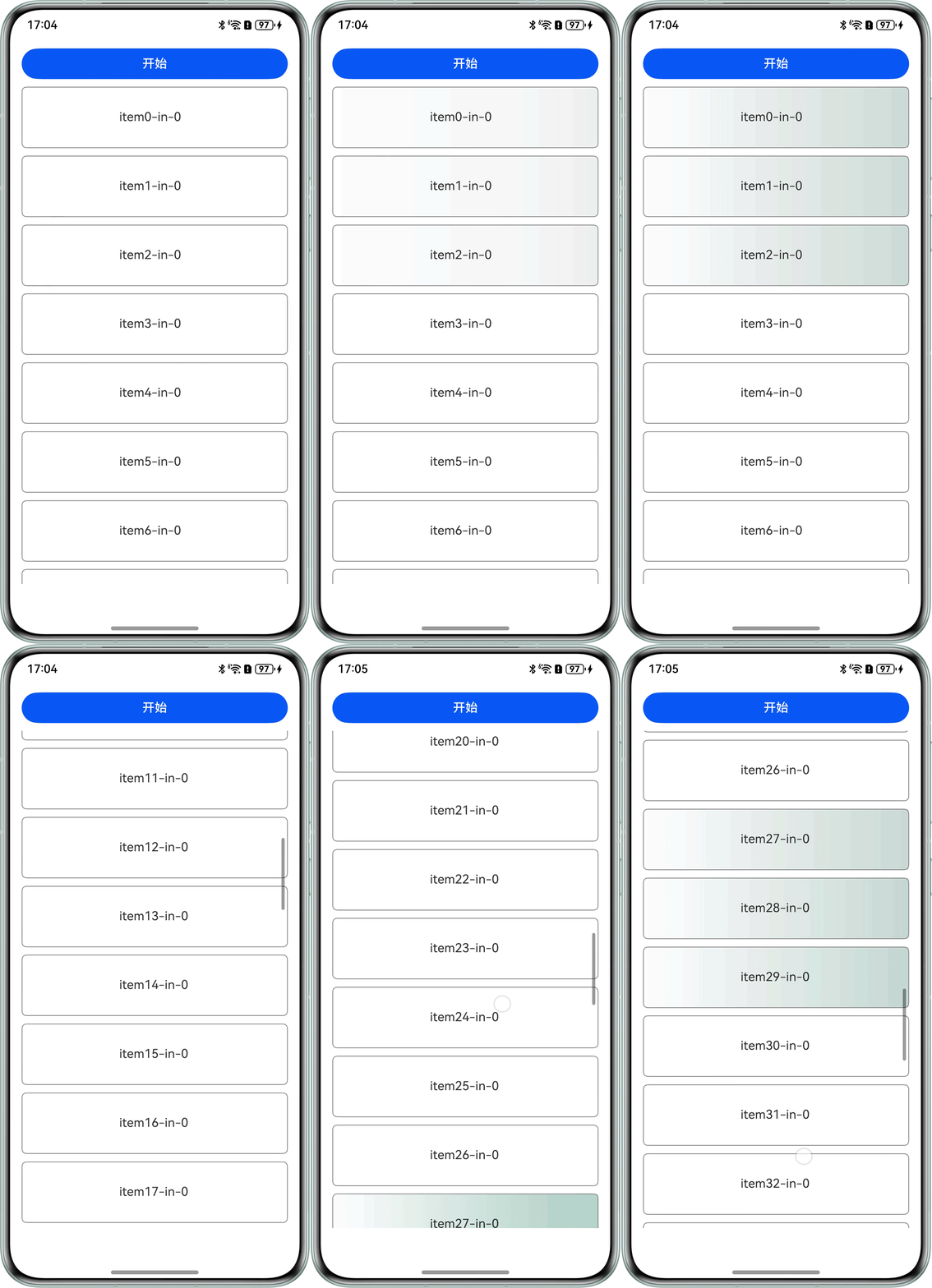
使用linearGradient给List子组件设置线性渐变颜色,并使用@Reusable设置子组件复用,复用时animation属性动画不停止。问题现象如下:开始给item0,item1,item2加上背景渐变的属性动画,快速滑动页面,item27,item28,item29三项使用了复用的组件,但背景渐变动画没有及时停止。
问题效果预览:

背景知识
- @Reusable装饰器标记的自定义组件可以复用。在从组件树中移除时,组件及其对应的JS对象将被放入复用缓存中,后续创建新自定义组件节点时,将复用缓存中的节点。
- linearGradient设置组件的颜色线性渐变效果。颜色渐变属于组件内容,绘制在背景上方。
- onVisibleAreaChange组件可见区域变化时触发该回调,触发条件为输入的阈值数组。
- animation设置组件的属性动画。入参AnimateParam包含部分参数如下:
- duration:动画持续时间,单位为毫秒。
- curve:动画曲线。
解决方案
动画未停止原因:背景色渐变色动画未结束,滑动页面,组件对象放入缓存中等待复用,此时缓存中组件为播放动画的状态,当新的列表项复用此组件对象时,会按照放入缓存时的状态重新播放动画。若是等待动画结束后滑动页面,可以看到动画问题不会出现,因为组件对象放入缓存中是动画已经结束的状态。
可以通过状态变量控制animation动画的持续时间来避免此问题。
- 使用@State装饰器创建状态变量duration,作为animation的入参,控制动画持续时间。
- 监听复用组件的可见区域变化事件。
- 当组件复用放入缓存中,触发onVisibleAreaChange回调,设置duration为0,清除动画状态。
- 当组件从缓存中取出复用后,触发onVisibleAreaChange回调,重新设置duration为2500。
.onVisibleAreaChange([0.0, 1.0], (isVisible: boolean) => {
  if (isVisible) {
    this.duration = 2500; // 组件从缓存取出复用
  } else {
    this.duration = 0; // 组件放入缓存
  }
});
完整示例参考如下:
- List父组件页面代码:
@Entry
@Component
struct ListRepeatPage {
  // 复用组件的背景渐变色
  static readonly colorsGreen: [ResourceColor, number][] = [
    ['#00008A5C', 0.0],
    ['#66008A5C', 1.0]
  ];
  static readonly colorsDefault: [ResourceColor, number][] = [
    ['#00000000', 0.0],
    ['#00000000', 1.0]
  ];
  @State list: StockListData = new StockListData([]);

  aboutToAppear(): void {
    // 初始化显示数据
    const list: ItemInfo[] = [];
    for (let i = 0; i < 50; ++i) {
      let stockName = 'item' + i;
      let bgState = 0;
      list.push(new ItemInfo(stockName, bgState));
    }
    this.list.modifyAllData(list);
  }

  build() {
    Column({ space: 10 }) {
      Button('开始').width('100%')
        .onClick(() => {
          // 前三项渐变色
          for (let i = 0; i < 3; ++i) {
            const bg = this.list.getData(i).bgState;
            this.list.getData(i).bgState = bg === 1 ? 0 : 1;
          }
        });
      List({ space: 10 }) {
        LazyForEach(this.list, (info: ItemInfo) => {
          ListItem() {
            ItemView({ info: info });
          }.height('80').border({ width: 1, color: Color.Gray, radius: '6vp' });
        }, (info: ItemInfo, index: number) => info.stockName + 'type' + index);
      }.height('90%').width('100%');
    }.margin('16vp');
  }
}
- List子组件代码如下:可被复用,使用状态变量控制动画展示。
@Reusable
@Component
struct ItemView {
  @ObjectLink @Watch('infoUpdate') info: ItemInfo;
  @State linearGradientBgStatus: number = 0;
  @State duration: number = 2500;

  infoUpdate() {
    let status = this.info.bgState;
    if (this.linearGradientBgStatus !== status) {
      this.linearGradientBgStatus = status;
    }
  }

  build() {
    Column() {
      Flex({ justifyContent: FlexAlign.Center, alignItems: ItemAlign.Center }) {
        Column() {
          Text(this.info.stockName + '-in-' + this.info.code)
            .maxFontSize('16')
            .minFontSize('8')
            .maxLines(1)
            .margin({ bottom: 2 });
        }.width('36.27%')
        .alignItems(HorizontalAlign.Start)
        .padding({ left: '16', right: 8 });
      }
      .height('100%')
      .linearGradientBlur(0,
        { fractionStops: [[0, 0], [0, 0.33], [1, 0.66], [1, 1]], direction: GradientDirection.Bottom })
      .linearGradient({
        direction: GradientDirection.Right,
        colors: this.linearGradientBgStatus === 1 ? ListRepeatPage.colorsGreen : ListRepeatPage.colorsDefault
      })
      .animation({
        duration: this.duration,
        curve: Curve.FastOutLinearIn,
        onFinish: () => {
          // 绿色渐变结束后,渐变回原来的颜色
          if (this.linearGradientBgStatus !== this.info.bgState) {
            this.linearGradientBgStatus = this.info.bgState;
          } else {
            if (this.linearGradientBgStatus !== 0) {
              this.linearGradientBgStatus = 0;
              this.info.bgState = 0;
            }
          }
        }
      });
    }
    .onVisibleAreaChange([0.0, 1.0], (isVisible: boolean) => {
      if (isVisible) {
        this.duration = 2500; // 组件从缓存取出复用
      } else {
        this.duration = 0; // 组件放入缓存
      }
    });
  }
}
- List数据源结构:
@Observed
class ItemInfo {
  @Track stockName: string = '--';
  @Track code: number = 0;
  @Track bgState: number = 0;

  constructor(name: string, bg: number) {
    this.stockName = name;
    this.bgState = bg;
  }
}

class StockListData implements IDataSource {
  private listData: ItemInfo[] = [];
  private listeners: DataChangeListener[] = [];

  constructor(dataArray: ItemInfo[]) {
    this.listData = dataArray;
  }

  public totalCount(): number {
    return this.listData.length;
  }

  public getData(index: number): ItemInfo {
    return this.listData[index];
  }

  public modifyAllData(data: ItemInfo[]): void {
    this.listData = data;
    this.notifyDataReload();
  }

  registerDataChangeListener(listener: DataChangeListener): void {
    if (this.listeners.indexOf(listener) < 0) {
      this.listeners.push(listener);
    }
  }

  unregisterDataChangeListener(listener: DataChangeListener): void {
    const position = this.listeners.indexOf(listener);
    if (position >= 0) {
      this.listeners.splice(position, 1);
    }
  }

  notifyDataReload(): void {
    this.listeners.forEach((listener: DataChangeListener) => {
      listener.onDataReloaded();
    });
  }
}