问题现象
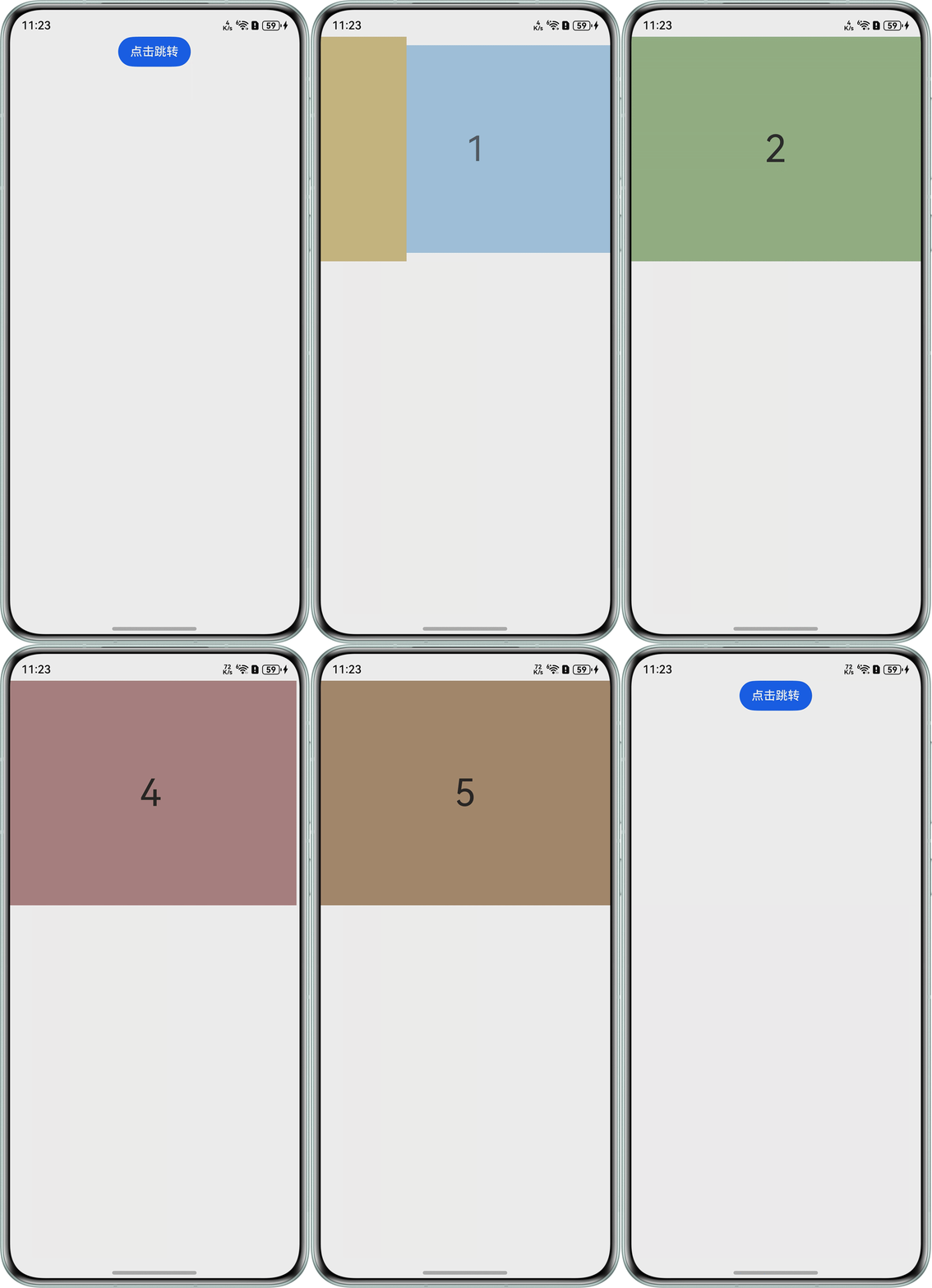
在Swiper的onAnimationStart方法中进行监听,如果滑动的下一页是最后一页就调用router.back返回。在没有给Swiper添加自定义动效时是正常的,添加动效后,跳转页面时会闪一下。
问题代码示例参考如下:
- Index.ets。
@Entry
@Component
struct Index {
  build() {
    Column() {
      Button('点击跳转').onClick(() => {
        this.getUIContext().getRouter().pushUrl({ url: 'pages/SecondPage' })
      })
    }.width('100%').height('100%')
  }
}
- SecondPage.ets。
import { Router, UIContext } from '@kit.ArkUI';

let uiContext: UIContext = new UIContext();
let router: Router = uiContext.getRouter();

@Entry
@Component
struct SecondPage {
  private DISPLAY_COUNT: number = 1
  private MIN_SCALE: number = 0.75
  @State backgroundColors: string[] =
    ['#ffd2bf82', '#ff7db5db', '#ff95b784', '#ff867aa7', '#ffae8080', '#ffa98b6a', '#ffa9a9a9']
  @State opacityList: number[] = []
  @State scaleList: number[] = []
  @State translateList: number[] = []
  @State zIndexList: number[] = []

  aboutToAppear(): void {
    for (let i = 0; i < this.backgroundColors.length; i++) {
      this.opacityList.push(1.0)
      this.scaleList.push(1.0)
      this.translateList.push(0.0)
      this.zIndexList.push(0)
    }
  }

  build() {
    Column() {
      Swiper() {
        ForEach(this.backgroundColors, (backgroundColor: Color, index: number) => {
          Text(index.toString())
            .width('100%')
            .height('100%')
            .fontSize(50)
            .textAlign(TextAlign.Center)
            .backgroundColor(backgroundColor) // 自定义动画变化透明度、缩放页面、抵消系统默认位移、渲染层级等
            .opacity(this.opacityList[index])
            .scale({ x: this.scaleList[index], y: this.scaleList[index] })
            .translate({ x: this.translateList[index] })
            .zIndex(this.zIndexList[index])
        })
      }
      .height(300)
      .indicator(false)
      .displayCount(this.DISPLAY_COUNT, true)
      // 关键代码
      .onAnimationStart((index: number, targetIndex: number) => {
        // 目标页面是最后一页则可以开始返回了
        if (targetIndex === this.backgroundColors.length - 1) {
          router.back()
        }
      })
      .customContentTransition({
        // 页面移除视窗时超时1000ms下渲染树
        timeout: 1000,
        // 对视窗内所有页面逐帧回调transition,在回调中修改opacity、scale、translate、zIndex等属性值,实现自定义动画。
        transition: (proxy: SwiperContentTransitionProxy) => {
          if (proxy.position <= proxy.index % this.DISPLAY_COUNT ||
            proxy.position >= this.DISPLAY_COUNT + proxy.index % this.DISPLAY_COUNT) {
            // 同组页面往左滑或往右完全滑出视窗外时,重置属性值
            this.opacityList[proxy.index] = 1.0
            this.scaleList[proxy.index] = 1.0
            this.translateList[proxy.index] = 0.0
            this.zIndexList[proxy.index] = 0
          } else {
            // 同组页面往右滑且未滑出视窗外时,对同组中左右两个页面,逐帧根据position修改属性值,实现两个页面往Swiper中间靠拢并透明缩放的自定义切换动画。
            if (proxy.index % this.DISPLAY_COUNT === 0) {
              this.opacityList[proxy.index] = 1 - proxy.position / this.DISPLAY_COUNT
              this.scaleList[proxy.index] =
                this.MIN_SCALE + (1 - this.MIN_SCALE) * (1 - proxy.position / this.DISPLAY_COUNT)
              this.translateList[proxy.index] =
                -proxy.position * proxy.mainAxisLength + (1 - this.scaleList[proxy.index]) * proxy.mainAxisLength / 2.0
            } else {
              this.opacityList[proxy.index] = 1 - (proxy.position - 1) / this.DISPLAY_COUNT
              this.scaleList[proxy.index] =
                this.MIN_SCALE + (1 - this.MIN_SCALE) * (1 - (proxy.position - 1) / this.DISPLAY_COUNT)
              this.translateList[proxy.index] = -(proxy.position - 1) * proxy.mainAxisLength -
                (1 - this.scaleList[proxy.index]) * proxy.mainAxisLength / 2.0
            }
            this.zIndexList[proxy.index] = -1
          }
        }
      })
      .onContentDidScroll((selectedIndex: number, index: number, position: number, mainAxisLength: number) => {
        // 监听Swiper页面滑动事件,在该回调中可以实现自定义导航点切换动画等。
        console.info(`onContentDidScroll selectedIndex: ${selectedIndex}, index: ${index}, position: ${
        position} , mainAxisLength: ${mainAxisLength}`)
      })
    }.width('100%')
  }

  pageTransition() {
    PageTransitionEnter({ duration: 500 }).opacity(1)
    PageTransitionExit({ duration: 400 }).opacity(0)
  }
}
问题效果预览:翻到最后一页时会闪一下。

背景知识
- Swiper组件为滑块视图容器,提供子组件滑动轮播显示的能力。
- onAnimationStart方法用于切换动画开始时触发该回调。调用此回调后,切换动画的逻辑将在渲染线程中执行,从而使处于空闲状态的主线程能够充分利用这段时间来加载子组件所需资源,减少后续在cachedCount范围内节点的预加载时间。onAnimationEnd方法用于切换动画结束时触发该回调。
解决方案
经过测试发现是onAnimationStart动画与router路由的页面切换效果存在冲突,目前没有办法解决。
可修改为在onAnimationEnd中执行router.back()进行规避。
即将上述SecondPage.ets中的onAnimationStart方法改为:
.onAnimationEnd((index: number, extraInfo: SwiperAnimationEvent) => {
  if (index === this.backgroundColors.length - 1) {
    router.back()
  }
})
完整示例参考如下:
- Index.ets:
@Entry
@Component
struct Index {
  build() {
    Column() {
      Button('点击跳转').onClick(() => {
        this.getUIContext().getRouter().pushUrl({ url: 'pages/SecondPage' })
      })
    }.width('100%').height('100%')
  }
}
- SecondPage.ets:
import { Router, UIContext } from '@kit.ArkUI';

let uiContext: UIContext = new UIContext();
let router: Router = uiContext.getRouter();

@Entry
@Component
struct SecondPage {
  private DISPLAY_COUNT: number = 1
  private MIN_SCALE: number = 0.75
  @State backgroundColors: string[] =
    ['#ffd2bf82', '#ff7db5db', '#ff95b784', '#ff867aa7', '#ffae8080', '#ffa98b6a', '#ffa9a9a9']
  @State opacityList: number[] = []
  @State scaleList: number[] = []
  @State translateList: number[] = []
  @State zIndexList: number[] = []

  aboutToAppear(): void {
    for (let i = 0; i < this.backgroundColors.length; i++) {
      this.opacityList.push(1.0)
      this.scaleList.push(1.0)
      this.translateList.push(0.0)
      this.zIndexList.push(0)
    }
  }

  build() {
    Column() {
      Swiper() {
        ForEach(this.backgroundColors, (backgroundColor: Color, index: number) => {
          Text(index.toString())
            .width('100%')
            .height('100%')
            .fontSize(50)
            .textAlign(TextAlign.Center)
            .backgroundColor(backgroundColor) // 自定义动画变化透明度、缩放页面、抵消系统默认位移、渲染层级等
            .opacity(this.opacityList[index])
            .scale({ x: this.scaleList[index], y: this.scaleList[index] })
            .translate({ x: this.translateList[index] })
            .zIndex(this.zIndexList[index])
        })
      }
      .height(300)
      .indicator(false)
      .displayCount(this.DISPLAY_COUNT, true)
      // 关键代码
      .onAnimationEnd((index: number, extraInfo: SwiperAnimationEvent) => {
        if (index === this.backgroundColors.length - 1) {
          router.back()
        }
      })
      .customContentTransition({
        // 页面移除视窗时超时1000ms下渲染树
        timeout: 1000,
        // 对视窗内所有页面逐帧回调transition,在回调中修改opacity、scale、translate、zIndex等属性值,实现自定义动画。
        transition: (proxy: SwiperContentTransitionProxy) => {
          if (proxy.position <= proxy.index % this.DISPLAY_COUNT ||
            proxy.position >= this.DISPLAY_COUNT + proxy.index % this.DISPLAY_COUNT) {
            // 同组页面往左滑或往右完全滑出视窗外时,重置属性值
            this.opacityList[proxy.index] = 1.0
            this.scaleList[proxy.index] = 1.0
            this.translateList[proxy.index] = 0.0
            this.zIndexList[proxy.index] = 0
          } else {
            // 同组页面往右滑且未滑出视窗外时,对同组中左右两个页面,逐帧根据position修改属性值,实现两个页面往Swiper中间靠拢并透明缩放的自定义切换动画。
            if (proxy.index % this.DISPLAY_COUNT === 0) {
              this.opacityList[proxy.index] = 1 - proxy.position / this.DISPLAY_COUNT
              this.scaleList[proxy.index] =
                this.MIN_SCALE + (1 - this.MIN_SCALE) * (1 - proxy.position / this.DISPLAY_COUNT)
              this.translateList[proxy.index] =
                -proxy.position * proxy.mainAxisLength + (1 - this.scaleList[proxy.index]) * proxy.mainAxisLength / 2.0
            } else {
              this.opacityList[proxy.index] = 1 - (proxy.position - 1) / this.DISPLAY_COUNT
              this.scaleList[proxy.index] =
                this.MIN_SCALE + (1 - this.MIN_SCALE) * (1 - (proxy.position - 1) / this.DISPLAY_COUNT)
              this.translateList[proxy.index] = -(proxy.position - 1) * proxy.mainAxisLength -
                (1 - this.scaleList[proxy.index]) * proxy.mainAxisLength / 2.0
            }
            this.zIndexList[proxy.index] = -1
          }
        }
      })
      .onContentDidScroll((selectedIndex: number, index: number, position: number, mainAxisLength: number) => {
        // 监听Swiper页面滑动事件,在该回调中可以实现自定义导航点切换动画等。
        console.info(`onContentDidScroll selectedIndex: ${selectedIndex}, index: ${index}, position: ${
        position} , mainAxisLength: ${mainAxisLength}`)
      })
    }.width('100%')
  }

  pageTransition() {
    PageTransitionEnter({ duration: 500 }).opacity(1)
    PageTransitionExit({ duration: 400 }).opacity(0)
  }
}