问题现象
在应用中实现沉浸式效果时:
- 当设置FullScreen属性后,Navigation导航栏不会避让状态栏,而Navigation导航栏使用padding来避让状态栏后,这一设置会影响所有navDestination页面。
- 当不设置FullScreen属性,需要铺满全屏的页面,不能在状态栏和系统底部导航条区域渲染。
问题效果如下:
|
|


背景知识
1. 窗口全屏布局方案:当不隐藏避让区时,可通过接口查询状态栏和导航条区域进行可交互元素避让处理,并设置状态栏或导航条的颜色等属性与界面元素匹配。当隐藏避让区时,通过对应接口设置全屏布局即可。
2. 组件安全区方案:布局系统保持安全区内布局,然后通过接口延伸绘制内容(如背景色,背景图)到状态栏和导航条区域实现沉浸式效果。该方案下,界面元素仅做绘制延伸,无法单独布局到状态栏和导航条区域。
3. padding内边距设置:通过padding设置组件的内边距以达到期望效果。
4. @StorageLink:管理应用全局的UI状态。
解决方案
针对不同场景下的沉浸式效果需求,可以选择设置或不设置FullScreen属性,采用不同的解决方案处理对应的问题。
- 设置FullScreen:
- 当应用中大多数页面需要全屏渲染时,可以在onWindowStageCreate方法中全局设置windowLayoutFullScreen为true。或者在需要的场景内单独设置windowLayoutFullScreen为true,退出时恢复原值。
EntryAbility.ets文件。
import { UIAbility } from '@kit.AbilityKit';
import { hilog } from '@kit.PerformanceAnalysisKit';
import { window } from '@kit.ArkUI';

const DOMAIN = 0x0000;

export default class EntryAbility extends UIAbility {
  onDestroy(): void {
    hilog.info(DOMAIN, 'testTag', '%{public}s', 'Ability onDestroy');
  }

  onWindowStageCreate(windowStage: window.WindowStage): void {
    // Main window is created,set main page for this ability
    hilog.info(0x0000, 'testTag', '%{public}s', 'Ability onWindowStageCreate');
    windowStage.loadContent('pages/XxxPage3', (err) => {
      if (err.code) {
        hilog.error(0x0000, 'testTag', 'Failed to load the content. Cause: %{public}s', JSON.stringify(err) ?? '');
        return;
      }
      // 此处添加以下代码
      let windowClass: window.Window = windowStage.getMainWindowSync(); // 获取应用主窗口
      // 设置窗口全屏
      let isLayoutFullScreen = false;
      windowClass.setWindowLayoutFullScreen(isLayoutFullScreen).then(() => {
        console.info('Succeeded in setting the window layout to full-screen mode.');
      }).catch((err: Error) => {
        console.info('error in setting the window layout to full-screen mode.', err.message);
      });
      hilog.info(0x0000, 'testTag', 'Succeeded in loading the content.');
    });
  }


  onWindowStageDestroy(): void {
    // Main window is destroyed, release UI related resources
    hilog.info(DOMAIN, 'testTag', '%{public}s', 'Ability onWindowStageDestroy');
  }

  onForeground(): void {
    // Ability has brought to foreground
    hilog.info(DOMAIN, 'testTag', '%{public}s', 'Ability onForeground');
  }

  onBackground(): void {
    // Ability has back to background
    hilog.info(DOMAIN, 'testTag', '%{public}s', 'Ability onBackground');
  }
};
XxxPage.ets页面。
import { window } from '@kit.ArkUI';

@Entry
@Component
export struct XxxPage {
  @State isFullScreen: boolean = false;
  // page中使用此方式设置是否开启FullScreen
  @StorageLink('safeTop') safeTop: number = 0;
  @StorageLink('safeBottom') safeBottom: number = 0;
  @State topFlexAreaHeight: number = 0;
  @State bottomFlexAreaHeight: number = 0;

  setFullScreen(value: boolean) {
    window.getLastWindow(this.getUIContext().getHostContext()).then(currentWindow => {
      currentWindow.setWindowLayoutFullScreen(value);
    });
  }

  build() {
    Column() {
      Flex({ direction: FlexDirection.Column }) {
        Row() {
          Text('currentHeight:' + this.topFlexAreaHeight);
        }
        .justifyContent(FlexAlign.Center)
        .height('40%')
        .width('100%')
        .backgroundColor('#f1f3f5')
        .onAreaChange((oldValue: Area, newValue: Area) => {
          console.info(oldValue.height.toString());
          this.topFlexAreaHeight = newValue.height as number;
        });

        Flex({ direction: FlexDirection.Column, justifyContent: FlexAlign.SpaceEvenly }) {
          Row() {
            Text('设置全屏渲染效果')
              .padding({ left: 15 });
            Blank();
            Toggle({ type: ToggleType.Switch, isOn: false })
              .selectedColor('#0a59f7')
              .switchPointColor('#FFFFFF')
              .onChange((isOn: boolean) => {
                this.isFullScreen = isOn;
                this.setFullScreen(isOn);
              })
              .margin({ right: 15 });
          }
          .width('100%');

          Row() {
            Text('添加顶部padding')
              .padding({ left: 15 });
            Blank();
            Toggle({ type: ToggleType.Switch, isOn: false })
              .selectedColor('#0a59f7')
              .switchPointColor('#FFFFFF')
              .onChange((isOn: boolean) => {
                if (isOn) {
                  this.safeTop = 40;
                } else {
                  this.safeTop = 0;
                }
              })
              .margin({ right: 15 });
          }
          .width('100%');

          Row() {
            Text('添加底部padding')
              .padding({ left: 15 });
            Blank();
            Toggle({ type: ToggleType.Switch, isOn: false })
              .selectedColor('#0a59f7')
              .switchPointColor('#FFFFFF')
              .onChange((isOn: boolean) => {
                if (isOn) {
                  this.safeBottom = 30;
                } else {
                  this.safeBottom = 0;
                }
              })
              .margin({ right: 15 });
          }
          .width('100%');
        }
        .height('20%')
        .width('100%')
        .backgroundColor(Color.White);

        Row() {
          Text('currentHeight:' + this.bottomFlexAreaHeight);
        }
        .justifyContent(FlexAlign.Center)
        .height('40%')
        .width('100%')
        .backgroundColor('#f1f3f5')
        .onAreaChange((oldValue: Area, newValue: Area) => {
          console.info(oldValue.height.toString());
          this.bottomFlexAreaHeight = newValue.height as number;
        });

      }

      .height('100%')
      .width('100%');
    }
    .padding({
      top: this.isFullScreen ? this.safeTop : 0,
      bottom: this.isFullScreen ? this.safeBottom : 0,
    })
    .height('100%')
    .width('100%');
  }
}
效果预览:
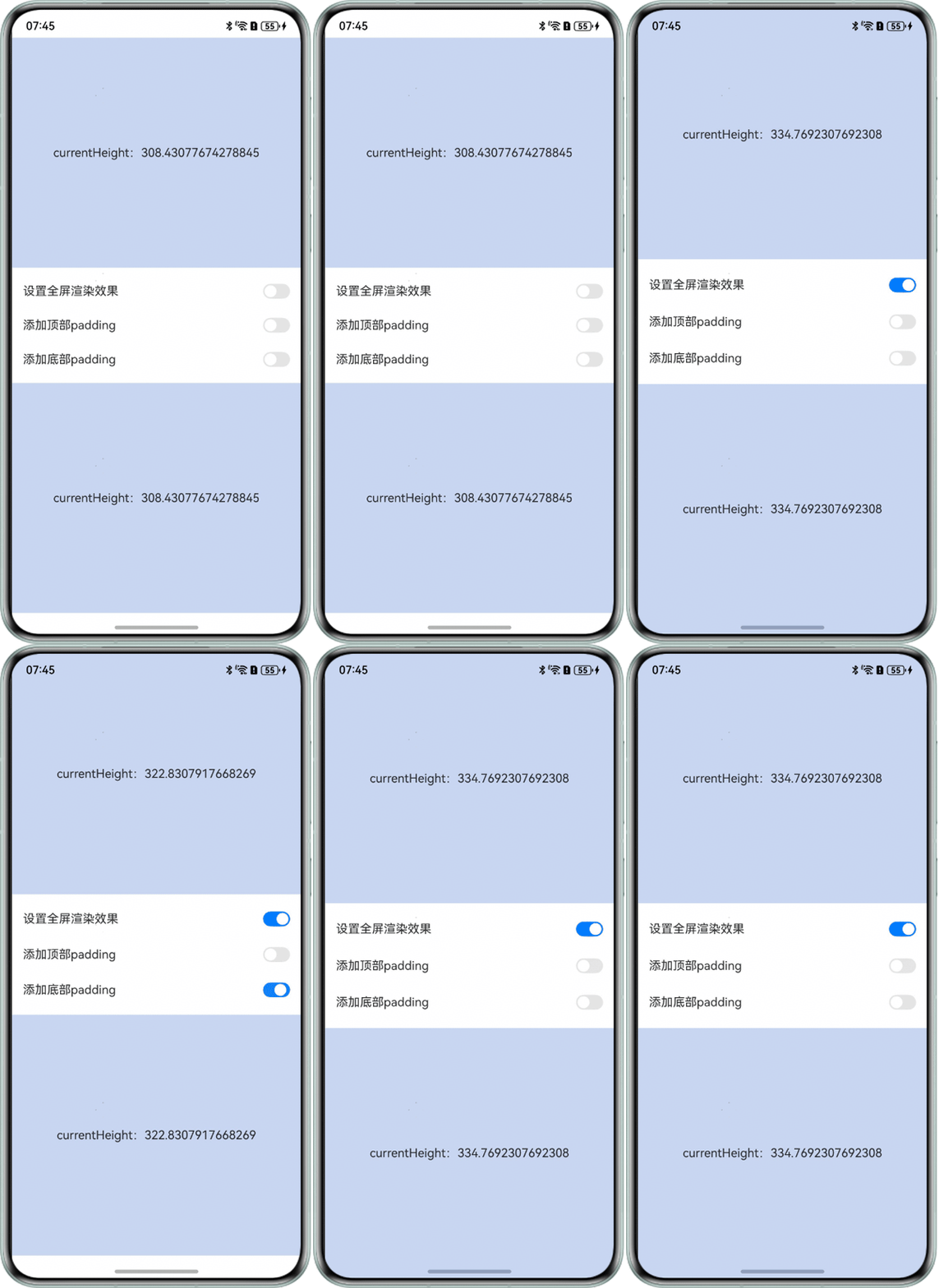
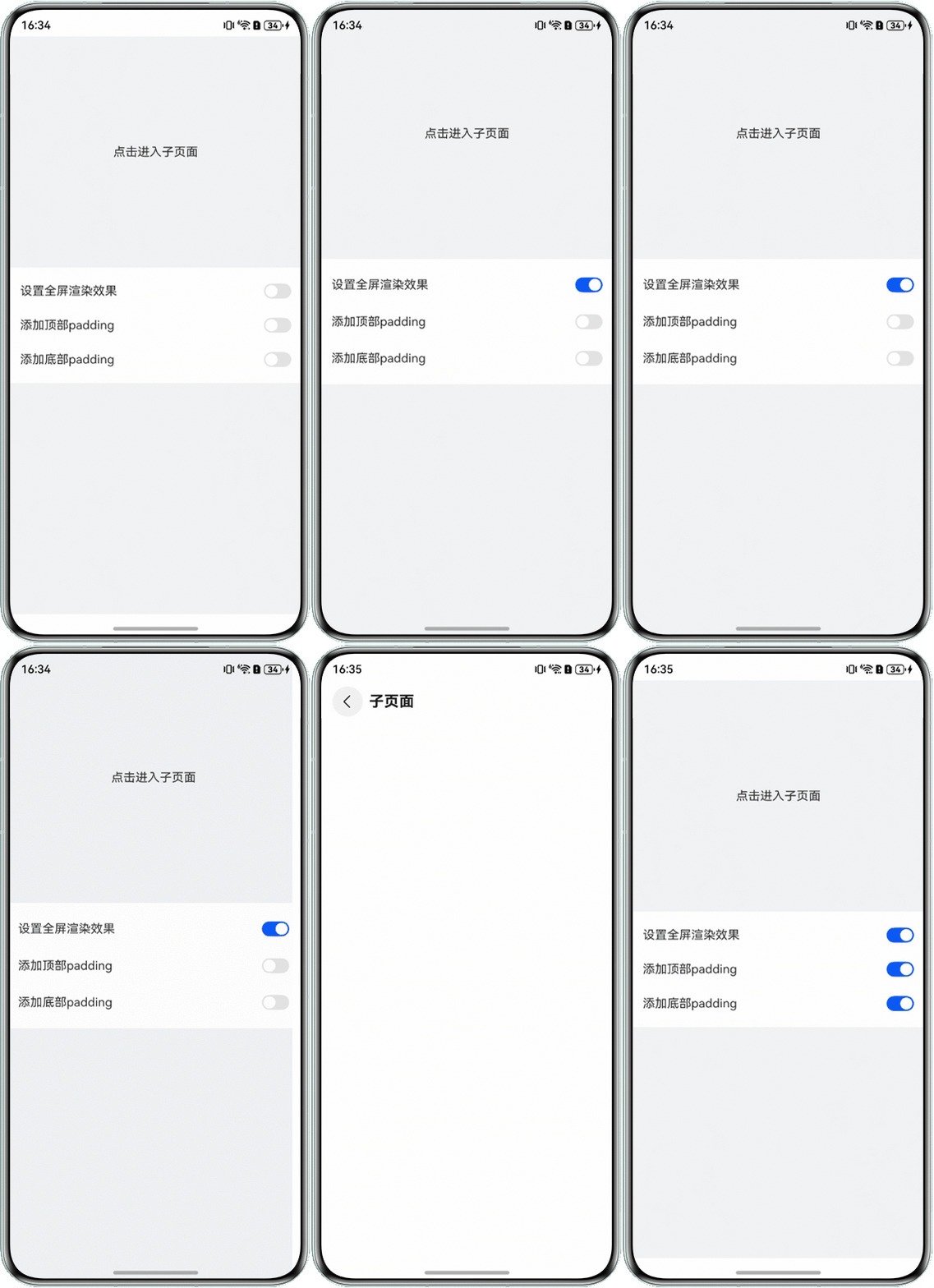
- 在FullScreen模式下,Navigation的TitleBar会被顶部状态栏遮挡,底部Tab组件会被系统导航条遮挡。可以通过设置padding来手动避让,设置padding后子页面也会受到影响,需要更新Navigation根页面中设置的padding才生效,使用AppStorage可以设置此padding值。
Index.ets页面。
import { window } from '@kit.ArkUI';

AppStorage.setOrCreate('safeTop', 0);
AppStorage.setOrCreate('safeBottom', 0);

@Entry
@Component
struct Index55 {
  @StorageLink('safeTop') safeTop: number = 0;
  @StorageLink('safeBottom') safeBottom: number = 0;
  @State isTopAvoid: boolean = false;
  @State isBottomAvoid: boolean = false;
  pageInfos: NavPathStack = new NavPathStack();

  aboutToAppear(): void {

    window.getLastWindow(this.getUIContext().getHostContext()).then(windowClass => {
      let topType = window.AvoidAreaType.TYPE_SYSTEM;
      let statusBarArea = windowClass.getWindowAvoidArea(topType);
      this.safeTop = this.getUIContext().px2vp(statusBarArea.topRect.height);
      let navigationIndicatorArea = windowClass.getWindowAvoidArea(window.AvoidAreaType.TYPE_NAVIGATION_INDICATOR);
      this.safeBottom = this.getUIContext().px2vp(navigationIndicatorArea.bottomRect.height);
    });
  }

  setFullScreen(value: boolean) {
    window.getLastWindow(this.getUIContext().getHostContext()).then(currentWindow => {
      currentWindow.setWindowLayoutFullScreen(value);
    });
  }

  build() {
    Navigation(this.pageInfos) {
      Flex({ direction: FlexDirection.Column }) {
        Row() {
          Text('点击进入子页面').onClick(() => {
            this.pageInfos.pushPath({ name: 'XxxPage1' });
          });
        }
        .justifyContent(FlexAlign.Center)
        .height('40%')
        .width('100%')
        .backgroundColor('#f1f3f5');

        Flex({ direction: FlexDirection.Column, justifyContent: FlexAlign.SpaceEvenly }) {
          Row() {
            Text('设置全屏渲染效果')
              .padding({ left: 15 });
            Blank();
            Toggle({ type: ToggleType.Switch, isOn: false })
              .selectedColor('#0a59f7')
              .switchPointColor('#FFFFFF')
              .onChange((isOn: boolean) => {
                this.setFullScreen(isOn);
              })
              .margin({ right: 15 });
          }
          .width('100%');

          Row() {
            Text('添加顶部padding')
              .padding({ left: 15 });
            Blank();
            Toggle({ type: ToggleType.Switch, isOn: false })
              .selectedColor('#0a59f7')
              .switchPointColor('#FFFFFF')
              .onChange((isOn: boolean) => {
                this.isTopAvoid = isOn;
              })
              .margin({ right: 15 });
          }
          .width('100%');

          Row() {
            Text('添加底部padding')
              .padding({ left: 15 });
            Blank();
            Toggle({ type: ToggleType.Switch, isOn: false })
              .selectedColor('#0a59f7')
              .switchPointColor('#FFFFFF')
              .onChange((isOn: boolean) => {
                this.isBottomAvoid = isOn;
              })
              .margin({ right: 15 });
          }
          .width('100%');
        }
        .height('20%')
        .width('100%')
        .backgroundColor(Color.White);

        Row() {

        }
        .height('40%')
        .width('100%')
        .backgroundColor('#f1f3f5');
      }
      .height('100%')
      .width('100%');
    }
    .hideTitleBar(true)
    .height('100%')
    .width('100%')
    .padding({
      top: this.isTopAvoid ? this.safeTop : 0,
      bottom: this.isBottomAvoid ? this.safeBottom : 0,
    });
  }
}
XxxPage1.ets页面。
@Builder
export function XxxPage1Builder() {
  XxxPage1();
}

@Component
export struct XxxPage1 {
  @StorageLink('safeTop') safeTop: number = 0;
  @StorageLink('safeBottom') safeBottom: number = 0;
  pageInfos: NavPathStack = new NavPathStack();

  build() {
    NavDestination() {
      Column() {
      }
      .padding({
        top: this.safeTop,
        bottom: this.safeBottom,
      });
    }.title('子页面');
  }
}
在src/main目录下的module.json5配置文件中的module字段里配置"routerMap": "$profile:router_map",并在src/main/resources/base/profile目录下新增router_map.json。router_map.json示例如下:
{
  "routerMap": [
    {
      "name": "XxxPage1",
      "pageSourceFile": "src/main/ets/pages/XxxPage1.ets",
      "buildFunction": "XxxPage1Builder",
      "data": {
        "description": "this is XxxPage1"
      }
    }
  ]
}
效果预览:
- 当应用中大多数页面需要全屏渲染时,可以在onWindowStageCreate方法中全局设置windowLayoutFullScreen为true。或者在需要的场景内单独设置windowLayoutFullScreen为true,退出时恢复原值。
- 不设置FullScreen:
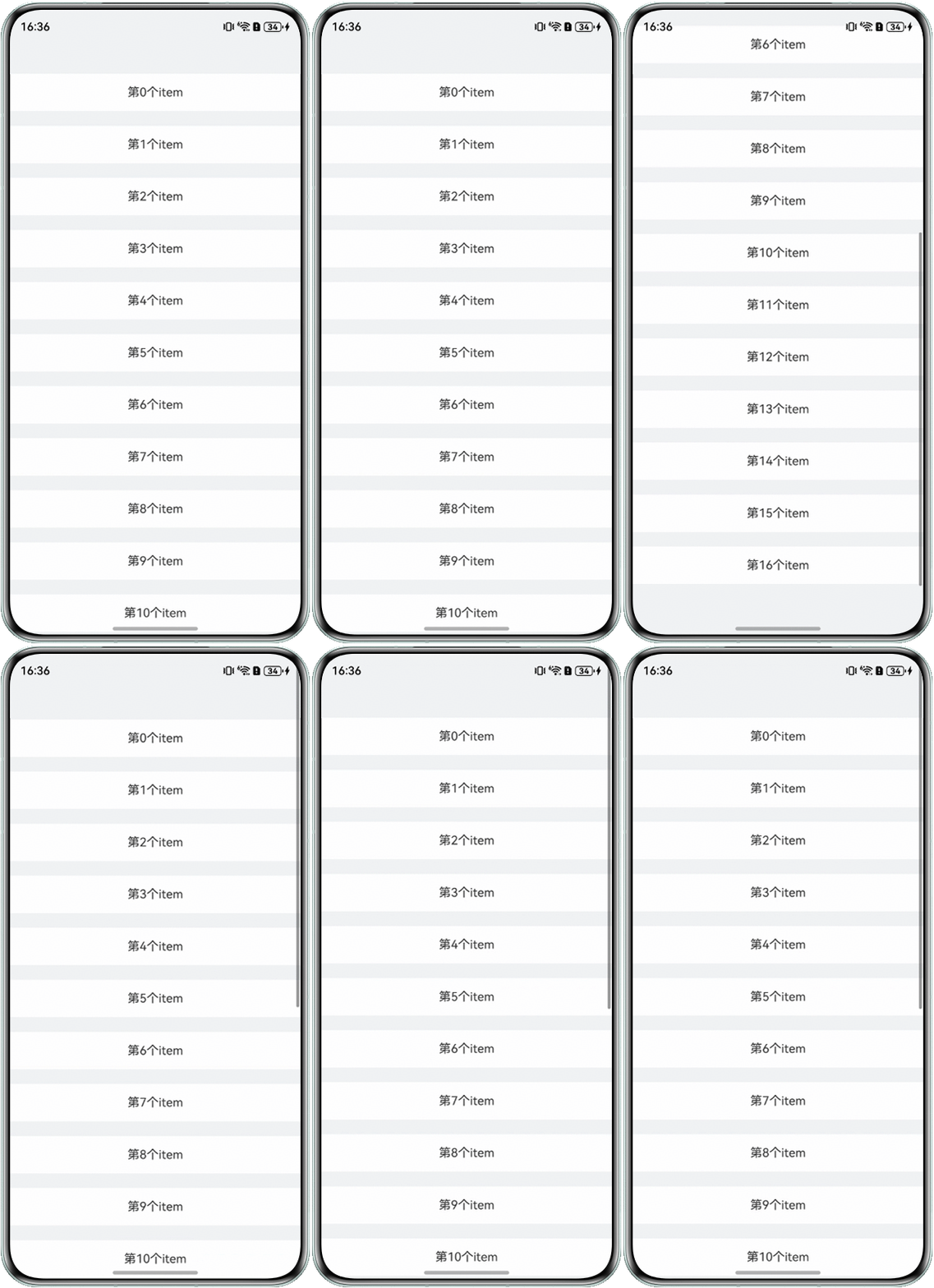
当应用中大多数页面需要避让系统顶部状态栏和底部导航条时,可以不使用FullScreen模式,使用组件的扩展安全区域方式。当组件布局不需要避让时,可以通过expandSafeArea属性让组件渲染到非安全区。List组件还可以通过contentStartOffset和contentEndOffset设置内容顶部和底部的空余高度。
代码示例如下:
import { window } from '@kit.ArkUI';

@Entry
@Component
export struct XxxPage3 {
  @StorageLink('safeTop') safeTop: SafeAreaEdge = 0;
  @StorageLink('safeBottom') safeBottom: number = 0;
  @State dataSource: number[] = [0, 1, 2, 3, 4, 5, 6, 7, 8, 9, 10, 11, 12, 13, 14, 15, 16];

  aboutToAppear(): void {
    window.getLastWindow(this.getUIContext().getHostContext()).then(windowClass => {
      let topType = window.AvoidAreaType.TYPE_SYSTEM;
      let statusBarArea = windowClass.getWindowAvoidArea(topType);
      this.safeTop = this.getUIContext().px2vp(statusBarArea.topRect.height);
      let navigationIndicatorArea = windowClass.getWindowAvoidArea(window.AvoidAreaType.TYPE_NAVIGATION_INDICATOR);
      this.safeBottom = this.getUIContext().px2vp(navigationIndicatorArea.bottomRect.height);
    });
  }

  // 同步获取系统信息
  build() {
    Column() {
      List() {
        ForEach(this.dataSource, (item: number) => {
          ListItem() {
            Text(`第${item}个item`)
              .align(Alignment.Center);
          }
          .height(50)
          .margin({ top: 10, bottom: 10 })
          .backgroundColor(Color.White)
          .width('100%');
        });
      }
      .backgroundColor('#f1f3f5')
      // 设置底部绘制延伸到头部时间栏和底部导航条
      .expandSafeArea([SafeAreaType.SYSTEM], [SafeAreaEdge.TOP, SafeAreaEdge.BOTTOM])
      .contentStartOffset(this.safeTop)
      .contentEndOffset(this.safeBottom);
    }
    .width('100%')
    .height('100%');
  }
}
效果预览:
这种方案特别需要注意的是,默认摄像头挖孔区域不为非安全区域,页面不避让挖孔。在不设置FullScreen时,竖屏状态下摄像头挖孔区域会因为导航栏非安全区域的存在避让,但在横屏状态下不会主动避让。如果要实现横屏状态下页面默认避让摄像头挖孔区域,需要在module.json5中添加配置项,具体请参考安全区域章节开头说明部分。