问题现象
TextInput获焦时点击Select弹出菜单选项,此时TextInput会失焦,导致软键盘收起,希望弹出菜单选项时TextInput不会失焦,如何实现?
问题效果预览:
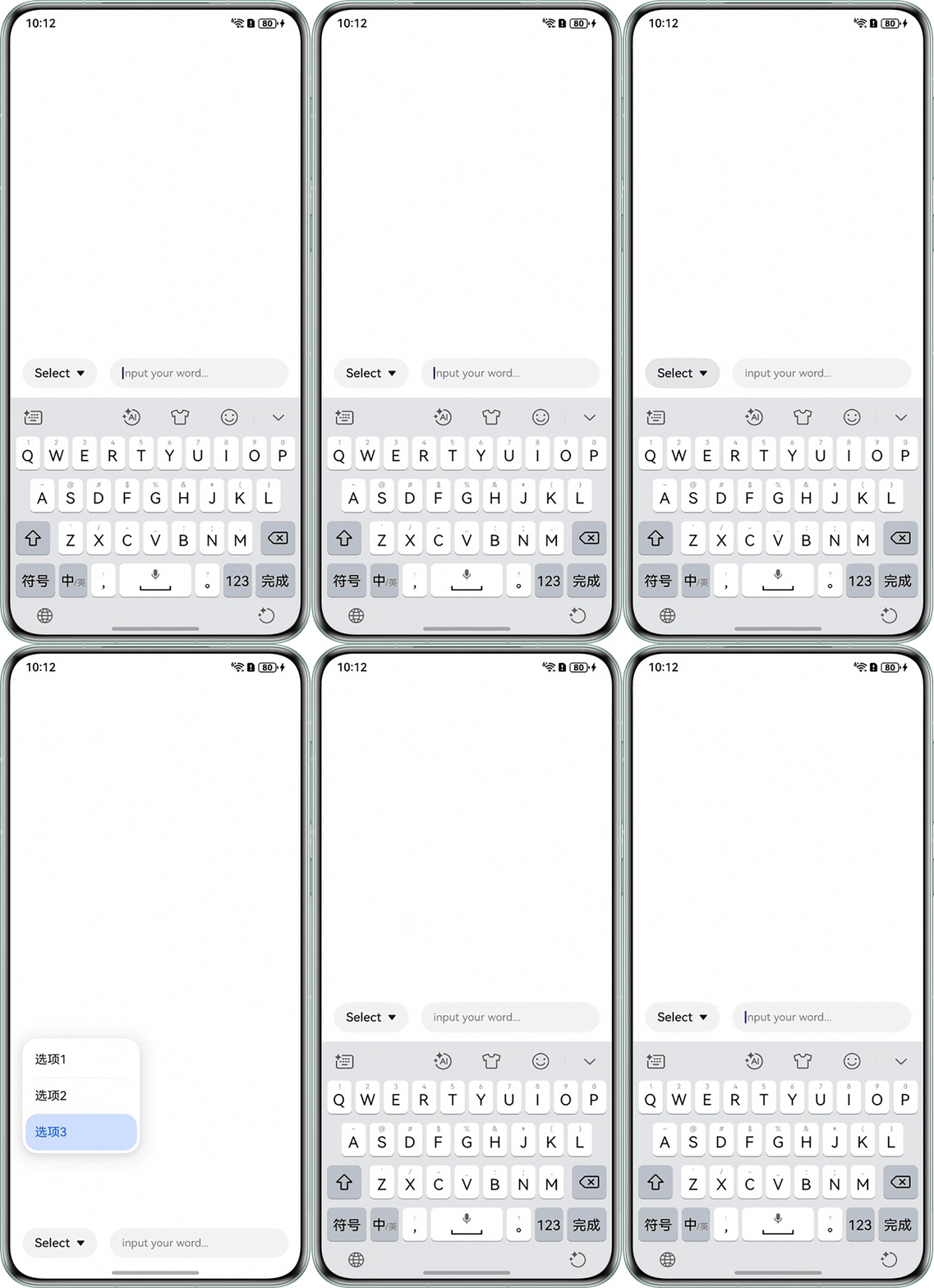
问题代码示例如下:
@Entry
@Component
struct SelectExample {
  @State text: string = 'Select';
  @State value: string = '';
  @State index: number = 2;
  controller: TextInputController = new TextInputController();

  build() {
    Column() {
      Blank().layoutWeight(1).width('100%');
      Row({ space: 16 }) {
        Select([{ value: '选项1' },
          { value: '选项2' },
          { value: '选项3' }])
          .selected(this.index)
          .value(this.text)
          .font({ size: 16, weight: 500 })
          .fontColor('#182431')
          .onSelect((index: number, text?: string | undefined) => {
            this.index = index;
            if (text) {
              this.text = text;
            }
          })
          .avoidance(AvoidanceMode.COVER_TARGET)
          .onFocus(() => {
            console.info(`Select获焦`);
          })
          .onBlur(() => {
            console.info(`Select失焦`);
          });

        TextInput({ text: this.value!!, placeholder: 'input your word...', controller: this.controller })
          .placeholderColor(Color.Grey)
          .placeholderFont({ size: 14, weight: 400 })
          .caretColor(Color.Blue)
          .layoutWeight(1)
          .id('TextInput')
          .onFocus(() => {
            console.info(`TextInput获焦`);
          })
          .onBlur(() => {
            console.info(`TextInput失焦`);
          })
          .inputFilter('[a-z]', (e) => {
            console.info(JSON.stringify(e));
          });
      }
      .padding({ left: 16, right: 16 })
      .width('100%');
    };
  }
} 
修改建议
自定义一个完全属于页面这个层级的自定义Select,防止焦点转移到弹窗这个层级,导致TextInput失焦。
@Entry
@Component
struct SelectExample {
  @State text: string = 'Select';
  controller: TextInputController = new TextInputController();
  @State selectVisibility: Visibility = Visibility.None;

  build() {
    Column() {
      Blank().layoutWeight(1).width('100%');

      Column() {
        Row() {
          Text('选项1');
        }
        .justifyContent(FlexAlign.Start)
        .width(120)
        .onClick(() => {
          this.text = '选项1';
        });

        Blank().height(5);
        Divider().width(120).color(Color.Black);
        Blank().height(5);

        Row() {
          Text('选项2');
        }
        .justifyContent(FlexAlign.Start)
        .width(120)
        .onClick(() => {
          this.text = '选项2';
        });

        Blank().height(5);
        Divider().width(120).color(Color.Black);
        Blank().height(5);

        Row() {
          Text('选项3');
        }
        .justifyContent(FlexAlign.Start)
        .width(120)
        .onClick(() => {
          this.text = '选项3';
        });

        Blank().height(5);
      }
      .shadow({
        radius: 60,
        color: 'rgba(0, 0, 0, 0.2)',
        offsetX: 0,
        offsetY: 0
      })
      .padding(5)
      .borderRadius(20)
      .width(150)
      .margin({ left: 16 })
      .visibility(this.selectVisibility);

      Blank().height(5);

      Row({ space: 16 }) {
        Blank().width(0);
        Row() {
          Text(this.text);
          Text('▼');
        }
        .borderRadius(20)
        .backgroundColor('#F1F3F5')
        .height(40)
        .width(80)
        .justifyContent(FlexAlign.SpaceEvenly)
        .onClick(() => {
          if (this.selectVisibility === Visibility.None) {
            this.selectVisibility = Visibility.Visible;
          } else if (this.selectVisibility === Visibility.Visible) {
            this.selectVisibility = Visibility.None;
          }
        });

        TextInput({ placeholder: 'input your word...', controller: this.controller })
          .placeholderColor(Color.Grey)
          .placeholderFont({ size: 14, weight: 400 })
          .caretColor(Color.Blue)
          .layoutWeight(1)
          .id('TextInput')
          .inputFilter('[a-z]', (e) => {
            console.info(JSON.stringify(e));
          })
          .onFocus(() => {
            console.info(`TextInput获焦`);
          })
          .onBlur(() => {
            console.info(`TextInput失焦`);
          });
        Blank().width(0);
      }.width('100%');
    }
    .alignItems(HorizontalAlign.Start);
  }
}