[h2]定位过程
- 同一张图片,新建项目展示查看确认正常。
- 使用代码确认其尺寸,发现其尺寸被压缩到512像素尺寸。
- 全局搜索图片资源,发现该图片资源也被用于在module.json5中的icon属性引用。
- 修改module.json5的icon属性对该图片引用后,该图片应用内展示恢复正常。
- 重新设置icon属性复现之后,发现是编译打包后的HAP包内,该图片大小被压缩到512像素大小的正方形。
[h2]问题现象
使用Image组件加载图片时,图片自动被旋转了90度,如何使图片显示方向正确。问题代码如下:
@Entry
@Component
struct ImageRotationProblem {
  build() {
    Column() {
      // 运行时请按需替换图片资源
      Image($r('app.media.startIcon'));
    };
  }
}
左图为正常显示效果,右图为Image加载显示效果:


[h2]修改建议
方案一:通过组件旋转属性,使图片显示方向正常:
直接给Image组件加上对应的旋转属性,使图片正常显示。因为图片的方向是逆时针90度,将Image组件顺时针旋转90度后,图片会正常显示。通过以下属性旋转:
@Entry
@Component
struct ImageRotationOne {
  build() {
    Column() {
      // 运行时请按需替换图片资源
      Image($r('app.media.startIcon'))
        .rotate({ angle: 90 });
    };
  }
} 
这种方案只有在确定图片的方向信息时才能使用,如果是从网络加载的、不能确定方向的图片列表,该方案则不适用。
方案二:通过orientation属性,设置图片的显示方向:
利用orientation属性,设置图像内容的显示方向。如果需要显示携带旋转角度信息或翻转信息的图片建议使用ImageRotateOrientation.AUTO进行设置。示例代码如下:
// 运行时请按需替换图片资源
@Entry
@Component
struct ImageRotationTwo {
  build() {
    Column() {
      // 运行时请按需替换图片资源
      Image($r('app.media.startIcon'))
        .orientation(ImageRotateOrientation.AUTO);
    };
  }
} 
这种方案不支持gif和svg类型的图片。
方案三:将图片转成ImageSource对象后读取旋转信息:
思路:读取每张图片的方向orientation信息,根据其方向,设置图片的显示方向。
- 使用Image Kit的createImageSource接口,将图片转换成image.ImageSource对象。
- 使用ImageSource的getImageProperty接口获取图片的image.PropertyKey.ORIENTATION旋转信息。
- 根据图片的EXIF方向信息设置orientation属性值进行旋转,使图片正常显示。
详细代码可以参考:获取图片的Exif信息并设置图像内容的显示方向。


[h2]定位过程
- 通过DevEco Testing查看问题组件,发现是Image组件。
- 排查该Image组件的同层组件的设置,发现没有使用linearGradient设置颜色渐变的同层组件。
@Entry
@Component
struct ImgExample {

  build() {
    Stack() {
      Image($r('app.media.long')) // $r('app.media.long')需要替换为开发者需要的图片资源文件
        .width(200)
        .height(300)
        .objectFit(ImageFit.Auto)
        // 没有使用linearGradient设置颜色渐变的同层组件
    }
    .width('100%')
    .height('100%');
  }
}

[h2]修改建议
添加使用linearGradient设置颜色渐变的同层组件。
@Entry
@Component
struct ImgExample {
  build() {
    Stack() {
      Stack() {
        Image($r('app.media.long')) // $r('app.media.long')需要替换为开发者需要的图片资源文件
          .width('100%')
          .height('100%')
          .objectFit(ImageFit.Auto);

        // 使用linearGradient设置颜色渐变的同层组件
        Row()
          .width('100%')
          .height('40')
          .linearGradient({
            direction: GradientDirection.Bottom,
            colors: [['#00000000', 0.0], ['#ff000000', 1.0]]
          });
      }
      .width(200)
      .height(300)
      .alignContent(Alignment.Bottom);
    }
    .width('100%')
    .height('100%');
  }
}
效果图如下:


[h2]定位过程
- 使用DevEco Testing查看问题组件,该组件为Image组件。
- 查看Image组件的objectFit属性是否正确,图片的缩放模式选用不当可能造成图片显示不完整,如果图片缩放模式设置为cover,图片会保持宽高比,并填满容器,超出部分会被裁剪。
@Entry
@Component
struct ImgEmpty {

  build() {
    Stack() {
      Image($r('app.media.product')) // $r('app.media.product')需要替换为开发者需要的图片资源文件
        .width(300)
        .height(200)
        .objectFit(ImageFit.Cover) // 图片保持宽高比并填满容器,超出部分会被裁剪
    }
    .width('100%')
    .height('100%');
  }
}

[h2]修改建议
objectFit属性设置为Contain,该缩放模式会保持宽高比,完整显示图片。
@Entry
@Component
struct ImgTruncation {
  build() {
    Stack() {
      Image($r('app.media.product')) // $r('app.media.product')需要替换为开发者需要的图片资源文件
        .width(300)
        .height(200)
        .objectFit(ImageFit.Contain) // 保持宽高比,完整显示图片
    }
    .width('100%')
    .height('100%');
  }
} 
[h2]定位过程
- 使用DevEco Testing查看问题组件,问题所在位置缺少Image组件,而正常显示图片组件的相同位置使用了Image组件。
- 排查Image组件的设置,发现添加了判断图片资源是否存在的逻辑。
@Entry
@Component
struct ImgEmpty {
  imgSrcs: ResourceStr[] = ['', $r('app.media.myposter2')];

  build() {
    Stack() {
      List() {
        ForEach(this.imgSrcs, (img: ResourceStr, index: number) => {
          ListItem() {
            Row() {
              Text('图片' + (index + 1))
                .fontSize(20)
                .height('100%')
                .width(100)
                .textAlign(TextAlign.Center)
                .borderRadius(10);

              // 图片资源为空时不显示图片组件
              if (img !== '') {
                Image(img)
                  .width(150)
                  .objectFit(ImageFit.Contain);
              }
            }
            .width('100%')
            .height(120)
            .justifyContent(FlexAlign.Start)
            .borderRadius(10)
            .backgroundColor('#f1f3f5');
          }
          .margin({ top: 5, bottom: 5 });
        }, (item: string) => item);
      }
      .nestedScroll({
        scrollForward: NestedScrollMode.PARENT_FIRST,
        scrollBackward: NestedScrollMode.SELF_FIRST
      })
      .scrollBar(BarState.Off)
      .width('80%');
    }
    .width('100%')
    .height('100%');
  }
}

[h2]修改建议
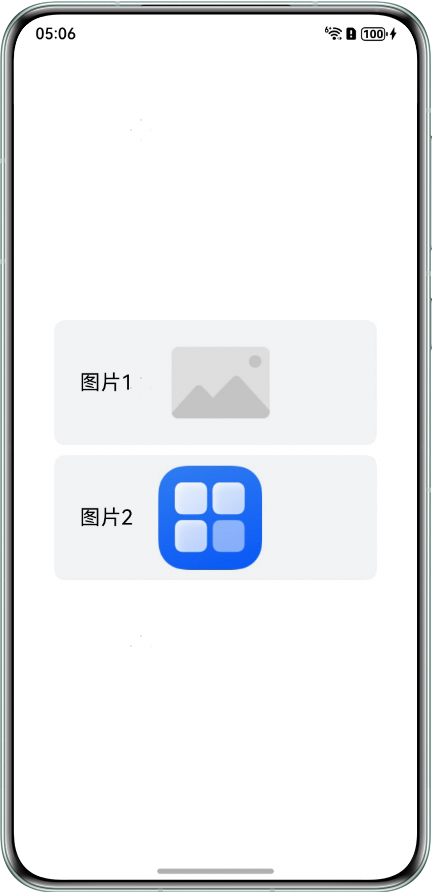
无图片资源时通过alt属性使用占位图片替代。
@Entry
@Component
struct ImgEmpty {
  imgSrcs: ResourceStr[] = ['', $r('app.media.startIcon')]; // $r('app.media.startIcon')需要替换为开发者需要的图片资源文件

  build() {
    Stack() {
      List() {
        ForEach(this.imgSrcs, (img: ResourceStr, index: number) => {
          ListItem() {
            Row() {
              Text('图片' + (index + 1))
                .fontSize(20)
                .height('100%')
                .width(100)
                .textAlign(TextAlign.Center)
                .borderRadius(10);

              Image(img)
                .width(100)
                // $r('app.media.empty')需要替换为开发者需要的图片资源文件
                .alt($r('app.media.empty')) // 图片资源为空时显示占位图片
                .objectFit(ImageFit.Contain);
            }
            .width('100%')
            .height(120)
            .justifyContent(FlexAlign.Start)
            .borderRadius(10)
            .backgroundColor('#f1f3f5');
          }
          .margin({ top: 5, bottom: 5 });
        }, (item: string) => item);
      }
      .nestedScroll({
        scrollForward: NestedScrollMode.PARENT_FIRST,
        scrollBackward: NestedScrollMode.SELF_FIRST
      })
      .scrollBar(BarState.Off)
      .width('80%');
    }
    .width('100%')
    .height('100%');
  }
}
效果图如下: