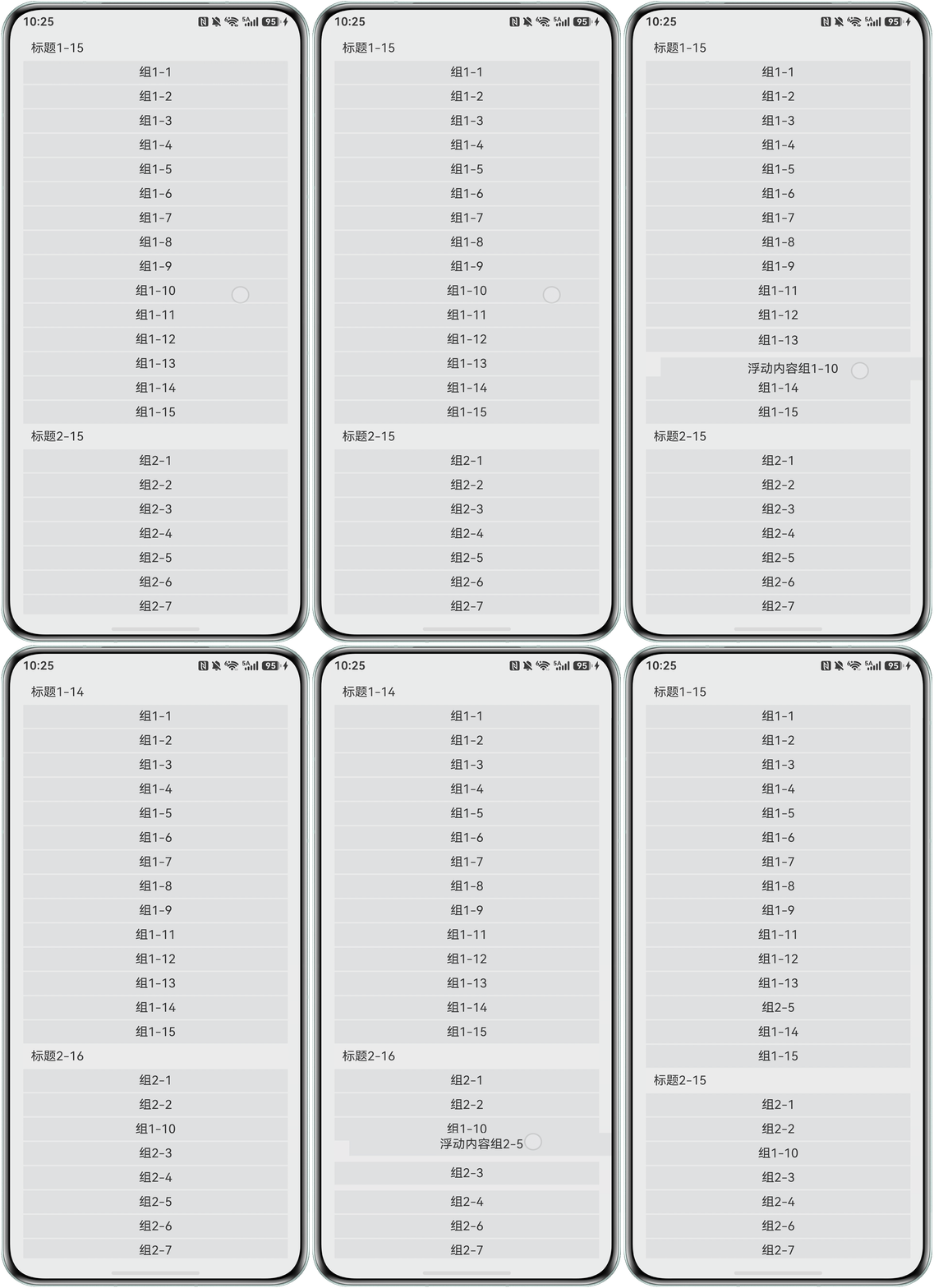
背景知识
- 使用Grid组件构建网格元素布局,启动editMode编辑模式,进入编辑模式可以拖拽Grid组件内部GridItem。
- onItemDragStart和onItemDrop事件分别在开始拖拽网格元素时触发和停止拖拽时触发,通过事件的组合完成交换数组位置的逻辑。
解决方案
- 使用Grid布局构建界面。其中,columnsTemplate可设置当前网格布局列的数量、固定列宽或最小列宽值;columnsGap可设置列与列的间距;rowsGap可设置行与行的间距。
Grid(this.scroller) { GridItem() { Text('标题1-' + this.numbers.length) .fontSize(16) .width('100%') .height(30) .padding({ left: 10 }) .textAlign(TextAlign.Start); } .onClick(() => { this.isShowGroup1 = !this.isShowGroup1; }); if (this.isShowGroup1) { ForEach(this.numbers, (day: string) => { GridItem() { Text(day) .fontSize(16) .backgroundColor('#f1f3f5') .width('100%') .height(30) .textAlign(TextAlign.Center); }; }); } GridItem() { Text('标题2-' + this.numbers2.length) .fontSize(16) .width('100%') .height(30) .padding({ left: 10 }) .textAlign(TextAlign.Start); } .onClick(() => { this.isShowGroup2 = !this.isShowGroup2; }); if (this.isShowGroup2) { ForEach(this.numbers2, (day: string) => { GridItem() { Text(day) .fontSize(16) .backgroundColor('#f1f3f5') .width('100%') .height(30) .textAlign(TextAlign.Center); }; }); } } .columnsTemplate('1fr') .columnsGap(2) .rowsGap(2) .scrollBar(BarState.Off) - 给Grid组件设置editMode为true,即Grid进入编辑模式,进入编辑模式可以拖拽Grid组件内部GridItem。设置supportAnimation为true,即Grid拖拽元素时支持动画。
.supportAnimation(true)
.editMode(true) // 设置Grid是否进入编辑模式,进入编辑模式可以拖拽Grid组件内部GridItem
- 定义GridItem被拖拽时元素的样式,元素被拖拽时展示浮动内容。
@Builder pixelMapBuilder() { // 拖拽过程样式 Column() { Text('浮动内容' + this.text) .fontSize(16) .backgroundColor('#f1f3f5') .width('90%') .height(30) .textAlign(TextAlign.Center); }; } - 判断当前移动的是不是标题,如果是标题禁止拖动。
// 判断是否是标题 isTitle(index: number) { if (index === 0) { return true; } if (!this.isShowGroup1 && index === 1) { return true; } if (this.isShowGroup1 && index === this.numbers.length + 1) { return true; } return false; } - 定义拖拽过程中的数组交换逻辑。
moveToIndex(index1: number, index2: number) { // 将index1位置的元素移动至 index2位置 let temp = ''; let num1Length = 1 + (this.numbers.length - 1) * Number(this.isShowGroup1); if (index1 <= num1Length) { temp = this.numbers.splice(index1 - 1, 1)[0]; } else { index1 = index1 - this.numbers.length - 1; temp = this.numbers2.splice(index1 - 1, 1)[0]; } if (index2 <= num1Length) { this.numbers.splice(index2 - 1, 0, temp); } else { index2 = index2 - this.numbers.length - 1; this.numbers2.splice(index2 - 1, 0, temp); } } - 给Grid组件绑定onItemDragStart和onItemDrop事件,在onItemDragStart回调中设置拖拽过程中显示的图片,并在onItemDrop中完成交换数组位置的逻辑。
.onItemDragStart((event: ItemDragInfo, itemIndex: number) => { // 第一次拖拽此事件绑定的组件时,触发回调。
  if (this.isTitle(itemIndex)) {
    return;
  }
  if (itemIndex > this.numbers.length) {
    itemIndex = itemIndex - this.numbers.length - 1;
    this.text = this.numbers2[itemIndex - 1];
  } else {
    this.text = this.numbers[itemIndex - 1];
  }
  return this.pixelMapBuilder(); // 设置拖拽过程中显示的图片。
})
.onItemDrop((event: ItemDragInfo, itemIndex: number,
  insertIndex: number) => { // 绑定此事件的组件可作为拖拽释放目标,当在本组件范围内停止拖拽行为时,触发回调。
  console.info(`eventX: ${event.x}`);
  this.moveToIndex(itemIndex, insertIndex);
});
完整示例如下:
@Entry
@Component
struct GridDemo {
  @State numbers: string[] = [];
  @State numbers2: string[] = [];
  @State isShowGroup1: boolean = true;
  @State isShowGroup2: boolean = true;
  @State text: string = 'drag';
  scroller: Scroller = new Scroller();

  @Builder
  pixelMapBuilder() { // 拖拽过程样式
    Column() {
      Text('浮动内容' + this.text)
        .fontSize(16)
        .backgroundColor('#f1f3f5')
        .width('90%')
        .height(30)
        .textAlign(TextAlign.Center);
    };
  }


  aboutToAppear() {
    for (let i = 1; i <= 15; i++) {
      this.numbers.push('组1-' + i);
      this.numbers2.push('组2-' + i);
    }
  }

  moveToIndex(index1: number, index2: number) { // 将index1位置的元素移动至 index2位置
    let temp = '';
    let num1Length = 1 + (this.numbers.length - 1) * Number(this.isShowGroup1);
    if (index1 <= num1Length) {
      temp = this.numbers.splice(index1 - 1, 1)[0];
    } else {
      index1 = index1 - this.numbers.length - 1;
      temp = this.numbers2.splice(index1 - 1, 1)[0];
    }
    if (index2 <= num1Length) {
      this.numbers.splice(index2 - 1, 0, temp);
    } else {
      index2 = index2 - this.numbers.length - 1;
      this.numbers2.splice(index2 - 1, 0, temp);
    }
  }


  // 判断是否是标题
  isTitle(index: number) {
    if (index === 0) {
      return true;
    }
    if (!this.isShowGroup1 && index === 1) {
      return true;
    }
    if (this.isShowGroup1 && index === this.numbers.length + 1) {
      return true;
    }
    return false;
  }


  build() {
    Column({ space: 5 }) {
      Column() {
        Grid(this.scroller) {
          GridItem() {
            Text('标题1-' + this.numbers.length)
              .fontSize(16)
              .width('100%')
              .height(30)
              .padding({ left: 10 })
              .textAlign(TextAlign.Start);
          }
          .onClick(() => {
            this.isShowGroup1 = !this.isShowGroup1;
          });

          if (this.isShowGroup1) {
            ForEach(this.numbers, (day: string) => {
              GridItem() {
                Text(day)
                  .fontSize(16)
                  .backgroundColor('#f1f3f5')
                  .width('100%')
                  .height(30)
                  .textAlign(TextAlign.Center);
              };
            });
          }
          GridItem() {
            Text('标题2-' + this.numbers2.length)
              .fontSize(16)
              .width('100%')
              .height(30)
              .padding({ left: 10 })
              .textAlign(TextAlign.Start);
          }
          .onClick(() => {
            this.isShowGroup2 = !this.isShowGroup2;
          });

          if (this.isShowGroup2) {
            ForEach(this.numbers2, (day: string) => {
              GridItem() {
                Text(day)
                  .fontSize(16)
                  .backgroundColor('#f1f3f5')
                  .width('100%')
                  .height(30)
                  .textAlign(TextAlign.Center);
              };
            });
          }
        }
        .columnsTemplate('1fr')
        .columnsGap(2)
        .rowsGap(2)
        .scrollBar(BarState.Off)
        .onScrollIndex((first: number) => {
          console.info(first.toString());
        })
        .width('90%')
        .supportAnimation(true)
        .editMode(true) // 设置Grid是否进入编辑模式,进入编辑模式可以拖拽Grid组件内部GridItem
        .onItemDragStart((event: ItemDragInfo, itemIndex: number) => { // 第一次拖拽此事件绑定的组件时,触发回调。
          if (this.isTitle(itemIndex)) {
            return;
          }
          if (itemIndex > this.numbers.length) {
            itemIndex = itemIndex - this.numbers.length - 1;
            this.text = this.numbers2[itemIndex - 1];
          } else {
            this.text = this.numbers[itemIndex - 1];
          }
          return this.pixelMapBuilder(); // 设置拖拽过程中显示的图片。
        })
        .onItemDrop((event: ItemDragInfo, itemIndex: number,
          insertIndex: number) => { // 绑定此事件的组件可作为拖拽释放目标,当在本组件范围内停止拖拽行为时,触发回调。
          console.info(`eventX: ${event.x}`);
          this.moveToIndex(itemIndex, insertIndex);
        });

      };
    }.width('100%').margin({ top: 5 });
  }
}
效果图如下: