解决方案
可以通过getCurrentTopAbility获取当前应用顶部Ability,再获取其Context。示例代码如下:
import { describe, it } from '@ohos/hypium';
import { relationalStore } from '@kit.ArkData';
import { abilityDelegatorRegistry } from '@kit.TestKit';

const delegator = abilityDelegatorRegistry.getAbilityDelegator()

export default function OhosGetContext() {
  describe('OhosGetContextTest', () => {
    // Defines a test suite. Two parameters are supported: test suite name and test suite function.
    it('GetContextTest', 0, async () => {
      const STORE_CONFIG: relationalStore.StoreConfig = {
        // 数据库文件名
        name: 'RdbTest.db',
        // 数据库安全级别
        securityLevel: relationalStore.SecurityLevel.S3,
      };
      const SQL_CREATE_TABLE =
        'CREATE TABLE IF NOT EXISTS EMPLOYEE (ID INTEGER PRIMARY KEY AUTOINCREMENT, NAME TEXT NOT NULL, AGE INTEGER, SALARY REAL, CODES BLOB, IDENTITY UNLIMITED INT)';

      let cont = await delegator.getCurrentTopAbility()

      await new Promise<void>((resolve, reject) => {
        relationalStore.getRdbStore(cont.context, STORE_CONFIG, async (err, store) => {
          if (err) {
            console.error(`Failed to get RdbStore. Code:${err.code}, message:${err.message}`);
            reject(err);
            return;
          }
          console.info('Succeeded in getting RdbStore.');
          try {
            await store.execute(SQL_CREATE_TABLE);
            resolve();
          } catch (e) {
            console.error(`Failed to execute sql.`);
            reject(e);
          }
        });
      });
    });
  });
}

Context本身是一个对象,无法直接打印,但可以按需打印字段,如console.info('deviceTypes:', cont.context.abilityInfo.deviceTypes)可打印测试设备的设备类型。

常见FAQ
Q:对每个测试文件(如Ability.test.ets)执行Instrument Test可以成功,但是运行整个工程目录(test)只会成功第一个测试文件,这种情况如何解决?
A:每个测试文件需要加后置处理步骤,查阅基础流程能力,可以在每个测试文件里加入afterAll(),清除当前的Ability: await ability.context.terminateSelf();
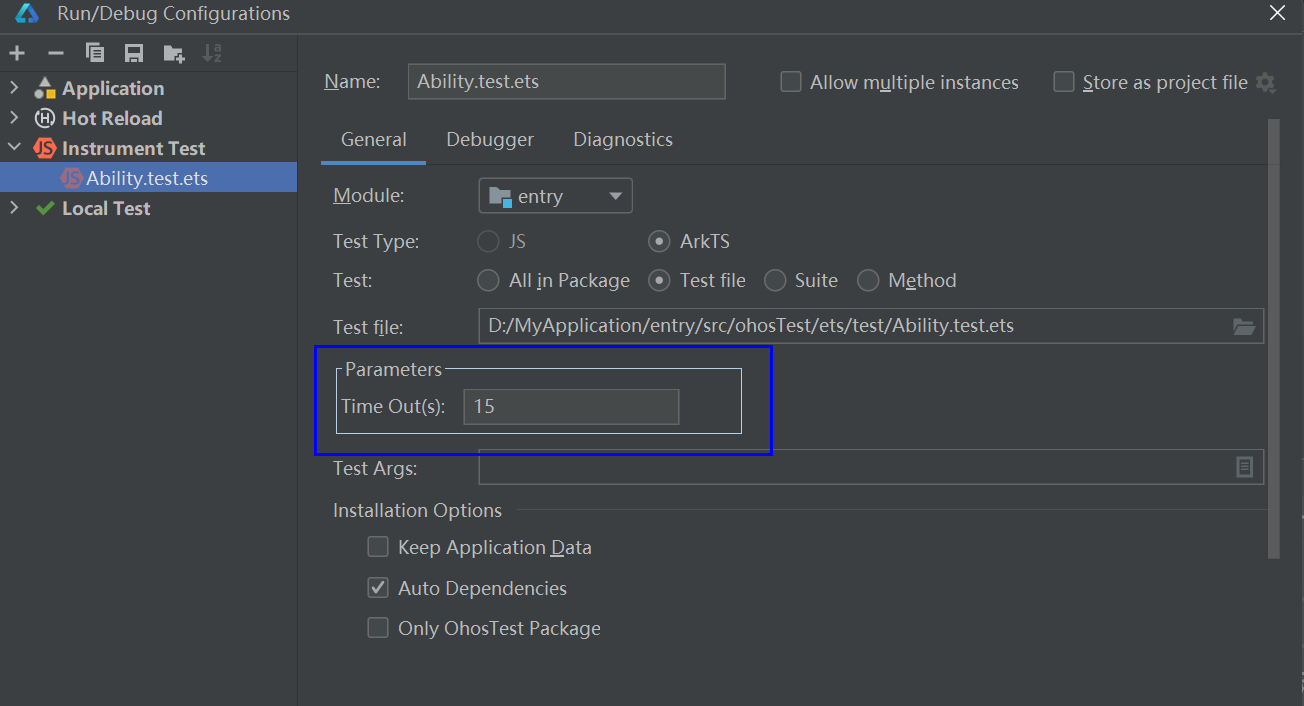
Q:Instrument Test测试文件的超时时间如何设置?
A:在工具栏主菜单单击Run > Edit Configurations进入Run/Debug Configurations界面,选择左边下拉菜单Instrument Test里的测试文件(如Ability.test.ets),在Parameters中设置Time Out参数,并点击OK即可。