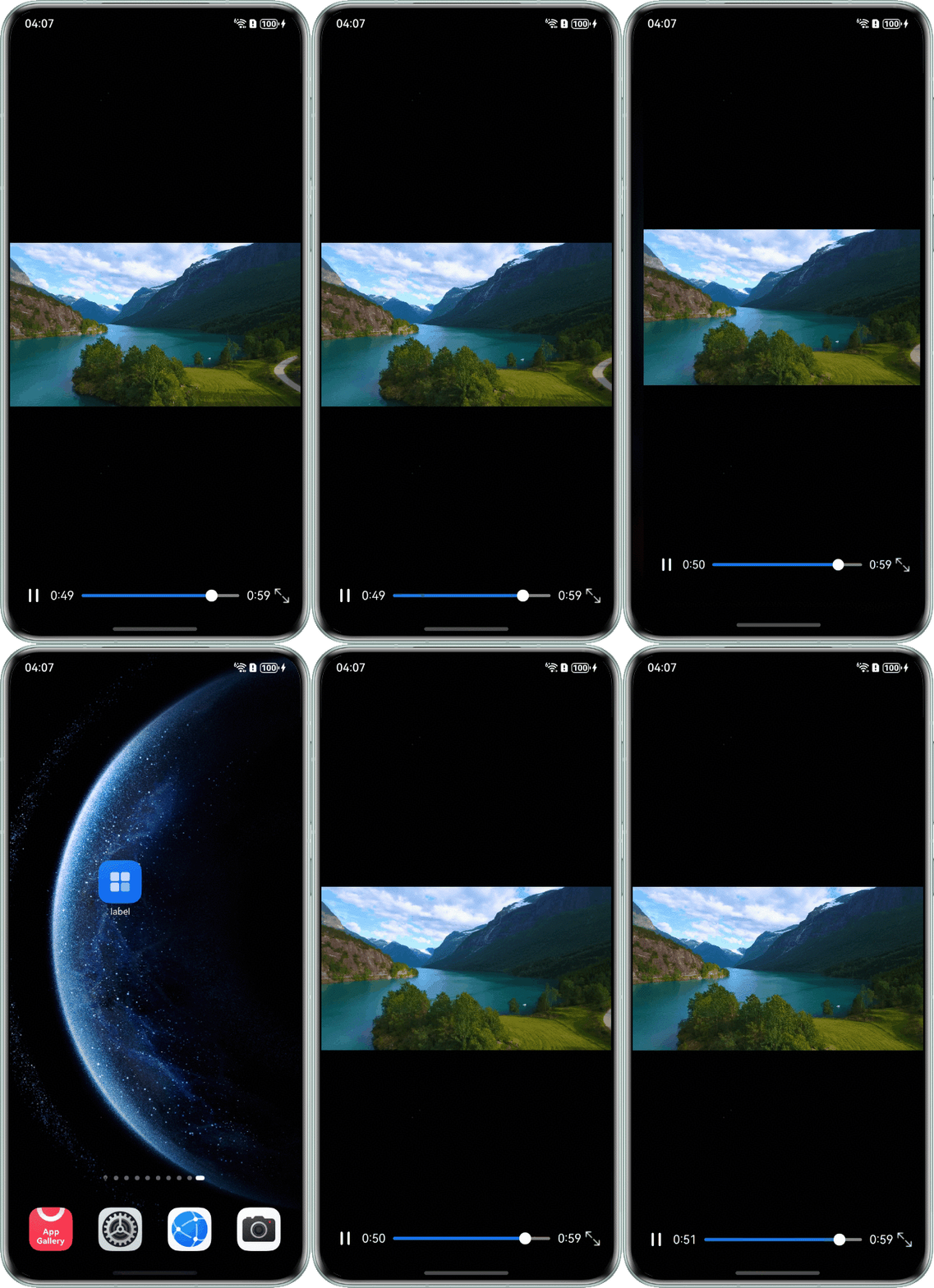
问题定位
- 使用DevEco Testing查看问题组件,为Stack组件下的Video组件,且同层组件为Image组件。
- 查看该页面的相关设置,发现页面使用了onPageShow和onPageHide在应用进入和退出前台时控制图片的显示。应用退出前台暂停播放时显示静态图片,返回前台恢复播放时又从图片切换到视频,造成视频窗口闪屏。
import { window } from '@kit.ArkUI';
import { common } from '@kit.AbilityKit';

@Entry
@Component
export struct Index {
  private videoSrc: ResourceStr = $rawfile('video1.mp4'); // $rawfile('video1.mp4')需要替换为开发者需要的视频资源文件
  controller: VideoController = new VideoController();
  @State showImg: boolean = true;
  context: common.UIAbilityContext = this.getUIContext().getHostContext() as common.UIAbilityContext;

  aboutToAppear(): void {
    window.getLastWindow(this.context).then((lastWindow) => {
      lastWindow.setWindowLayoutFullScreen(true);
      let systemBarProperties: window.SystemBarProperties = {
        statusBarColor: '#00000000',
        statusBarContentColor: '#ffffff'
      };
      lastWindow.setWindowSystemBarProperties(systemBarProperties);
    });
  }

  onPageHide(): void {
    // 应用退到后台时显示预览图和暂停视频
    this.showImg = true;
    this.controller.pause();
  }

  onPageShow(): void {
    // 应用返回时播放视频
    // 模拟视频加载
    setTimeout(() => {
      this.controller.start();
    }, 300);
  }

  build() {
    Stack({ alignContent: Alignment.Start }) {
      Video({
        src: this.videoSrc,
        controller: this.controller,
      })
        .width('100%')
        .height('90%')
        .objectFit(ImageFit.Contain)
        .loop(true)
        .autoPlay(true)
        .onStart(() => {
          this.showImg = false; // 开始播放视频时不显示预览图
        });
      if (this.showImg) {
        Image($r('app.media.myposter1')) // $r('app.media.myposter1')需要替换为开发者需要的图片资源文件
          .width('100%')
          .height('90%')
          .objectFit(ImageFit.Contain);
      }
    }
    .height('100%')
    .width('100%')
    .backgroundColor(Color.Black)
    .expandSafeArea([SafeAreaType.SYSTEM], [SafeAreaEdge.TOP, SafeAreaEdge.BOTTOM]); // 扩展页面区域到导航栏和状态栏
  }
}

修改建议
应用进入和退出前台时不改变图片的显示,只在初次播放时改变。
import { window } from '@kit.ArkUI';
import { common } from '@kit.AbilityKit';

interface DurationObject {
  duration: number;
}

interface TimeObject {
  time: number;
}

@Entry
@Component
export struct Index {
  private videoSrc: ResourceStr = $rawfile('video1.mp4'); // $rawfile('video1.mp4')需要替换为开发者需要的视频资源文件
  controller: VideoController = new VideoController();
  @State showImg: boolean = true;
  @State isPlay: boolean = false;
  @State durationTime: number = 0;
  @State currentTime: number = 0;
  @State sliderWidth: number = 230;
  @State @Watch('changeOrientation') isFull: boolean = false;
  context: common.UIAbilityContext = this.getUIContext().getHostContext() as common.UIAbilityContext;

  aboutToAppear(): void {
    window.getLastWindow(this.context).then((lastWindow) => {
      lastWindow.setWindowLayoutFullScreen(true);
      let systemBarProperties: window.SystemBarProperties = {
        statusBarColor: '#00000000',
        statusBarContentColor: '#ffffff'
      };
      lastWindow.setWindowSystemBarProperties(systemBarProperties);
    });
  }

  timeConvert(time: number): string {
    let min: number = Math.floor(time / 60);
    let second: string = (time % 60).toFixed(0);
    second = second.padStart(2, '0');
    return `${min}:${second}`;
  }

  changeOrientation() {
    let context: common.UIAbilityContext = this.getUIContext().getHostContext() as common.UIAbilityContext;
    window.getLastWindow(context).then((lastWindow) => {
      lastWindow.setPreferredOrientation(this.isFull ? window.Orientation.AUTO_ROTATION_LANDSCAPE :
        window.Orientation.PORTRAIT);
      // 进入全屏时进入沉浸式,退出全屏时再显示状态栏和导航栏
      lastWindow.setWindowLayoutFullScreen(this.isFull);
      lastWindow.setWindowSystemBarEnable(this.isFull ? [] : ['status', 'navigation']);
    });
  }

  onPageHide(): void {
    // 应用退到后台时暂停视频
    this.controller.pause();
  }

  onPageShow(): void {
    // 应用返回时播放视频
    // 模拟视频加载
    setTimeout(() => {
      this.controller.start();
    }, 300);
  }

  build() {
    Stack({ alignContent: Alignment.Start }) {
      Video({
        src: this.videoSrc,
        controller: this.controller,
      })
        .width('100%')
        .height('100%')
        .objectFit(ImageFit.Contain)
        .controls(false)
        .loop(true)
        .autoPlay(true)
        .onPrepared((e?: DurationObject) => {
          this.showImg = false; // 加载完成视频时不显示预览图
          console.info('duration is ' + e?.duration);
          this.isPlay = true;
          if (e !== undefined) {
            this.durationTime = e.duration;
          }
        })
        .onUpdate((e?: TimeObject) => {
          if (e !== undefined) {
            this.currentTime = e.time;
          }
        })
        .onSizeChange(() => {
          this.sliderWidth = this.isFull ? 650 : 230;
        });

      Stack() {
        Row() {
          // $r('app.media.ic_video_play')和$r('app.media.ic_video_pause')需要替换为开发者需要的图片资源文件
          Image(this.isPlay ? $r('app.media.ic_video_play') : $r('app.media.ic_video_pause'))
            .width(25)
            .height(25)
            .onClick(() => {
              if (this.isPlay) {
                this.controller.pause();
                this.isPlay = false;
              } else {
                this.controller.start();
                this.isPlay = true;
              }
            });

          // 左侧时间
          Text(this.timeConvert(this.currentTime))
            .fontColor(Color.White)
            .textAlign(TextAlign.End)
            .fontWeight(FontWeight.Regular)
            .margin({ left: 10 });

          Slider({
            value: this.currentTime,
            min: 0,
            max: this.durationTime,
            style: SliderStyle.OutSet
          })
            .blockColor(Color.White)
            .trackColor(Color.Gray)
            .selectedColor('#007DFF')
            .showTips(false)
            .width(this.sliderWidth)
            .onChange((value: number, mode: SliderChangeMode) => {
              if (mode === SliderChangeMode.Begin) {
                this.controller.pause();
              } else if (mode === SliderChangeMode.Moving) {
                this.controller.setCurrentTime(value);
              } else if (mode === SliderChangeMode.End) {
                this.controller.start();
              }
            });

          // 右侧时间
          Text(this.timeConvert(this.durationTime))
            .id('durationTimeText')
            .fontColor(Color.White)
            .fontWeight(FontWeight.Regular);

          // $r('app.media.out')和$r('app.media.full')需要替换为开发者需要的图片资源文件
          Image(this.isFull ? $r('app.media.out') : $r('app.media.full'))
            .width(20)
            .height(20)
            .objectFit(ImageFit.Contain)
            .onClick(() => {
              this.isFull = !this.isFull; // 进入全屏或退出全屏
            })
            .margin({ left: 5 });
        }
        .width('100%')
        .justifyContent(FlexAlign.Center)
        .padding({ left: 10, right: 5 })
        .margin({ bottom: 5 });
      }
      .width('100%')
      .height('100%')
      .alignContent(Alignment.Bottom);

      if (this.showImg) {
        Image($r('app.media.myposter1')) // $r('app.media.myposter1')需要替换为开发者需要的图片资源文件
          .width('100%')
          .height('90%')
          .objectFit(ImageFit.Contain);
      }
    }
    .height('100%')
    .width('100%')
    .backgroundColor(Color.Black)
    .expandSafeArea([SafeAreaType.SYSTEM], [SafeAreaEdge.TOP, SafeAreaEdge.BOTTOM]); // 扩展页面区域到导航栏和状态栏
  }
}
效果图如下: