背景知识
在HarmonyOS中,自定义视频播放的横竖屏转换可以通过调用窗口的setPreferredOrientation()方法实现。屏幕状态从熄屏到亮屏会触发页面级onPageShow()方法,每次页面回到最前方都需要触发的操作可以放置在该方法内执行。


修改建议
将数据的初始化操作放在aboutToAppear()方法内,防止页面因熄屏后重新亮起、退到后台再拉起等操作触发页面重置。示例代码如下:
- 在EntryAbility.ets文件中设置沉浸式:
import { AbilityConstant, ConfigurationConstant, UIAbility, Want } from '@kit.AbilityKit'; import { hilog } from '@kit.PerformanceAnalysisKit'; import { window } from '@kit.ArkUI'; import {BusinessError} from '@kit.BasicServicesKit'; const DOMAIN = 0x0000; export default class EntryAbility extends UIAbility { onCreate(want: Want, launchParam: AbilityConstant.LaunchParam): void { try { this.context.getApplicationContext().setColorMode(ConfigurationConstant.ColorMode.COLOR_MODE_NOT_SET); } catch (err) { hilog.error(DOMAIN, 'testTag', 'Failed to set colorMode. Cause: %{public}s', JSON.stringify(err)); } console.info(`${want}, ${launchParam}`); hilog.info(DOMAIN, 'testTag', '%{public}s', 'Ability onCreate'); } onDestroy(): void { hilog.info(DOMAIN, 'testTag', '%{public}s', 'Ability onDestroy'); } onWindowStageCreate(windowStage: window.WindowStage): void { // Main window is created, set main page for this ability hilog.info(DOMAIN, 'testTag', '%{public}s', 'Ability onWindowStageCreate'); windowStage.loadContent('pages/Index', (err) => { if (err.code) { hilog.error(DOMAIN, 'testTag', 'Failed to load the content. Cause: %{public}s', JSON.stringify(err)); return; } hilog.info(DOMAIN, 'testTag', 'Succeeded in loading the content.'); }); let windowClass: window.Window | undefined = windowStage.getMainWindowSync(); // 获取应用主窗口 // 1. 设置窗口全屏 windowClass.setWindowLayoutFullScreen(true).then(() => { hilog.info(0x0000, 'testTag', 'Succeeded in setting the window layout to full-screen mode.'); }).catch((err: BusinessError) => { hilog.error(0x0000, 'testTag', 'Failed to set the window layout to full-screen mode. Cause:' + JSON.stringify(err)); }); //设置状态栏 //设置状态栏颜色及文字高亮 let SystemBarProperties: window.SystemBarProperties = { statusBarColor: '#ff000000', isStatusBarLightIcon: true }; windowClass.setWindowSystemBarProperties(SystemBarProperties).then(() => { hilog.info(0x0000, 'testTag', 'Succeeded in setting the system bar properties.'); }).catch((err: BusinessError) => { hilog.error(0x0000, 'testTag', `Failed to set the system bar properties. Cause code: ${err.code}, message: ${err.message}`); }); //状态栏隐藏 windowClass.setSpecificSystemBarEnabled('status', true).then(() => { hilog.info(0x0000, 'testTag', 'Succeeded in setting the status bar to be invisible.'); }).catch((err: BusinessError) => { hilog.error(0x0000, 'testTag', `Failed to set the status bar to be invisible. Code is ${err.code}, message is ${err.message}`); }); //导航条隐藏 windowClass.setSpecificSystemBarEnabled('navigationIndicator', false).then(() => { hilog.info(0x0000, 'testTag', 'Succeed in setting the system bar to be invisible'); }).catch((err: BusinessError) => { hilog.error(0x0000, 'testTag', `Failed to set the system bar to be invisible. Cause code: ${err.code}, message: ${err.message}`); }); } onWindowStageDestroy(): void { // Main window is destroyed, release UI related resources hilog.info(DOMAIN, 'testTag', '%{public}s', 'Ability onWindowStageDestroy'); } onForeground(): void { // Ability has brought to foreground hilog.info(DOMAIN, 'testTag', '%{public}s', 'Ability onForeground'); } onBackground(): void { // Ability has back to background hilog.info(DOMAIN, 'testTag', '%{public}s', 'Ability onBackground'); } } - 视频页面:
import { window } from '@kit.ArkUI';
import {BusinessError} from '@kit.BasicServicesKit';
import { common, Context } from '@kit.AbilityKit';

function switchScreen(orientation: window.Orientation, context: Context) {
  let windowClass: window.Window | undefined = undefined;
  try {
    let promise = window.getLastWindow(context);
    promise.then((data) => {
      windowClass = data;
      windowClass.setPreferredOrientation(orientation); // 获取窗口的显示方向
    }).catch((err: BusinessError) => {
      console.error('getLastWindow error', err);
    });
  } catch (e) {
    console.error('setScreenOrientation error');
  }
}

@Entry
@Component
struct MainPage {
  videoSrc: Resource = $rawfile('videoTest.mp4');
  controller: VideoController = new VideoController();
  @State isFull: boolean | undefined = undefined;

  aboutToAppear(): void {
    this.isFull = false; // 初始化变量
  }

  build() {
    if (!this.isFull) { // 小屏展示
      LittleVideoScreen({
        isFull: this.isFull
      })
    } else { // 全屏展示
      FullVideoScreen({
        isFull: this.isFull
      })
    }
  }
}

@Component
struct LittleVideoScreen {
  @Link isFull: boolean;
  videoSrc: Resource = $rawfile('videoTest.mp4');
  controller: VideoController = new VideoController();
  build() {
    Column() {
      Column() {
        Video({src: this.videoSrc, controller: this.controller})
          .width('100%')
          .height(300)
          .controls(false)
          .autoPlay(true)
        Row() { // 控制栏
          Text('全屏')
            .onClick(() => {
              this.isFull = true;
              switchScreen(window.Orientation.LANDSCAPE, this.getUIContext().getHostContext() as common.Context); // 设置横屏
            })
        }
        .width('100%')
        .justifyContent(FlexAlign.End)
      }
      Divider() // 分割线
        .strokeWidth(2)
        .width('100%')
      Tabs({barPosition: BarPosition.Start}) {
        TabContent() {
        }.tabBar('推荐')

        TabContent() {
        }.tabBar('评论')
      }
    }
    .width('100%')
    .height('100%')
  }
}

@Component
struct FullVideoScreen {
  @Link isFull: boolean;
  videoSrc: Resource = $rawfile('videoTest.mp4');
  controller: VideoController = new VideoController();
  build() {
    Stack({alignContent: Alignment.Bottom}) {
      Video({src: this.videoSrc, controller: this.controller})
        .width('100%')
        .height('100%')
        .controls(false)
        .autoPlay(true)

      Row() { // 控制栏
        Text('小屏')
          .onClick(() => {
            this.isFull = false;
            switchScreen(window.Orientation.PORTRAIT, this.getUIContext().getHostContext() as common.Context); // 设置竖屏
          })
      }
      .width('100%')
      .height('10%')
      .padding({
        right: 50
      })
      .backgroundColor(Color.Pink)
      .justifyContent(FlexAlign.End)
    }
    .width('100%')
    .height('100%')
  }
}
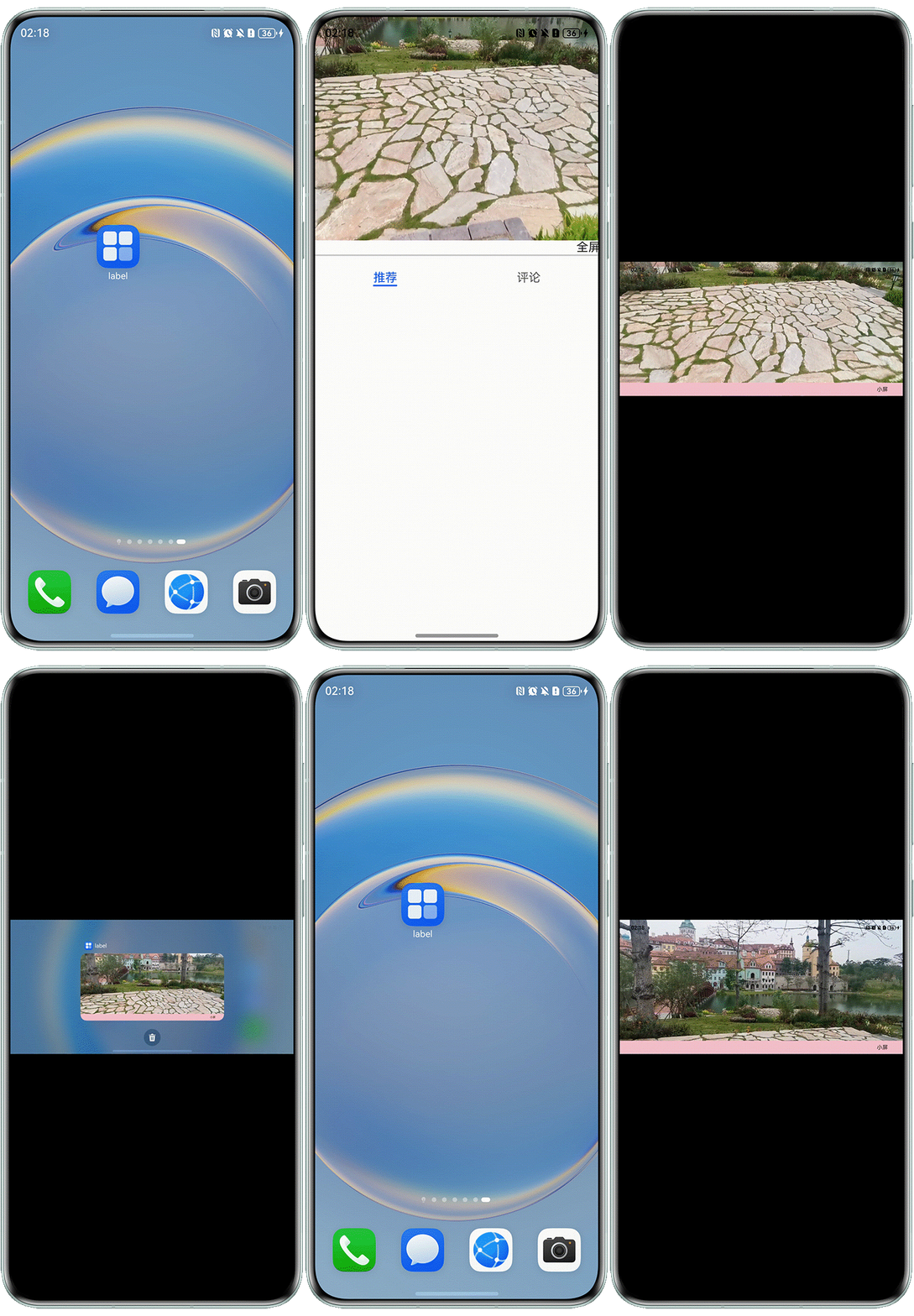
运行效果图: